Databricks Feature Store
Databricks Feature Store is a central registry for the features used in your AI and ML models. When you register features and models in Unity Catalog, you get built-in governance, lineage, point-in-time joins, and cross-workspace feature sharing and discovery.
You can author features using two strategies. Both produce Unity Catalog-governed features that publish to the Online Feature Store. For new use cases, Databricks recommends Feature Views. See Choose an authoring strategy for more details.
- Feature Views, which define features declaratively and let Databricks compute and manage the feature pipelines for you.
- Feature tables, which you populate yourself by writing feature values to a Delta table.
With Databricks, the entire model training workflow takes place on a single platform, including:
- Data pipelines that ingest raw data, create feature tables, train models, and perform batch inference.
- Model and feature serving endpoints that are available with a single click and that provide milliseconds of latency.
- Data and model monitoring.
When you use features from Databricks Feature Store to train models, the model automatically tracks lineage to the features that were used in training. At inference time, the model automatically looks up the latest feature values. Databricks Feature Store also provides on-demand computation of features for real-time applications, handling all feature computation tasks. This eliminates training/serving skew, ensuring that the feature computations used at inference are the same as those used during model training. It also significantly simplifies the client-side code, as all feature lookups and computation are handled by Databricks Feature Store.
This page describes Databricks Feature Store for workspaces that are enabled for Unity Catalog. If your workspace is not enabled for Unity Catalog, see Workspace Feature Store (deprecated).
How Feature Store works
For an overview of how Databricks Feature Store works and a glossary of terms, see Databricks Feature Store overview and glossary.
Choose an authoring strategy
Feature Store supports two ways to author features. Both create Unity Catalog-governed features and both can publish to the Online Feature Store. Feature Views are recommended for new cases, although feature tables are a good fit for workloads that need Delta Sharing.
Strategy | Best for | How it works |
|---|---|---|
Feature Views (recommended) | Most new projects, time-windowed aggregations, and streaming features. | Define features declaratively as Unity Catalog |
Feature tables | Workloads that need Delta Sharing or a third-party online store. | Write feature values to a Delta table in Unity Catalog that has a primary key. You own the pipeline that populates and refreshes the table. |
Develop features
Feature | Description |
|---|---|
Define and compute features declaratively using Feature Views, including time-windowed aggregations and streaming features. | |
Materialize Feature Views for offline training or online serving. | |
Recompute materialized feature values after you correct or add historical source data. | |
Remove materialized feature values for selected entities from offline and online stores. | |
Create and work with feature tables. |
Discover and share features
Feature | Description |
|---|---|
Explore and manage feature tables using Catalog Explorer and the Features UI. | |
Use simple key-value pairs to categorize and manage your feature tables and features. | |
Browse Feature View definitions and materialization status in the Databricks UI. |
Use features in training workflows
Feature | Description |
|---|---|
Use features to train models. | |
Use point-in-time correctness to create a training dataset that reflects feature values as of the time a label observation was recorded. | |
Python API reference |
Serve features
Feature | Description |
|---|---|
Serve feature data to online applications and real-time machine learning models. Powered by Databricks Lakebase. | |
Automatically look up feature values from an online store. | |
Serve features to models and applications outside of Databricks. | |
Calculate feature values at the time of inference. |
Feature governance and lineage
Feature | Description |
|---|---|
Use Unity Catalog to control access to feature tables and view the lineage of a feature table, model, or function. |
Tutorials
Tutorial | Description |
|---|---|
Basic notebook. Shows how to create a feature table, use it to train a model, and run batch scoring using automatic feature lookup. Also shows the Feature Engineering UI to search for features and view lineage. Taxi example notebook. Shows the process of creating features, updating them, and using them for model training and batch inference. | |
Tutorial and example notebook showing how to deploy and query a feature serving endpoint. | |
Tutorial showing how to use Databricks online tables and feature serving endpoints for retrieval augmented generation (RAG) applications. |
Requirements
To use Databricks Feature Store, your workspace must be enabled for Unity Catalog. If your workspace is not enabled for Unity Catalog, see Workspace Feature Store (deprecated).
Supported data types
Databricks Feature Store and legacy Workspace Feature Store support the following PySpark data types:
IntegerTypeFloatTypeBooleanTypeStringTypeDoubleTypeLongTypeTimestampTypeDateTypeShortTypeArrayTypeBinaryType[1]DecimalType[1]MapType[1]StructType[2]
[1] BinaryType, DecimalType, and MapType are supported in all versions of Feature Engineering in Unity Catalog and in Workspace Feature Store v0.3.5 or above.
[2] StructType is supported in Feature Engineering v0.6.0 or above.
The data types listed above support feature types that are common in machine learning applications. For example:
- You can store dense vectors, tensors, and embeddings as
ArrayType. - You can store sparse vectors, tensors, and embeddings as
MapType. - You can store text as
StringType.
When published to online stores, ArrayType and MapType features are stored in JSON format.
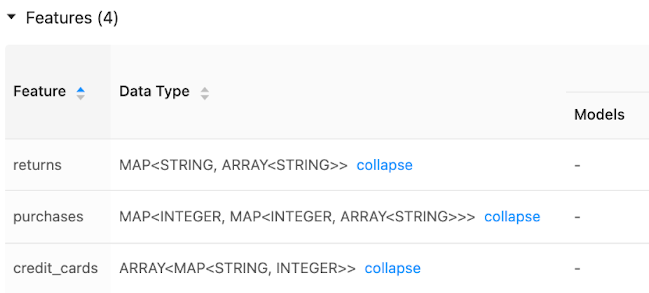
The Feature Store UI displays metadata on feature data types:
More information
For more information on best practices, download The Comprehensive Guide to Feature Stores.