Manage users, service principals, and groups
Databricks provides centralized identity management for users, groups, and service principals across your account and workspaces. Identity management in Databricks enables you to control who can access your workspaces, data, and compute resources, with flexible options for syncing identities from your identity provider.
For an opinionated perspective on how to best configure identity in Databricks, see Identity best practices.
To manage access for users, service principals, and groups, see Authentication and access control.
Databricks identities
Databricks supports three types of identities for authentication and access control:
Identity type | Description |
|---|---|
User identities recognized by Databricks and represented by email addresses. | |
Identities for use with jobs, automated tools, and systems such as scripts, apps, and CI/CD platforms. | |
A collection of identities used by admins to manage group access to workspaces, data, and other securable objects. All Databricks identities can be assigned as members of groups. |
A Databricks account can have a maximum of 10,000 combined users and service principals, along with up to 5,000 groups. Each workspace also can have a maximum of 10,000 combined users and service principals as members, along with up to 5,000 groups.
Databricks can also store identity attributes (such as title, department, and cost center) sourced from your identity provider on account users, for use in access policies. Identity attributes are in Beta. See Identity attributes.
Who can manage identities in Databricks?
To manage identities in Databricks, you must have one of the following roles:
Role | Capabilities |
|---|---|
Account admins |
|
Workspace admins |
|
Group managers |
|
Service principal managers |
|
Identity management workflows
All new workspaces are enabled for identity federation by default. Identity federation allows you to manage identities centrally at the account level and assign them to workspaces. This page assumes your workspace has identity federation enabled. If you have a legacy workspace without identity federation, use the instructions below to enable it.
Identity federation
Databricks enables identity federation by default for all new workspaces, and you cannot disable it.
In an identity federated workspace, when you add a user, service principal, or group in workspace admin settings, you can select from identities that exist in your account.
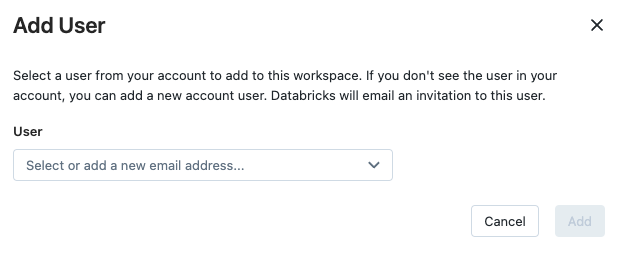
To provide Unity Catalog and other Databricks features, Databricks stores your Databricks identities and their attributes in the United States and in each region you have a workspace. For more granular control over the regions in which your identities are present, create separate Databricks accounts. Please contact Support for assistance if needed.
To check if your legacy workspace has identity federation enabled, look for Identity federation: Enabled on the workspace page in the account console. To enable identity federation for an older workspace, an account admin must enable the workspace for Unity Catalog by assigning a Unity Catalog metastore. See Enable a workspace for Unity Catalog.
Sync identities from your identity provider
Databricks recommends syncing identities using automatic identity management. Automatic identity management supports Microsoft Entra ID and Okta.
Using automatic identity management, you can directly search for users, service principals, and groups in workspace admin settings and add them to your workspace and to the Databricks account. Databricks uses your identity provider as the source of record, so any changes to users or group memberships are respected in Databricks. For detailed instructions, see Automatic identity management.
If automatic identity management is not available for your identity provider, use SCIM provisioning to sync users and groups automatically. For detailed instructions, see Sync users and groups from your identity provider using SCIM.
Assign identities to workspaces
To enable a user, service principal, or group to work in a Databricks workspace, an account admin or workspace admin assigns them to the workspace. You can assign workspace access to any user, service principal, or group that exists in the account.
Workspace admins can also add a new user, service principal, or group directly to a workspace. This action automatically adds the identity to the account and assigns it to that workspace.
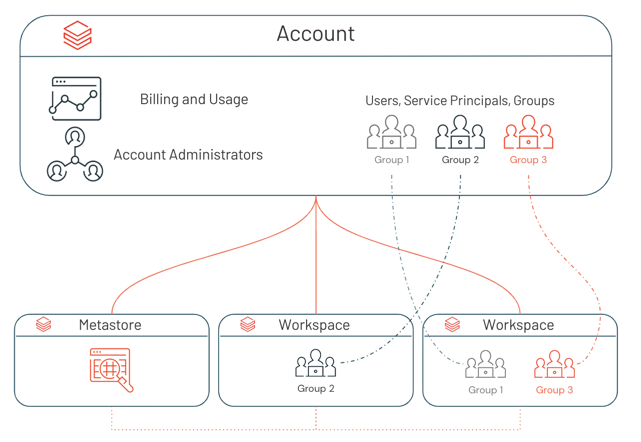
For detailed instructions, see:
Share dashboards with account users
Users can share published dashboards with other users in the Databricks account, even if those users are not members of their workspace. Using automatic identity management, users can share dashboards with any user in their identity provider, which adds the user to the Databricks account upon login. Users in the Databricks account who are not members of any workspace are the equivalent of view-only users in other tools. They can view objects that have been shared with them, but they cannot modify objects. For more information, see User and group management.
Authentication
Single sign-on (SSO)
Single sign-on (SSO) enables you to authenticate your users using a third-party identity provider like Okta. To enable SSO, see Configure SSO in Databricks.
Just-in-time provisioning
When SSO is configured, you can configure just-in-time (JIT) provisioning to automatically create new user accounts from your identity provider upon their first login. See Automatically provision users (JIT).
Access control
Admins can assign roles, entitlements, and permissions to users, service principals, and groups to control access to workspaces, data, and other securable objects. For more information, see Access control overview.
Legacy workspaces without identity federation
For workspaces that aren't enabled for identity federation, workspace admins manage workspace users, service principals, and groups entirely within the scope of the workspace. Users and service principals added to non-identity federated workspaces are automatically added to the account. If the workspace user shares a username (that is, an email address) with an account user or admin that already exists, those users are merged into a single identity. Groups added to non-identity federated workspaces are legacy workspace-local groups that are not added to the account.
To enable identity federation for a legacy workspace, see Identity federation.
Additional resources
- Identity management best practices - Opinionated guidance on configuring identity in Databricks
- Users - Manage user identities
- Service principals - Manage service principal identities
- Groups - Manage group identities
- Identity attributes - Store attributes sourced from your identity provider on users for access policies (Beta)
- Access control - Manage permissions and access
- SCIM provisioning - Sync identities from your identity provider
- Workspace-local groups - Manage legacy workspace-local groups