Agent memory (Model Serving)
This feature is in Public Preview.
For new agents, Databricks recommends the Agent Bricks CLI. The CLI deploys your agent with the Agent Bricks agent server on Agent Runtime. See Deploy agents on Databricks. To move an existing agent from Model Serving to Databricks Apps, see Migrate an agent from Model Serving to Databricks Apps.
Memory lets agents remember information from earlier in the conversation or from previous conversations. This lets agents provide context-aware responses and build personalized experiences over time. Use Databricks Lakebase, a fully-managed Postgres OLTP database, to manage conversation state and history.
Requirements
- A Lakebase instance, see Lakebase Postgres.
Short-term vs. long-term memory
Short-term memory captures context in a single conversation session while long-term memory extracts and stores key information across multiple conversations. You can build your agent with either or both types of memory.
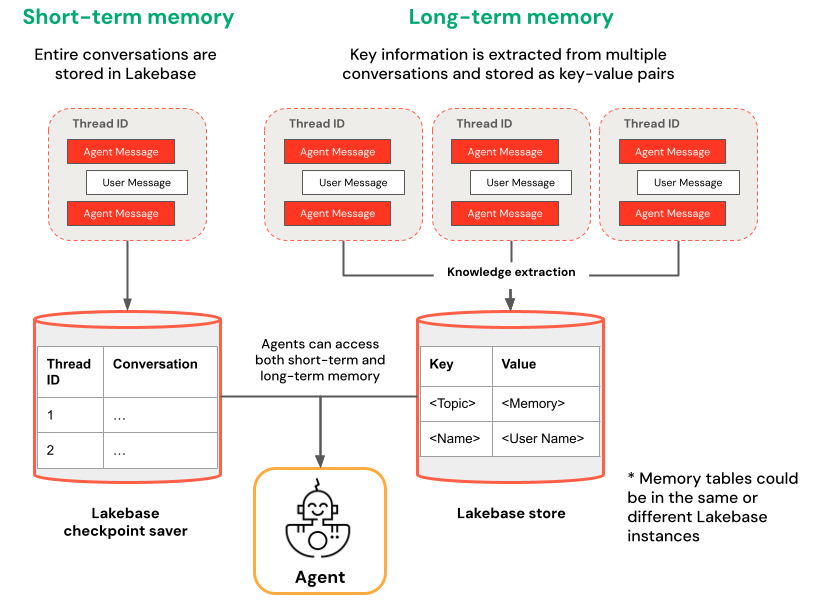
Short-term memory | Long-term memory |
|---|---|
Capture context in a single conversation session using thread IDs and checkpointing Maintain context for follow-up questions within a session Debug and test conversation flows using time travel | Automatically extract and store key insights across multiple sessions Personalize interactions based on past preferences Build a knowledge base about users that improves responses over time |
Notebook examples
Agent with short-term memory
Agent with long-term memory
Query your deployed agent
After you deploy your agent to a Model Serving endpoint, see Query a legacy agent on Model Serving for query instructions.
To pass in a thread id, use the extra_body param. The following example shows you how to pass in a thread ID to a ResponsesAgent endpoint:
   response1 = client.responses.create(
    model=endpoint,
    input=[{"role": "user", "content": "What are stateful agents?"}],
    extra_body={
        "custom_inputs": {"thread_id": thread_id}
    }
)
If you are using a client that automatically passes ChatContext like the Playground or Review app, the conversation id and user id will automatically be passed in for short-term/long-term memory use cases.
Short-term memory time travel
For agents with short-term memory, use LangGraph time-travel to resume execution from checkpoints. You can either replay the conversation or modify it to explore alternative paths. Each time you resume from a checkpoint, LangGraph creates a new fork in the conversation history, preserving the original while enabling experimentation.
-
In agent code, create functions that retrieve checkpoint history and update checkpoint state in the
LangGraphResponsesAgentclass:Pythonfrom typing import List, Dictdef get_checkpoint_history(self, thread_id: str, limit: int = 10) -> List[Dict[str, Any]]:"""Retrieve checkpoint history for a thread.Args:thread_id: The thread identifierlimit: Maximum number of checkpoints to returnReturns:List of checkpoint information including checkpoint_id, timestamp, and next nodes"""config = {"configurable": {"thread_id": thread_id}}with CheckpointSaver(instance_name=LAKEBASE_INSTANCE_NAME) as checkpointer:graph = self._create_graph(checkpointer)history = []for state in graph.get_state_history(config):if len(history) >= limit:breakhistory.append({"checkpoint_id": state.config["configurable"]["checkpoint_id"],"thread_id": thread_id,"timestamp": state.created_at,"next_nodes": state.next,"message_count": len(state.values.get("messages", [])),# Include last message summary for context"last_message": self._get_last_message_summary(state.values.get("messages", []))})return historydef _get_last_message_summary(self, messages: List[Any]) -> Optional[str]:"""Get a snippet of the last message for checkpoint identification"""return getattr(messages[-1], "content", "")[:100] if messages else Nonedef update_checkpoint_state(self, thread_id: str, checkpoint_id: str,new_messages: Optional[List[Dict]] = None) -> Dict[str, Any]:"""Update state at a specific checkpoint (used for modifying conversation history).Args:thread_id: The thread identifiercheckpoint_id: The checkpoint to updatenew_messages: Optional new messages to set at this checkpointReturns:New checkpoint configuration including the new checkpoint_id"""config = {"configurable": {"thread_id": thread_id,"checkpoint_id": checkpoint_id}}with CheckpointSaver(instance_name=LAKEBASE_INSTANCE_NAME) as checkpointer:graph = self._create_graph(checkpointer)# Prepare the values to updatevalues = {}if new_messages:cc_msgs = self.prep_msgs_for_cc_llm(new_messages)values["messages"] = cc_msgs# Update the state (creates a new checkpoint)new_config = graph.update_state(config, values=values)return {"thread_id": thread_id,"checkpoint_id": new_config["configurable"]["checkpoint_id"],"parent_checkpoint_id": checkpoint_id} -
Update the
predictandpredict_streamfunctions to support passing in checkpoints:- Predict
- Predict_stream
Pythondef predict(self, request: ResponsesAgentRequest) -> ResponsesAgentResponse:"""Non-streaming prediction"""# The same thread_id is used by BOTH predict() and predict_stream()ci = dict(request.custom_inputs or {})if "thread_id" not in ci:ci["thread_id"] = str(uuid.uuid4())request.custom_inputs = cioutputs = [event.itemfor event in self.predict_stream(request)if event.type == "response.output_item.done"]# Include thread_id and checkpoint_id in custom outputscustom_outputs = {"thread_id": ci["thread_id"]}if "checkpoint_id" in ci:custom_outputs["parent_checkpoint_id"] = ci["checkpoint_id"]try:history = self.get_checkpoint_history(ci["thread_id"], limit=1)if history:custom_outputs["checkpoint_id"] = history[0]["checkpoint_id"]except Exception as e:logger.warning(f"Could not retrieve new checkpoint_id: {e}")return ResponsesAgentResponse(output=outputs, custom_outputs=custom_outputs)Pythondef predict_stream(self,request: ResponsesAgentRequest,) -> Generator[ResponsesAgentStreamEvent, None, None]:"""Streaming prediction with PostgreSQL checkpoint branching support.Accepts in custom_inputs:- thread_id: Conversation thread identifier for session- checkpoint_id (optional): Checkpoint to resume from (for branching)"""# Get thread ID and checkpoint ID from custom inputscustom_inputs = request.custom_inputs or {}thread_id = custom_inputs.get("thread_id", str(uuid.uuid4())) # generate new thread ID if one is not passed incheckpoint_id = custom_inputs.get("checkpoint_id") # Optional for branching# Convert incoming Responses messages to LangChain formatlangchain_msgs = self.prep_msgs_for_cc_llm([i.model_dump() for i in request.input])# Build checkpoint configurationcheckpoint_config = {"configurable": {"thread_id": thread_id}}# If checkpoint_id is provided, we're branching from that checkpointif checkpoint_id:checkpoint_config["configurable"]["checkpoint_id"] = checkpoint_idlogger.info(f"Branching from checkpoint: {checkpoint_id} in thread: {thread_id}")# DATABASE CONNECTION POOLING LOGIC FOLLOWS# Use connection from pool
Then, test your checkpoint branching:
-
Start a conversational thread and add a few messages:
Pythonfrom agent import AGENT# Initial conversation - starts a new threadresponse1 = AGENT.predict({"input": [{"role": "user", "content": "I'm planning for an upcoming trip!"}],})print(response1.model_dump(exclude_none=True))thread_id = response1.custom_outputs["thread_id"]# Within the same thread, ask a follow-up question - short-term memory will remember previous messages in the same thread/conversation sessionresponse2 = AGENT.predict({"input": [{"role": "user", "content": "I'm headed to SF!"}],"custom_inputs": {"thread_id": thread_id}})print(response2.model_dump(exclude_none=True))# Within the same thread, ask a follow-up question - short-term memory will remember previous messages in the same thread/conversation sessionresponse3 = AGENT.predict({"input": [{"role": "user", "content": "Where did I say I'm going?"}],"custom_inputs": {"thread_id": thread_id}})print(response3.model_dump(exclude_none=True)) -
Retrieve checkpoint history and fork the conversation with a different message:
Python# Get checkpoint history to find branching pointhistory = AGENT.get_checkpoint_history(thread_id, 20)# Retrieve checkpoint at index - indices count backward from most recent checkpointindex = max(1, len(history) - 4)branch_checkpoint = history[index]["checkpoint_id"]# Branch from node with next_node = `('__start__',)` to re-input message to agent at certain part of conversation# I want to update the information of which city I am going to# Within the same thread, branch from a checkpoint and override it with different context to continue the conversation in a new forkresponse4 = AGENT.predict({"input": [{"role": "user", "content": "I'm headed to New York!"}],"custom_inputs": {"thread_id": thread_id,"checkpoint_id": branch_checkpoint # Branch from this checkpoint!}})print(response4.model_dump(exclude_none=True))# Thread ID stays the same even though it branched from a checkpoint:branched_thread_id = response4.custom_outputs["thread_id"]print(f"original thread id was {thread_id}")print(f"new thread id after branching is the same as original: {branched_thread_id}")# Continue the conversation in the same thread and it will pick up from the information you tell it in your branchresponse5 = AGENT.predict({"input": [{"role": "user", "content": "Where am I going?"}],"custom_inputs": {"thread_id": thread_id,}})print(response5.model_dump(exclude_none=True))