Claude Max and Anthropic Enterprise support
This feature is in Beta. To access it, an account admin must enable the Enhanced Unity Gateway preview from the account console Previews page. See Manage Databricks previews.
Claude Max and Anthropic Enterprise support lets you use an existing Claude Pro, Max, Enterprise, or Team plan with Unity Gateway. Instead of storing an Anthropic API key, Unity Gateway relays each caller's own Anthropic OAuth token to Anthropic. Requests are billed against the caller's subscription, while Unity Gateway governs access, routing, and usage.
This applies to Claude Code only, because it relies on Claude Code's own Anthropic subscription login.
Requirements
CREATE SERVICEon the schema where you create the model provider service, plusUSE CATALOGandUSE SCHEMAon its catalog and schema.- A Claude Pro, Max, Enterprise, or Team subscription to authenticate with when querying.
Create a model provider service
Register the connection once as a relayed model provider service. When creating a model provider service, select the Claude Max/Enterprise authentication mode. The service stores no credential. It exists to relay each caller's Anthropic OAuth token and to let you govern access with Unity Catalog privileges.
Connect Claude Code
For most users, the Unity Gateway CLI is the recommended path. It obtains and refreshes your Databricks OAuth token, sets the headers, and points Claude Code at the gateway automatically. Use the manual setup below only if you cannot use the Unity Gateway CLI.
Step 1: Get a Databricks token
The X-Databricks-AI-Gateway-Token header carries a Databricks token that authenticates the request to Unity Gateway. Unity Gateway attributes access control and usage logs to the identity tied to this token, so use a token that belongs to the querying user.
Select one of the following:
-
OAuth user-to-machine (U2M) with the Databricks CLI (recommended). Log in once with the CLI, then mint a short-lived OAuth token:
Bashdatabricks auth login --host https://<workspace-url>
databricks auth token --host https://<workspace-url> | jq -r .access_tokenSee Authorize user access to Databricks with OAuth and Authentication for the Databricks CLI. A U2M OAuth token expires in about 1 hour, so for interactive use you must refresh it and re-export the variable when it expires. To automate token refresh, use the Unity Gateway CLI, which runs a local proxy that refreshes the OAuth token for you on every request.
-
Personal access token (PAT), as a backup. If you cannot use OAuth, create a PAT and use it as
<databricks-token>. A PAT does not expire on the 1-hour OAuth cadence, but it is a long-lived credential tied to your identity. See Authenticate with Databricks personal access tokens (legacy).
Step 2: Set your environment variables
Add the following to your shell configuration file (~/.zshrc or ~/.bashrc):
export ANTHROPIC_BASE_URL="https://<workspace-url>/ai-gateway/anthropic"
export ANTHROPIC_CUSTOM_HEADERS="X-Databricks-AI-Gateway-Token: <databricks-token>
Databricks-Model-Provider-Service: <catalog>.<schema>.<name>"
- Replace
<workspace-url>with your workspace URL. - Replace
<databricks-token>with the Databricks token from Step 1. - Replace
<catalog>.<schema>.<name>with the fully qualified name of your model provider service.
Step 3: Start Claude Code
claude
Step 4: Log in with your Claude subscription
If you are not already logged in, Claude Code prompts you to authenticate. Select Option 1 - Claude account with subscription and log in with your Anthropic account.
If you run into issues, log out with claude /logout and log in again.
Your Claude Code requests now route through Unity Gateway. Requests are billed against your Anthropic subscription, and you get centralized access, routing, and usage governance.
How Claude Max and Anthropic Enterprise support works
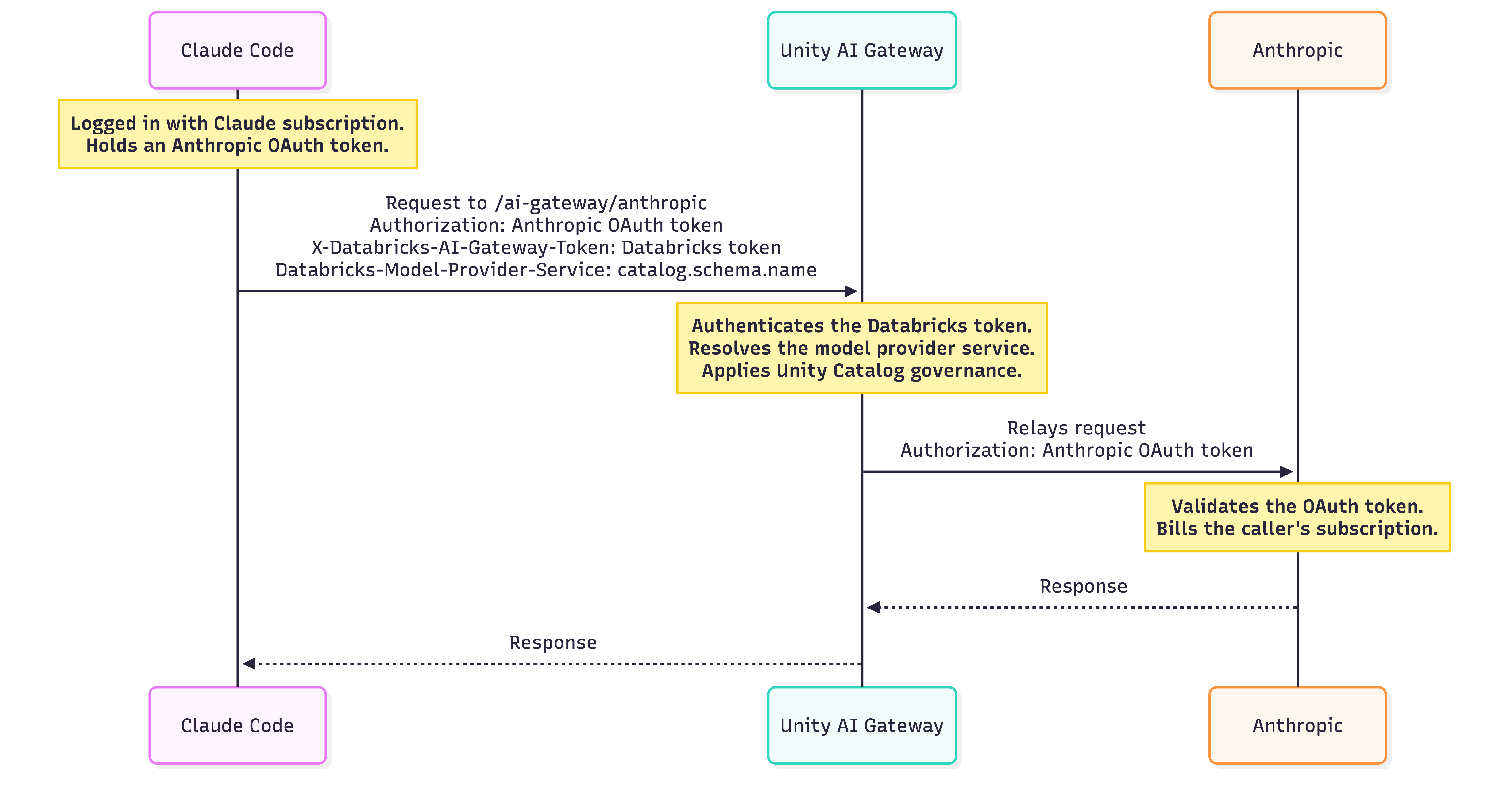
When you configure Claude Code to use Unity Gateway, Claude Code continues to authenticate with Anthropic. It sends its Authorization header, and Unity Gateway relays the OAuth token to Anthropic on each request.
Because the Authorization header is reserved for Claude subscription credentials, Unity Gateway uses a separate header, X-Databricks-AI-Gateway-Token, for its own Databricks credentials. This lets both Anthropic and Databricks authentication mechanisms coexist.
The Databricks-Model-Provider-Service header specifies which model provider service Unity Gateway resolves. Because that service is a Unity Catalog securable, you register it once, govern access with Unity Catalog privileges, and query it through Unity Gateway. The only difference from a standard model provider service is how each request is authenticated.
The following diagram shows how the two credentials travel together and where each is used. Unity Gateway never stores the Anthropic credential. It relays it on every request.
Automate setup with the Unity Gateway CLI
The Unity Gateway CLI installs, authenticates, and configures Claude Code for you. It sets the headers, manages OAuth token refresh through a local proxy, and points Claude Code at the gateway, so you skip the manual environment setup above.
Step 1: Install the Unity Gateway CLI
uv tool install git+https://github.com/databricks/unity-gateway
Step 2: Open Claude Code against a model provider service
Pass the model provider service's fully qualified name (<catalog>.<schema>.<name>) to --provider and the workspace URL to --workspace:
ug claude --provider main.default.claude_subscription --workspace https://<workspace>.databricks.com
The Unity Gateway CLI configures Claude Code to send the Databricks-Model-Provider-Service header and points Claude Code at a local refresh proxy rather than directly at the Unity Gateway endpoint. The proxy forwards each request to https://<workspace-url>/ai-gateway/anthropic and adds the X-Databricks-AI-Gateway-Token header. Because the service stores no credential, the Unity Gateway CLI relays your Anthropic OAuth token instead of an API key.
--provider for a Claude Max/Enterprise model provider service is only supported with ug claude.
Limitations
- Requests are billed against the caller's Anthropic subscription and are subject to that subscription's rate limits.
- A model provider service that uses Claude Max and Anthropic Enterprise support stores no credential, so it can only serve requests that relay a caller's Anthropic OAuth token.