Create and manage providers with Model Provider Services
Learn how to register a provider as a model provider service, grant access to it, configure Unity Gateway features, and delete it.
Requirements
CREATE SERVICEon the schema where you create the model provider service, plusUSE CATALOGandUSE SCHEMAon its catalog and schema.- The credentials for the external provider you want to register (for example, an OpenAI API key or an AWS access key pair).
- To authenticate Amazon Bedrock or Amazon Bedrock Mantle with a service credential instead of an access key pair, you must have an existing service credential and
ACCESSon it. See Authenticate Amazon Bedrock with a service credential.
To back a provider credential with a customer-owned Unity Catalog secret instead of storing the value inline, you must have an existing Unity Catalog secret and READ SECRET on it. See Back a provider credential with a Unity Catalog secret.
Create a model provider service
Model provider services and model services share a single name namespace within a Unity Catalog schema. You can't use a name for a model provider service if a model service in the schema already uses it, and vice versa.
Create a model provider service in the Unity Gateway UI or Catalog Explorer. To create one programmatically, use the REST API, the Databricks SDKs, the Databricks CLI, Terraform, or Declarative Automation Bundles (DABs).
- UI
- REST API
- CLI
- Terraform
- DABs (Beta)
- Python SDK
- Go SDK
- Go Modular SDK
- Java SDK
- JS Modular SDK
- Do one of the following:
- In the workspace sidebar, click AI Gateway, then open the Providers tab and click Provider.
- In Catalog Explorer, go to the schema where you want to create the model provider service, click Create > Service, then select Model provider service in the Create a service dialog.
- Enter a name for the model provider service, and select the catalog and schema to create it in. If you start from Catalog Explorer, Catalog Explorer prefills the catalog and schema.
- Select the provider type, and enter the provider's connection details and credentials.
- Click Create. Databricks encrypts and stores the credentials. The UI does not display them after this point.
Send a POST to /api/2.1/unity-catalog/model-provider-services, passing parent and model_provider_service_id as query parameters. Set provider_type and exactly one matching provider block; targets allowlists the reachable upstream models, and secrets are supplied inline as plaintext:
databricks api post \
  "/api/2.1/unity-catalog/model-provider-services?parent=schemas/main.default&model_provider_service_id=my_provider" \
  --json '{
  "comment": "Routes to a custom OpenAI-compatible provider",
  "config": {
    "provider_type": "EXTERNAL_MODEL_PROVIDER_TYPE_CUSTOM",
    "targets": [
      { "model": "gpt-4o", "native_api_types": ["openai/v1/chat/completions"] }
    ],
    "custom": {
      "direct": {
        "base_url": "https://api.example.com/v1",
        "api_key": { "plaintext": "dummy-api-key" }
      }
    }
  }
}'
Pass the parent schema and a leaf name, and supply the config with --json. Set provider_type and exactly one matching provider block; targets allowlists the reachable upstream models, and secrets are supplied inline as plaintext. To install the CLI, see Install or update the Databricks CLI.
databricks ai-gateway create-model-provider-service schemas/main.default my_provider --json '{
  "comment": "Routes to a custom OpenAI-compatible provider",
  "config": {
    "provider_type": "EXTERNAL_MODEL_PROVIDER_TYPE_CUSTOM",
    "targets": [
      { "model": "gpt-4o", "native_api_types": ["openai/v1/chat/completions"] }
    ],
    "custom": {
      "direct": {
        "base_url": "https://api.example.com/v1",
        "api_key": { "plaintext": "dummy-api-key" }
      }
    }
  }
}'
Create and manage a model provider service with the Databricks Terraform provider and the databricks_ai_gateway_model_provider_service resource. Keep real keys out of source control by passing the API key through a sensitive = true variable (set it with -var or a TF_VAR_provider_api_key environment variable):
variable "provider_api_key" {
  type      = string
  sensitive = true
}

resource "databricks_ai_gateway_model_provider_service" "example" {
  parent                    = "schemas/main.default"
  model_provider_service_id = "my_provider"
  comment                   = "Routes to a custom OpenAI-compatible provider"

  config = {
    provider_type = "EXTERNAL_MODEL_PROVIDER_TYPE_CUSTOM"

    targets = [{
      model            = "gpt-4o"
      native_api_types = ["openai/v1/chat/completions"]
    }]

    custom = {
      direct = {
        base_url = "https://api.example.com/v1"
        api_key  = { plaintext = var.provider_api_key }
      }
    }
  }
}
Define the model provider service in a bundle and deploy it with databricks bundle deploy. Keep real keys out of source control by passing the API key through a bundle variable (set it with --var or a BUNDLE_VAR_provider_api_key environment variable):
variables:
  provider_api_key:
    description: Provider API key.

resources:
  model_provider_services:
    my_provider:
      parent: schemas/main.default
      model_provider_service_id: my_provider
      comment: Routes to a custom OpenAI-compatible provider
      config:
        provider_type: EXTERNAL_MODEL_PROVIDER_TYPE_CUSTOM
        targets:
          - model: gpt-4o
            native_api_types: [openai/v1/chat/completions]
        custom:
          direct:
            base_url: https://api.example.com/v1
            api_key:
              plaintext: ${var.provider_api_key}
Create and manage a model provider service with the Databricks SDK for Python:
from databricks.sdk.service import catalog as c

model_provider_service = w.ai_gateway.create_model_provider_service(
    parent="schemas/main.default",
    model_provider_service_id="my_provider",
    model_provider_service=c.ModelProviderService(
        comment="Routes to a custom OpenAI-compatible provider",
        config=c.ModelProviderServiceConfig(
            provider_type=(
                c.ModelProviderServiceConfigExternalModelProviderType
                .EXTERNAL_MODEL_PROVIDER_TYPE_CUSTOM
            ),
            targets=[
                c.ModelProviderServiceConfigModelTargetConfig(
                    model="gpt-4o",
                    native_api_types=["openai/v1/chat/completions"],
                )
            ],
            custom=c.ModelProviderServiceConfigCustomProviderConfig(
                direct=c.ModelProviderServiceConfigCustomProviderDirectConfig(
                    base_url="https://api.example.com/v1",
                    api_key=c.ModelProviderServiceConfigProviderSecret(
                        plaintext="dummy-api-key"
                    ),
                )
            ),
        ),
    ),
)
Create and manage a model provider service with the Databricks SDK for Go:
modelProviderService, err := w.AiGateway.CreateModelProviderService(ctx,
	catalog.CreateModelProviderServiceRequest{
		Parent:                 "schemas/main.default",
		ModelProviderServiceId: "my_provider",
		ModelProviderService: catalog.ModelProviderService{
			Comment: "Routes to a custom OpenAI-compatible provider",
			Config: &catalog.ModelProviderServiceConfig{
				ProviderType: catalog.ModelProviderServiceConfigExternalModelProviderTypeExternalModelProviderTypeCustom,
				Targets: []catalog.ModelProviderServiceConfigModelTargetConfig{{
					Model:          "gpt-4o",
					NativeApiTypes: []string{"openai/v1/chat/completions"},
				}},
				Custom: &catalog.ModelProviderServiceConfigCustomProviderConfig{
					Direct: &catalog.ModelProviderServiceConfigCustomProviderDirectConfig{
						BaseUrl: "https://api.example.com/v1",
						ApiKey: &catalog.ModelProviderServiceConfigProviderSecret{
							Plaintext: "dummy-api-key",
						},
					},
				},
			},
		},
	})
Create and manage a model provider service with the Databricks AI Gateway SDK for Go. Optional fields are pointers, so the example uses a one-line helper, func ptr[T any](v T) *T { return &v }.
modelProviderService, err := c.CreateModelProviderService(ctx,
	aigateway.CreateModelProviderServiceRequest{
		Parent:                 ptr("schemas/main.default"),
		ModelProviderServiceId: ptr("my_provider"),
		ModelProviderService: &aigateway.ModelProviderService{
			Comment: ptr("Routes to a custom OpenAI-compatible provider"),
			Config: &aigateway.ModelProviderServiceConfig{
				ProviderType: aigateway.ModelProviderServiceConfig_ExternalModelProviderType_ExternalModelProviderTypeCustom,
				Targets: []aigateway.ModelProviderServiceConfig_ModelTargetConfig{{
					Model:          ptr("gpt-4o"),
					NativeApiTypes: []string{"openai/v1/chat/completions"},
				}},
				Provider: &aigateway.ModelProviderServiceConfig_Provider_Custom{
					Custom: aigateway.ModelProviderServiceConfig_CustomProviderConfig{
						ProviderMode: &aigateway.ModelProviderServiceConfig_CustomProviderConfig_ProviderMode_Direct{
							Direct: aigateway.ModelProviderServiceConfig_CustomProviderDirectConfig{
								BaseUrl: ptr("https://api.example.com/v1"),
								AuthMode: &aigateway.ModelProviderServiceConfig_CustomProviderDirectConfig_AuthMode_ApiKey{
									ApiKey: aigateway.ModelProviderServiceConfig_ProviderSecret{
										Value: &aigateway.ModelProviderServiceConfig_ProviderSecret_Value_Plaintext{
											Plaintext: "dummy-api-key",
										},
									},
								},
							},
						},
					},
				},
			},
		},
	})
Create and manage a model provider service with the Databricks SDK for Java:
ModelProviderServiceConfig config =
    new ModelProviderServiceConfig()
        .setProviderType(
            ModelProviderServiceConfigExternalModelProviderType
                .EXTERNAL_MODEL_PROVIDER_TYPE_CUSTOM)
        .setTargets(
            Collections.singletonList(
                new ModelProviderServiceConfigModelTargetConfig()
                    .setModel("gpt-4o")
                    .setNativeApiTypes(
                        Collections.singletonList("openai/v1/chat/completions"))))
        .setCustom(
            new ModelProviderServiceConfigCustomProviderConfig()
                .setDirect(
                    new ModelProviderServiceConfigCustomProviderDirectConfig()
                        .setBaseUrl("https://api.example.com/v1")
                        .setApiKey(
                            new ModelProviderServiceConfigProviderSecret()
                                .setPlaintext("dummy-api-key"))));

ModelProviderService modelProviderService =
    w.aiGateway()
        .createModelProviderService(
            new CreateModelProviderServiceRequest()
                .setParent("schemas/main.default")
                .setModelProviderServiceId("my_provider")
                .setModelProviderService(
                    new ModelProviderService()
                        .setComment("Routes to a custom OpenAI-compatible provider")
                        .setConfig(config)));
Create and manage a model provider service with the Databricks AI Gateway SDK for JavaScript:
import { ModelProviderServiceConfig_ExternalModelProviderType as ProviderType } from '@databricks/sdk-aigateway/v1';

const created = await client.createModelProviderService({
  parent: 'schemas/main.default',
  modelProviderServiceId: 'my_provider',
  modelProviderService: {
    comment: 'Routes to a custom OpenAI-compatible provider',
    config: {
      providerType: ProviderType.EXTERNAL_MODEL_PROVIDER_TYPE_CUSTOM,
      targets: [{ model: 'gpt-4o', nativeApiTypes: ['openai/v1/chat/completions'] }],
      provider: {
        $case: 'custom',
        custom: {
          providerMode: {
            $case: 'direct',
            direct: {
              baseUrl: 'https://api.example.com/v1',
              authMode: {
                $case: 'apiKey',
                apiKey: {
                  value: { $case: 'plaintext', plaintext: 'dummy-api-key' },
                },
              },
            },
          },
        },
      },
    },
  },
});
For the full list of providers and their authentication methods, see Model providers external to Databricks.
Authenticate Amazon Bedrock with a service credential
You can authenticate an Amazon Bedrock or Amazon Bedrock Mantle provider with a service credential instead of storing an AWS access key pair. A service credential holds an identity and access management (IAM) role that Unity Catalog governs, so no long-lived AWS key is copied into the model provider service: Databricks obtains short-lived credentials from the role to authenticate each request.
Create the model provider service as described in Create a model provider service. Select Amazon Bedrock or Amazon Bedrock Mantle as the provider type, then set Auth method to Service credential and select the credential instead of entering an access key pair.
Confirm the following requirements:
-
The owner of the model provider service has
ACCESSon the service credential. Because Databricks re-checks the owner's access when serving requests, the owner must keep it for as long as the provider is in use. Revoking it stops queries for everyone, even callers who holdEXECUTEon the provider. To grant the owner access to the credential:SQLGRANT ACCESS ON SERVICE CREDENTIAL <service-credential-name> TO `<model-provider-service-owner>`; -
The credential's purpose is service, not storage.
-
The credential is available in the workspaces requests come from. Its workspace bindings still apply, so a request from a workspace the credential isn't bound to fails there, even though the model provider service itself is reachable from any workspace that shares the metastore.
-
The service credential IAM role can invoke the Bedrock models you plan to query. To create one, see Create service credentials.
Callers who query the provider need the same grants as for any other provider. They don't need any privilege on the service credential, which is what keeps the credential itself out of their reach.
The model provider service tracks a credential by its internal identifier, so you can rename a credential without query failure.
If you delete a credential, queries fail and there is no warning that a model provider service references it. Confirm that there are no references to this credential before you delete it.
You can't switch an existing model provider service between service credential and access key pair authentication. Create a new model provider service instead.
Send a custom provider API key in a header
A custom provider sends its API key as a bearer token by default. When your endpoint expects the key in a specific header instead, use API key header authentication and name the header yourself. Databricks then sends the key on each outbound request as <header name>: <header value>.
Create the model provider service as described in Create a model provider service. Select Custom as the provider type, then set Auth method to API key header and supply the Header name your endpoint expects (such as X-API-Key or Ocp-Apim-Subscription-Key) along with the Header value.
The two methods are mutually exclusive: a custom provider uses either a bearer token or a named header, not both. Header authentication takes exactly one header.
The header name must be a valid HTTP header name: letters, digits, and the characters !#$%&'*+-.^_`|~, up to 255 characters. Any other character is rejected, including spaces, colons, slashes, and line breaks.
Back a provider credential with a Unity Catalog secret
Instead of storing a provider credential inline, you can point a model provider service at a customer-owned Unity Catalog secret that holds the value. Databricks reads the secret at query time under the model provider service owner's access and never copies the value onto the model provider service, so rotating the secret takes effect with no change to the model provider service.
This works for any provider whose credential is a single inline value: OpenAI, Azure OpenAI, Anthropic, Amazon Bedrock, Amazon Bedrock Mantle, Microsoft Foundry, Google Gemini Enterprise, and Custom.
Create the model provider service as described in Create a model provider service. Select the provider type and enter its connection details. For the credential (such as the API key), change the authentication type from Plaintext to Secret, then select the catalog, schema, and secret that identify your Unity Catalog secret.
Confirm the following requirements:
-
The owner of the model provider service has
READ SECRETon the Unity Catalog secret. Because Databricks re-checks the owner's access when serving requests, the owner must keep it for as long as the provider is in use. Revoking it stops queries for everyone, even callers who holdEXECUTEon the provider. To grant the owner access to the secret:SQLGRANT READ SECRET ON SECRET <catalog>.<schema>.<secret> TO `<model-provider-service-owner>`; -
The Unity Catalog secret exists before you reference it. To create and govern Unity Catalog secrets, see Secrets in Unity Catalog.
Callers who query the provider need the same grants as for any other provider. They don't need any privilege on the Unity Catalog secret, which is what keeps the secret value out of their reach.
To rotate the credential, update the Unity Catalog secret's value, with no change to the model provider service.
If you delete the Unity Catalog secret, queries fail. The model provider service keeps the now-broken reference so you can see the dependency, and you can restore the provider by updating it to reference a secret that still exists.
Deleting a model provider service never deletes the Unity Catalog secret it references.
Grant access to a model provider service
By default, only the model provider service owner can query it. To let others query a model provider service, grant them EXECUTE on it, plus USE CATALOG and USE SCHEMA on its catalog and schema. If the model provider service logs to an inference table, grant SELECT on the table to let them read the logged requests and responses.
- UI
- REST API
- CLI
- Terraform
- DABs (Beta)
- Python SDK
- Go SDK
- Java SDK
- Open the model provider service in Catalog Explorer, or go to AI Gateway and select the service.
- Go to the Permissions tab.
- Click Grant.
- Select the users, groups, or service principals to give access to.
- Select the EXECUTE privilege.
- Click Grant.
databricks api patch \
  "/api/2.1/unity-catalog/permissions/model_provider_service/main.default.my_provider" \
  --json '{
    "changes": [
      { "principal": "data-team", "add": ["EXECUTE"] }
    ]
  }'
Grant EXECUTE with the Databricks CLI. To install the CLI, see Install or update the Databricks CLI.
databricks grants update model_provider_service main.default.my_provider \
  --json '{"changes": [{"principal": "data-team", "add": ["EXECUTE"]}]}'
Grant EXECUTE with the Databricks Terraform provider and the databricks_grant resource:
resource "databricks_grant" "example" {
  model_provider_service = "main.default.my_provider"
  principal              = "data-team"
  privileges             = ["EXECUTE"]
}
Add a grants block to the model provider service resource in your bundle and redeploy to grant access.
variables:
  provider_api_key:
    description: Provider API key.

resources:
  model_provider_services:
    my_provider:
      parent: schemas/main.default
      model_provider_service_id: my_provider
      comment: Routes to a custom OpenAI-compatible provider
      config:
        provider_type: EXTERNAL_MODEL_PROVIDER_TYPE_CUSTOM
        targets:
          - model: gpt-4o
            native_api_types: [openai/v1/chat/completions]
        custom:
          direct:
            base_url: https://api.example.com/v1
            api_key:
              plaintext: ${var.provider_api_key}
      grants:
        - principal: data-team
          privileges: [EXECUTE]
Grant EXECUTE with the Databricks SDK for Python:
from databricks.sdk.service import catalog as c

w.grants.update(
    securable_type="model_provider_service",
    full_name="main.default.my_provider",
    changes=[c.PermissionsChange(principal="data-team", add=[c.Privilege.EXECUTE])],
)
Grant EXECUTE with the Databricks SDK for Go:
_, err := w.Grants.Update(ctx, catalog.UpdatePermissions{
	SecurableType: "model_provider_service",
	FullName:      "main.default.my_provider",
	Changes: []catalog.PermissionsChange{{
		Principal: "data-team",
		Add:       []catalog.Privilege{catalog.PrivilegeExecute},
	}},
})
Grant EXECUTE with the Databricks SDK for Java:
w.grants().update(
    new UpdatePermissions()
        .setSecurableType("model_provider_service")
        .setFullName("main.default.my_provider")
        .setChanges(Arrays.asList(
            new PermissionsChange().setPrincipal("data-team").setAdd(Arrays.asList(Privilege.EXECUTE)))));
For more about granting and discovering access, see Discover and govern access to external model providers (model provider services).
Configure features
Because a model provider service routes through Unity Gateway, apply the same governance and observability features you use for other Unity Gateway traffic:
- Inference logging. Log requests and responses to a Unity Catalog table. See Log requests and responses to inference tables.
- Rate limits. Cap queries per minute to manage capacity and cost. See Apply rate limits to model and MCP services.
- Service policies. Govern the content of each interaction, such as blocking unsafe content or redacting sensitive data, by attaching a service policy. See Service policies for AI securables and Create and attach a service policy.
Configure a price multiplier
By default, Databricks estimates external model spend using the provider's published list prices. If your provider pricing differs, configure a price multiplier to reflect discounts or margins. For example, 0.8 uses 80% of the list price, while 1.2 uses 120%.
- Create a model provider service, or open an existing model provider service in Catalog Explorer or AI Gateway and click Edit.
- Expand Advanced options.
- Enter a Price multiplier.
- Click Create or Save.
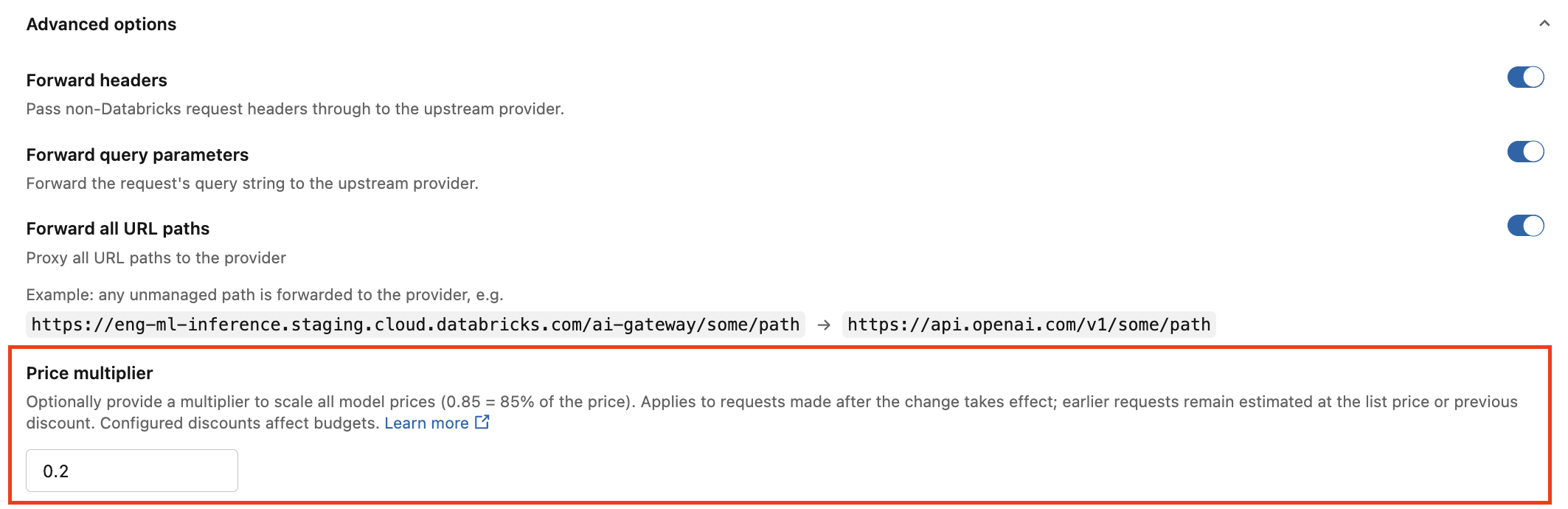
The multiplier applies to all models available through the model provider service. Computed spend in system.ai_gateway.external_model_spend reflects the configured multiplier. Changes apply to requests made after the configuration takes effect; earlier requests remain estimated using the list price or the previously configured multiplier.
A configured multiplier displays a Custom Pricing tag. Adjusted prices have a dotted underline in pricing tables. Hover over an adjusted price to compare the adjusted price with the provider's list price.
Configure endpoint routes for a custom provider
Endpoint routes are optional. Use them when a custom provider hosts different models at different paths under the same base_url. A model can support multiple API types. Each model has one endpoint route shared by its supported API types.
To configure a route, set endpoint_route on the target to a relative path, not a full URL. Unity Gateway appends the route to the end of base_url, after any path that base_url already contains.
- UI
- REST API
- Open the Create model provider service dialog as described in Create a model provider service, and select Custom in the Provider section.
- In the Models section, enter a model name, select the API types that model serves, and enter a relative path in Endpoint route (optional).
- Click Add model. Repeat for each model.
- Click Create.
The following request configures separate routes for a chat model and an embedding model:
databricks api post \
  "/api/2.1/unity-catalog/model-provider-services?parent=schemas/main.default&model_provider_service_id=my_provider" \
  --json '{
  "config": {
    "provider_type": "EXTERNAL_MODEL_PROVIDER_TYPE_CUSTOM",
    "targets": [
      {
        "model": "chat-model",
        "native_api_types": ["openai/v1/chat/completions"],
        "endpoint_route": "serve/openai/chat"
      },
      {
        "model": "embedding-model",
        "native_api_types": ["openai/v1/embeddings"],
        "endpoint_route": "serve/openai/embed"
      }
    ],
    "custom": {
      "direct": {
        "base_url": "https://api.example.com/gateway",
        "api_key": { "plaintext": "placeholder-api-key" }
      }
    }
  }
}'
With this base_url, requests use the following upstream URLs:
chat-model:https://api.example.com/gateway/serve/openai/chatembedding-model:https://api.example.com/gateway/serve/openai/embed
If you omit endpoint_route or set it to an empty string, Unity Gateway uses the base_url unchanged.
native_api_types selects the API translation for each model. It doesn't select or change the upstream route.
Update a model provider service
You must be an owner or have MANAGE. The provider type is immutable.
- UI
- REST API
- CLI
- Terraform
- DABs (Beta)
- Python SDK
- Go SDK
- Go Modular SDK
- Java SDK
- JS Modular SDK
Edit the model provider service's configuration from the Unity Gateway UI or Catalog Explorer. Changes apply in place.
databricks api patch \
  "/api/2.1/unity-catalog/model-provider-services/main.default.my_provider?update_mask=comment" \
  --json '{"comment": "Updated: routes to a custom provider"}'
databricks ai-gateway update-model-provider-service model-provider-services/main.default.my_provider comment \
  --json '{"comment": "Updated: routes to a custom provider"}'
Edit comment (or any other mutable field) on the databricks_ai_gateway_model_provider_service resource and re-apply. Changes apply in place.
Edit comment (or any other mutable field) in the bundle resource and run databricks bundle deploy. Changes apply in place.
from databricks.sdk.service import catalog as c
from google.protobuf.field_mask_pb2 import FieldMask

updated = w.ai_gateway.update_model_provider_service(
    name="model-provider-services/main.default.my_provider",
    update_mask=FieldMask(paths=["comment"]),
    model_provider_service=c.ModelProviderService(
        comment="Updated: routes to a custom provider"
    ),
)
updated, err := w.AiGateway.UpdateModelProviderService(ctx,
	catalog.UpdateModelProviderServiceRequest{
		Name:       "model-provider-services/main.default.my_provider",
		UpdateMask: *fieldmask.New([]string{"comment"}),
		ModelProviderService: catalog.ModelProviderService{
			Comment: "Updated: routes to a custom provider",
		},
	})
mask, err := types.NewFieldMask[aigateway.ModelProviderService]("comment")
updated, err := c.UpdateModelProviderService(ctx,
	aigateway.UpdateModelProviderServiceRequest{
		ModelProviderService: &aigateway.ModelProviderService{
			Name:    ptr("model-provider-services/main.default.my_provider"),
			Comment: ptr("Updated: routes to a custom provider"),
		},
		UpdateMask: mask,
	})
ModelProviderService updated =
    w.aiGateway()
        .updateModelProviderService(
            new UpdateModelProviderServiceRequest()
                .setName("model-provider-services/main.default.my_provider")
                .setUpdateMask(FieldMask.newBuilder().addPaths("comment").build())
                .setModelProviderService(
                    new ModelProviderService()
                        .setComment("Updated: routes to a custom provider")));
import { modelProviderServiceFieldMask } from '@databricks/sdk-aigateway/v1';

const updated = await client.updateModelProviderService({
  modelProviderService: {
    name: 'model-provider-services/main.default.my_provider',
    comment: 'Updated: routes to a custom provider',
  },
  updateMask: modelProviderServiceFieldMask('comment'),
});
Delete a model provider service
You must be an owner or have MANAGE.
- UI
- REST API
- CLI
- Terraform
- DABs (Beta)
- Python SDK
- Go SDK
- Go Modular SDK
- Java SDK
- JS Modular SDK
Open the model provider service in the Unity Gateway UI or Catalog Explorer and select Delete from the kebab menu.
databricks api delete "/api/2.1/unity-catalog/model-provider-services/main.default.my_provider"
databricks ai-gateway delete-model-provider-service model-provider-services/main.default.my_provider
Run terraform destroy, or remove the resource block and re-apply.
Remove the resource from the bundle and run databricks bundle deploy to delete it. databricks bundle destroy also works, but it removes every resource the bundle manages, not just this one.
w.ai_gateway.delete_model_provider_service(
    name="model-provider-services/main.default.my_provider"
)
err := w.AiGateway.DeleteModelProviderService(ctx,
	catalog.DeleteModelProviderServiceRequest{
		Name: "model-provider-services/main.default.my_provider",
	})
err := c.DeleteModelProviderService(ctx,
	aigateway.DeleteModelProviderServiceRequest{
		Name: ptr("model-provider-services/main.default.my_provider"),
	})
w.aiGateway()
    .deleteModelProviderService(
        new DeleteModelProviderServiceRequest()
            .setName("model-provider-services/main.default.my_provider"));
await client.deleteModelProviderService({
  name: 'model-provider-services/main.default.my_provider',
});