Scale AI Search endpoint throughput with high QPS
By default, standard endpoints support 20–200 QPS depending on index size. Real-time applications such as search bars, recommendation systems, and entity matching often require 100–1000+ QPS. On standard endpoints only, you can set a target QPS. Databricks provisions the infrastructure to best match that throughput level (best-effort, not guaranteed).
Setting a target QPS provisions additional capacity, which increases the cost of the endpoint. You are charged for this additional capacity regardless of actual query traffic. Throughput scaling is best-effort and not guaranteed.
Use high QPS when:
- Your application requires more than 50 QPS of sustained throughput.
- You receive 429 (Too Many Requests) errors under normal load.
- Latency degrades as traffic ramps up, even when average utilization appears low.
Requirements
- High QPS is available for standard endpoints only. Storage-optimized endpoints are not supported.
- Use service principal OAuth authentication and the index URL for high-QPS production workloads. Personal access tokens (PATs) and the workspace query URL are appropriate for prototyping, but they do not use the optimized query route and are capped at a few tens of QPS.
- Delta Sync indexes that use managed embedding models can't use the optimized query route if the workspace has the IP access list feature enabled or has a private access settings object attached.
- Workspaces that use AWS PrivateLink for front-end or back-end connectivity have a private access settings object. The object's settings, such as Public access enabled, don't change this.
- In that configuration, queries to the index use the workspace query URL, which is capped at a few tens of QPS, so the endpoint can't reach a higher target QPS. This applies to all queries to the index, including queries that pass
query_vector. - To reach your target QPS, use self-managed embeddings: a Delta Sync index with an embedding vector column, or a Direct Vector Access index. See options for providing embeddings. If you can't use self-managed embeddings, contact your Databricks account team.
Configure target QPS
Set a target QPS when creating a new endpoint or updating an existing one. The additional capacity needed to best match the target throughput is provisioned automatically. Throughput scaling is best-effort and not guaranteed: actual QPS depends on your index size, vector dimensionality, query complexity, and filter usage.
- Databricks UI
- Python SDK
- REST API
When creating a new endpoint:
-
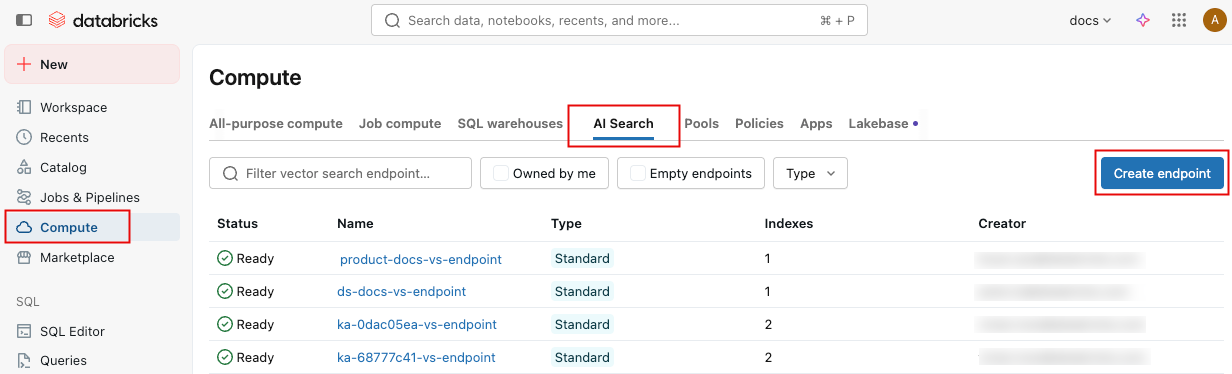
In the left sidebar, click Compute.
-
Click the AI Search tab and click Create endpoint.
-
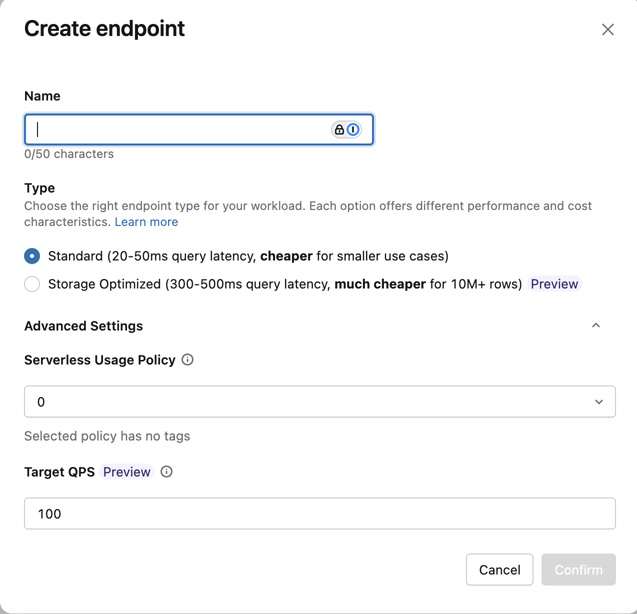
Under Advanced Settings, enter the Target QPS value.
When updating an existing endpoint:
-
Navigate to the endpoint detail page.
-
In the right panel, click the pencil icon
 next to Target QPS.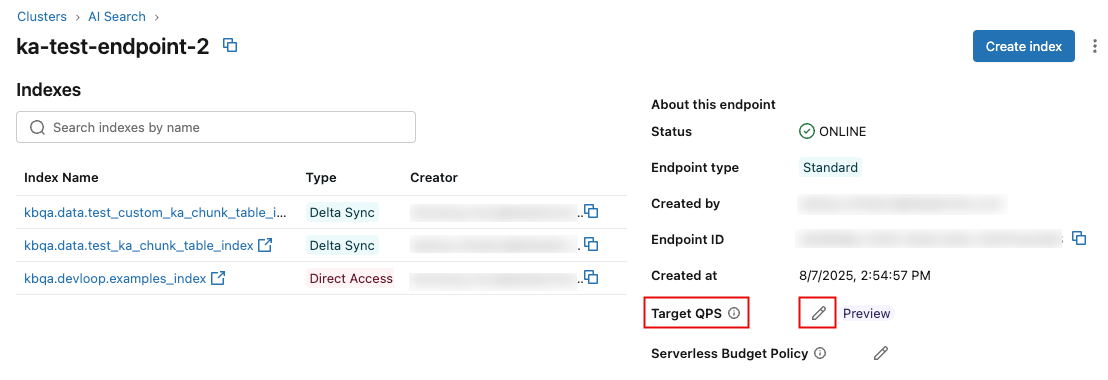
-
Enter the new value and click Save.

from databricks.ai_search.client import AISearchClient

client = AISearchClient()

# Create a new endpoint with target QPS
endpoint = client.create_endpoint(
    name="my-high-qps-endpoint",
    endpoint_type="STANDARD",
    target_qps=500,
)

# Update an existing endpoint's target QPS
response = client.update_endpoint(name="my-endpoint", target_qps=500)

# Check scaling status
scaling_info = response.get("endpoint", {}).get("scaling_info", {})
print(f"Requested target QPS: {scaling_info.get('requested_target_qps')}")
print(f"State: {scaling_info.get('state')}")
# State is "SCALING_CHANGE_IN_PROGRESS" while capacity is being provisioned,
# then transitions to "SCALING_CHANGE_APPLIED"
Create an endpoint with target QPS:
POST /api/2.0/vector-search/endpoints
{
  "name": "my-high-qps-endpoint",
  "endpoint_type": "STANDARD",
  "target_qps": 500
}
Update target QPS on an existing endpoint:
PATCH /api/2.0/vector-search/endpoints/<ENDPOINT_NAME>
{
  "target_qps": 500
}
Check scaling status:
GET /api/2.0/vector-search/endpoints/<ENDPOINT_NAME>
The response scaling_info field shows the requested_target_qps and scaling state. The state is SCALING_CHANGE_IN_PROGRESS while capacity is being provisioned, then transitions to SCALING_CHANGE_APPLIED.
Set up a service principal
High-QPS queries need an OAuth token with authorization_details for the index. Use a service principal for production. To set up the service principal:
-
Add a service principal and assign it to the workspace that contains the index.
-
Create an OAuth secret for the service principal:
- Follow the steps in Create an OAuth secret.
- Under Scopes, select all APIs. The Python SDK requests the
all-apisscope, and a token can't exceed its secret's scopes, so a secret limited to narrower scopes can't get a token for the SDK. The REST example also requestsall-apis. This scope makes the secret broad, so use a dedicated service principal that has only the grants on this page. - Store the client ID and secret in a secret scope instead of in your application code.
-
Grant the service principal the following Unity Catalog privileges:
- USE CATALOG on the catalog that contains the index.
- USE SCHEMA on the schema that contains the index.
- SELECT on the index.
- SELECT and MODIFY on the index, if the service principal upserts or deletes data in a Direct Vector Access index.
If the service principal owns the index, it doesn't need SELECT or MODIFY, but it still needs USE CATALOG and USE SCHEMA.
-
For an index that uses a Databricks-managed embedding model, grant permissions on the embedding model serving endpoint and, if the index sets
model_endpoint_name_for_query, on that endpoint too. The required permission depends on the endpoint type:- Pay-per-token Foundation Model APIs endpoints, such as
databricks-gte-large-en: No grant is needed, unless your account restricts foundation models with Unity Catalog permissions, in which case grant EXECUTE on the model. - Provisioned throughput and custom serving endpoints: Grant Can Query to query with
query_text. Grant at least Can View even if you only query withquery_vectorand use the Python SDK, becauseget_index()reads these serving endpoints and fails without permission.
- Pay-per-token Foundation Model APIs endpoints, such as
Querying an index doesn't require any permission on the AI Search endpoint itself.
The service principal authenticates with OAuth machine-to-machine (M2M) authorization. The OAuth token must include authorization_details that allow ReadVectorIndex on the index, or WriteVectorIndex for upserts and deletes.
If the embedding model serving endpoint or the model_endpoint_name_for_query endpoint is route-optimized, the token also needs a workspace_permission entry that allows query_inference_endpoint on each one. To check whether a serving endpoint is route-optimized, see the route_optimized field returned by GET /api/2.0/serving-endpoints/<name>.
- Python SDK: Pass the client ID and secret to
AISearchClient, as shown in Query the index URL. The SDK requests a token with the requiredauthorization_detailsand adds the serving endpoint entries automatically. For a route-optimizedmodel_endpoint_name_for_queryendpoint, this requiresdatabricks-ai-search0.79 and above. - REST API: Request the token yourself. See the service principal example in the REST API tab of How to query an AI Search index.
For testing, you can also use a token obtained through the notebook token exchange. Use a service principal for production.
Privilege changes apply only to newly issued tokens. Revoking a privilege doesn't invalidate a token that was already issued. That token stays valid until it expires, which is up to one hour. With the Python SDK, call get_index() again after you change privileges or the embedding endpoint configuration. REST callers must request a new token.
Query the index URL
After the endpoint scaling state is SCALING_CHANGE_APPLIED, send queries to the index URL using an OAuth token with authorization_details for the index, such as a service principal token. This URL is required to use the additional query capacity provisioned by target_qps.
For Python applications, call get_index() once and reuse the returned index object. The Python SDK sends queries to the index URL.
from databricks.ai_search.client import AISearchClient

client = AISearchClient(
    service_principal_client_id="...",
    service_principal_client_secret="...",
    workspace_url="https://<workspace-url>",
)

index = client.get_index(endpoint_name="my-high-qps-endpoint", index_name="catalog.schema.index")

# Reuse this index object for every query.
index.similarity_search(query_vector=[...], columns=["id", "text"], num_results=10)
For REST or non-Python applications, first get the index URL, then send query requests to that URL. The token must be an OAuth token with authorization_details for the index. Use a service principal for production.
export WORKSPACE_URL=https://<workspace-url>
export INDEX_NAME=catalog.schema.index
export TOKEN=<oauth-token>

export INDEX_URL=$(curl -X GET \
  -H "Authorization: Bearer $TOKEN" \
  "$WORKSPACE_URL/api/2.0/vector-search/indexes/$INDEX_NAME" \
  | jq -r '.status.index_url')

case "$INDEX_URL" in
  http://*|https://*) ;;
  *) INDEX_URL="https://$INDEX_URL" ;;
esac

curl -X POST \
  -H "Authorization: Bearer $TOKEN" \
  -H "Content-Type: application/json" \
  "$INDEX_URL/query" \
  --data '{"num_results": 10, "query_vector": [...], "columns": ["id", "text"]}'
Do not use the workspace query URL, such as /api/2.0/vector-search/indexes/<index_name>/query, for high-QPS production traffic. That URL does not use the optimized query route and might return 429 errors before the endpoint reaches the configured target QPS.
How scaling applies
After you set a target QPS, the required capacity is provisioned automatically. The new throughput level applies after provisioning completes; you do not need to sync indexes to trigger the change.
Attempting to update target QPS while a scaling operation is in progress returns a RESOURCE_CONFLICT error. Wait for the current operation to complete before retrying.
Troubleshoot 429 errors
For high-QPS workloads, use these checks to find the bottleneck:
- If you use a PAT or the workspace query URL, switch to service principal OAuth authentication and the index URL.
- If
scaling_info.stateisSCALING_CHANGE_IN_PROGRESS, wait until the state changes toSCALING_CHANGE_APPLIED. - If your application sends vector queries with
query_vector, the embedding model is not in the query path. If 429 errors continue after scaling completes, reduce request concurrency or set a highertarget_qps. - If your application sends text queries to a Delta Sync index with Databricks-managed embedding models, the embedding model might be the bottleneck. Use a smaller embedding model, such as
databricks-qwen3-embedding-0-6b, instead ofdatabricks-gte-large-en, or use a provisioned throughput Foundation Model APIs endpoint or another dedicated Model Serving endpoint for embeddings.
Limitations
- No autoscaling: You must set target QPS manually based on expected traffic. If traffic exceeds the provisioned level, 429 errors occur. See Plan for query spikes.
- Standard endpoints only: Storage-optimized endpoints do not support
target_qps. - Optimized route required: The configured target QPS applies to traffic that uses service principal OAuth authentication and the index URL. PAT traffic and workspace query URL traffic are capped at a few tens of QPS.
- Managed embedding models can add a second limit: For Delta Sync indexes that use a managed embedding model for text queries, query throughput also depends on the embedding model serving endpoint. Increase model serving capacity, use provisioned throughput, or use self-managed embeddings for predictable query throughput.