Manage serverless compute
This page explains how to manage access to serverless compute and how to implement serverless rate limits. Workspace admins govern serverless compute using built-in serverless compute objects. A serverless compute object is a resource type that defines the permission boundary for serverless workloads. Your workspace automatically gets two default compute objects:
- Default Interactive Compute: Governs access to notebooks and Databricks Connect.
- Default Automated Compute: Governs access to jobs and Spark Declarative Pipelines on Lakeflow.
By default, all workspace users have Can Use on both objects, so existing workloads continue to run without any changes. A workspace admin can remove users or groups from either object to restrict access. A user who loses access will see the Serverless compute option as unavailable in their product surfaces.
Manage access to serverless compute
To control who has access to serverless compute, workspace admins can edit the permissions on the Default Interactive Compute and Default Automated Compute objects. Workspace admins have the Can Manage permission by default, but they can grant the permission to any user. These default compute objects cannot be renamed or deleted.

Each serverless compute object supports two permission levels:
Permission | Allows you to |
|---|---|
Can Use | Run workloads on this compute |
Can Manage | Run workloads on this compute and edit the compute's permissions |
You can also manage permissions for serverless compute objects programmatically using the Permissions API. Serverless compute objects use the serverless-compute object type, and each object is identified by its ID.
Restrict access to serverless interactive
To limit who can use serverless for notebooks and Databricks Connect:
- Click Compute in the workspace sidebar.
- In the Serverless tab, click the kebab menu
 next to Default Interactive Compute, then click Edit permissions.
- Remove the All Users group, or the group that includes all workspace users.
- Add only the specific users, groups, or service principals that you want to authorize.
If you revoke a user's interactive serverless permissions, notebooks already attached to serverless will fail to connect when the user runs a cell and the user will no longer see the Serverless option as available in the notebook's compute picker. If they attempt to run Databricks Connect, the connection request fails with an error indicating that the user doesn't have access to serverless.
Restrict access to serverless jobs and pipelines
To limit who can use serverless in jobs and pipelines:
- Click Compute in the workspace sidebar.
- In the Serverless tab, click the kebab menu next to Default Automated Compute, then click Edit permissions.
- Remove the All Users group, or the group that includes all workspace users.
- Add only the specific users, groups, or service principals that you want to authorize.
If you revoke a user's access to Default Automated Compute, jobs and pipelines that run as that user and use that compute object fail to run. Workloads that select a custom automated compute object require permission on the selected object.
Before you revoke a user's access to Default Automated Compute, audit which jobs and pipelines the affected users own. The following query identifies recent serverless workloads for a specific user:
SELECT *
FROM system.billing.usage
WHERE usage_date >= date_add(now(), -30)
  AND billing_origin_product IN ('JOBS', 'DLT')
  AND identity_metadata.run_as = '<user_email>';
Check the usage_metadata column to see the affected resources, such as job IDs and pipeline IDs.
Audit serverless usage
Serverless billing records include a serverless_compute_id field in usage_metadata. Use it to track which compute object a workload ran on:
SELECT
  usage_metadata.serverless_compute_id,
  identity_metadata.run_as,
  SUM(usage_quantity) AS total_dbus
FROM system.billing.usage
WHERE billing_origin_product IN ('JOBS', 'DLT', 'INTERACTIVE')
  AND usage_metadata.serverless_compute_id IS NOT NULL
  AND usage_date >= date_add(now(), -30)
GROUP BY 1, 2
ORDER BY 3 DESC;
Supported serverless compute access control features
The following features are integrated with serverless compute access controls.
Interactive (Default Interactive Compute)
- Notebooks and AI Runtime notebooks
- Databricks Connect
Automated (Default Automated Compute)
- Jobs and AI Runtime jobs
- Spark Declarative Pipelines on Lakeflow
Unsupported serverless compute access control features
The following features aren't integrated with serverless compute access controls:
- Databricks SQL (DBSQL)
- Batch inference (
ai_query()) - Model Serving
- Foundation Model API provisioned throughput endpoints
- Lakebase
- Databricks Apps
- Agent Evaluation and synthetic data
- AI Search indexing
- Predictive Optimization
- Data profiling
- Fine-grained access control on dedicated compute. Access to the dedicated compute determines whether a user can use fine-grained access control.
For any feature not listed here, contact your Databricks account team to ask about its status.
Serverless access control limitations
In the event of a service disruption, access checks might fail open, and users who would otherwise be denied access might be able to start serverless workloads. This feature is intended to help govern access to serverless compute. Do not use this feature to ensure an absolute spend cap on final billed amounts. Databricks is not responsible for costs incurred by workloads that run during such an event.
- You can't rename or delete default compute objects.
- Jobs and pipelines that use Default Automated Compute require permission on that object. Review active workloads before you remove a user's access.
- Background compute (system-initiated jobs) is exempt from serverless compute access controls.
Set rate limits on serverless compute
A rate limit controls how far an automated workload's Spark executors can autoscale. Workspace admins can create custom automated compute objects and assign each one a size. When a workload uses the compute object, that size sets its maximum Spark executor autoscaling capacity.
Rate limits only apply to automated workloads (jobs and Lakeflow pipelines). Interactive workloads (notebooks and Databricks Connect) aren't rate-limited.
A size maps to an approximate Databricks unit (DBU) consumption rate for Spark executors. Rate limits do not set a hard limit on total workload cost or final billed amounts. They don't cap driver, REPL virtual machine, GPU, or materialized view and streaming table refresh costs.
The rate limit applies independently to each workload that uses the compute object. Two jobs that use the same compute object each receive the full cap. Within a job, the cap is shared across its serverless tasks, even when the tasks run on separate clusters. A compute object does not impose an aggregate limit across all workloads that use it.
Rate limit requirements
- To create a serverless compute object, you must be a workspace admin or have the unrestricted cluster creation entitlement.
- To edit a custom compute object's size or permissions, you must have Can Manage on that object.
- To run a workload on a compute object, you must have Can Use or Can Manage on that object.
Create a serverless compute with a rate limit
- Click Compute in the workspace sidebar.
- In the Serverless tab, click Create serverless compute.
- Enter a name.
- For Size, select the rate limit to apply, from Small to 2X-Large. Leave it set to Default to use your workspace's default cap.
- Click Create.
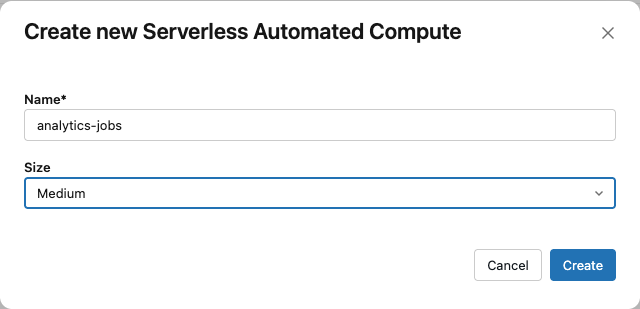
The new compute object appears on the Serverless tab with a type of Automated. Grant users access before they run workloads on it. You can't edit the size of a default compute object.
Grant access to rate-limited compute
- On the Serverless tab, open the custom compute object.
- Click Actions, then Edit permissions.
- Add the users, groups, or service principals that need access.
- Grant Can Use to run workloads, or Can Manage to also edit the size and permissions.
- Click Save.
Change a rate limit
- On the Serverless tab, open the custom compute object.
- Click Edit.
- For Size, select a size.
- Click Save.
Rate limit sizes
The following sizes map to approximate Spark executor consumption rates:
Size | Approximate executor consumption rate |
|---|---|
Small | ~60 DBUs per hour |
Medium | ~120 DBUs per hour |
Large | ~240 DBUs per hour |
X-Large | ~480 DBUs per hour |
2X-Large | ~960 DBUs per hour |
These values are estimates. Actual usage can exceed them because of variability in serverless infrastructure and costs that the rate limit doesn't cover.
Choosing Default uses your workspace's existing maximum autoscaling capacity for serverless automated workloads. The default depends on your workspace's tier and any workspace-specific limits.
Run a workload on rate-limited compute
A user with Can Use on a compute object can select it when configuring a job or pipeline. The workload then runs under the compute's rate limit. If a workload doesn't specify a compute object, it falls back to your workspace's Default Automated Compute. If the user doesn't have access to that default, the workload fails to run.
- Jobs: In the job's Compute settings, use Compute policy to select the automated serverless compute object. The selector can also be labeled Serverless compute. The list shows the compute objects that the job's run-as identity can use. To configure a job with the Jobs API, see Use rate-limited compute with the Jobs API.
- Pipelines: Select the automated compute object as the serverless compute for a pipeline in the Lakeflow editor.
When a rate limit throttles a pipeline, you can view the impact in the pipeline's query history or in the Lakeflow UI.
Use rate-limited compute with the Jobs API
To run a job on a rate-limited compute object with the Jobs API, define a job cluster that sets serverless_compute.policy_id to the compute object's ID. This is the same automated serverless compute object selected as the job's compute policy. Then set job_cluster_key on every serverless task in the job to reference that job cluster. To copy the ID, on the Serverless tab, click the kebab menu for the compute object, then click Copy compute ID.
{
  "job_clusters": [
    {
      "job_cluster_key": "rate_limited",
      "serverless_compute": { "policy_id": "<compute-id>" }
    }
  ],
  "tasks": [
    {
      "task_key": "ingest",
      "job_cluster_key": "rate_limited",
      "notebook_task": { "notebook_path": "/Workspace/Jobs/ingest" }
    },
    {
      "task_key": "transform",
      "job_cluster_key": "rate_limited",
      "notebook_task": { "notebook_path": "/Workspace/Jobs/transform" }
    }
  ]
}
A job can define at most one job cluster that sets serverless_compute. The same configuration applies when you create, update, reset, or submit a job, and when you deploy a job with Declarative Automation Bundles. For the full request schema, see Create a new job in the REST API reference.
The job_clusters[].serverless_compute_id field is deprecated. Use serverless_compute.policy_id instead.
Rate limit limitations
- Rate limits cap Spark executor autoscaling only. Other cost components, such as the driver, REPL VMs, GPUs, and materialized view or streaming table refreshes, aren't capped.
- The DBU-per-hour cap for each size is an estimate. Actual usage can exceed the target because of modest fluctuations in the applied limit and the inherent variability of serverless infrastructure.
- A workload at the 2X-Large size might perform below expectations because the physical cluster size is capped at 256 executors. If two or more 2X-Large workloads are scheduled on the same runtime cluster, each might attain less than the expected performance.
- Because of billing implementation details, the same workload might incur different DBU usage under different rate limit sizes.
- You can't set a rate limit on a default compute object.