Git Folder Serverless
This feature is in Beta.
Git Folder Serverless provides a single serverless compute resource shared across assets in a Git folder, including notebooks and files. Use Git Folder Serverless for multi-file authoring without starting a new serverless compute resource or setting up an environment for every notebook or file. The environment is managed by a pyproject.toml file at the Git folder root.
Requirements
To use Git Folder Serverless:
- Your project must be in a Git folder.
- You must open the Git folder in the Git folder editor.
- If the Git folder contains a root
pyproject.tomlfile, theenvironment_versionmust be set to5or later.
Shared compute and environment
- Notebooks and files in the same Git folder attach to one Git Folder Serverless compute resource and use the environment managed by
pyproject.toml. - Only assets inside the associated Git folder can attach to the compute resource.
- Python variables defined in one notebook are not available in another notebook.
- A web terminal opened from any attached notebook or file in the Git folder runs on the same compute resource.
Use Git Folder Serverless in the Git folder editor
-
In the workspace sidebar, click Workspace and navigate to the Git folder.
-
Click Open in editor.
-
Open a notebook or file in the Git folder.
-
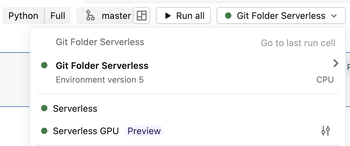
Click the compute drop-down menu.
-
Select Git Folder Serverless.
-
Run the notebook or file to start the compute resource.
To use the same compute from another asset, open another notebook or file in the same Git folder and select Git Folder Serverless. The assets share compute and the environment managed by pyproject.toml.
Manage the environment with pyproject.toml
Git Folder Serverless manages Python dependencies for the entire Git folder with a pyproject.toml file at the root of the folder. This differs from standard serverless notebooks, where dependencies configured in the Environment side pane apply to one notebook.
You can add dependencies and apply environment changes with notebook commands or by editing pyproject.toml.
Use notebook commands
-
Open a notebook attached to Git Folder Serverless.
-
Check whether a
pyproject.tomlfile exists at the root of the Git folder. If it does not exist, open the Environment side pane and click Create pyproject.toml. -
Run
%uv add <package>to add a dependency to the rootpyproject.tomlfile. For example:Python%uv add cowsay -
Run
%uv syncto apply the dependencies to the shared environment and generate or updateuv.lock.Python%uv sync
Edit pyproject.toml
-
In the Git folder editor, check whether a
pyproject.tomlfile exists at the root of the Git folder. If it does not exist, open the Environment side pane and click Create pyproject.toml. -
Open the
pyproject.tomlfile. -
Manually edit the
dependencieslist. For example:Toml[project]
name = "my-project"
version = "0.1.0"
dependencies = [
"simplejson==3.18.1",
]
[tool.databricks.environment]
environment_version = "5" -
At the top of the
pyproject.tomlfile editor, click Apply to apply the environment changes to Git Folder Serverless.
The updated environment is available to notebooks and files attached to the same Git Folder Serverless compute. To inspect the environment, open the Environment side pane. See Configure the serverless environment for information about serverless environment versions and installed dependencies.
Collaborate through Git
Only the user who starts a Git Folder Serverless compute resource can run workloads on it. If another user opens the same Git folder, they are blocked from running notebooks or files on the existing compute resource.
Databricks recommends that each collaborator clone the repository into a Git folder in their personal workspace folder. Each collaborator then gets a separate compute resource and environment managed by pyproject.toml for their clone.
Use branches, commits, pushes, and pulls to exchange changes through the remote Git repository. See Collaborate in Git folders.
Limitations
- Compute sharing is scoped to a serverless usage policy. Notebooks and files in the same Git folder that use different usage policies are assigned separate compute resources instead of sharing one.