Local metric views
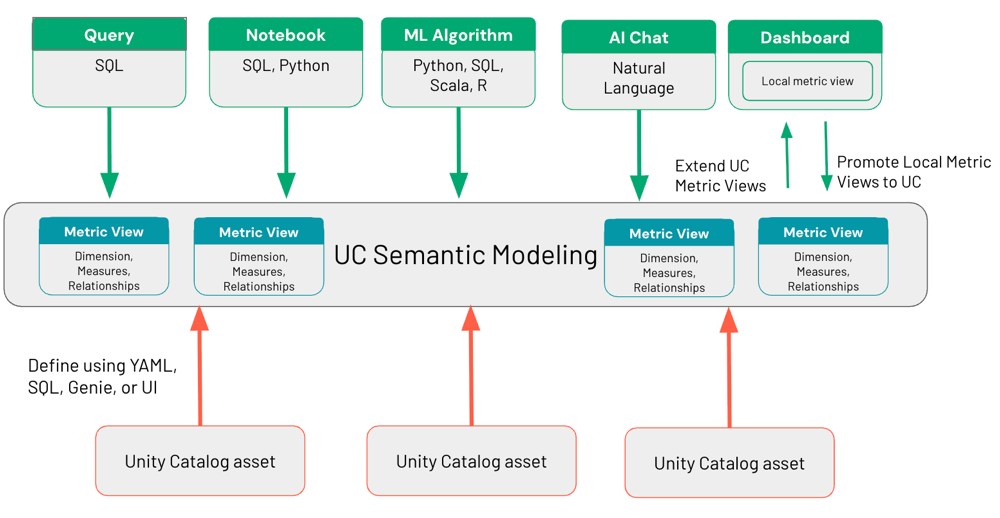
Local metric views enable you to define fields (previously called dimensions), measures, and join relationships directly in an AI/BI dashboard using a visual interface. Local metric views retain all of the benefits of semantic objects, such as accurate metric aggregations regardless of groupings and query-time transformation rather than pre-processing, while keeping the semantic logic contained within a single dashboard.
They provide a location to house semantic logic that doesn't immediately belong in the global Unity Catalog layer, such as analysis specific to small teams or analysis that hasn't yet been hardened and prepared for broader use. When your metrics are ready for broader use, you can promote them to Unity Catalog to make them global metric views, accessible by all downstream tools.
Requirements
To use local metric views, your workspace must meet the following requirements:
- You must have CAN USE permissions on a SQL warehouse.
When to use local metric views
Local metric views are best suited for the following scenarios:
- Prototyping and iteration: Experiment with metric definitions without going through the Unity Catalog publishing process.
- Dashboard-specific analysis: Define metrics scoped to a single dashboard that do not need to be shared across tools.
- Users without Unity Catalog write access: Create and use metric views for dashboards without write permissions on a Unity Catalog catalog or schema.
- Validation before promotion: Test and refine metric definitions before promoting them to Unity Catalog metric views.
For metrics that must be shared across multiple dashboards, Genie Agents, or other tools, use Unity Catalog metric views instead. See Unity Catalog metric views.
Create a local metric view
You can create a local metric view from one or more tables, or by extending an existing Unity Catalog metric view with additional measures and fields.
Create from tables
To create a local metric view from tables:
-
Click
 Dashboards in the sidebar.
 -
Click Create dashboard.
-
Click the Data tab.
-
Click Add data and select the option to create a metric view.
-
Select one or more tables to use as the data source.
-
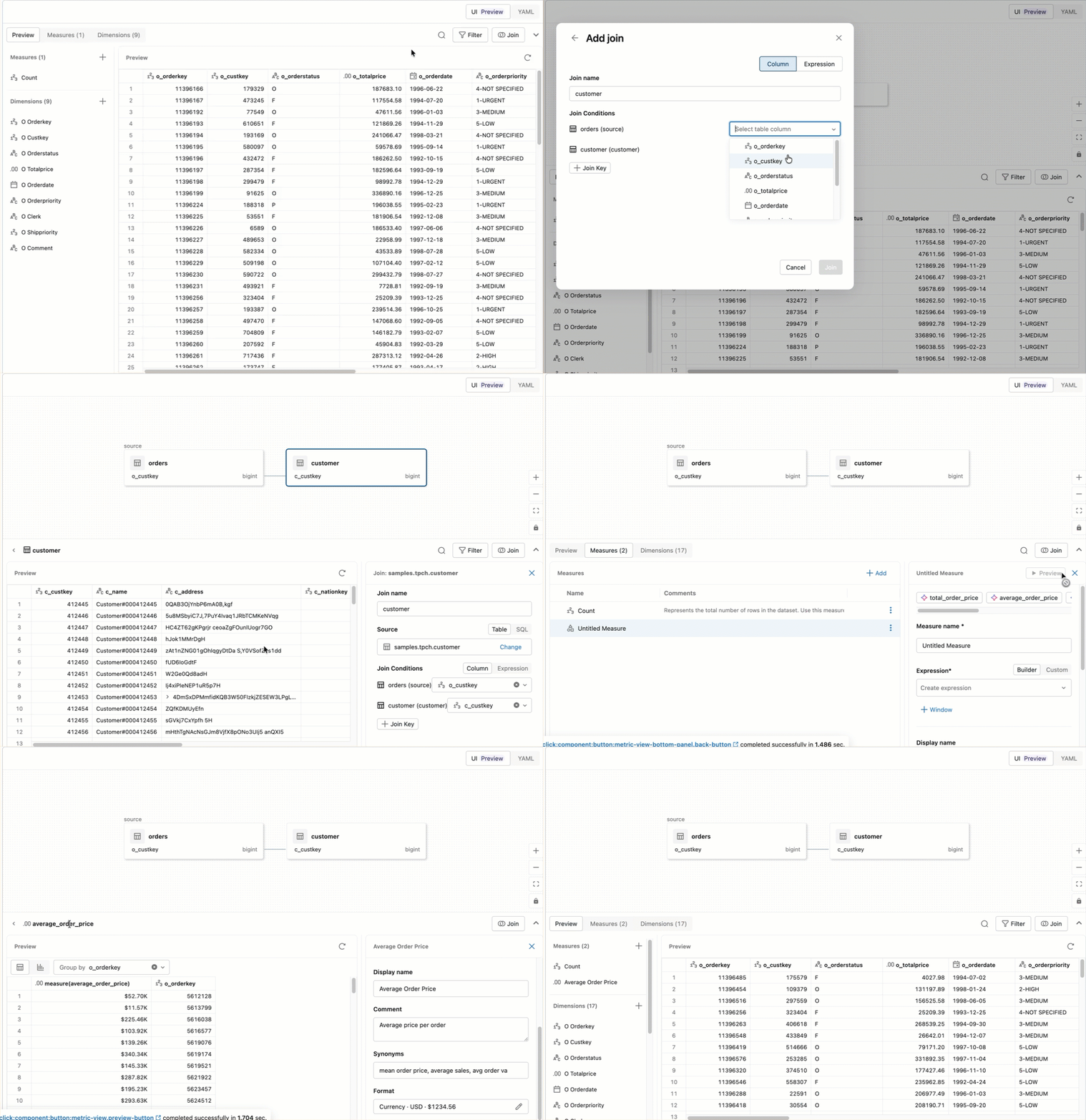
Use the visual interface to define the following:
- Fields: Columns used to group or filter results, such as region, product category, or date. Fields were previously called dimensions. A dashboard uses a field's display name everywhere the field appears, such as widget titles, axis labels, and downloaded data.
- Measures: Aggregated values, such as total revenue or average order value.
- Joins: Relationships between tables.
- Filters: Conditions that limit the rows the metric view returns.
- Parameters: Named values that you pass in at query time to reuse a single definition across different inputs.
-
Save the metric view. It is added to your dashboard as a dataset.
The visual interface works the same as the Unity Catalog metric view editor. For the full walkthrough, see Create a metric view.
Extend a Unity Catalog metric view
You can build on top of an existing Unity Catalog metric view by adding dashboard-specific measures and fields. Read-only access to the Unity Catalog metric view is sufficient.
To extend a Unity Catalog metric view:
- Open an AI/BI dashboard and click the Data tab.
- Click Add data and select the option to create a metric view.
- Select an existing Unity Catalog metric view as the base.
- Add measures or fields specific to your dashboard.
- Save the metric view.
Cluster by and partition by
Local metric views support CLUSTER BY and PARTITION BY configuration, which controls how the underlying data is physically laid out to improve query performance. These settings work the same way as the CLUSTER BY and PARTITION BY clauses on a materialized view. You can configure them in the low-code visual interface or directly in YAML.
To configure clustering or partitioning in the visual interface, use the Custom tab.
To configure them in YAML, add cluster_by or partition_by within the materialization block of the metric view definition. For cluster_by, list the columns to cluster by, or set auto: true to let Databricks choose the clustering columns automatically. For partition_by, list the columns to partition by:
version: 1.1
source: samples.tpch.orders

fields:
  - name: order_date
    expr: o_orderdate
  - name: order_status
    expr: o_orderstatus

measures:
  - name: total_revenue
    expr: SUM(o_totalprice)
  - name: order_count
    expr: COUNT(1)

materialization:
  schedule: every 6 hours
  mode: relaxed
  materialized_views:
    - name: daily_status_metrics
      type: aggregated
      dimensions:
        - order_date
        - order_status
      measures:
        - total_revenue
        - order_count
      cluster_by:
        cols:
          - order_date
          - order_status
      partition_by:
        - order_date
Export to a Unity Catalog metric view
When a local metric view is ready for broader use, you can export it to Unity Catalog to make it a global metric view, accessible by all downstream tools. Exporting makes the metric view available to other dashboards, Genie Agents, and tools that support Unity Catalog metric views.
To export a local metric view to Unity Catalog:
- In the Data tab, click the
 kebab menu next to the local metric view.
 - Select Export to Metric View.
- (Optional) Edit the metric view name.
- Choose the catalog and schema where you want to store the metric view.
- Click Create.
For more information about Unity Catalog metric views, see Unity Catalog metric views.
Limitations
The following limitations apply to local metric views:
- Local metric views do not support
IDENTIFIERparameters. - Local metric views do not support SQL queries with GRANT statements (e.g.
USE CATALOG). See GRANT.