Fan-in and fan-out architecture in Lakeflow pipelines
Fan-in and fan-out are common patterns for building scalable, reliable data pipelines. Fan-in ingests data from multiple sources into a single pipeline, and fan-out routes one processed stream to multiple destinations. You can implement both in Lakeflow pipelines.
What are fan-in and fan-out?
Fan-in is an architectural pattern where data from multiple sources is ingested and processed within a single pipeline.
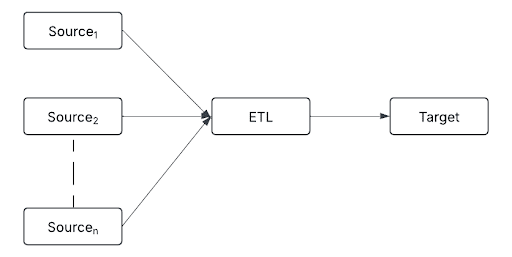
Sources can include:
- Real-time event streams (for example, Kafka and Kinesis)
- Cloud storage (for example, S3, ADLS, and Google Cloud Storage)
- Relational databases (for example, PostgreSQL, MySQL, and Snowflake)
- IoT devices (for example, sensors, logs, and APIs)
By consolidating diverse data streams into a single processing layer, fan-in enables consistent transformation, deduplication, and data enrichment before data moves downstream.
Fan-out follows a one-to-many approach, routing a single processed data stream to multiple destinations.
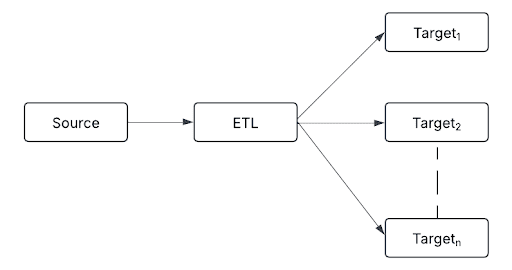
Destinations can include:
- Delta tables for structured storage
- Real-time alerting systems for anomaly detection
- Machine-learning models for predictive analytics
- Data warehouses for reporting and analytics
- Message queues for asynchronous communication and decoupled processing
This pattern ensures that each downstream system receives data in the required format, allowing organizations to integrate streaming data into various business applications.
In practice, pipelines often combine both patterns. For example:
- A company collects user activity data from multiple applications, websites, and mobile devices (fan-in).
- The processed data is stored in Delta Lake for historical analysis while real-time alerts trigger for unusual activity (fan-out).
Implement fan-in with append flows
Fan-in pipelines merge multiple data streams into a unified target. Traditionally, this requires complex union queries and manual checkpointing. Append flows simplify this by enabling various data streams to feed directly into a single streaming table without explicit unions or complex logic. Each source is managed independently, allowing incremental data ingestion and updates.
For example, use append flows to consolidate multiple Kafka topics or regional data streams into a unified target table.
- Python
- SQL
from pyspark import pipelines as dp

dp.create_streaming_table("all_topics")

# Kafka stream from topic1
@dp.append_flow(target="all_topics")
def topic1():
    return spark.readStream.format("kafka") \
        .option("kafka.bootstrap.servers", "host1:port1,...") \
        .option("subscribe", "topic1") \
        .load()

# Kafka stream from topic2
@dp.append_flow(target="all_topics")
def topic2():
    return spark.readStream.format("kafka") \
        .option("kafka.bootstrap.servers", "host1:port1,...") \
        .option("subscribe", "topic2") \
        .load()
CREATE OR REFRESH STREAMING TABLE all_topics;

CREATE FLOW
  topic1
AS INSERT INTO
  all_topics BY NAME
SELECT * FROM
  read_kafka(bootstrapServers => 'host1:port1,...', subscribe => 'topic1');

CREATE FLOW
  topic2
AS INSERT INTO
  all_topics BY NAME
SELECT * FROM
  read_kafka(bootstrapServers => 'host1:port1,...', subscribe => 'topic2');
Implement fan-out
Fan-out pipelines distribute data from one source to multiple outputs. Lakeflow pipelines support three approaches depending on your use case.
Use for loops for generalized logic
If your ETL logic is identical across multiple targets, use Python for loops to dynamically generate multiple tables through parameterized loops. This avoids repetitive coding and simplifies pipeline scaling through configuration.
Each generated flow or table processes the entire source dataset independently. For sources with shared throughput or read capacity limits, such as Kafka, this can significantly impact performance. Evaluate the approach carefully for such sources before using it.
regions = ["US", "EU", "APAC"]

for region in regions:
    @dp.materialized_view(name=f"orders_{region.lower()}_filtered")
    def filtered_orders(region_filter=region):
        return spark.read.table("combined_orders").filter(f"region = '{region_filter}'")
Use independent flows for target-specific logic
When ETL transformations vary significantly per target, implement independent data flows. This approach has precise control and optimized performance tailored to each use case.
from pyspark import pipelines as dp
from pyspark.sql.functions import col

# Grouped output
@dp.materialized_view(name="orders_sink")
def region_orders():
    df = spark.read.table("combined_orders").groupBy("region").count()
    # Add additional logic here
    return df

# BI materialized view
@dp.materialized_view(name="orders_bi_materialized")
def orders_bi():
    return spark.read.table("combined_orders").select("order_id", "amount", "region")

# ML feature table
@dp.materialized_view(name="orders_ml_features")
def orders_ml():
    return (
        spark.read.table("combined_orders")
        .withColumn("high_value_order", col("amount") > 1000)
        .select("order_id", "high_value_order", "region")
    )
Use ForEachBatch for custom routing
foreach_batch_sink is available in Public Preview via the Lakeflow pipelines PREVIEW channel. See channel in Pipeline configurations.
The foreach_batch_sink applies custom logic to each micro-batch, enabling complex transformation, merging, or routing to multiple destinations, including those without built-in streaming support, such as JDBC sinks.
Each batch runs multiple write operations independently. Failures in one operation do not automatically roll back previously successful writes. This can lead to partial or inconsistent data across targets, particularly when processing shared sources like Kafka. Design your pipelines with careful error handling and thorough testing. See Use ForEachBatch to write to arbitrary data sinks in pipelines.
from pyspark import pipelines as dp

@dp.foreach_batch_sink(name="user_events_feb")
def user_events_handler(batch_df, batch_id):
    # Write to Delta table
    batch_df.write.format("delta").mode("append").saveAsTable("my_catalog.my_schema.my_delta_table")

    # Write to JSON files
    batch_df.write.format("json").mode("append").save("/Volumes/path/to/json_target")

@dp.append_flow(target="user_events_feb", name="user_events_flow")
def read_user_events():
    return (
        spark.readStream.format("cloudFiles")
        .option("cloudFiles.format", "json")
        .load("/data/incoming/events")
    )
Common ForEachBatch patterns
The foreach_batch_sink supports multiple patterns. Some common patterns include:
-
Single flow to multi-destination sink: A single
append_flowreads from a streaming source and routes data to aforeach_batch_sink. The sink handles writing to multiple destinations (for example, Delta, JSON, and external systems). This is ideal for straightforward multi-output use cases with shared transformation logic. -
Multiple flows into a unified sink: Multiple
append_flowsources (for example, different directories, formats, Kafka topics, or external APIs) merge into a singleforeach_batch_sink. This centralizes common transformation logic, output management, and error handling. Because only one checkpoint needs to be maintained, this approach reduces coordination complexity significantly. It is particularly useful when handling message queues such as Kafka or external APIs. -
One flow to one sink (many independent pairs): Each
append_flowhas a dedicatedforeach_batch_sink, establishing clear, isolated relationships between single sources and their targets. This is ideal for pipelines with many independent streams requiring unique processing logic, simplified troubleshooting, and isolated error handling.
In practice, these approaches often complement each other. For example, use loops to generate multiple append flows dynamically for large-scale fan-in scenarios, then distribute results using loops or foreach_batch_sink for fan-out.
Best practices
- Append flows require that source schemas align with the target streaming table to prevent processing errors. Use Lakeflow pipelines schema expectations to detect and handle exceptions proactively, ensuring schema consistency throughout the pipeline.
- Keep for loop logic well-defined and straightforward.
- Name each flow and table clearly to maintain readability.
- Monitor resource utilization to scale efficiently and avoid performance bottlenecks.
- When writing to message queues, use one
foreach_batch_sinkwith a singleappend_flowthat consolidates all input streams. This simplifies downstream state and checkpoint management.
Limitations
- The Lakeflow pipelines lineage UI might not show metrics and flow-level metadata for new append flow sources.
- Expand rather than reduce the list of values used in a for loop. If a previously defined dataset is omitted in subsequent pipeline runs, it is automatically dropped from the target schema, which causes unintended data loss.