Track model service and provider lineage
Unity Catalog captures lineage for model services and external model providers (model provider services) governed through Unity Gateway. You can track the foundation models each service serves, its primary or fallback routing, and the downstream assets that consume the payload data. Lineage lets you:
- Scope impact before deprecating a foundation model or service: Identify downstream services or workloads affected before you deprecate a restricted foundation model or swap a model provider.
- Track dependencies across data and AI assets: Follow a service from the foundation models it serves to the inference table it logs payloads to, and on to the downstream workloads that consume the payload data.
Requirements
- The model service or model provider service must be registered in a Unity Catalog metastore. See Custom model services and Model providers external to Databricks.
- To view lineage for a service, you must have at least the
BROWSEprivilege on the parent catalog of the service, and the catalog must be accessible from the workspace. See Workspace-catalog binding. - Lineage respects Unity Catalog permissions. Objects you do not have permission to view appear as masked nodes. For details, see Permissions.
Unity Gateway is not supported on AWS GovCloud or Azure Government.
What lineage is captured
Unity Catalog captures a service's dependencies from its definition: the objects it references when you create or update the service. Lineage distinguishes two directions, consistent with table lineage:
- Upstream dependencies are the objects a service depends on, such as a served foundation model.
- Downstream dependencies are the objects that depend on a service, such as an inference table.
The following table lists the lineage relationships captured for each service type.
Service | Upstream | Downstream |
|---|---|---|
The served foundation models, annotated as PRIMARY or FALLBACK. A served external model appears as its external model provider. | The inference table configured to log request payloads. | |
External model provider (model provider service) | None. Judge model services from guardrail policies are not covered here. | Each model service configured to route to the provider, and the inference table configured to log request payloads. |
Lineage is reciprocal: a served foundation model shows the model service as a downstream consumer on the foundation model's own Lineage tab, and an inference table shows the service as an upstream producer.
View service lineage in Catalog Explorer
To view lineage for a model service or model provider service:
- In your Databricks workspace, click
 Catalog.
 - Search or browse for the service, then click its name.
- Select the Lineage tab. The tab lists the service's upstream and downstream lineage, with the following columns:
- Name: The name of the related object.
- Direction: Whether the object is Upstream or Downstream of the service.
- Type: The type of the related object, such as Model, Model provider service, or Table.
- Last activity: When the lineage relationship was last captured.
- To narrow the list, enter a name in Filter lineage, or filter by direction, object type, workspace, and time range.
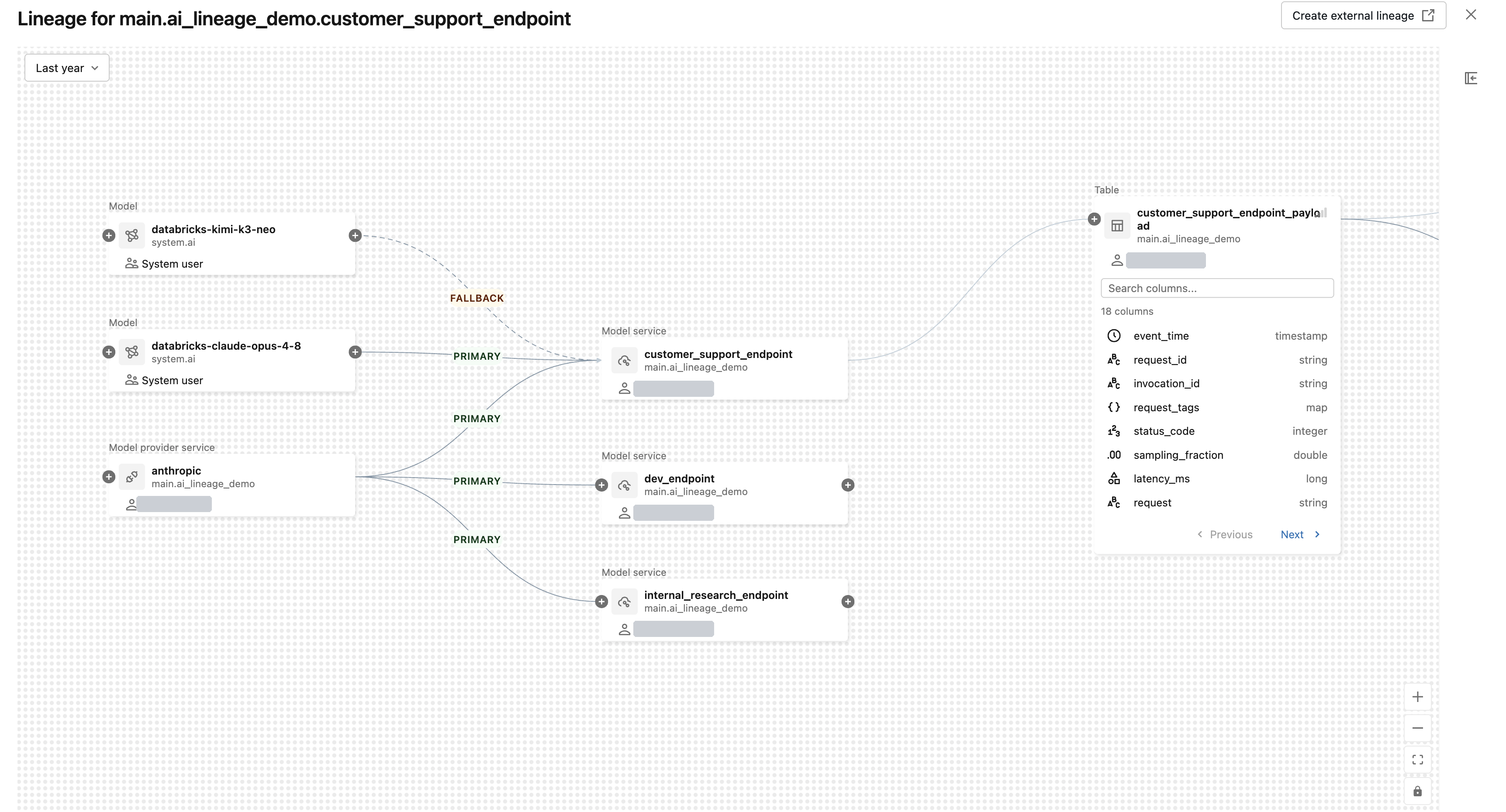
The following example shows the Lineage tab for the main.ai_lineage_demo.customer_support_endpoint model service. The upstream assets include the databricks-claude-opus-4-8 and databricks-kimi-k3-neo foundation models, and the anthropic model provider service it serves. The downstream asset is the customer_support_endpoint_payload inference table that logs its request payloads.

View the lineage graph
The lineage graph renders services and their related objects as connected nodes, so you can explore multi-hop dependencies visually.
- On the service's Lineage tab, click See lineage graph.
- Click the
 icon on a node to expand its connections.
 - For a model service, the edges to the foundation models or model provider services it serves are labeled PRIMARY or FALLBACK. Click a node to navigate to the object or explore its lineage.
By default, the graph shows lineage across all workspaces attached to the metastore. Use the time-range filter in the graph toolbar to distinguish active dependencies from stale ones. To limit the results to the current workspace, select a node and then select Only this workspace in the Lineage details panel.
The following example shows the graph accessed from the main.ai_lineage_demo.customer_support_endpoint model service. The anthropic model provider service fans out to three model services, so a single view shows every service that a change to that provider would affect. Before you deprecate a foundation model or restrict access to a service, use the lineage graph to:
- Find every affected service in one view: See all model services that serve a given model or provider, instead of checking each service one by one.
- Identify which services would break from those that degrade: The PRIMARY and FALLBACK edge labels show which services fail if you remove a model and which fall back to another, so you can prioritize migration.
- Reach the right owners: Each node shows its owner, so you know who to notify. Click a node to open the object in Catalog Explorer.
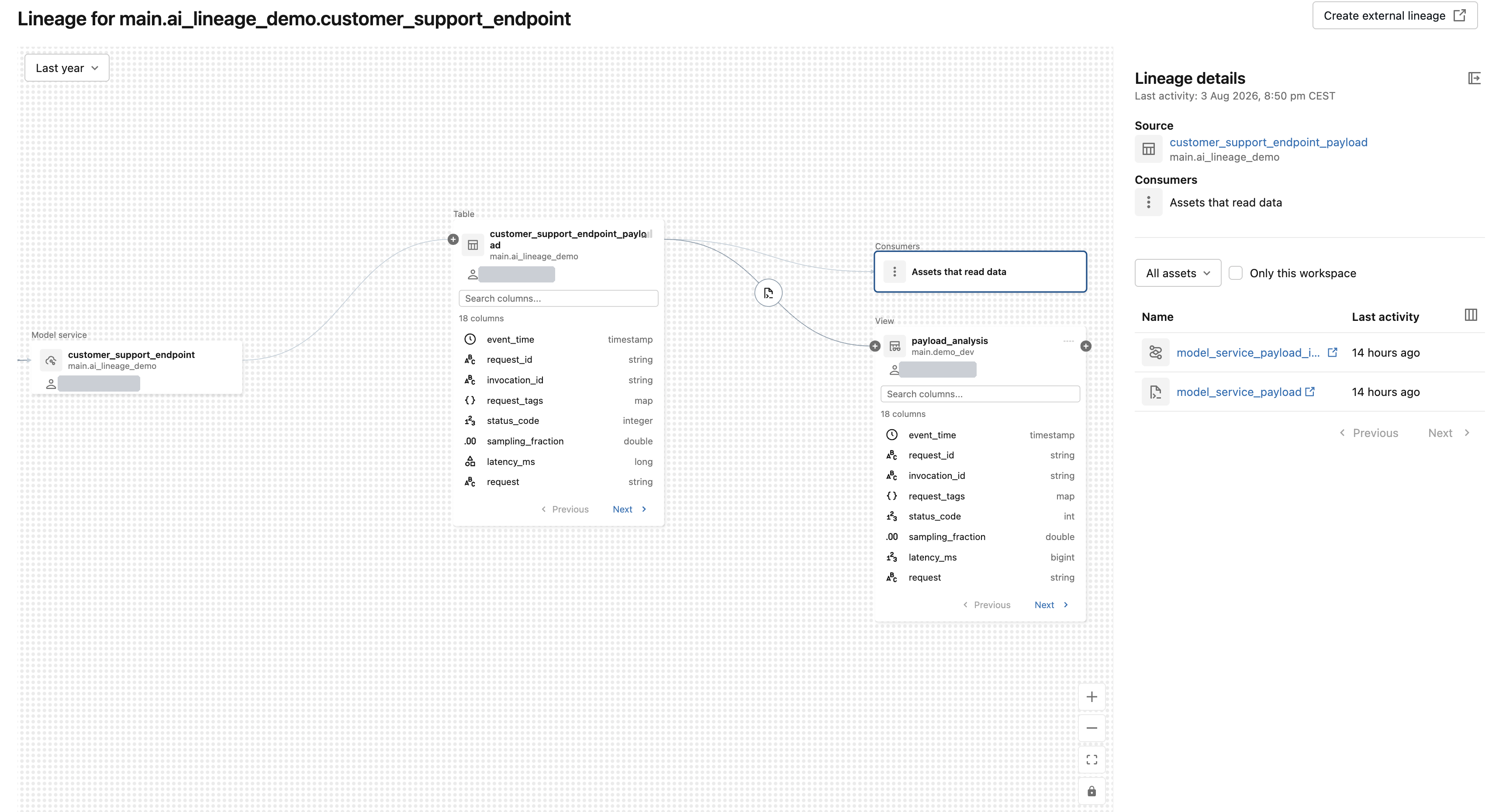
Because a service's inference table carries its own lineage, you can expand it downstream to follow where the logged request and response payloads flow. In the following example, the customer_support_endpoint_payload table feeds the payload_analysis view and its downstream consumers. See table lineage.
Limitations
Service lineage captures only the dependencies in a service's definition. Unity Catalog does not capture the workloads and agents that call a service at runtime, or the data they access through it. The limitations that apply to all Unity Catalog lineage also apply.