Service policies for AI securables
This feature is in Beta. Workspace admins can control access to this feature from the Previews page by opting into the Unity Gateway Service Policies preview. See Manage workspace-level previews.
Service policies let you govern the content of interactions with AI services registered in Unity Catalog — including external MCP servers and models from any provider, not just Databricks-hosted ones. Unity Catalog grants determine whether a principal can call a service. Service policies govern how that interaction proceeds, based on the content of the request and response and on who is making the call.
Service policies are the mechanisms you use to implement guardrails for AI services. If you're looking to add guardrails, such as blocking PII, prompt injection, or unsafe content, service policies are the mechanism: Databricks has built-in guardrails for common risks, you can write custom policies for rules specific to your organization, and you can enforce a third-party guardrail vendor's decisions with an external service policy.
This matters most when agents act on behalf of users. An agent inherits everything the user can access, and services often reach external systems. Service policies let you set guardrails on that activity. For example, you can require user consent before an agent pushes code to a Git repository through an MCP Service, deny a model response that contains personally identifiable information (PII), or block unsafe content.
Custom policies can also check and enforce the presence or absence of caller-supplied request tags. See Require an eligible project and the request tags reference.
Service policies are one of three kinds of attribute-based access control (ABAC) policy in Unity Catalog:
- ABAC GRANT policies grant Unity Catalog privileges on securables whose governed tags match a condition. They control whether a principal can reach an object.
- Row filter and column mask policies control which rows and columns a principal sees in a table.
- Service policies govern the content of each request and response to an AI service, to allow or deny it. On an MCP Service, a policy can also hold an input request for approval.
ABAC GRANT policies are access control. Row filter and column mask policies and service policies are content policies, which govern what happens after a principal has access. Like a row filter or column mask, a custom SQL service policy references a Unity Catalog function that contains the governance logic and attaches it to a securable.
How service policies complement Unity Catalog grants
Unity Catalog privileges and service policies address different governance questions and operate at different enforcement points.
Aspect | Unity Catalog privileges | Service policies |
|---|---|---|
Question answered | Can this principal call this service? | How must this interaction proceed? |
Inputs | Principal identity and granted privileges | Request content, response content, request tags, tool annotations, and actor context |
Enforcement point | Before the request reaches the service | Before the service is invoked (input phase, ON CALL) and after the service responds (output phase, ON RESULT) |
Granularity | Per principal, per securable | Per request, based on content and context |
Service policies don't replace Unity Catalog grants. A principal must first have the appropriate Unity Catalog privileges to call a service. Service policies then evaluate the content of each interaction to enforce additional governance rules.
Policy decisions
A service policy evaluates the content of a request or response and returns one of three outcomes:
- ALLOW: the interaction proceeds.
- DENY: the policy blocks the interaction. Instead of an error status, Databricks returns a successful (HTTP 200) response. The assistant turn carries a short message naming the service policy that blocked, and a top-level
databricks_service_policyobject carries the structured detail, including the blockreason. Returning the block as a normal turn keeps conversational clients that resend the full history, such as coding agents, from re-triggering the same block on every later turn. - ASK: on an MCP Service, the policy pauses a request for user approval before the tool runs. Use this action when a user must approve a sensitive operation, such as a destructive MCP tool call. For external agents calling an MCP Service, the approval prompt is delivered through MCP URL-mode elicitation. If a custom SQL or Python policy returns
ASKfor a Model Service or Model Provider Service, Databricks blocks the request or response because these services cannot ask the user for approval. See Write a decision policy.
A custom policy is either a SQL user-defined function (UDF) that receives the interaction event (which includes the actor and the request or response content) and returns a decision result, or an LLM-as-a-judge policy that classifies the content against criteria you write in natural language. Built-in policies are managed by Databricks, and an external service policy sends the content to a third-party guardrail service that returns the decision.
Evaluation points
Databricks evaluates a service policy at two points in every interaction:
- Input (ON CALL): Before Databricks invokes the service, against the request. Use this phase to inspect requests before they reach the underlying service. For example, block a request that invokes a destructive MCP tool, or deny a prompt that contains PII before it reaches a model.
- Output (ON RESULT): After the service responds, against the response. Use this phase to inspect responses before they return to the caller. For example, block a response that contains hallucinated content or sensitive data.
A custom SQL policy function runs at both points. It inspects the current phase (event:type) and decides how to act, so a single policy can govern the request, the response, or both. To act on only one phase, branch on event:type in the function body. Built-in policies and custom LLM-as-a-judge policies are scoped with a Phase setting instead. Some built-in policies support different phases on different services. The Jailbreak guardrail runs only on the input phase on model and model provider services, and on input, output, or both on MCP services. The policy form preselects output for Jailbreak on an MCP service, but API callers must explicitly set the policy's options.phases request field to pre_call (input), post_call (output), or pre_call,post_call (both). Hallucination detection runs only on the output phase. External service policies are also scoped by phase: you choose the input phase, the output phase, or both when you attach one.
Order of evaluation
You can attach more than one service policy to a service. Each attachment has a rank (priority), and a DENY at one rank stops evaluation of all later ranks. Databricks evaluates ranks in ascending order on the input phase (ON CALL, lowest rank first) and in the reverse order on the output phase (ON RESULT). Policies at the same rank keep the order you attached them on both phases. Use rank to control which checks run first.
Evaluation within a rank
Databricks evaluates policies at the same rank in two stages:
- Blocking LLM-as-a-judge policies run in parallel. These are the built-in and custom LLM-as-a-judge policies that block (
DENY) content, such as unsafe-content detection. Because they are the model-backed checks, running them concurrently means their added latency is roughly that of the slowest single evaluation, not their sum. - The remaining policies then run sequentially, but only if no policy in the first stage returned
DENY. This stage covers custom SQL policies, external service policies, thesystem.ai.detect_sensitive_databuilt-in policy, and policies that pause for approval (ASK), including an LLM-as-a-judge policy set to ask instead of block. They run in the order you attached them, with no fixed order by policy type.ASKpauses an input call only for MCP Services. For Model Services and Model Provider Services,ASKblocks the request or response.
A DENY in the parallel stage skips the sequential stage. The sequential stage doesn't stop at a DENY: every policy in it runs, even after one returns DENY. For example, a custom SQL policy that denies a request doesn't stop a later external service policy at the same rank from sending the content to its vendor. When more than one policy denies, the caller sees the reason from the first DENY in attachment order. A DENY in either stage stops all later ranks, so to skip a policy when another one denies, put the denying policy at a rank that's evaluated first.
Because Databricks parallelizes the slow model-backed checks, stacking several blocking guardrails on a service doesn't multiply their latency.
The following diagram shows where the two phases sit around a service and what each decision does:

To see the policies attached to a specific service and the order they run in, open the service's Policies tab and click See execution flow.
Built-in service policies
Databricks provides built-in service policies under the system.ai namespace. These cover common governance scenarios without custom SQL. The Databricks AI guardrails are built-in service policies: preconfigured, Databricks-managed policies (such as unsafe-content and jailbreak detection) that you attach the same way as a custom policy:
system.ai.block_unsafe_content: denies interactions that contain unsafe or harmful content.system.ai.block_jailbreak: detects jailbreak and prompt-injection content. On Model Services and Model Provider Services, it evaluates model input only. On MCP Services, it can evaluate the tool call and arguments on input, the tool result on output, or both.system.ai.block_hallucination: denies responses that contain hallucinated content.system.ai.detect_sensitive_data: detects structured sensitive data (such as credit card numbers and Social Security numbers) and either blocks the interaction or redacts the matched values. Unlike the others, it's deterministic (pattern-based, no evaluator model) and can redact rather than only block. See Detect sensitive data with a service policy.
To use a built-in policy, attach it to a service. You need MANAGE on the target service.
The built-in policies are Databricks-managed and don't appear as functions you can browse in the system.ai schema in Catalog Explorer. You select and attach them by name through the Unity Gateway UI, as described in Create and attach a service policy.
How built-in service policies work
Built-in service policies are LLM-as-a-judge checks: each runs a Databricks-curated prompt against an evaluator model to decide whether the content violates the policy.
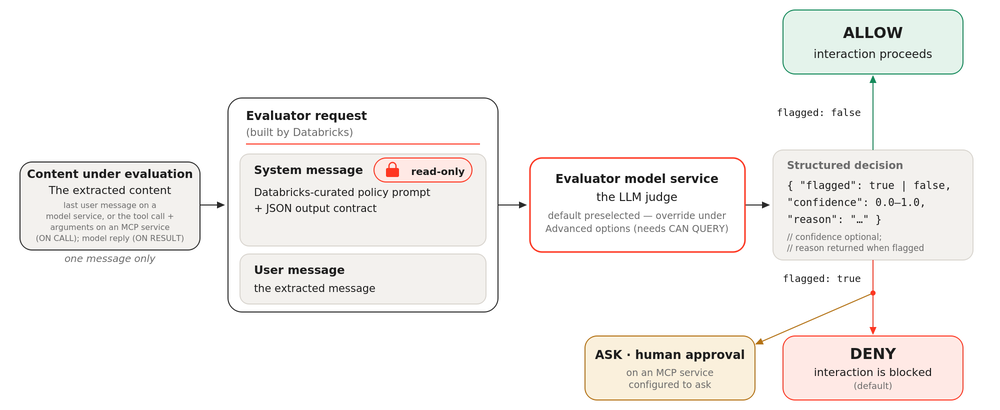
The evaluator model service
Each built-in service policy runs its prompt on an evaluator model service, the model that judges the content. Databricks preselects a default evaluator, so no setup is required. To use a different model, expand Advanced options when you attach the policy and select one. You need EXECUTE on the model service you choose, plus USE CATALOG and USE SCHEMA on its catalog and schema. See Grant access to a model service. Databricks checks this access when you attach the policy, so callers of the protected service don't need access to the evaluator. The evaluator is separate from the service you're protecting, so a policy can judge a request to one model service using a different model as the evaluator.
Databricks maintains the policy's prompt, which is read-only. You can view it under Prompt when you attach the policy to see the exact criteria the evaluator applies.
What the evaluator receives
When a built-in service policy runs, Databricks sends the evaluator a request with two parts:
- A system message that contains the policy prompt and an output contract (described in the following section).
- A user message that contains the content under evaluation. On the input phase, it's the latest user message on a model or model provider service, together with a window of recent conversation turns (see below), or the tool call and its arguments on an MCP service. On the output phase, it's the model's reply or the MCP tool result after the tool has run.
The evaluator receives serialized text rather than decoded image or audio payloads. On the output phase and on MCP services, it judges only that single extracted item. For Jailbreak output evaluation on an MCP service, the input includes both result.content and result.structuredContent, including inline text and textual resource blobs. Other LLM judges on MCP services receive result.content only. On the input phase, LLM judges on MCP services skip tool calls that have no arguments.
Jailbreak on an MCP service extracts resource blobs the same way as Sensitive Data Detection. Decoding is best effort: blobs that can't be decoded or that exceed the size limit are omitted. Screening uses the media type (mimeType) that the MCP server declares. A missing or empty media type is treated as text, and blobs declared as nontextual are excluded. The evaluator doesn't fetch resource links.
Jailbreak on an MCP service screens tool calls (tools/call) and their results. Tool descriptions returned by tools/list are not screened.
On the input phase of model and model provider services, the evaluator also receives a window of recent conversation turns, so it can catch patterns that build up across a conversation, such as gradual escalation. When you create a policy in the policy form, the Conversation window defaults to the last 10 turns. You can change the number, set it to 1 to judge only the latest message, or select Evaluate the entire conversation. A policy that has no conversation window set judges only the latest message.
Output contract
Databricks automatically appends a JSON output contract to the policy prompt, so the evaluator returns a structured decision instead of free text. The evaluator returns:
flagged(boolean):trueif the content violates the policy's criteria.confidence(float,0.0to1.0, optional): the evaluator's confidence in the decision.reason(string): a short explanation of why the content was flagged. Returned whenflaggedistrue.
When the evaluator returns flagged: true, Databricks blocks the interaction by default. On an MCP service, a policy configured to ask instead pauses the request for human approval before the tool runs. Because Databricks applies the contract for you, built-in service policies need no configuration beyond the phase and rank.
An OpenJev evaluator doesn't use this contract. It answers a flag-or-allow question instead and returns no reason. See Use OpenJev as the evaluator.
The evaluator is a model, so its verdicts are non-deterministic, and the reason is short free text rather than structured data. To see which policies ran on a request and what each decided, use the unified trace table. To also see a judge's confidence and the exact content it judged, enable an inference table on the evaluator model service. See Debug and audit a policy decision.
Evaluation cost
Databricks doesn't charge a separate fee for built-in service policies. Each evaluation is billed like any other call to the evaluator model service, so the cost depends on how that model is served. The tokens billed for each evaluation cover the policy prompt, the output contract, the extracted message, and the evaluator's response. To limit overhead, keep the number of policies per phase small and prefer a low-latency evaluator model.
External service policies
An external service policy enforces the decisions of a third-party guardrail vendor, such as an AI security or data-loss-prevention service. You attach it with the External guardrail type and point it at a Unity Catalog HTTP connection that stores the vendor's endpoint and OAuth machine-to-machine credentials. On each evaluation, Databricks sends the content under evaluation to the vendor, which returns a verdict with an optional reason, and Databricks enforces the result.
The vendor must implement the Databricks external policy API. External service policies return ALLOW or DENY, or ASK to hold an MCP tool call for user approval. They can't redact content. They fail closed, so an unreachable or slow vendor endpoint denies the call. See Enforce a partner guardrail with an external service policy.
Supported services
You can attach service policies to the following Unity Catalog service securables:
- MCP Services: managed, external, and custom MCP servers.
- Model Services: hosted and external LLM endpoints.
- Model Provider Services: governed external model providers.
Fail-closed behavior
Service policy evaluation uses fail-closed semantics. When you attach a policy through the Unity Gateway, Databricks validates it at attach time, and any error during evaluation results in DENY. Errors include user errors in the policy function, system errors, missing fields in the request context, and timeouts. For an external service policy, errors also include a vendor endpoint that is unreachable, returns an error, or returns a verdict other than ALLOW, DENY, or ASK.
A misconfigured or broken policy blocks the interaction rather than allowing it through.
A policy in Log mode is non-enforcing. It records what the policy would have decided without blocking the interaction, so even a would-be DENY lets the request proceed. Request validation still applies, including request-tag validation.
Limitations
The following limitations apply:
- Transformation: Service policies return a decision (ALLOW, DENY, or ASK) and don't transform request or response content. The one exception is the built-in
system.ai.detect_sensitive_datapolicy, which can redact matched values on model services. - External service policies: An external service policy returns
ALLOWorDENY, orASKon an MCP tool call, and supports OAuth machine-to-machine authentication only. See External service policy limitations. - Supported services: Service policies apply to MCP Services, Model Services, and Model Provider Services. Agent Services are not supported.
- Model provider service passthrough: On a model provider service, Databricks does not evaluate service policies on passthrough requests, which Unity Gateway forwards to the provider unchanged when you enable Forward all URL paths. Policies apply only to the provider's supported API paths.
- Conversation window: Only input evaluation on model and model provider services can use a conversation window. Output evaluation and MCP services judge a single message, tool call, or tool result. See How built-in service policies work.
- Nested evaluation: If the evaluator model service you select for a built-in service policy has its own policies attached, Databricks skips them when running the evaluation. This prevents recursion.