Bundle deployment history
This feature is in Beta.
Deployment history provides a structured, auditable record of every Declarative Automation Bundles deployment in your workspace. A deployment is a bundle deployed to a specific target. Each time you deploy, a new version is recorded.
For each deployment, you can review:
- Deployment metadata: The identity who deployed, the timestamp, the target, and the resulting status.
- Source control context: The Git repository, branch, commit SHA, and any release tag associated with the version.
- Resource changes: The resources created, updated, deleted, or recreated in each version.
Deployment history is a single place to validate deployments, investigate regressions, and answer questions such as who last modified a job or pipeline. It's the foundation for governed deployments for teams that manage Databricks resources as code.
For an overview of bundles, see What are Declarative Automation Bundles?. To learn how to deploy a bundle, see Deploy bundles and run workflows from the workspace and Declarative Automation Bundles deployment modes.
Enable deployment history
Deployment history is available in Databricks CLI version 1.23.0 and above.
Deployment history is on by default for bundles that you deploy from the workspace. You can toggle this setting for all workspaces in your account, or set it for a specific bundle in the bundle configuration.
Deployment history account setting
The Deployment history setting controls whether bundles that you deploy from the workspace record deployment history. The setting applies to every workspace in your account.
To change the setting, do one of the following:
- In the bundle editor, click Deployment history at the top of the Deployments pane, then toggle the setting. For information about bundle deployments, see Deploy bundles and run workflows from the workspace.

- Click your username at the upper-right of your workspace, then click Settings. In the Settings sidebar, select Developer. Under Experimental features, toggle Deployment history.
The Deployment history user setting applies only to deployments from the workspace. To record deployment history when you deploy with the Databricks CLI, set experimental.deployment_history to true. See experimental.
Override the setting for a bundle
To enable or disable deployment history for a specific bundle, set experimental.deployment_history in the bundle configuration:
experimental:
  deployment_history: true
View deployments
To view deployments, do one of the following:
- From a bundle's Deployments pane, open the deployment history for that bundle. See Deploy bundles and run workflows from the workspace.
- For a job, pipeline, or dashboard managed by a bundle, use the Managed by indicator to jump to the deployment that owns it.
- Search for a bundle by name to open its deployment history directly.
The deployments list displays all deployments (and corresponding versions and resources) that you have CAN_READ access to.
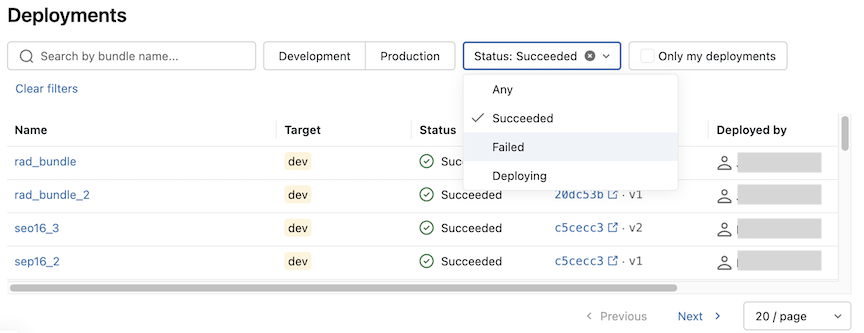
You can filter and sort the list by the following columns:
Column | Description |
|---|---|
Name | The bundle and target, or the deployment display name. |
Target | The deployment target, such as |
Status | The state of the latest deployment. |
View deployment version details
Select a deployment from deployment history to open its details, then select a version to discover information such as when the deployment was initiated and by whom, the source Git repository and branch, the commit SHA (linked to the diff in your Git provider), and the release tag, if one applies.
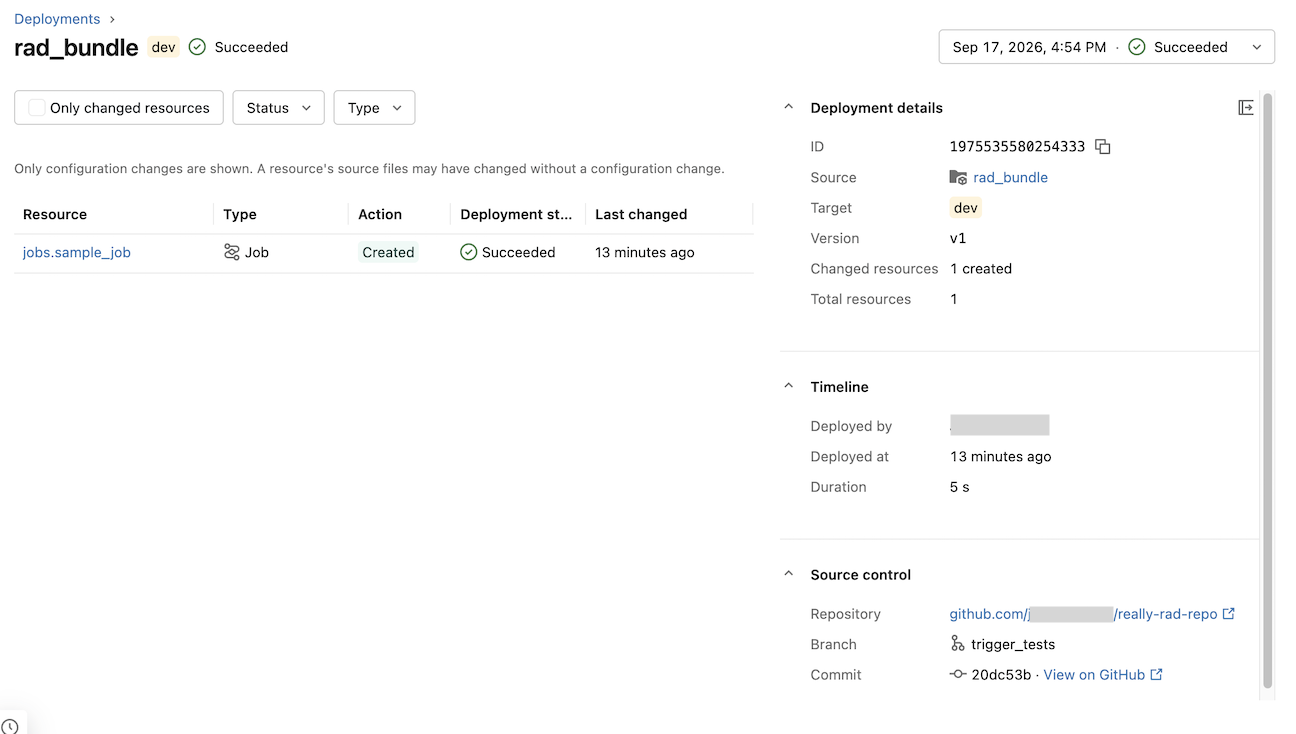
Use the version history dropdown in the header to move between versions.
Resource changes are listed in a table where each row contains the key for the changed resource (such as jobs.ETL_Main), the action (Create, Update, Delete, or Recreate) taken on the resource, the status of the resource, and the timestamp of the change.
Deployment history from the CLI
For automated workflows, you can access deployment history with the Databricks CLI bundle-deployments commands. See databricks bundle-deployments.
Limitations
- Deployment history is recorded on a best-effort basis and is not yet the source of truth for deployment state. In rare cases, such as during Databricks infrastructure issues, history entries may be missing even when a deployment succeeds.
- Underlying entities of deployments (such as job runs) may have retention policies.
- Only deployments using the direct engine are supported. See Migrate to the direct deployment engine.