Document Parsing
Document Parsing uses state-of-the-art research techniques to extract and visualize structured data from a wide range of document types, including but not limited to PDFs, images, Word documents (DOC/DOCX), and PowerPoint files (PPT/PPTX). It's designed to handle complex layouts such as tables, charts, and mixed text-image content.
Document parsing is available through the Agent Bricks UI, in SQL, and with the REST API.
Create a document parsing agent in the UI
Requirements
- A workspace that includes the following:
- Serverless compute enabled. See Serverless compute requirements.
- Unity Catalog enabled. See Enable a workspace for Unity Catalog.
- Access to a serverless usage policy with a nonzero budget.
- This function is only available in some regions, see AI function availability.
- The
ai_parse_documentfunction is also available to workspaces with the Enhanced Security and Compliance add-on.
- The
Use Document Parsing to parse your documents and visualize their structure.
- Go to
 Agents in the left navigation pane of your workspace.
 - Click Create Agent > Document Parsing.
- Select your source document. You can choose to upload a file or select one from an existing Unity Catalog catalog. Supported formats include: PDF, images, DOC/DOCX, and PPT/PPTX.
- Click Parse document.
Parsing your document can take a few minutes. When complete, Document Parsing shows the source document on the left and the parsed document on the right. You can choose to view the parsed document as Formatted text or Raw JSON.
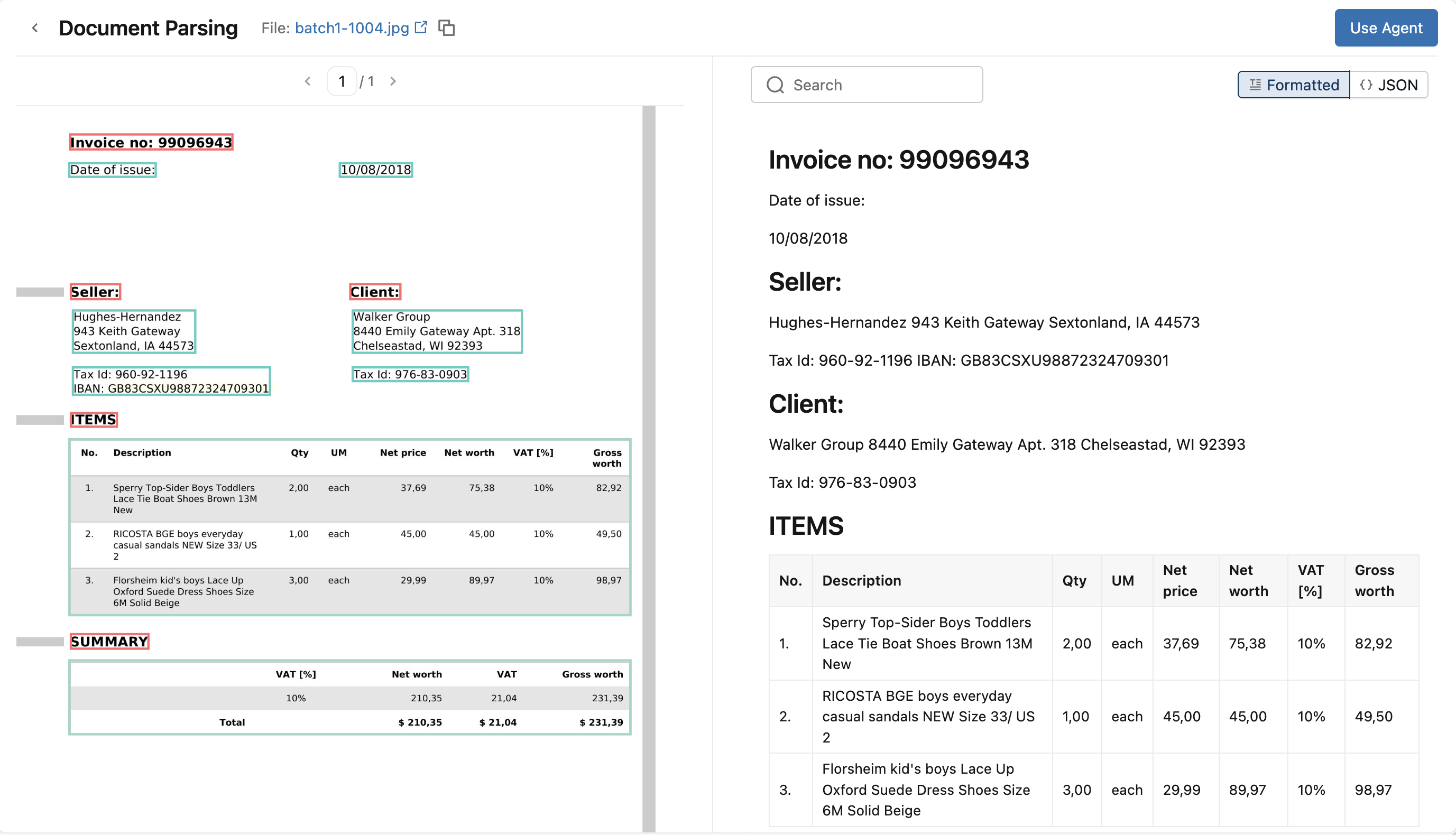
Process and query results
To view the ai_parse_document query and run it on more documents, click Use Agent and choose either to run the query from the SQL Editor or Notebook. You can edit the query to point to the volume or table your documents live in.
To prepare the parsed output for retrieval (RAG), use ai_prep_search (Beta) downstream.
Parse documents in SQL
Call ai_parse_document in SQL to parse documents at scale:
SELECT
  ai_parse_document(
    content,
    map('version', '2.0')
  ) AS parsed
FROM READ_FILES('/Volumes/my_catalog/my_schema/my_documents', format => 'binaryFile');
See the ai_parse_document SQL reference.
Parse documents with the REST API
Use the REST API to parse documents from applications, services, and automation workflows. See the REST API docs for reference.
ai_parse_document REST API requests are limited to 100 pages per document.
The default rate limit for ai_parse_document REST API requests is 250 requests per minute per workspace. Contact your Databricks account team to request a higher limit.
ai_parse_document reads its input from a Unity Catalog volume. The following example uploads a local PDF to a volume with the Files API, then parses it.
First, upload the document to a volume:
curl -X PUT "$DATABRICKS_HOST/api/2.0/fs/files/Volumes/my_catalog/my_schema/my_volume/invoice.pdf?overwrite=true" \
     -H "Authorization: Bearer $DATABRICKS_TOKEN" \
     -H "Content-Type: application/octet-stream" \
     --data-binary @invoice.pdf
Then parse the uploaded document by passing its volume path as content:
curl -X POST "$DATABRICKS_HOST/api/2.0/ai-functions/ai-parse-document" \
     -H "Authorization: Bearer $DATABRICKS_TOKEN" \
     -H "Content-Type: application/json" \
     -d '{
  "content": "/Volumes/my_catalog/my_schema/my_volume/invoice.pdf"
}'