Self-managed agent memory (Lakebase)
Self-managed agent memory uses Databricks Lakebase, a fully managed Postgres OLTP database, as a durable memory store for your agents. Use this approach when you need direct SQL access to memories (for example, to integrate memory with existing data pipelines or to use a custom schema), or when you need short-term memory backed by Lakebase. This approach requires you to manage the database schema, connection setup, and access controls.
If you don't need direct SQL access or a custom schema, use managed agent memory instead, which Databricks governs through Unity Catalog. For a comparison of the two approaches, see Agent memory.
Requirements
- Enable Databricks Apps in your workspace. See Set up your Databricks Apps workspace and development environment.
- A Lakebase instance. See Get a Postgres database.
Short-term and long-term memory
Self-managed memory supports both short-term and long-term memory, and you can build your agent with either or both:
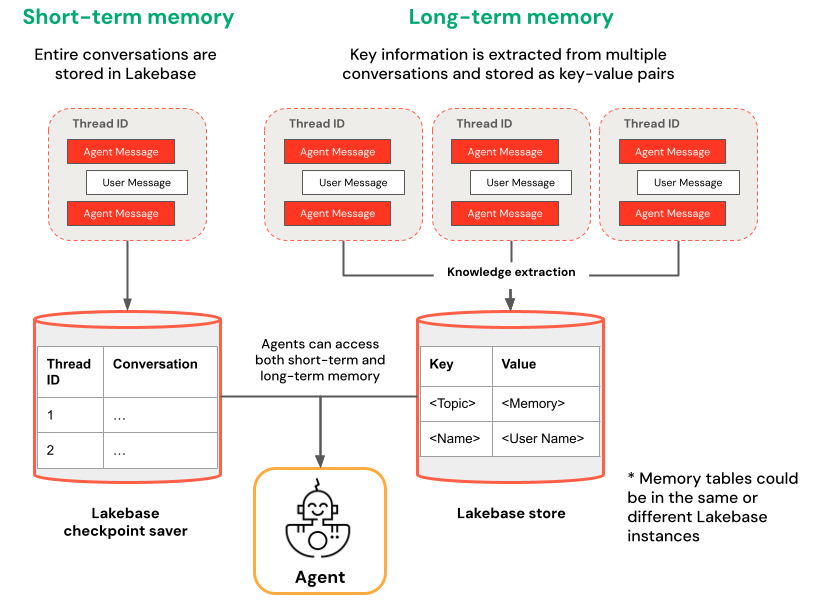
- Short-term memory captures context in a single conversation session using thread IDs and checkpointing. It maintains context for follow-up questions within a session.
- Long-term memory extracts and stores key information across multiple conversations. It personalizes interactions based on past preferences and builds a knowledge base about users that improves responses over time.
For more about how memory types work, see Agent memory.
Get started
To create an agent with memory on Databricks Apps, clone a pre-built app template and follow the development workflow described in Author an AI agent and deploy it on Apps. The following templates demonstrate how to add short-term and long-term memory to agents using popular frameworks.
LangGraph
Clone the agent-langgraph-advanced template to build a LangGraph agent with both short-term and long-term memory. The template uses LangGraph's built-in checkpointing with Lakebase for durable state management, including thread-based conversation context and persistent user insights across sessions.
git clone https://github.com/databricks/app-templates.git
cd app-templates/agent-langgraph-advanced
OpenAI Agents SDK
Clone the agent-openai-advanced template to build an agent using the OpenAI Agents SDK with short-term memory. The template uses Lakebase for durable state management, enabling stateful multi-turn conversations with automatic conversation history management.
git clone https://github.com/databricks/app-templates.git
cd app-templates/agent-openai-advanced
Background execution for long-running agents
The advanced templates agent-langgraph-advanced and agent-openai-advanced extend the base templates with short-term memory and long-running background execution via LongRunningAgentServer from databricks-ai-bridge. They add background and streaming modes that let agent tasks keep running past the Databricks Apps HTTP connection timeout, with support for polling or resuming a streaming connection to retrieve results. For the full client contract, see the advanced template README.
Deploy and query your agent
After you configure your agent with memory, follow the steps in Author an AI agent and deploy it on Apps to run your agent locally, evaluate it, and deploy it to Databricks Apps.