Use Genie One
Genie One is the simplified Databricks UI for business users, a single entry point for interacting with data and AI without navigating technical concepts like compute, queries, models, or notebooks.
Genie One was previously known as Databricks One.
Genie One enables users to:
-
View and interact with AI/BI dashboards to track key performance indicators (KPIs) and analyze metrics.
-
Ask data questions in natural language.
-
Use custom-built Databricks Apps that combine analytics, AI, and workflows.
When enabled, the home page also shows personalized starter questions: one-click prompts tailored to your recent activity that open a chat. See Personalized starter questions (Beta).
Genie One is available at two levels:
-
Workspace-level: Scoped to a single workspace and available only to its members; account-only users don't have access. Workspace members need at least one workspace entitlement. Consumer access, the least-privileged option, is enough for Genie One chat. Higher entitlements such as Databricks SQL access, Workspace access, and workspace admin also qualify. See What is consumer access? and Manage entitlements.
-
Account-level: A unified view across all workspaces in your Databricks account. Available to all account users. Users can only access assets explicitly shared with them. To view data from a specific workspace, the Consumer access entitlement is required for that workspace.
Users in a registered identity provider who aren't assigned to a workspace can use a limited account-only experience. This feature is in Beta.
Open Genie One
Account-level Genie One
You can access account-level Genie One in several ways:
-
Account landing page: From the account console, click Genie to open the account-level view.
-
Direct URL: Navigate directly to your account-level Genie One URL using the
/onevanity URL:https://accounts.cloud.databricks.com/one -
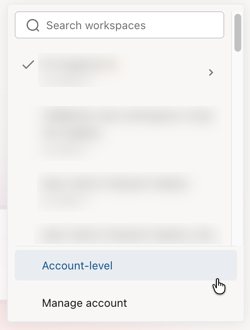
Workspace switcher: Use the workspace switcher in Genie One and select Account-level.
Workspace-level Genie One
If a user's only entitlement is Consumer access, they land on the Genie One homepage after log in.
If a user has other entitlements, they can use the app switcher  in the upper-right corner of the workspace to move between the two UIs.
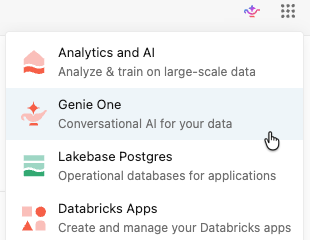
Alternatively, users can navigate to the Genie One UI by adding /one to their workspace URL, for example:
https://<WORKSPACE_URL>/one?o=<WORKSPACE_ID>
Customize the Genie One homepage
Workspace admins can customize the Genie One homepage appearance for all users in the workspace, including branding colors, a logo, a markdown welcome message, and pinned content. See Customize the Genie One homepage.
Interact with data assets
You can only interact with data assets that have been shared with you. See Data governance. Click an asset to open and interact with it. To mark an asset as a favorite, click the star icon next to the asset's name. Favorite assets can be filtered in listing pages.
Search bar
Use the search bar to find assets or ask data questions in natural language:
-
Search: Find assets that have been shared with you by name.
-
Ask: When Ask is turned on, you can use the search bar to interact with Genie.
If chat is not enabled, click Ask in the search bar and select a Genie Agent. The search bar connects to that space and interprets your question using Genie Code.
Chat
Chat in Genie One is a unified, full-screen interface for asking data questions in natural language. Chat searches across existing dashboards, queries, and Genie Agents to answer your questions. You can also connect external data sources such as Google Drive or SharePoint to give chat access to your company documents. See Chat in Genie One.
For you
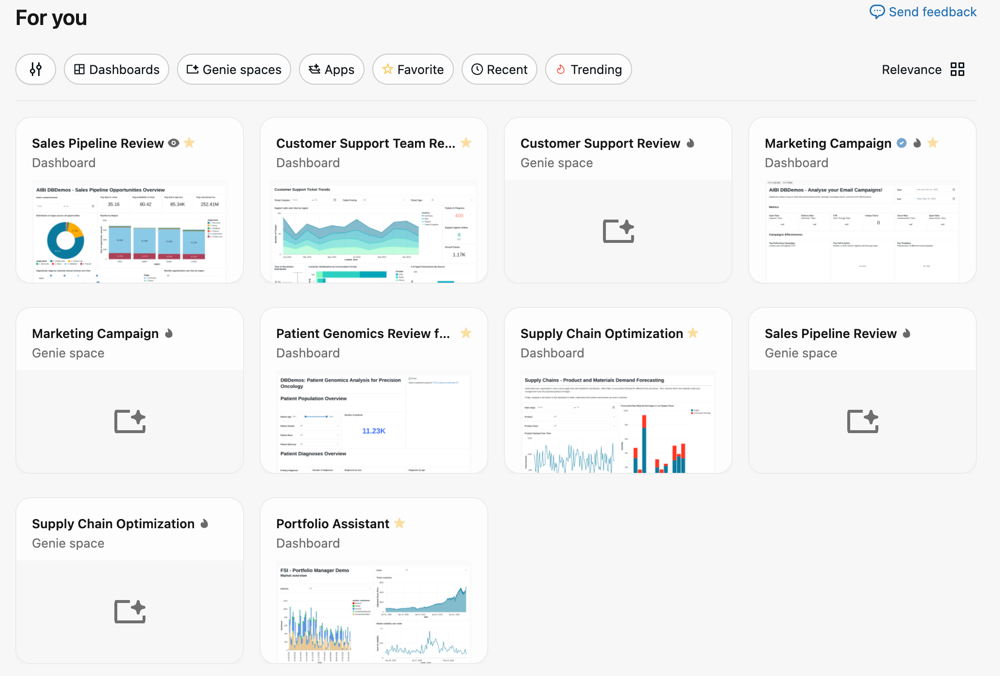
The For you section on the Genie One home page shows personalized asset recommendations based on your activity and the activity of other users in your workspace, including:
- Recently opened: Assets you have opened recently.
- Favorites: Assets you have marked with a star.
- Recently shared: Assets that have been shared with you recently.
- Trending: Assets that are popular among similar users in the workspace.
Domains
This feature is in Public Preview.
In the sidebar, click Domains to browse assets organized by domain. Domains group assets by business context, making it easier to find data relevant to your work without navigating catalog hierarchies. Click a domain card to view the assets it contains. See Discover page.
Scheduled tasks
Click Scheduled tasks in the left sidebar to create and manage scheduled chat tasks. See Chat in Genie One.
Documents
Ask Genie to draft a shareable document from any chat conversation. See Documents in Genie One.
Listing pages
When you search from the Genie One home page, the results open in a listing page. Listing pages show the assets that have been shared with you and provide options to filter and browse them.
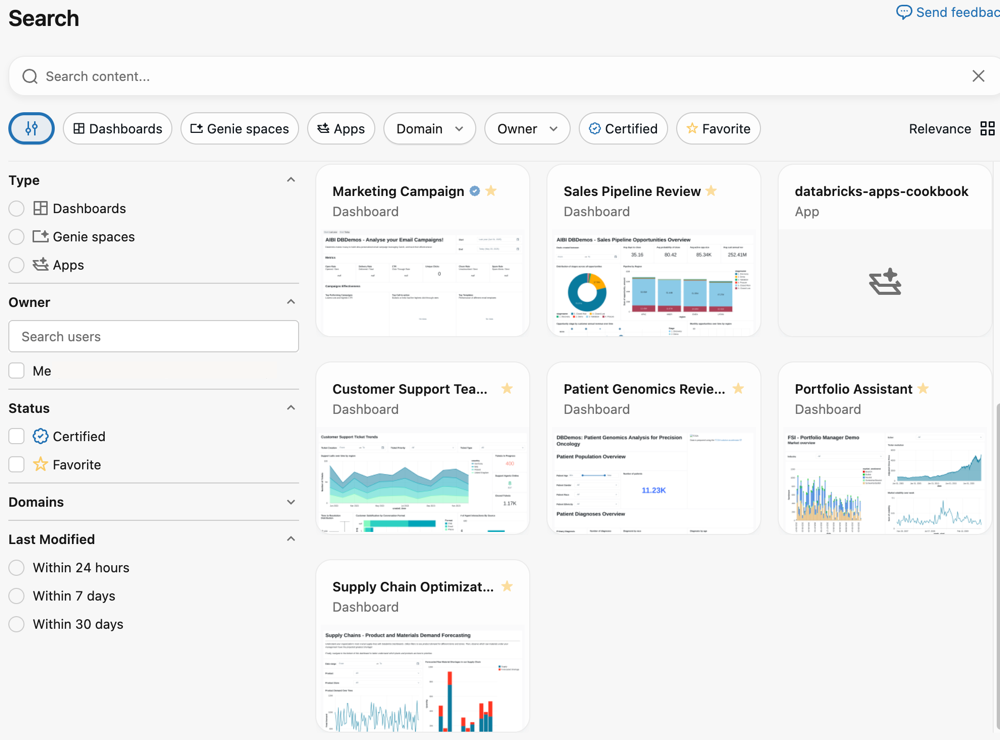
You can use the filter buttons under the search bar. To see all filtering options, click  on the left. This opens a menu with the following categories:
- Type: Click a radio button to view only dashboards or Genie Agents. Clear the button to show both asset types.
- Owner: Use the owner filter to search for an asset by their Databricks user ID.
- Status: Use the checkboxes to show only assets that have been marked as Certified or you have marked as a Favorite.
- Domains: Use the domain filter to show only assets that belong to a specific domain. Domains group assets by governed tags, helping you browse data by business context. See Discover page.
- Last modified: Use the radio buttons to select assets that have been modified within the selected window.
On the right, click Relevance to change the sort order and page appearance.
- Sort by: Choose Relevance to intelligently sort assets by what is most relevant to you. Choose Name to show the listings by name in alphabetical order.
- View as: Click List to show a list of assets. Click Grid to show assets with a thumbnail preview.
Open assets
When you click an asset, it opens in the familiar experience for that object (for example, a dashboard).
- If you have viewing rights only, the asset opens within Genie One.
- If you have authoring privileges, click Edit draft to edit the asset in the Analytics and AI workspace UI.
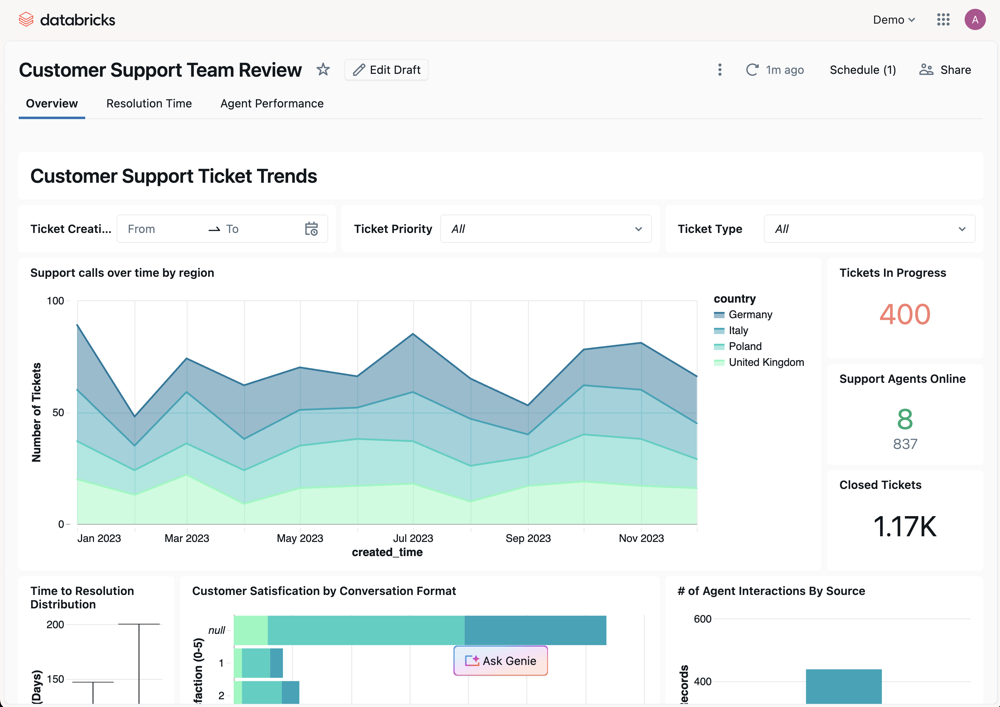
This applies to Genie Agents as well. If you have viewing rights only, a Genie Agent opens as a chat within Genie One. If you have authoring privileges, click Edit draft to edit the agent in the Analytics and AI workspace UI.
Open tables
You can open Unity Catalog tables directly in Genie without navigating to Catalog Explorer. How a table opens depends on where you open it from:
- From chat: Opening a table from a chat conversation keeps you in the conversation. The table opens next to your chat, where you can view its overview details, columns, and sample data.
- From Discover: Opening a table from Discover shows a full-page, catalog-style view optimized for Genie.
When you open a table from Discover, you can also:
- Ask Genie: Click Ask Genie to start a chat about the table.
- Request access: If you have browse access only, request access to the table from the table view.
Account-level Genie One data handling and processing
Account-level Genie One is an account-wide discovery and search surface for dashboards, Genie Agents, Databricks Apps, and other assets that you have permission to access. When you open an asset, it opens in the originating workspace.
System workspace for account-level Genie One
To support account-level features, Databricks automatically provisions a managed workspace named databricks-system-workspace in your account. Account-level Genie One runs on this workspace.
The system workspace appears in the system.access.workspaces_latest system table.
Like account-level Genie One, the system workspace does not aggregate or process data from workspaces that use the compliance security profile.
To remove the system workspace from your account, contact Databricks support.
Network connectivity
Account-level Genie One supports front-end Private Link (Beta). Users in your VPCs or on-premises networks can reach account-level Genie One over a private connection instead of the public internet. For setup, see Configure inbound Private Link for account-level resources.
What data is processed and where
When you use account-level Genie One, Databricks-generated metadata (such as asset identifiers, usage signals, and audit events) might be processed in the US. Customer data and metadata (such as tables, dashboards, charts, and similar objects) is stored in the same region as your workspace but processed according to your Geo settings:
- If you've disabled cross-Geo processing, processing happens in the same Geo as the workspace.
- If not, processing can happen across multiple Geos.
If your data residency or compliance policies do not permit metadata to be sent to US-based services, disable account-level Genie One using the control described in Disable account-level Genie One. Disabling the feature stops account-level Genie One from sending additional metadata to US-based services.
Workspaces using the compliance security profile are excluded
Account-level Genie One does not aggregate data from workspaces with the compliance security profile enabled.
Disable account-level Genie One
Account admins can disable account-level Genie One in the account console. This setting applies to all users in the account and does not apply to workspace-level Genie One.
- In the account console, click
 Settings.
 - Click the Feature enablement tab.
- Use the toggle
 to disable Genie.