Create development, staging, and production workspaces
Plan a Databricks workspace for each of your development, staging, and production environments, and then choose how to deploy them on your cloud. With separate workspaces, you can test code and workspace settings in development and staging before they reach production.
A workspace is the operational boundary in a cloud region where teams develop and run workloads. It contains collaboration assets, such as notebooks, jobs, and dashboards, and workspace-scoped configuration, such as permissions, compute policies, and secrets. Your workspace layout determines administrative boundaries, separation of duties, and cost attribution, so plan it before you create workspaces.
Serverless and classic workspaces
Databricks offers two types of workspaces:
- Serverless workspaces: These workspaces come preconfigured with serverless compute and default storage. You don't deploy any network or compute infrastructure in your cloud account. Serverless workspaces run only serverless compute. See Create a serverless workspace.
- Classic workspaces: These workspaces provision compute and storage resources in your cloud account. Serverless compute is also available in classic workspaces.
Serverless is the preferred choice for most new workspaces, so start with a serverless workspace unless one of the following applies:
- You need classic compute, for example to use Scala or R as your primary language or to port Spark resilient distributed dataset (RDD) code.
- You need to connect directly to on-premises systems or private databases through Lakeflow Connect.
- You need compute that runs in your own cloud network, such as a customer-managed virtual network.
Serverless workspaces use default storage for the workspace root. Classic workspaces use storage in your cloud account. See Choosing a workspace type.
Separate workspaces for each environment
Databricks recommends that you deploy each software development lifecycle (SDLC) environment in its own workspace. This page uses the following three-workspace layout:
- Development: Engineers write and test code.
- Staging: Teams run integration and user acceptance testing before changes reach production.
- Production: Stable workloads that the business depends on run here.
Many organizations also isolate each environment at the storage and network level, with a separate storage location and a separate virtual network for each workspace.
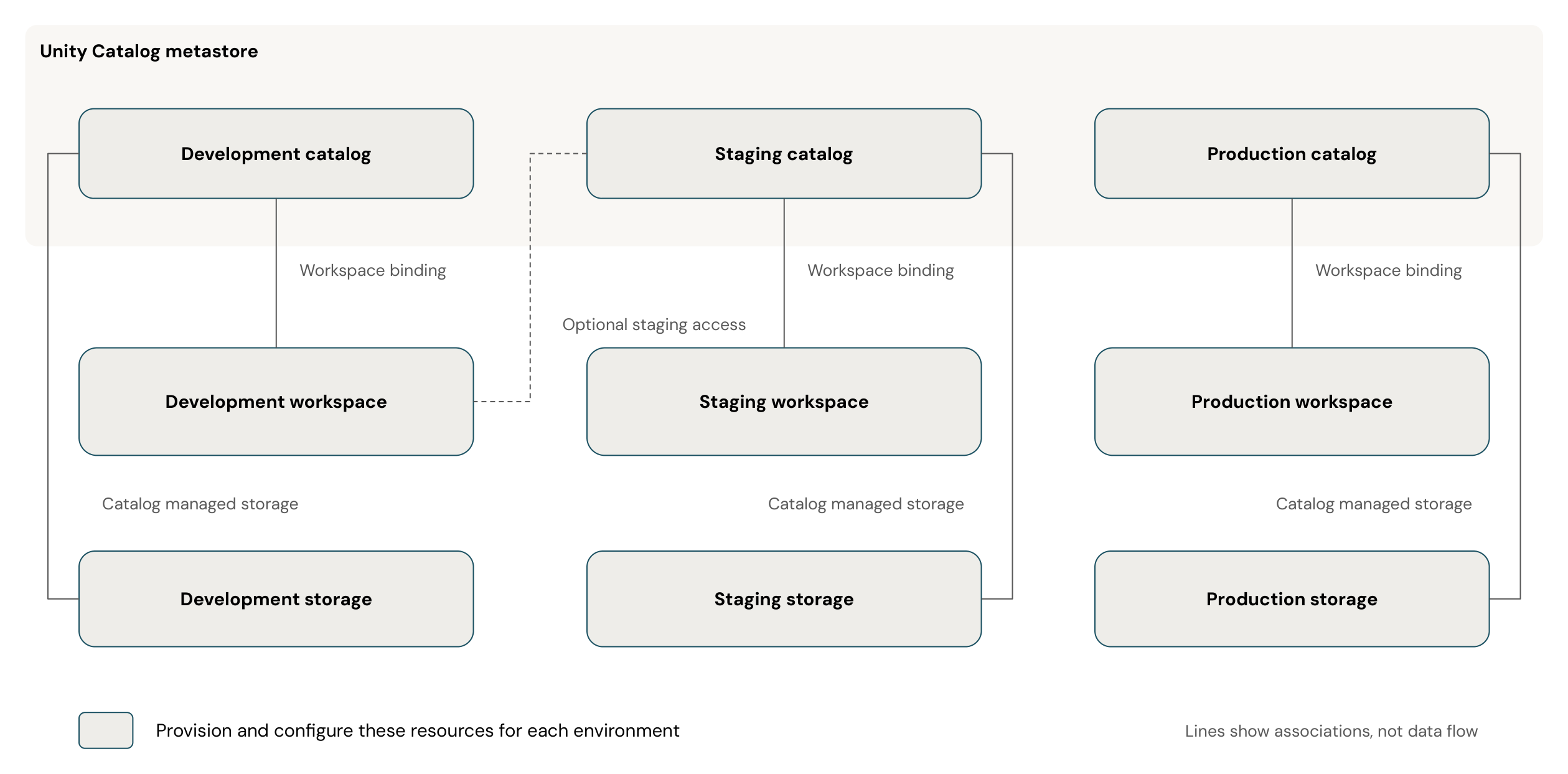
Plan a workspace, a catalog, and a catalog-level managed storage location for each environment. The lines show workspace bindings and storage associations. Create the workspaces in this section. Configure catalogs, storage, and grants later in your data governance strategy. Use the following principles for the layout:
- Delegate administration: Assign administrators for each environment to separate management responsibilities.
- Bind catalogs to workspaces: Bind each catalog to its environment's workspace. Bind the production catalog only to the production workspace. If development workloads need access to staging data, you can also bind the staging catalog to the development workspace.
- Isolate storage: Configure a separate managed storage location for each catalog to separate development, staging, and production data.
- Grant data access: Use Unity Catalog privileges to control access to data and metadata. A workspace binding restricts where a catalog is accessible. Users still need the appropriate privileges to access its contents. See Workspace-catalog binding.
For guidance about other reasons to split workspaces, such as business units, regions, and resource limits, see Phase 2: Design workspace strategy. To learn how catalogs isolate data between these environments, see Organize data for medium and large organizations.
Separate workspaces by business unit
When multiple business units share a Databricks account, create a development, staging, and production workspace for each unit. The following example uses classic workspaces in one region, with separate cloud resources for each business unit and shared account administration and Unity Catalog governance.

The CI/CD arrows show code promotion from development to staging to production. The dashed lines associate each business unit with its cloud resources. Create catalogs for each business unit and environment, bind them to the matching workspaces, and grant privileges to that unit's groups. See Organize data for medium and large organizations.
Legacy features in new workspaces
New workspaces don't include the Databricks File System (DBFS) root and mounts, the Hive metastore, no-isolation shared clusters, or Databricks Runtime versions earlier than 13.3 LTS. Use Unity Catalog to govern data access in your new workspaces.
Since October 8, 2026, Databricks provisions new workspaces in all accounts without these legacy features, so you don't need to configure anything before you create a workspace. The Disable legacy features account setting is deprecated. It still appears in the account console, but it's enabled and locked. The setting doesn't change existing workspaces. See Disable access to legacy features.
Choose a deployment method
The guides in this section cover the following deployment methods:
- Account console: Create the workspace in the account console. Use the UI for your first classic workspace or a proof of concept, so that you understand the resources involved before you automate them.
- Terraform: Define the workspace as code in version control. Use Terraform for staging and production so that each deployment is repeatable and every change is recorded.
- Security Reference Architecture (SRA): Deploy a workspace with Terraform templates that apply Databricks security best practices, including private connectivity with Private Link.
If you need a classic workspace, create your first one in the UI, and then use Terraform or the SRA for staging and production. Console steps are hard to repeat exactly, so workspaces built by hand diverge over time.
If you're new to Databricks, the Platform Deployment Kit is a browser-based tool that generates Terraform for your cloud from the workspace, networking, and security settings that you enter. Start with it when you want to review the Terraform before you apply it, rather than writing it yourself. The AI Platform Kit is a set of agent skills for an AI coding agent that generates and applies the Terraform for you.
The following table lists the guide for each deployment method:
Deployment method | Guide |
|---|---|
Serverless, account console | |
Classic, account console | |
Classic, Terraform | |
Classic, SRA |
Next steps
-
- Configure single sign-on for your Databricks account
- After you create your workspaces, set up single sign-on so that users authenticate through your identity provider
-
- Create a workspace
- Learn about all of the options for creating and managing Databricks workspaces