Work with files in Unity Catalog volumes
This page has examples for managing files in Unity Catalog volumes for various user interfaces, tools, libraries, and languages.
Available in Beta, use the FILE type to reference files in volumes as values in a table and apply table access controls to them. See FILE type and unstructured data.
Databricks recommends using volumes for managing all access to non-tabular data in cloud object storage and for storing workload support files. Examples include the following:
- Data files for ingestion, such as CSV, JSON, and Parquet
- Text, image, and audio files for data science, ML, and AI workloads
- CSV or JSON artifacts written by Databricks for integration with external systems
- Libraries, init scripts, and build artifacts
Volumes provide Portable Operating System Interface (POSIX)-style paths that work with Filesystem in Userspace (FUSE)-dependent tools and frameworks. This makes them ideal for machine learning frameworks and open source Python modules that require POSIX-style access. For detailed information about URI schemes, POSIX paths, and how they relate to volumes, see Do I need to provide a URI scheme to access data?.
Methods for managing files in volumes
For quick examples of each method, see Work with files in Unity Catalog volumes.
Interface | Description |
|---|---|
Interactive file management through the Databricks workspace | |
Read and write files using Apache Spark, Pandas, or SQL | |
File operations using | |
Query file metadata using | |
File operations using SQL keywords ( | |
Command-line operations using | |
File operations using Python, Java, or Go SDKs | |
Direct API access for custom integrations |
Use Catalog Explorer
Catalog Explorer has options for common file management tasks for files stored with Unity Catalog volumes.
To interact with files in a volume, do the following:
- In your Databricks workspace, click
 Catalog.
 - Search or browse for the volume that you want to work with and select it.
For details on creating and managing volumes, see Create and manage Unity Catalog volumes.
Upload files to a volume
You can upload files of any format—structured, semi-structured, or unstructured—to a volume. Volumes support files up to the maximum size supported by the underlying cloud storage. However, when you upload files to a volume through the Databricks UI, there's a 5 GB file size limit. To upload files larger than 5 GB, use the Databricks SDK for Python. For details, see Manage files in Unity Catalog volumes.
Requirements
Before you upload to a volume, make sure you have the following:
- A workspace with Unity Catalog enabled
WRITE VOLUMEon the target volumeUSE SCHEMAon the parent schemaUSE CATALOGon the parent catalog
For details, see Unity Catalog privileges reference.
Upload steps
- In the sidebar, click New, then Add or upload data.
- Click Upload files to a volume.
- Under Files, click browse or drag and drop files into the drop zone.
- Under Destination volume, select a volume or directory, or paste a volume path.
If no volume exists in the target schema, you can create one by clicking Create volume. Within the volume, you can create a new directory.
To upload your own files without first creating a catalog, schema, and volume, you can select My Files, a per-user volume, as the destination. My Files is in Beta. See Store files in My Files.
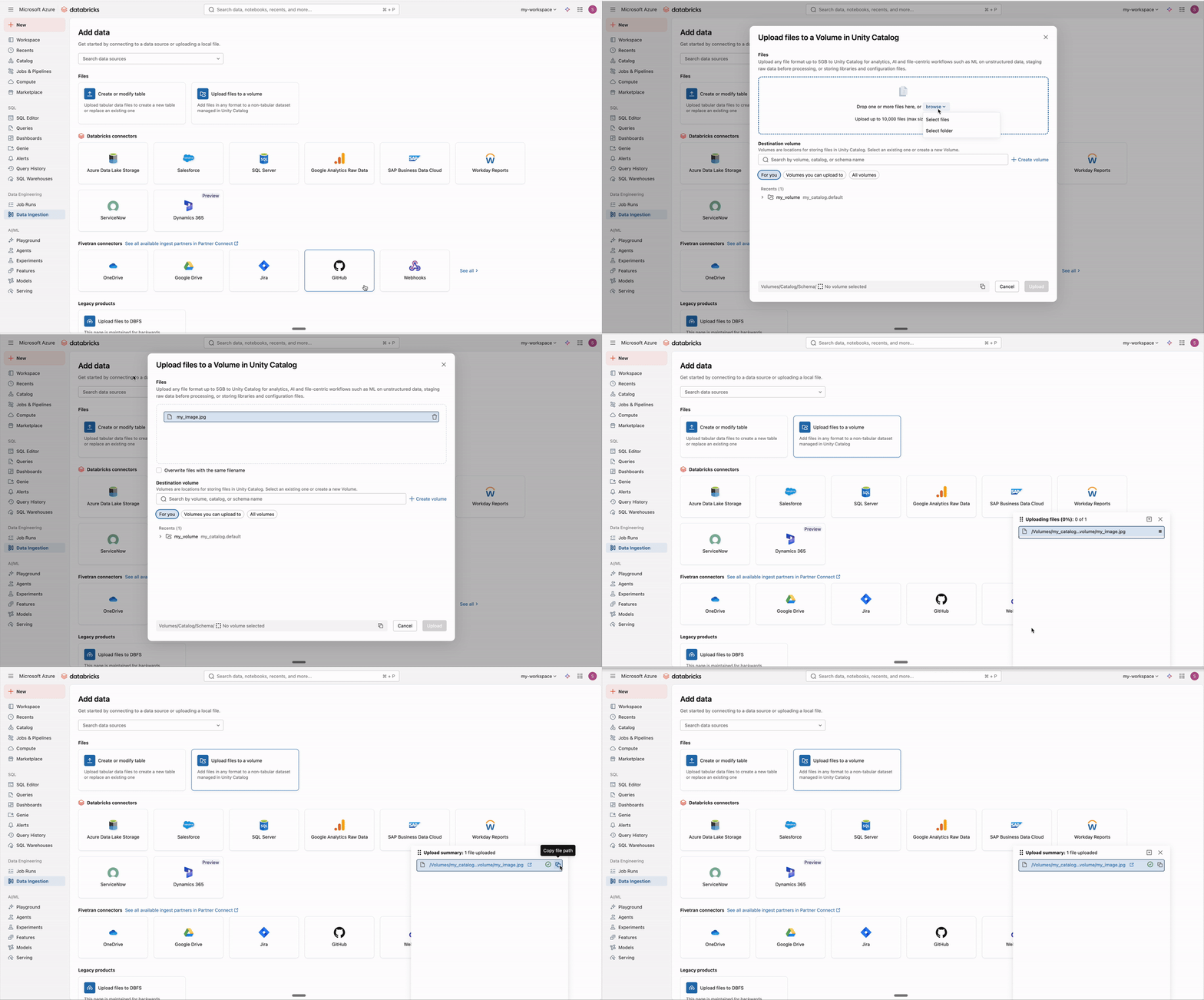
You can also access the upload UI in the following ways:
- In Catalog Explorer: Add data > Upload files to a volume
- From a notebook: File > Upload files to volume
Next steps
After you upload to a volume, you can do the following:
- Create a Unity Catalog managed table from the files. See Create a table from data in a volume.
- Use the files in ML and data science workloads
- Configure cluster libraries, notebook-scoped libraries, or job dependencies using the uploaded files
- Ingest data for engineering pipelines using Auto Loader or COPY INTO
- Process files with AI functions such as
ai_parse_document - Set up file arrival triggers in jobs
- Upload documents for use with Knowledge Assistant
Edit files in a volume
You can open a text file stored in a volume in the Databricks file editor and edit it in place, without downloading the file and uploading it again. The editor saves your changes to the volume automatically.
To open a file in the editor, you need these privileges:
READ VOLUMEon the volumeUSE SCHEMAon the parent schemaUSE CATALOGon the parent catalogWRITE VOLUMEon the volume to save changes. For details, see Unity Catalog privileges reference.
To edit a file in a volume:
-
In Catalog Explorer, browse to the volume that contains the file.
-
Click the
 kebab menu next to the file name, and then click Open in Editor.
You can also click the file name to open its preview, and then click the
 Open in Editor icon.
 -
Edit the file. The editor saves your changes to the volume automatically.
You can also open a volume file from a notebook or the SQL editor. In the schema browser, hover over the file, click the kebab menu, and then click Open file.
If the file changes outside the editor while you have it open, the editor shows a Conflict detected dialog. Click Yes, I would like to fetch the latest changes to load the latest version of the file, or click No, overwrite contents to save your version over it.
In the editor, you can use Genie Code to read and edit the file. Genie Code can edit only the file that is open in the editor, and only if you have WRITE VOLUME on the volume.
Supported file types
The editor opens files with these extensions:
- Text files: txt, log, md
- Code files: py, scala, sql, r, sh
- Semi-structured data files: json, ndjson, jsonl, csv, tsv, tab
- Configuration files: yaml, yml, toml, ini, conf, properties, env
Files named stdout or stderr also open in the editor.
Limitations
The editor has these limitations:
- If a file is larger than 10 MB, you can't open it in the editor. To edit the file, download it, edit it locally, and upload it again.
- If a file has an extension that isn't in the preceding list, such as an image, PDF, or Parquet file, you can't open it in the editor. You can still preview supported formats such as images, PDFs, and Parquet files. See Preview files in volumes.
- The file editor isn't available in AWS GovCloud regions.
Download files from a volume
To download files from a volume, do the following:
- Select one or more files.
- Click Download to download these files.
Delete files from a volume
To delete files from a volume, do the following:
- Select one or more files.
- Click Delete.
- Click Delete to confirm in the dialog that appears.
Create a blank directory
To create a new directory in a volume, do the following:
- On the volume overview tab, click Create directory.
- Enter a directory name.
- Click Create.
Download a directory
To download a directory in a volume, do the following:
- Click the kebab menu to the right of the directory.
- Click Download directory.
The directory is downloaded as a ZIP file.
Delete directories from a volume
To delete directories from a volume, do the following:
- Select one or more directories.
- Click Delete.
- Click Delete to confirm in the dialog that appears.
UI file management tasks for volumes
Click the kebab menu next to a file name to perform the following actions:
- Open in Editor (supported text files only). See Edit files in a volume.
- Copy path
- Download file
- Delete file
- Create table
Create a table from data in a volume
Databricks provides a UI to create a Unity Catalog managed table from a file, files, or directory of files stored in a Unity Catalog volume.
You must have CREATE TABLE permissions in the target schema and have access to a running SQL warehouse.
-
Select one or more files or a directory. Files should have the same data layout.
-
Click Create table. The Create table from volumes dialog appears.
-
Use the provided dialog to review a preview of the data and complete the following configurations:
- Choose to Create new table or Overwrite existing table
- Select the target Catalog and Schema.
- Specify the Table name.
- (Optional) Override default column names and types, or choose to exclude columns.
noteClick Advanced attributes to view additional options.
-
Click Create table to create the table with the specified attributes. Upon completion, Catalog Explorer displays the table details.
Programmatically work with files in volumes
Read and write files in volumes from all supported languages and workspace editors using the following format:
/Volumes/catalog_name/schema_name/volume_name/path/to/files
You interact with files in volumes in the same way that you interact with files in any cloud object storage location. That means that if you currently manage code that uses cloud URIs, DBFS mount paths, or DBFS root paths to interact with data or files, you can update your code to use volumes instead.
Volumes are only used for non-tabular data. Databricks recommends registering tabular data using Unity Catalog tables and then reading and writing data using table names.
Read and write data in volumes
Use Apache Spark, pandas, Spark SQL, and other OSS libraries to read and write data files in volumes.
The following examples demonstrate reading a CSV file stored in a volume:
- Python
- Pandas
- SQL
df = spark.read.format("csv").load("/Volumes/catalog_name/schema_name/volume_name/data.csv")

display(df)
import pandas as pd

df = pd.read_csv('/Volumes/catalog_name/schema_name/volume_name/data.csv')

display(df)
SELECT * FROM csv.`/Volumes/catalog_name/schema_name/volume_name/data.csv`
Utility commands for files in volumes
Databricks provides the following tools for managing files in volumes:
- The
dbutils.fssubmodule in Databricks Utilities. See File system utility (dbutils.fs). - The
%fsmagic, which is an alias fordbutils.fs. - The
%shmagic, which allows bash command against volumes.
For an example of using these tools to download files from the internet, unzip files, and move files from ephemeral block storage to volumes, see Download data from the internet.
You can also use OSS packages for file utility commands, such as the Python os module, as shown in the following example:
import os

os.mkdir('/Volumes/catalog_name/schema_name/volume_name/directory_name')
DataFrame checkpoints in volumes
You can use Unity Catalog volume paths to store DataFrame checkpoints. DataFrame checkpoints truncate the execution plan of a DataFrame and save the contents to storage. This can improve performance for iterative algorithms and complex query plans by preventing excessively long lineages when reusing DataFrames.
Storing checkpoints in Unity Catalog volumes applies governance and access controls to your checkpoint data, helping you move away from unmanaged cloud storage paths.
Requirements
- Databricks Runtime 18.1 or above.
- Unity Catalog-enabled compute with either dedicated or standard access mode. DataFrame checkpoints in volumes are not supported on serverless compute.
Configure the checkpoint directory
The method for setting the checkpoint directory depends on the access mode of your compute:
- Dedicated access mode
- Standard access mode
On compute with dedicated access mode, use SparkContext.setCheckpointDir:
spark.checkpoint.dir=/Volumes/<catalog>/<schema>/<volume>/checkpoint
On compute with standard access mode, use the spark.checkpoint.dir Spark configuration:
spark.conf.set("spark.checkpoint.dir", "/Volumes/<catalog>/<schema>/<volume>/checkpoints")
Create a DataFrame checkpoint
After configuring the checkpoint directory, use DataFrame.checkpoint() to truncate the execution plan and save the data:
df = spark.range(100).withColumn("doubled", col("id") * 2)
checkpointed_df = df.checkpoint()
DataFrame checkpoints differ from Structured Streaming checkpoints. For information about storing streaming checkpoint data in volumes, see Structured Streaming checkpoints.
List and query files in volumes with SQL
You can use the read_files table-valued function SQL function to list files in a volume and query their metadata. This is useful for discovering files, filtering by file properties, and preparing files for processing with AI functions.
When using READ_FILES with format => "binaryFile", the function returns a table with the following columns:
path: The full file pathmodificationTime: The last modification timestamplength: The file size in bytescontent: The raw file content as binary data
You can also select the _metadata column to access additional file information, including file_path, file_name, file_size, and file_modification_time.
List all files in a volume
The following example lists all files in a volume, excluding the binary content:
SELECT
  * EXCEPT (content),
  _metadata
FROM read_files(
  "/Volumes/<catalog>/<schema>/<volume>",
  format => "binaryFile"
);
Filter files by type and size
The following example filters for image files between 20 KB and 1 MB:
SELECT * EXCEPT (content), _metadata
FROM read_files(
  "/Volumes/my_catalog/my_schema/my_volume",
  format => "binaryFile",
  fileNamePattern => "*.{jpg,jpeg,png,JPG,JPEG,PNG}"
)
WHERE _metadata.file_size BETWEEN 20000 AND 1000000;
Filter files by modification time
The following example finds PDF files modified in the last day:
SELECT * EXCEPT (content), _metadata
FROM read_files(
  "/Volumes/my_catalog/my_schema/my_volume",
  format => "binaryFile",
  fileNamePattern => "*.{pdf,PDF}"
)
WHERE modificationTime >= current_timestamp() - INTERVAL 1 DAY;
Process images with AI functions
The following example uses the ai_query function function to generate descriptions for image files:
SELECT
  path AS file_path,
  ai_query(
    'system.ai.llama-4-maverick',
    'Describe this image in ten words or less: ',
    files => content
  ) AS result
FROM read_files(
  "/Volumes/my_catalog/my_schema/my_volume",
  format => "binaryFile",
  fileNamePattern => "*.{jpg,jpeg,png}"
)
WHERE _metadata.file_size < 1000000
  AND _metadata.file_name LIKE '%robots%';
Parse documents with AI functions
The following example uses the ai_parse_document function function to extract structured data from PDF receipts:
SELECT
  path AS file_path,
  ai_parse_document(content, map('version', '2.0')) AS result
FROM read_files(
  "/Volumes/main/public/my_files/",
  format => "binaryFile",
  fileNamePattern => "*.{pdf,PDF}"
)
WHERE _metadata.file_name ILIKE '%receipt%';
Manage files in volumes from external tools
Databricks provides a suite of tools for programmatically managing files in volumes from your local environment or integrated systems.
SQL commands for files in volumes
Databricks supports the following SQL keywords for interacting with files in volumes:
In Databricks notebooks and the SQL query editor, only the LIST command is supported. The other SQL commands (PUT INTO, GET, and REMOVE) are available through the following Databricks SQL connectors and drivers, which support managing files in volumes:
- Databricks SQL Connector for Python
- Databricks SQL Driver for Go
- Databricks SQL Driver for Node.js
- Databricks JDBC driver
- Databricks ODBC driver
Manage files in volumes with the Databricks CLI
Use the subcommands in databricks fs. See fs command group.
The Databricks CLI requires the scheme dbfs:/ to precede all volumes paths. For example, dbfs:/Volumes/catalog_name/schema_name/volume_name/path/to/data.
Manage files in volumes with SDKs
The following SDKs support managing files in volumes:
- The Databricks SDK for Python. Use the available methods in WorkspaceClient.files. For examples, see Manage files in Unity Catalog volumes.
- The Databricks SDK for Java. Use the available methods in WorkspaceClient.files. For examples, see Manage files in Unity Catalog volumes.
- The Databricks SDK for Go. Use the available methods in WorkspaceClient.files. For examples, see Manage files in Unity Catalog volumes.
Manage files in volumes with the REST API
Use the Files API to manage files in volumes.
REST API examples for files in volumes
The following examples use curl and the Files API 3.0 to perform file management tasks in volumes.
Files API 3.0 is in Beta. To use it, a workspace admin must turn on Files API V3 with Large File Upload Support from the Previews page. See Manage Databricks previews.
REGIONAL_WORKSPACE_HOSTis your workspace's regional hostname. See Send requests to the regional hostname.- Files API 3.0 requires network connectivity to Databricks and to your storage. See Configure network connectivity.
The following example creates an empty folder named my-folder in the specified volume.
curl --request PUT "https://${REGIONAL_WORKSPACE_HOST}/api/3.0/fs/directories/Volumes/main/default/my-volume/my-folder/" \
--header "Authorization: Bearer ${DATABRICKS_TOKEN}"
The following example creates a file named data.csv with the specified data in the specified path in the volume.
curl --request PUT "https://${REGIONAL_WORKSPACE_HOST}/api/3.0/fs/files/Volumes/main/default/my-volume/my-folder/data.csv?overwrite=true" \
--header "Authorization: Bearer ${DATABRICKS_TOKEN}" \
--header "Content-Type: application/octet-stream" \
--data-binary $'id,Text\n1,Hello World!'
The following example lists the contents of a volume in the specified path. This example uses jq to format the response body's JSON for easier reading.
curl --request GET "https://${REGIONAL_WORKSPACE_HOST}/api/3.0/fs/directories/Volumes/main/default/my-volume/" \
--header "Authorization: Bearer ${DATABRICKS_TOKEN}" | jq .
The following example lists the contents of a folder in a volume in the specified path. This example uses jq to format the response body's JSON for easier reading.
curl --request GET "https://${REGIONAL_WORKSPACE_HOST}/api/3.0/fs/directories/Volumes/main/default/my-volume/my-folder" \
--header "Authorization: Bearer ${DATABRICKS_TOKEN}" | jq .
The following example prints the contents of a file in the specified path in a volume.
curl --request GET "https://${REGIONAL_WORKSPACE_HOST}/api/3.0/fs/files/Volumes/main/default/my-volume/my-folder/data.csv" \
--header "Authorization: Bearer ${DATABRICKS_TOKEN}"
The following example deletes a file in the specified path from a volume.
curl --request DELETE "https://${REGIONAL_WORKSPACE_HOST}/api/3.0/fs/files/Volumes/main/default/my-volume/my-folder/data.csv" \
--header "Authorization: Bearer ${DATABRICKS_TOKEN}"
The following example deletes a folder from the specified volume.
curl --request DELETE "https://${REGIONAL_WORKSPACE_HOST}/api/3.0/fs/directories/Volumes/main/default/my-volume/my-folder/" \
--header "Authorization: Bearer ${DATABRICKS_TOKEN}"
Limitations of working with files in volumes
Before working with files in volumes, consider the following limitations:
-
Direct-append or non-sequential (random) writes are not supported. This affects operations like writing Zip and Excel files. For these workloads:
- Perform the operations on a local disk first
- Copy the results to the volume
For example:
Python# pythonimport xlsxwriterfrom shutil import copyfileworkbook = xlsxwriter.Workbook('/local_disk0/tmp/excel.xlsx')worksheet = workbook.add_worksheet()worksheet.write(0, 0, "Key")worksheet.write(0, 1, "Value")workbook.close()copyfile('/local_disk0/tmp/excel.xlsx', '/Volumes/my_catalog/my_schema/my_volume/excel.xlsx') -
Catalog Explorer can't preview spreadsheet files (xls, xlsx) larger than 1 MB or that use the ZIP64 format. See Preview files in volumes.
-
Sparse files are not supported. To copy sparse files, use
cp --sparse=never:Bash$ cp sparse.file /Volumes/my_catalog/my_schema/my_volume/sparse.fileerror writing '/dbfs/sparse.file': Operation not supported$ cp --sparse=never sparse.file /Volumes/my_catalog/my_schema/my_volume/sparse.file