Salesforce Marketing Cloud connector concepts
This feature is in Beta.
Learn about how the Salesforce Marketing Cloud connector works.
How the connector works
The Salesforce Marketing Cloud connector uses Server-to-Server OAuth authentication to connect to the Marketing Cloud API. After you create a Unity Catalog connection and configure an ingestion pipeline, the connector retrieves data from Salesforce Marketing Cloud and writes it to Delta tables in Unity Catalog.
The connector supports both incremental ingestion for many tables and batch updates for others. For tables with incremental support, the connector tracks changes and only retrieves new or modified records on subsequent pipeline runs. For batch-only tables, the connector performs a full refresh on each pipeline update.
Source schemas
The Salesforce Marketing Cloud connector uses the source_schema parameter to differentiate between different types of data. You can list multiple tables with different source schemas within the same pipeline.
The following table describes the available source schema values:
Source schema | Description |
|---|---|
| Ingest core tables like Campaigns, Clicks, Journeys, and other built-in Marketing Cloud objects |
| Ingest standard data extensions that store subscriber data, segments, and relational data |
| Ingest standard data extensions shared from one business unit to another |
| Ingest data extensions automatically synced from Salesforce CRM into Marketing Cloud (contacts, leads, etc.) |
| Ingest data extensions created by Salesforce integrations (Salesforce data events, Salesforce objects) |
| Ingest Salesforce data extensions shared across business units |
Note: Databricks recommends ingesting Salesforce and Shared Salesforce data extensions using the Lakeflow Connect Salesforce connector. The Salesforce Marketing Cloud connector cannot ingest these data extensions incrementally, but the Salesforce connector can.
Data extensions
Data extensions are tables in Salesforce Marketing Cloud that store subscriber, segment, and relational data. The connector supports ingesting multiple types of data extensions:
- Standard data extensions: Custom tables for storing marketing data
- Shared data extensions: Data extensions shared across business units
- Synchronized data extensions: Tables automatically synced from Salesforce CRM
- Salesforce data extensions: Tables created by Salesforce integrations
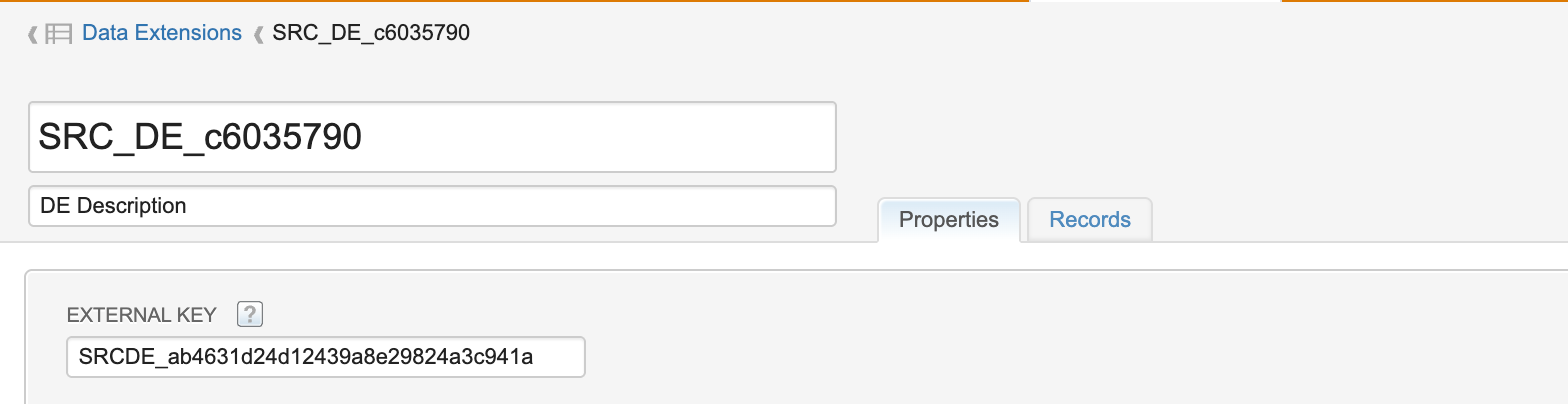
When ingesting data extensions, you must provide the External Key (Customer Key) as the source_table name. Using the display name instead of the External Key will cause the pipeline to fail.
Primary keys and history tracking
If a primary key is defined on the source data extension, the connector uses that key during ingestion. If no primary key is defined, the connector automatically adds a column called __databricks_id, which is a hash of all columns and is used as the primary key.
When __databricks_id is used, history tracking (SCD Type 2) is not supported for that table. If the table is configured to ingest in SCD Type 2 mode, the ingestion will fail.
Destination table naming
If you don't provide a destination_table name, the connector automatically names tables based on the source_schema:
Source schema | Default destination table name |
|---|---|
| Same as source table name |
|
|
|
|
|
|
|
|
|
|
Note: Databricks automatically normalizes data extension display names, replacing spaces and hyphens with underscores for Delta compatibility.
For example, the destination table containing the data from the standard data extension with display name src_de_c6035790 will be named de_src_de_c6035790, unless you provide a different destination_table name.
Business units
The Marketing Cloud API returns data for a single business unit, including child business units. If you have multiple business units, you must create separate Unity Catalog connections and configure separate API integration packages for each one.