Ingest data from SQL Server
Learn how to ingest data from SQL Server into Databricks using Lakeflow Connect.
The SQL Server connector supports Azure SQL Database, Azure SQL Managed Instance, and Amazon RDS SQL databases. This includes SQL Server running on Azure virtual machines (VMs) and Amazon EC2. The connector also supports SQL Server on-premises using Azure ExpressRoute and AWS Direct Connect networking.
Requirements
-
To create an ingestion gateway and an ingestion pipeline, you must first meet the following requirements:
-
Your workspace is enabled for Unity Catalog.
-
Serverless compute is enabled for your workspace. See Serverless compute requirements.
-
If you plan to create a connection: You have
CREATE CONNECTIONprivileges on the metastore. See Manage privileges in Unity Catalog.If your connector supports UI-based pipeline authoring, you can create the connection and the pipeline at the same time by completing the steps on this page. However, if you use API-based pipeline authoring, you must create the connection in Catalog Explorer before you complete the steps on this page. See Connect to managed ingestion sources.
-
If you plan to use an existing connection: You have
USE CONNECTIONprivileges orALL PRIVILEGESon the connection. -
You have
USE CATALOGprivileges on the target catalog. -
You have
USE SCHEMA,CREATE TABLE, andCREATE VOLUMEprivileges on an existing schema orCREATE SCHEMAprivileges on the target catalog.
-
You have access to a primary SQL Server instance. Change tracking and change data capture features are not supported on read replicas or secondary instances.
-
Unrestricted permissions to create clusters, or a custom policy (API only). A custom policy for the gateway must meet the following requirements:
-
Family: Job Compute
-
Policy family overrides:
{
  "cluster_type": {
    "type": "fixed",
    "value": "dlt"
  },
  "num_workers": {
    "type": "unlimited",
    "defaultValue": 1,
    "isOptional": true
  },
  "runtime_engine": {
    "type": "fixed",
    "value": "STANDARD",
    "hidden": true
  }
} -
Databricks recommends specifying the smallest possible worker nodes for ingestion gateways because they do not impact gateway performance. The following compute policy enables Databricks to scale the ingestion gateway to meet the needs of your workload. The minimum requirement for the driver node is 8 cores to enable efficient and performant data extraction from your source database.
JSON{
"driver_node_type_id": {
"type": "fixed",
"value": "r5n.16xlarge"
},
"node_type_id": {
"type": "fixed",
"value": "m5n.large"
}
}
For more information about cluster policies, see Select a compute policy.
-
-
-
To ingest from SQL Server, you must first complete the steps in Configure Microsoft SQL Server for ingestion into Databricks.
Create a gateway and an ingestion pipeline
Do not manually stop the ingestion gateway. The gateway must run continuously to capture changes before change logs are truncated in the source database. If the gateway is stopped, changes can be dropped due to log retention, requiring a full refresh of all affected tables. Stopping and restarting the gateway also re-provisions the VM, which increases startup time. If you need to troubleshoot gateway issues, see Troubleshoot SQL Server ingestion or contact Databricks Support.
- Databricks UI
- Declarative Automation Bundles
- Databricks notebook
- Terraform
-
In the sidebar of the Databricks workspace, click Data Ingestion.
-
On the Add data page, under Databricks connectors, click SQL Server.
-
On the Connection page of the ingestion wizard, select the connection that stores your SQL Server access credentials. If you have the
CREATE CONNECTIONprivilege on the metastore, you can click Create connection to create a new connection with the authentication details in Create a SQL Server connection.
 -
Click Next.
-
On the Ingestion setup page, enter a unique name for the ingestion pipeline. This pipeline moves data from the staging location to the destination.
-
Select a catalog and a schema to write event logs to. The event log contains audit logs, data quality checks, pipeline progress, and errors. If you have
USE CATALOGandCREATE SCHEMAprivileges on the catalog, you can click Create schema in the drop-down menu to create a new schema. -
(Optional) Set Auto full refresh for all tables to On. When auto refresh is on, the pipeline automatically tries to fix issues like log cleanup events and certain types of schema evolution by fully refreshing the impacted table. If history tracking is enabled, a full refresh erases that history.
-
Enter a unique name for the ingestion gateway. The gateway is a pipeline that extracts changes from the source and stages them for the ingestion pipeline to load.
-
Select a catalog and a schema for the Staging location. A volume is created in this location to stage extracted data. If you have
USE CATALOGandCREATE SCHEMAprivileges on the catalog, you can click Create schema in the drop-down menu to create a new schema. -
Click Create pipeline and continue.
-
On the Source page, select the tables to ingest. If you select specific tables, you can configure table settings:
a. (Optional) On the Settings tab, specify a Destination name for each ingested table. This is useful to differentiate between destination tables when you ingest an object into the same schema multiple times. See Name a destination table.
a. (Optional) Change the default History tracking setting. See Enable history tracking (SCD type 2).
-
Click Next, then click Save and continue.
-
On the Destination page, select a catalog and a schema to load data into. If you have
USE CATALOGandCREATE SCHEMAprivileges on the catalog, you can click Create schema in the drop-down menu to create a new schema. -
Click Save and continue.
-
On the Database setup page, click Validate to confirm that your source is properly configured for Databricks ingestion. Any missing configurations are returned. For steps to resolve, click Complete configuration. Then click Next. Alternatively, click Skip validation.
-
(Optional) On the Schedules and notifications page, click
Create schedule. Set the frequency to refresh the destination tables. -
(Optional) Click
Add notification to set email notifications for pipeline operation success or failure, then click Save and run pipeline.
Before you ingest using Declarative Automation Bundles, you must have access to an existing connection. For instructions, see Create a SQL Server connection.
The staging catalog and schema can be the same as the destination catalog and schema. The staging catalog can't be a foreign catalog. Specify the staging location in the gateway_definition section of your bundle pipeline YAML file.
The ingestion gateway extracts snapshot and change data from the source database and stores it in the Unity Catalog staging volume. You must run the gateway as a continuous pipeline. This helps to accommodate any change log retention policies that you have on the source database.
The ingestion pipeline applies the snapshot and change data from the staging volume into destination streaming tables.
Bundles can contain YAML definitions of jobs and tasks, are managed using the Databricks CLI, and can be shared and run in different target workspaces (such as development, staging, and production). For more information, see What are Declarative Automation Bundles?.
-
Create a bundle using the Databricks CLI:
Bashdatabricks bundle init -
Add your pipeline and job configuration to the bundle. See Examples for a complete example with all available options.
-
Deploy the pipeline using the Databricks CLI:
Bashdatabricks bundle deploy
Update the Configuration cell in the following notebook with the source connection, target catalog, target schema, and tables to ingest from the source.
You can use Terraform to deploy and manage SQL Server ingestion pipelines. For a complete example framework, including Terraform configurations for creating gateways and ingestion pipelines, see the Lakeflow Connect Terraform examples repository on GitHub.
Verify successful data ingestion
The list view on the pipeline details page shows the number of records processed as data is ingested. These numbers refresh automatically.
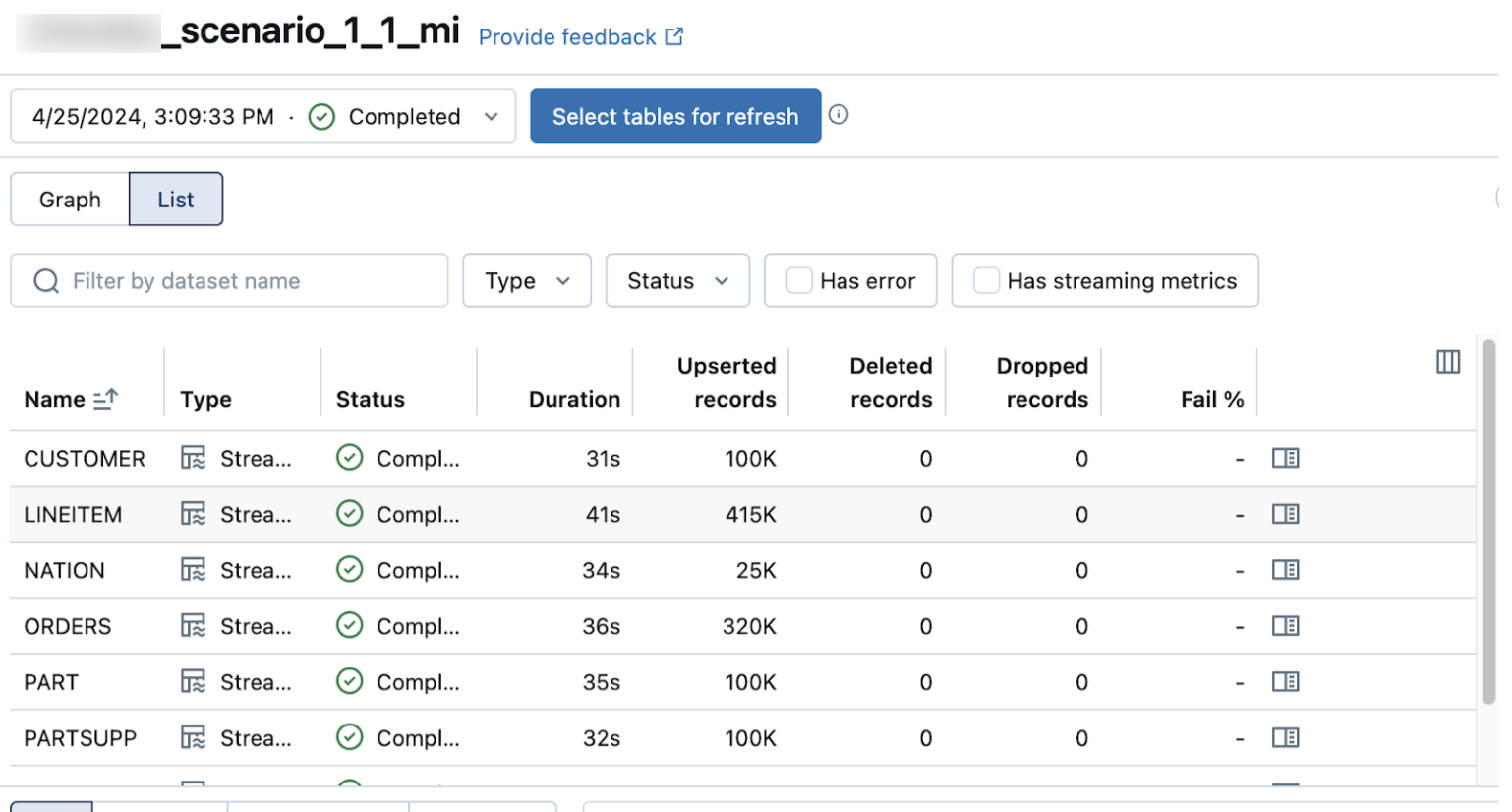
The Upserted records and Deleted records columns are not shown by default. You can enable them by clicking on the columns configuration  button and selecting them.
Examples
Use these examples to configure your pipeline.
Pipeline configuration
- Declarative Automation Bundles
- Databricks notebook
The following bundle defines a gateway pipeline, an ingestion pipeline, and a scheduled job. Commented-out options show all available configuration. Update the variables and targets sections with your source and destination details.
bundle:
  name: lakeflow-connect-sqlserver

# Variables parameterize the bundle for different environments and sources.
# Set values here, override per-target, or pass with: databricks bundle deploy -var="key=value"
variables:
  # The name of the Unity Catalog connection to your SQL Server instance.
  # This connection must already exist and be of type SQLSERVER.
  connection_name:
    description: 'Unity Catalog connection name for the SQL Server source'
  # The SQL Server database name to ingest from.
  # In Lakeflow Connect, this maps to source_catalog in the table/schema spec.
  source_database:
    description: 'SQL Server database name (maps to source_catalog in table specs)'
  # The SQL Server schema to ingest from (for example, "dbo", "sales").
  source_schema:
    description: 'SQL Server schema name to ingest from'
  # The Unity Catalog catalog where ingested Delta tables are created.
  dest_catalog:
    description: 'Destination Unity Catalog catalog for ingested tables'
  # The Unity Catalog schema where ingested Delta tables are created.
  dest_schema:
    description: 'Destination Unity Catalog schema for ingested tables'
  # The Unity Catalog catalog for the gateway's internal staging volume.
  # Can be the same as dest_catalog. Must not be a foreign catalog.
  staging_catalog:
    description: 'Catalog for gateway staging volume'
  # The Unity Catalog schema for the gateway's internal staging volume.
  staging_schema:
    description: 'Schema for gateway staging volume'

resources:
  pipelines:
    # --- Gateway pipeline ---
    # Extracts change data from SQL Server and stages it in a Unity Catalog
    # volume. Must run continuously to capture changes before change logs are
    # truncated in the source database.
    gw_pipeline:
      name: 'lfc-sqlserver-gateway-${bundle.target}'
      # Gateway pipelines must be continuous.
      continuous: true
      # "CURRENT" (stable) or "PREVIEW" (early access).
      channel: 'CURRENT'
      # (Optional) Associate with a budget policy for cost tracking.
      # budget_policy_id: "<policy-uuid>"
      # The gateway runs on classic compute. Cluster settings are managed
      # automatically. You can optionally customize the cluster:
      # clusters:
      #   - label: "default"
      #     autoscale:
      #       min_workers: 1
      #       max_workers: 4
      #     # node_type_id: "i3.xlarge"
      #     # Restrict the cluster to an approved cluster policy.
      #     # policy_id: "<cluster-policy-id>"
      catalog: ${var.staging_catalog}
      schema: ${var.staging_schema}
      gateway_definition:
        # (Required) Unity Catalog connection name (type SQLSERVER).
        connection_name: ${var.connection_name}
        # (Required) Catalog and schema for the staging volume.
        gateway_storage_catalog: ${var.staging_catalog}
        gateway_storage_schema: ${var.staging_schema}
        # (Optional) Custom staging volume name. If not set, the system
        # auto-generates: __databricks_ingestion_gateway_staging_data-<pipeline_id>
        # gateway_storage_name: "my_custom_staging_volume"

    # --- Ingestion pipeline ---
    # Reads staged data from the gateway and applies it to Delta tables.
    mi_pipeline:
      name: 'lfc-sqlserver-ingestion-${bundle.target}'
      # Continuous mode is not supported for the ingestion pipeline.
      # Use a scheduled job to trigger runs.
      continuous: false
      channel: 'CURRENT'
      # (Optional) Associate with a budget policy for cost tracking.
      # budget_policy_id: "<policy-uuid>"
      # The ingestion pipeline runs on serverless compute only.
      serverless: true
      # (Optional) Development mode for faster iteration (no retries).
      # development: true
      catalog: ${var.dest_catalog}
      schema: ${var.dest_schema}
      # (Optional) Email notifications for pipeline events.
      # notifications:
      #   - email_recipients:
      #       - "team@example.com"
      #     alerts:
      #       - "on-update-failure"
      #       - "on-update-fatal-failure"
      #       - "on-flow-failure"
      # (Optional) Run as a service principal for production.
      # run_as:
      #   service_principal_name: "my-service-principal"
      ingestion_definition:
        # (Required) References the gateway pipeline. The connection is
        # inherited from the gateway. Do not specify connection_name here.
        ingestion_gateway_id: ${resources.pipelines.gw_pipeline.id}
        # Pipeline-level table configuration defaults. These apply to all
        # tables unless overridden at the schema or table level.
        table_configuration:
          # SCD Type: How changes are applied to destination tables.
          #   SCD_TYPE_1: Overwrites rows with latest values (default).
          #   SCD_TYPE_2: Preserves history with __START_AT/__END_AT columns.
          #               Requires CDC on source. CT does not support SCD_TYPE_2.
          scd_type: 'SCD_TYPE_1'
          # (Optional) Auto full refresh policy. Triggers a snapshot when the
          # pipeline detects issues resolvable by re-reading all source data
          # (for example, CT/CDC retention window expired).
          # auto_full_refresh_policy:
          #   enabled: true
          #   min_interval_hours: 24
        # (Optional) Schedule automatic full refreshes.
        # full_refresh_window:
        #   start_hour: 2
        #   days_of_week:
        #     - "SUNDAY"
        #   time_zone_id: "America/Los_Angeles"
        objects:
          # Option 1: Schema-level ingestion. Ingests all tables from a source
          # schema. New tables added to the schema are picked up automatically.
          - schema:
              source_catalog: ${var.source_database}
              source_schema: ${var.source_schema}
              destination_catalog: ${var.dest_catalog}
              destination_schema: ${var.dest_schema}
              # (Optional) Override table_configuration for this schema.
              # table_configuration:
              #   scd_type: "SCD_TYPE_2"
          # Option 2: Table-level ingestion. Provides granular control.
          # Replace or combine with the schema-level spec.
          # - table:
          #     source_catalog: ${var.source_database}
          #     source_schema: ${var.source_schema}
          #     source_table: "customers"
          #     destination_catalog: ${var.dest_catalog}
          #     destination_schema: ${var.dest_schema}
          #     # (Optional) Rename the table at the destination.
          #     # destination_table: "customers_v2"
          #     table_configuration:
          #       scd_type: "SCD_TYPE_1"
          #       # Include only specific columns (mutually exclusive with exclude_columns).
          #       # include_columns:
          #       #   - "customer_id"
          #       #   - "first_name"
          #       #   - "email"
          #       # Exclude specific columns. All other columns are included.
          #       # exclude_columns:
          #       #   - "internal_notes"
          #       # Override the primary key used for change detection.
          #       # primary_keys:
          #       #   - "customer_id"
          #       # Logical ordering columns for change resolution.
          #       # sequence_by:
          #       #   - "updated_at"
          #       # Auto full refresh for this table.
          #       # auto_full_refresh_policy:
          #       #   enabled: true
          #       #   min_interval_hours: 48
      # (Optional) Grant additional users or groups access.
      # permissions:
      #   - user_name: "analyst@example.com"
      #     level: "CAN_VIEW"
      #   - group_name: "data-engineers"
      #     level: "CAN_RUN"

  # --- Scheduled job ---
  # Triggers the ingestion pipeline on a schedule.
  jobs:
    mi_schedule:
      name: 'lfc-sqlserver-ingestion-schedule-${bundle.target}'
      # Quartz cron syntax: "seconds minutes hours day month day-of-week"
      # Examples: "0 0 * * * ?" (hourly), "0 0 */4 * * ?" (every 4 hours)
      schedule:
        quartz_cron_expression: '0 */30 * * * ?'
        timezone_id: 'UTC'
      tasks:
        - task_key: 'run_ingestion'
          pipeline_task:
            pipeline_id: ${resources.pipelines.mi_pipeline.id}
      # email_notifications:
      #   on_failure:
      #     - "team@example.com"

# Deploy to different workspaces with: databricks bundle deploy -t <target>
targets:
  dev:
    default: true
    workspace:
      host: https://<workspace-url>.cloud.databricks.com
    variables:
      connection_name: '<sqlserver-connection>'
      source_database: '<database-name>'
      source_schema: 'dbo'
      dest_catalog: '<dest-catalog>'
      dest_schema: '<dest-schema>'
      staging_catalog: '<staging-catalog>'
      staging_schema: '<staging-schema>'
The following is an example Configuration section of a pipeline specification:
# The name of the UC connection with the credentials to access the source database
connection_name = "my_connection"

# The name of the UC catalog and schema to store the replicated tables
target_catalog_name = "main"
target_schema_name = "lakeflow_sqlserver_connector_cdc"

# The name of the UC catalog and schema to store the staging volume with intermediate
# CDC and snapshot data. Use the destination catalog/schema by default.
stg_catalog_name = target_catalog_name
stg_schema_name = target_schema_name

# The name of the Gateway pipeline to create
gateway_pipeline_name = "cdc_gateway"

# The name of the Ingestion pipeline to create
ingestion_pipeline_name = "cdc_ingestion"

# Construct the full list of tables to replicate.
# IMPORTANT: The letter case of catalog, schema, and table names must match exactly
# the case used in the source database system tables.
tables_to_replicate = replicate_full_db_schema("MY_DB", ["MY_DB_SCHEMA"])
# Append tables from additional schemas as needed:
#  + replicate_tables_from_db_schema("MY_DB", "MY_SCHEMA_2", ["table3", "table4"])
Common patterns
For advanced pipeline configurations, see Common patterns for managed ingestion pipelines.
Next steps
Start, schedule, and set alerts on your pipeline. See Common pipeline maintenance tasks.