Name a destination table
Applies to:  SaaS connectors Database connectors Query-based connectors
By default, a destination table created during Lakeflow Connect managed ingestion is given the name of the corresponding source table. However, you can optionally specify a different name for the destination table. For example, if you ingest an object into two tables in the same schema, you must specify a unique name for one of the tables to differentiate between them. Managed ingestion connectors don't support duplicate destination table names in the same schema.
Name a destination table in the UI
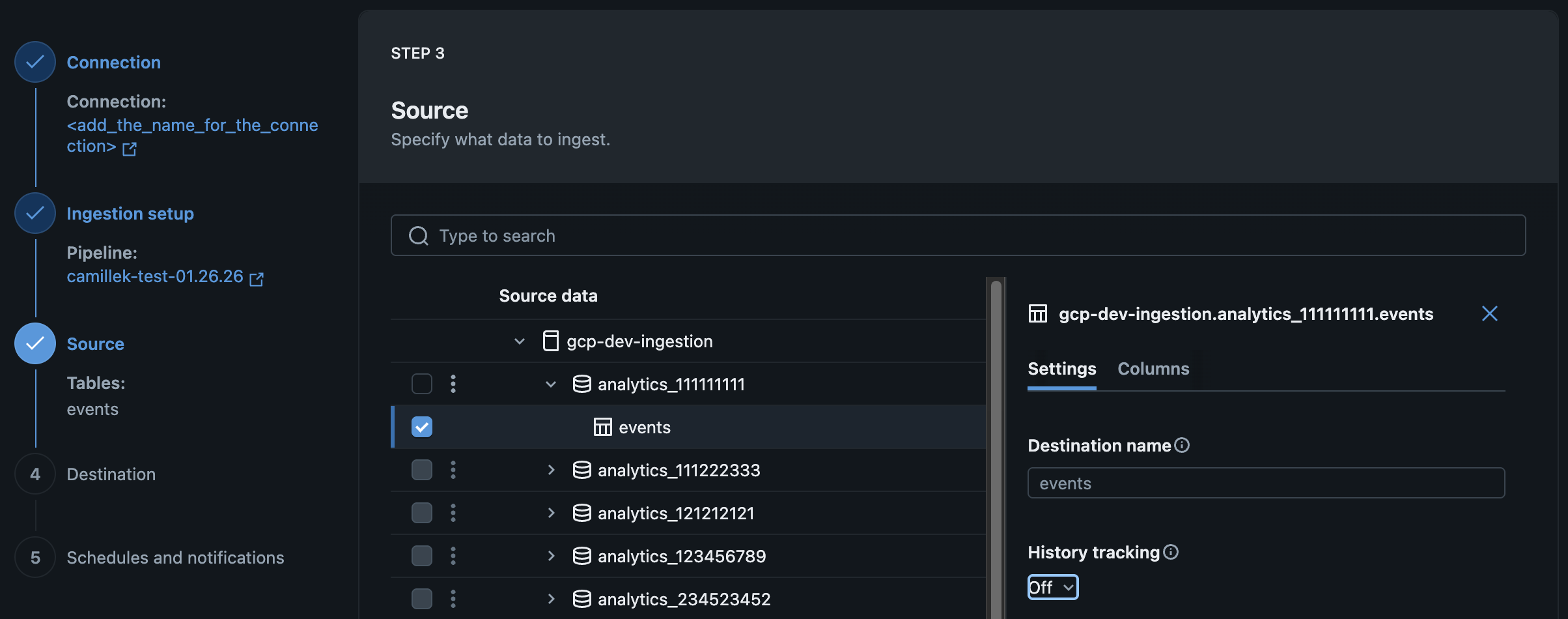
You can name a destination table when you create or edit your managed ingestion pipeline in the Databricks UI.
On the Source page of the data ingestion wizard, enter a name for Destination table.
Name a destination table using the API
You can name a destination table when you create or edit your managed ingestion pipeline using Declarative Automation Bundles, notebooks, or the Databricks CLI. To do this, set the destination_table parameter. For example:
Examples: Google Analytics
- Declarative Automation Bundles
- Databricks notebook
- Databricks CLI
resources:
  pipelines:
    pipeline_ga4:
      name: <pipeline-name>
      catalog: <target-catalog>	# Location of the pipeline event log
      schema: <target-schema> # Location of the pipeline event log
      ingestion_definition:
        connection_name: <connection-name>
        objects:
	        - table:
              source_url: <project-id>
              source_schema: <property-name>
              destination_catalog: <target-catalog>
              destination_schema: <target-schema>
              destination_table: <custom-target-table-name> # Specify destination table name
pipeline_spec = """
{
  "name": "<pipeline-name>",
  "ingestion_definition": {
    "connection_name": "<connection-name>",
    "objects": [
      {
        "table": {
          "source_catalog": "<project-id>",
          "source_schema": "<property-name>",
          "source_table": "<source-table>",
          "destination_catalog": "<target-catalog>",
          "destination_schema": "<target-schema>",
          "destination_table": "<custom-target-table-name>",
        }
      }
    ]
  }
}
"""
{
  "resources": {
    "pipelines": {
      "pipeline_ga4": {
        "name": "<pipeline-name>",
        "catalog": "<target-catalog>",
        "schema": "<target-schema>",
        "ingestion_definition": {
          "connection_name": "<connection-name>",
          "objects": [
            {
              "table": {
                "source_url": "<project-id>",
                "source_schema": "<property-name>",
                "destination_catalog": "<destination-catalog>",
                "destination_schema": "<destination-schema>",
                "destination_table": "<custom-destination-table-name>"
              }
            }
          ]
        }
      }
    }
  }
}
Examples: Salesforce
- Declarative Automation Bundles
- Databricks notebook
- Databricks CLI
resources:
  pipelines:
    pipeline_sfdc:
      name: <pipeline-name>
      catalog: <target-catalog>	# Location of the pipeline event log
      schema: <target-schema> # Location of the pipeline event log
      ingestion_definition:
        connection_name: <connection-name>
        objects:
	        - table:
              source_schema: <source-schema>
              source_table: <source-table>
              destination_catalog: <target-catalog>
              destination_schema: <target-schema>
              destination_table: <custom-target-table-name> # Specify destination table name
pipeline_spec = """
{
  "name": "<pipeline-name>",
  "ingestion_definition": {
    "connection_name": "<connection-name>",
    "objects": [
      {
        "table": {
          "source_catalog": "<source-catalog>",
          "source_schema": "<source-schema>",
          "source_table": "<source-table>",
          "destination_catalog": "<target-catalog>",
          "destination_schema": "<target-schema>",
          "destination_table": "<custom-target-table-name>",
        }
      }
    ]
  }
}
"""
{
  "resources": {
    "pipelines": {
      "pipeline_sfdc": {
        "name": "<pipeline-name>",
        "catalog": "<target-catalog>",
        "schema": "<target-schema>",
        "ingestion_definition": {
          "connection_name": "<connection-name>",
          "objects": [
            {
              "table": {
                "source_schema": "<source-schema>",
                "source_table": "<source-table>",
                "destination_catalog": "<destination-catalog>",
                "destination_schema": "<destination-schema>",
                "destination_table": "<custom-destination-table-name>"
              }
            }
          ]
        }
      }
    }
  }
}
Examples: Workday
- Declarative Automation Bundles
- Databricks notebook
- Databricks CLI
resources:
  pipelines:
    pipeline_workday:
      name: <pipeline-name>
      catalog: <target-catalog>	# Location of the pipeline event log
      schema: <target-schema> # Location of the pipeline event log
      ingestion_definition:
        connection_name: <connection-name>
        objects:
	        - report:
              source_url: <report-url>
              destination_catalog: <target-catalog>
              destination_schema: <target-schema>
              destination_table: <custom-target-table-name> # Specify destination table name
pipeline_spec = """
{
  "name": "<pipeline-name>",
  "ingestion_definition": {
    "connection_name": "<connection-name>",
    "objects": [
      {
        "report": {
          "source_url": "<report-url>",
          "destination_catalog": "<target-catalog>",
          "destination_schema": "<target-schema>",
          "destination_table": "<custom-target-table-name>",
        }
      }
    ]
  }
}
"""
{
  "resources": {
    "pipelines": {
      "pipeline_workday": {
        "name": "<pipeline-name>",
        "catalog": "<target-catalog>",
        "schema": "<target-schema>",
        "ingestion_definition": {
          "connection_name": "<connection-name>",
          "objects": [
            {
              "report": {
                "source_url": "<report-url>",
                "destination_catalog": "<destination-catalog>",
                "destination_schema": "<destination-schema>",
                "destination_table": "<custom-destination-table-name>"
              }
            }
          ]
        }
      }
    }
  }
}