Zerobus Ingest overview
Zerobus Ingest is a push-based streaming API that writes data straight into Unity Catalog Delta tables at high scale, with no message bus to run. It removes the middle layer that many teams place between their producers and the lakehouse. The workflow is two steps: create a table, then push data to it. A "hello world" client and a petabyte-scale workload run essentially the same code with no infrastructure to manage.
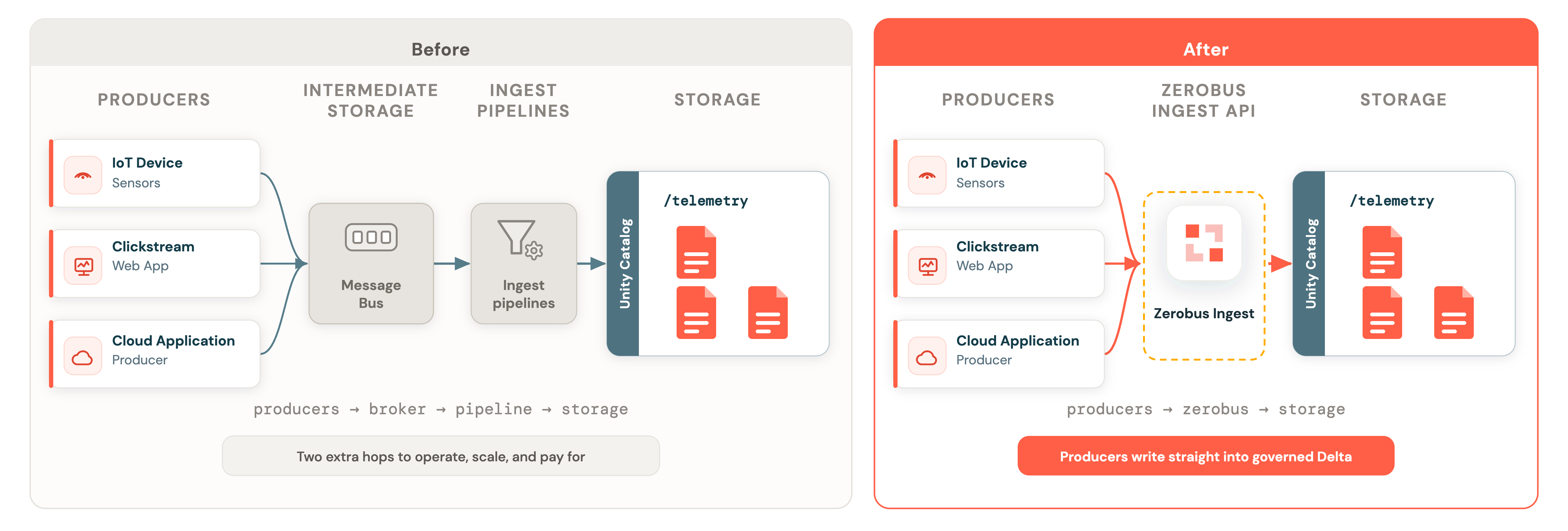
Zerobus Ingest is serverless, adding and removing capacity as load changes. It has ingested over 1 trillion records into a single table in under 24 hours (see the Ingesting the Milky Way: Petabyte-Scale with Zerobus Ingest blog post), and lands records within seconds.
- For the list of supported regions, see Ingestion availability.
Advantages
Zerobus Ingest keeps ingestion simple while scaling to the largest workloads:
- Simple by design. Create a table, then push data to it — there are no brokers, partitions, or pipelines to manage. Rather than routing data through a message bus and an ingestion job before it lands, producers write straight to the table, so there are fewer hops and fewer moving parts to operate.
- Serverless and elastic. Zerobus Ingest is on by default and adds or removes capacity as load changes. You scale by running more producers, not by rewriting your application. To learn how, see How Zerobus Ingest scales.
- High-throughput workloads. Zerobus Ingest is built for large-scale ingestion, sustaining high write rates into a single table.
- Near real-time freshness. Records land in Delta within seconds and are query-ready almost as soon as they arrive.
- High concurrency. Zerobus Ingest handles concurrent writes from thousands of clients to the same table.
When your destination is the lakehouse, Zerobus Ingest is the most direct path. Other Databricks tools fit adjacent needs and work well alongside it:
- For use cases where you're running Kafka to support non-Lakehouse consumers, you may also want a copy of the data made in the Lakehouse. Use managed streaming connectors to replicate it.
- For data already landed as files in cloud storage, use Auto Loader.
- When you need sub-second operational latency in the processing path, use real-time mode.
Create a table, then push data
Using Zerobus Ingest is as simple as creating a table and then pushing data to it. The table's schema defines what each record must contain. First, create the target table:
CREATE TABLE main.default.air_quality (
  device_name STRING,
  temp INT,
  humidity INT
);
Then, ingesting a record is a few lines of code:
from zerobus.sdk.sync import ZerobusSdk
from zerobus.sdk.shared import TableProperties

sdk = ZerobusSdk(SERVER_ENDPOINT, DATABRICKS_WORKSPACE_URL)

table_properties = TableProperties("main.default.air_quality")
stream = sdk.create_stream(CLIENT_ID, CLIENT_SECRET, table_properties)

stream.ingest_record_offset({"device_name": "sensor-1", "temp": 22, "humidity": 55})
# ingest more records...
stream.close()
The same code that you ship in dev can scale to production workloads. For the full walkthrough, see Use Zerobus Ingest.
Common use cases
- IoT and device telemetry: stream sensor, vehicle, and smart-device data from large distributed fleets directly into governed Delta tables.
- On-premises to cloud: bridge on-prem and hybrid systems to the lakehouse without standing up broker infrastructure in between. For private connectivity and firewall setup, see Networking considerations.
- Application and clickstream events: push events from cloud and edge applications for near real-time analytics.
- Change data capture (CDC): land row changes from operational systems into Delta.
- Observability data: send OpenTelemetry traces, logs, and metrics into Delta tables you own. See Ingest OpenTelemetry data with Zerobus Ingest.
How it works
A producer connects to Zerobus Ingest and sends records to a target Delta table. The service validates each record against the table schema and makes accepted records durable. For interfaces that provide durability acknowledgments, Zerobus Ingest acknowledges a record after it is durable. The data is materialized into the table shortly afterward, typically within seconds. Zerobus Ingest's dynamic, partitionless design makes ingestion elastic, so its serverless compute scales with your workloads.
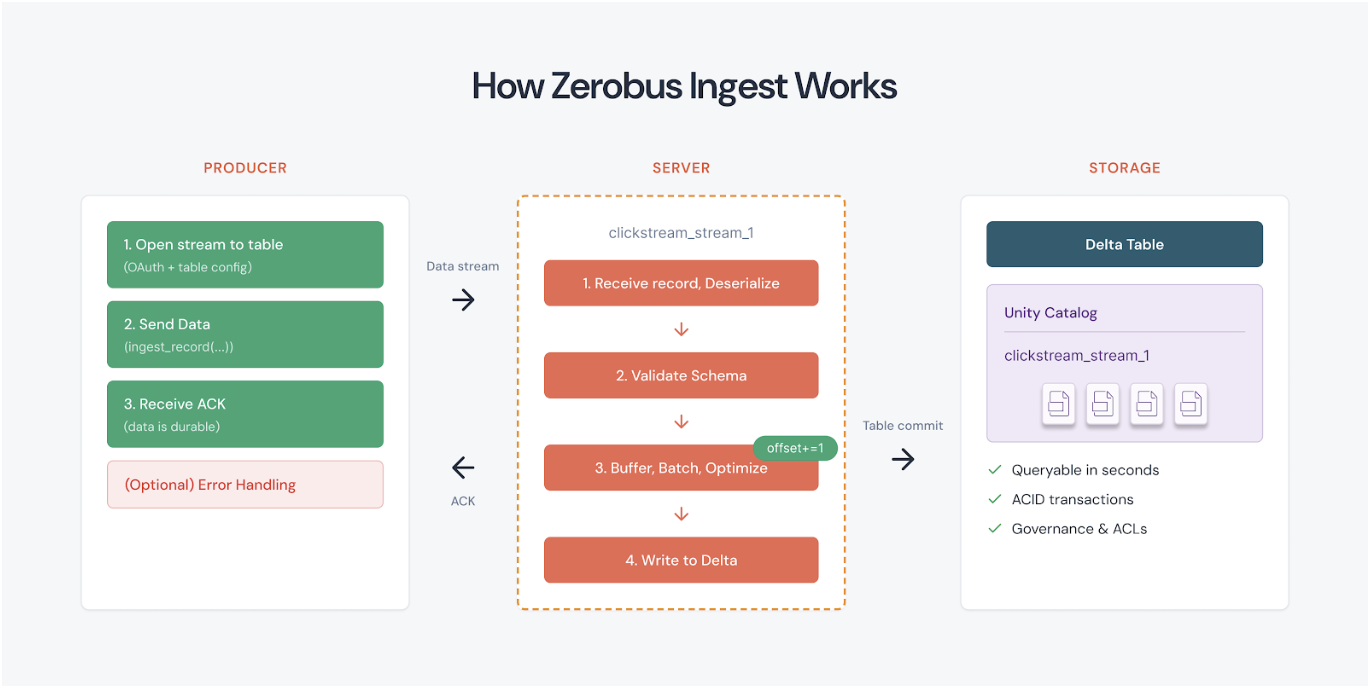
For a deeper explanation of streams and how Zerobus Ingest scales, see Zerobus Ingest concepts. For the asynchronous client and server communication model, see Asynchronous communication.
Ways to send data
Zerobus Ingest is one endpoint that supports multiple interfaces, so you can choose the best fit for each producer:
- SDKs over gRPC: high-throughput streaming clients in Python, Java, Rust, Go, TypeScript, and (in Beta) C++ and C# / .NET. Best for high-volume ordered ingestion. See Write a client.
- REST API: a stateless interface for lightweight or "chatty" clients such as large fleets of edge devices. See Write a client.
- OpenTelemetry (OTLP): point existing OpenTelemetry collectors at Zerobus Ingest to land traces, logs, and metrics with no custom integration. See Ingest OpenTelemetry data with Zerobus Ingest.
- MQTT: publish JSON records from existing MQTT v5 applications over TLS. See Use MQTT with Zerobus Ingest.
- Kafka-compatible APIs: point an existing Apache Kafka producer at Zerobus Ingest, with no Databricks SDK. See Use Kafka-compatible APIs with Zerobus Ingest.
The following diagram shows how records from source streams and APIs flow through auto-scaling and load balancing to a horizontally scalable pool of stateless Zerobus nodes. Each node has a write-ahead log and a Lakehouse writer that batch-commits records into a Unity Catalog managed Delta table. The source labels in the diagram are representative. MQTT follows the same path through load balancing, durable storage, and table materialization.
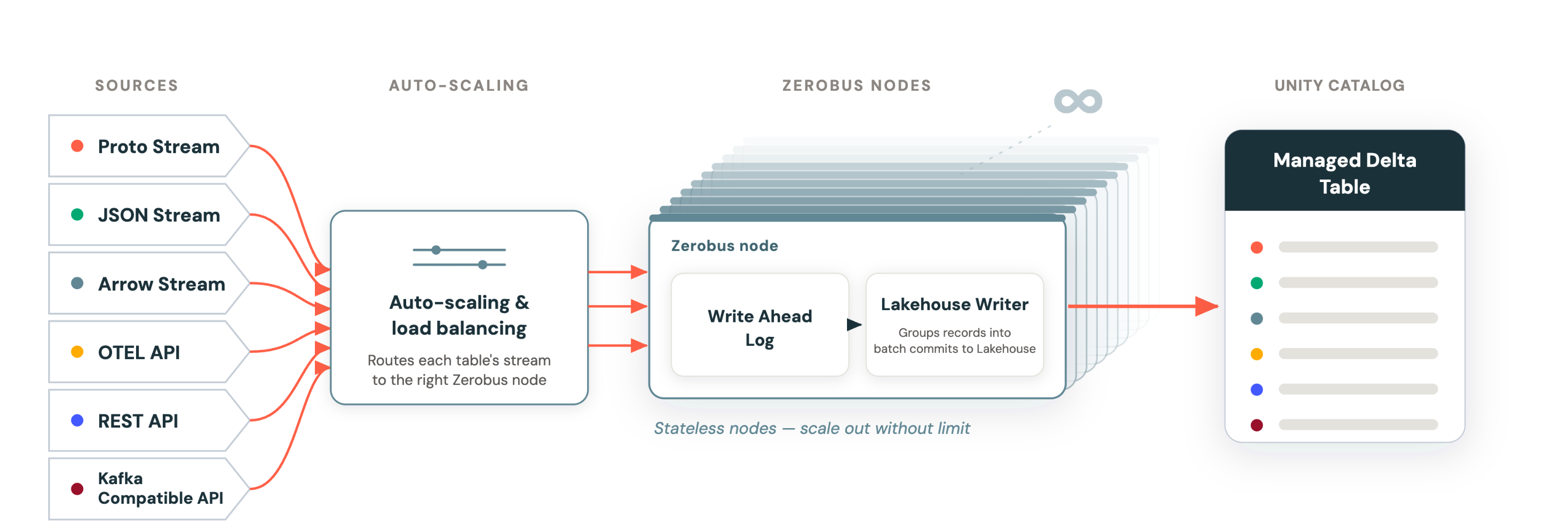
All of them write straight into Delta tables. For a full comparison and how to choose, see API protocols. To write your first client, see Use Zerobus Ingest.
Cost
Charges for Zerobus Ingest are billed against the "Jobs Serverless" SKU. Pricing is available on the Lakeflow Connect pricing page.
Monitoring your usage
You can monitor your spend through the billable usage system table. See Billable usage system table reference. Filter for Zerobus Ingest usage with:
billing_origin_product = 'LAKEFLOW_CONNECT'product_features.lakeflow_connect.zerobus_request_typeidentifies how the data was ingested:'GRPC'(SDK streaming),'HTTP'(REST),'OTEL_GRPC'and'OTEL_HTTP'(OpenTelemetry/OTLP),'KAFKA'(Kafka-compatible APIs), or'MQTT'(MQTT).
Additional resources
- Write a client: SDK and REST examples for sending data to Zerobus Ingest.
- Zerobus Ingest concepts: how streams, ordering, durability, and scaling work.
- Zerobus Ingest deep dives: in-depth guides, such as schema management and networking.
- Zerobus Ingest quotas: throughput quotas and limits.
- Lakeflow Connect pricing: pricing and billing for Zerobus Ingest.