Networking considerations
This deep dive covers how to connect producers to Zerobus Ingest in Lakeflow Connect securely and efficiently: front-end Private Link, connecting to firewalled storage, and compression.
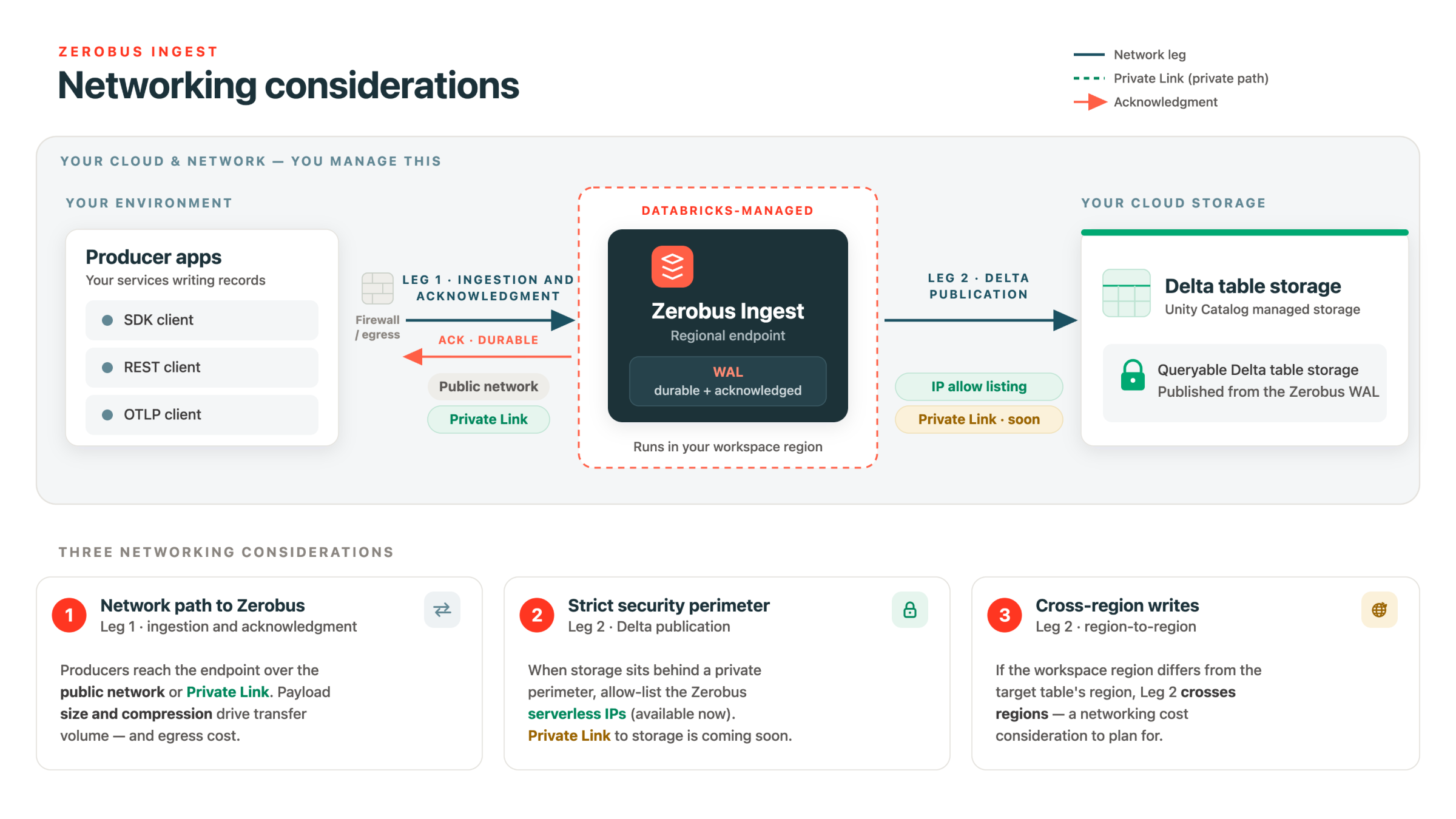
Zerobus Ingest always runs in the region of your workspace. Producers send data over the network to that regional endpoint, and Zerobus Ingest writes it to your target Delta table. Zerobus Ingest is available in select regions. See Ingestion availability.
A Zerobus Ingest write has two network legs, and you secure them differently:
- Your producer to the Zerobus Ingest service. Reach the regional endpoint over the public internet. For supported interfaces, you can keep traffic on a private path with front-end Private Link. MQTT and Kafka-compatible APIs don't support front-end Private Link and must use the public endpoint.
- The Zerobus Ingest service to your table's storage. Zerobus Ingest connects to your storage from Databricks serverless compute. If your storage is behind a firewall, allowlist the Databricks serverless outbound IPs so Zerobus Ingest can reach it. See Connect to firewalled storage.
Front-end Private Link
Front-end Private Link isn't supported for MQTT or Kafka-compatible API connections. These producers must connect to the public endpoint.
For supported interfaces, producers reach Zerobus Ingest over the network to your workspace's regional endpoint by default. If you don't want that traffic to traverse the public internet, or you need more bandwidth or a more predictable networking path, use front-end Private Link to keep the connection between your producers and the Zerobus Ingest service on a private path.
Consider front-end Private Link when you:
- Require that ingestion traffic never traverse the public internet.
- Need higher or more predictable bandwidth than a public path provides.
- Want to explore lowering your network traffic costs, since keeping ingestion on a private path can reduce public-internet data transfer.
Front-end Private Link to Zerobus Ingest uses the same workspace front-end private connectivity setup as the rest of your workspace. To set it up for your cloud, see:
Enable AWS PrivateLink front-end connectivity. For the underlying concepts, see Private Link concepts.
Connect to firewalled storage
Zerobus Ingest makes your data durable and then writes it into your target table's storage from Databricks serverless compute. If your storage account or bucket restricts inbound traffic with a firewall, allowlist the Databricks serverless outbound IP ranges so Zerobus Ingest can reach it.
Databricks publishes the serverless outbound IPs as a JSON file at ip-ranges.json, and also lists them per region in the network reference. You only need to allowlist the ranges for your workspace's cloud and region:
See Outbound IPs for serverless compute.
Cross-region considerations
Zerobus Ingest runs in your workspace's region (see Table requirements). Keep your producers in that region when you can: the closer your producers are to the endpoint, the lower the network latency and the higher the throughput you can sustain.
When producers run in a different region from the Zerobus Ingest endpoint, traffic crosses regions, which adds latency and can incur cloud egress charges. The exact cost depends on your cloud, regions, and data volume, and varies enough that a single figure would be misleading. Databricks recommends running a proof of concept with your own workload and regions to measure the actual cost before you commit to a cross-region topology.
Compression over the network
Compressing records before they go over the wire reduces the bytes you send, which can avoid bandwidth bottlenecks in exchange for additional CPU on the client. Your options depend on the interface:
- Arrow Flight supports IPC compression (
ZSTDfor the best ratio,LZ4_FRAMEwhen the client is CPU-constrained). See IPC compression. - OpenTelemetry (OTLP) supports gzip on all services. See Compression.
Choosing a compact record format, Protocol Buffers (protobuf) or Arrow rather than JSON, also reduces bytes on the wire.
Related
- API protocols: Choosing an interface.
- Message types: Record formats and their size trade-offs.
- Zerobus Ingest quotas: Default throughput quotas.