Feed (::::feed)
The feed directive is used to create RSS feed entries for release notes and other content. It transforms the directive content into formatted markdown for webpage display while also generating RSS feed items.
Basic Syntax
::::feed

::feed-title[Title]{level=3}

::feed-date[YYYY-MM-DD]{renderdate=false}

::feed-category[category1, category2]

:::feed-description

Description content with markdown support.

:::

::feed-enclosure[/relative/path/to/enclosure/image.png]

::::
Components
Feed Container (::::feed)
The main container directive.
Feed Title (::feed-title[Title])
Specifies the title of the feed item.
- Title: Required. The title text (supports markdown)
- Attributes:
level: Optional. Heading level (1-6, defaults to 3)
Feed Date (::feed-date[Date])
Specifies the publication date of the feed item.
- Date: Required. The publication date in format of "YYYY-MM-DD" (e.g. "2024-01-15").
- Attributes:
renderdate: Optional. Controls whether the date is displayed on the webpage (true/false, defaults totrue)
Feed Description (:::feed-description)
Contains the main content of the feed item.
- Content: Required. Markdown content including text, links, images, etc.
Feed Category (::feed-category[Categories])
Specifies categories for the RSS feed item.
- Categories: Required. Comma-separated list of categories (e.g., "feature-store, aws")
Available categories:
- Product
- aibi
- Assistant
- Audit logs
- Auto Loader
- Bundles
- Compliance
- Compute
- dashboards
- Data Connectivity
- Data Governance
- Data Warehousing
- Databricks Apps
- dbsql
- Delta Lake
- OpenSharing
- Drivers
- Generative AI
- genie
- Git Folders
- Ingestion
- Jobs
- Lakebase
- Lakeflow Connect
- Lakehouse Federation
- Marketplace
- Model Serving
- Networking
- Notebooks
- Partner Connect
- Pipelines
- Regions
- Security
- Serverless
- SQL
- Unity Catalog
Feed Enclosure (::feed-enclosure[/relative/path/to/image])
Set the enclosure image for the feed item, if not set, default to use databricks logo.
Example 1
<!--- Feed Item with Categories -->

::::feed

::feed-title[Example feed with categories]

::feed-date[2024-01-15]

::feed-category[mlflow, machine-learning, aws]

:::feed-description

This is a example release note feed with multiple categories.

Categories:

- MLFlow
- machine-learning
- AWS

:::

::::
Output
Note: the category set is not going to be visible in the rendered page, it will only show up in the feed.xml
Example feed with categories
Jan 15, 2024
This is a example release note feed with multiple categories.
Categories:
- MLFlow
- machine-learning
- AWS
Example 2
<!-- Feed Item with Media Enclosure -->
::::feed
::feed-title[Example feed with media enclosure]
::feed-date[2024-01-15]
:::feed-description
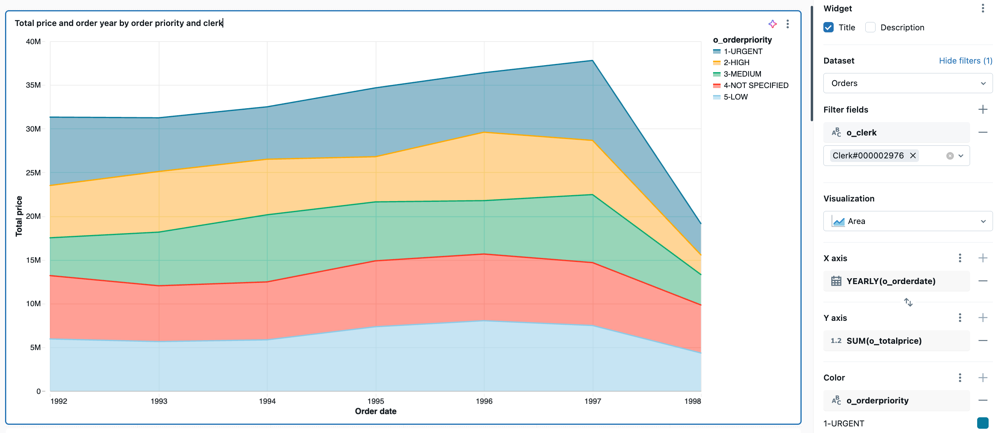
This is a example release note feed with image/enclosure included below.
:::
::feed-enclosure[/images/dashboards/area.png]
::::
Output
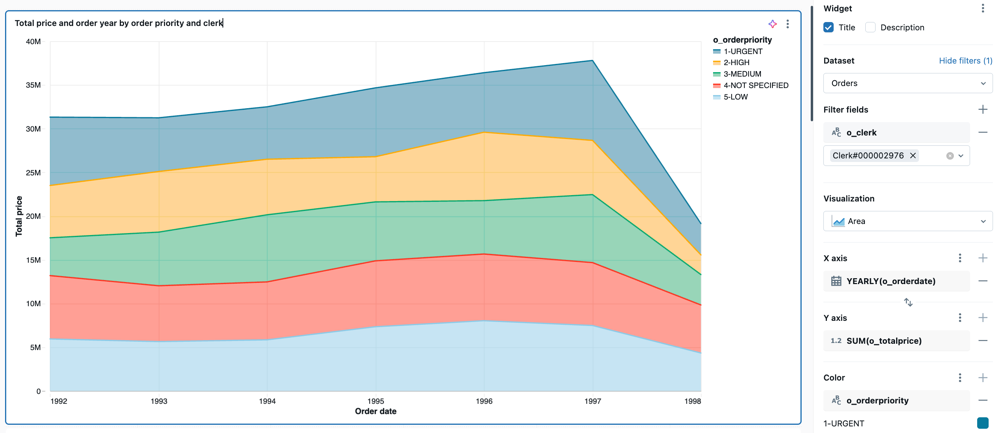
This image will show up as the feed item cover in the feed reader app
Example feed with media enclosure
Jan 15, 2024
This is a example release note feed with image/enclosure included below.
Example 3
<!-- Feed Item with Hidden Date and customized heading level size -->

::::feed

::feed-title[Example feed with hidden date and customized heading level size]{level=4}

::feed-date[2024-01-15]{renderdate=false}

:::feed-description

This is an example release note feed with date hidden and customized heading level size

:::

::::
Output
Example feed with hidden date and customized heading level size
This is an example release note feed with date hidden and customized heading level size
Example 4
<!-- Feed Item with enclosing cloud directive -->

:::::aws

::::feed

::feed-title[Example feed with surrounding cloud directive]

::feed-date[2024-01-15]

:::feed-description

This is an example release note feed with surrounding cloud directive

:::

::::

:::::
Output
This note will only shows up in AWS. Since feed directive is nested, you need to use more colons for the cloud directive.
Example feed with surrounding cloud directive
Jan 15, 2024
This is an example release note feed with surrounding cloud directive