Phase 3: Design Unity Catalog architecture
In this phase, you design Unity Catalog infrastructure to support data governance, access control, and data organization.
Unity Catalog is enabled automatically on workspaces in Databricks accounts created after November 8, 2023. For these accounts, a metastore is automatically created and assigned to workspaces.
For comprehensive Unity Catalog guidance including implementation steps and advanced features, see What is Unity Catalog?.
Choose a governance operational model
Before designing your Unity Catalog architecture, select a governance operational model that aligns with your organizational structure and data culture. The governance model determines how data ownership, access control, and policy enforcement are managed across your organization.
Governance model options
-
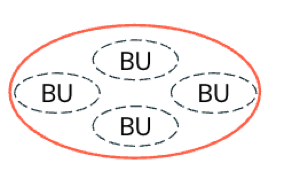
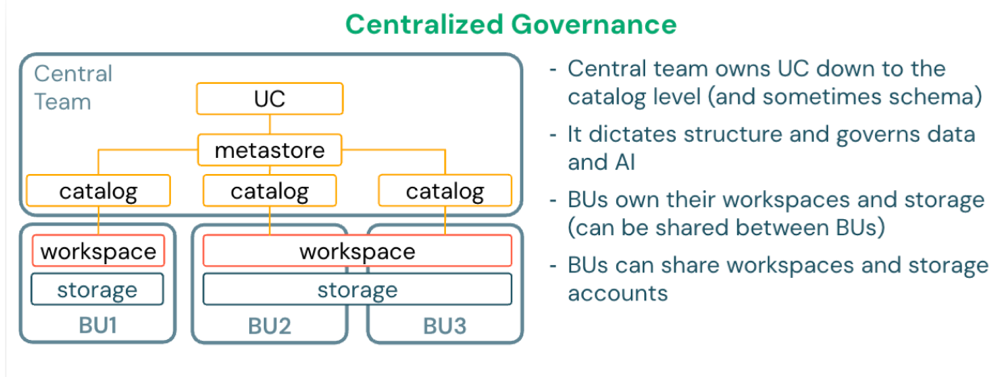
Centralized governance: Each business unit or domain operates in a different business boundary, but all units fall under the same operational boundary that governs all data and AI assets (multi-tenancy). A single platform or data governance team controls all data assets, policies, and access.
-
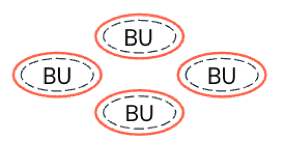
Decentralized governance: Each business unit or domain has an independent business and operational boundary (meaning it has its own tenant). Governance is delegated to each business unit to define and enforce its own policies independently with minimal central oversight.
-
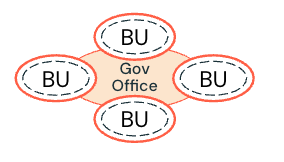
Federated governance: Each business unit or domain has an independent business and operational boundary. However, governance policies are defined by a centralized governance office and enforced by each business unit. Critical assets are governed by the governance office (for example, shared data products).
-
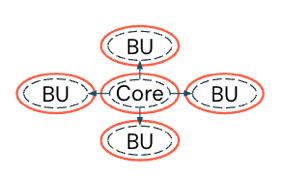
Hybrid governance: A model between centralized and decentralized, allowing each business unit or domain to govern its own data (decentralized). However, critical business data is collected and governed in one place for all to use (centralized).
Best practices for governance models
- Start with federated governance for most organizations (balances control and agility).
- Use centralized governance for highly regulated industries (for example, finance, healthcare, government).
- Document roles and responsibilities clearly for each governance model.
- Align governance model with existing organizational structures.
- Review and adjust governance model as your data platform matures.
Centralized governance | Decentralized governance | Federated governance | Hybrid governance | |
|---|---|---|---|---|
Definition | A single central authority controls all data and AI policies across the organization. | Each business unit independently manages its own data and AI policies. | Central teams set guidelines and standards, while local teams have autonomy to implement them. | Core data and policies are centrally managed, while business units control their domain-specific data and policies. |
Decision-making | All decisions flow through a central team using a top-down approach. | Business units make decisions independently without central coordination. | Central teams establish guidelines, and local teams make decisions within those boundaries. | Central teams make decisions for core data and infrastructure. Business units make their own decisions for domain-specific needs. |
Data ownership | A central team owns and manages all data assets. | Individual teams or business units own their data with no shared governance. | Multiple teams share ownership responsibilities across the organization. | Central teams own core shared data. Business units own their domain-specific data. |
Scalability | Scaling depends on the central team's capacity and can become a bottleneck as the organization grows. | Business units can scale independently, but coordination between teams may be difficult. | Organizations can scale while maintaining coordination through established governance structures. | Core data scales with central resources. Business units scale independently for their domains. |
Compliance and security | Policies are consistently enforced across the organization with strong central oversight. | Enforcement varies by team, which can lead to security gaps and inconsistent practices. | Central teams set security standards and local teams enforce them within their domains. | Core data follows strict compliance rules. Business units have flexibility for domain-specific requirements. |
Operational efficiency | Operations are efficient but can be slowed by bureaucratic processes and approval chains. | Teams work quickly and adapt easily, but efforts may be duplicated and silos can form. | Organizations balance efficiency and flexibility, though extensive coordination can slow decision-making. | Core operations may have bottlenecks. Business units operate efficiently within their domains. |
Use case suitability | Best for highly regulated industries like finance and healthcare that require strict oversight. | Best for agile businesses, startups, and innovation-driven organizations that prioritize speed. | Best for large enterprises and multinational corporations that need both central standards and local flexibility. | Best for organizations with mixed needs, such as fintech companies that balance compliance requirements with innovation. |
Your choice of governance operational model impacts your metastore design. In a centralized model, you can assign a single metastore admin. In a decentralized model, manage permissions through automated deployment pipelines (using CI/CD tools such as Terraform) rather than delegating to individual business unit or environment administrators.
Design metastore architecture
A Unity Catalog metastore is the top-level regional container for metadata and governance. Each metastore stores metadata for securable objects (for example, tables, views, volumes, external locations, shares) and the permissions that govern access to them. The metastore is hosted as a multi-tenant service in the Databricks control plane.
Unity Catalog allows a single metastore per region and only allows you to use that metastore in its assigned region. Each workspace must be assigned to exactly one metastore.
Metastore admin role
A metastore can optionally be configured with a metastore admin, depending on your governance model. This role is not set when using automatic enablement of Unity Catalog. The metastore admin role is required if you want to manage the storage of Unity Catalog objects at the metastore level, and it is convenient if you want to manage data centrally across multiple workspaces in a region.
- In a centralized model, assign a single metastore admin or designated group.
- In a decentralized model, manage permissions through automated deployment pipelines rather than delegating to individual administrators.
If you use a metastore admin, it is strongly recommended to assign the role to a designated group instead of a single user.
Isolation mechanisms
To support enterprise-grade segregation for security or organizational reasons, Unity Catalog supports isolation on several levels:
- Admin isolation (delegation of management): Data should be managed by designated people or teams, based on the purpose or ownership of that data.
- Workspace binding: Data should only be accessed in designated environments, based on the purpose of that data.
- One catalog (or other Unity Catalog object) can be bound to multiple workspaces.
- One workspace can be bound to multiple catalogs, credentials, and external locations of the same metastore.
- Storage isolation: Data should be physically separated in storage.
- Unity Catalog access control: Users should only gain access to data or metadata based on agreed access rules.
Use these isolation mechanisms to segregate workloads, teams, or business units in a single metastore per region.
Metastore design patterns
Single cloud, single region deployment
For organizations operating in a single cloud region, deploy one metastore in that region. All workspaces in the region are assigned to this metastore.
Single cloud, multi-region deployment
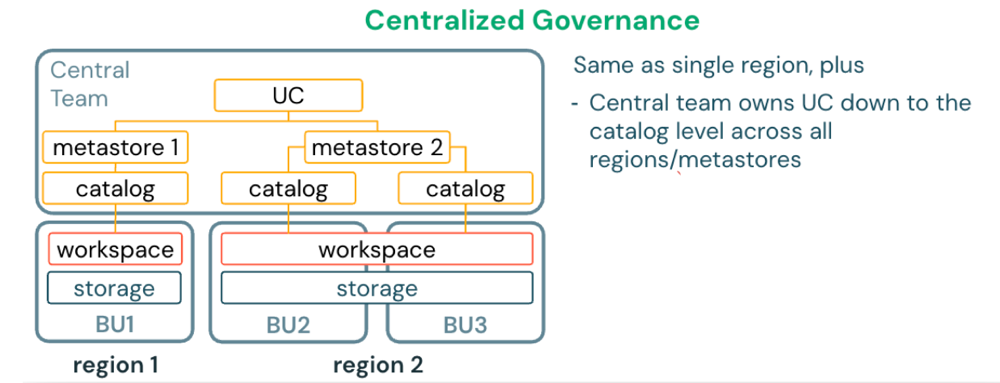
For organizations operating in multiple regions of the same cloud, deploy one metastore per region. Each workspace is assigned to the metastore in its region. Use Databricks-managed (D2D) OpenSharing to share data between metastores across regions.
Multi-cloud, multi-region deployment
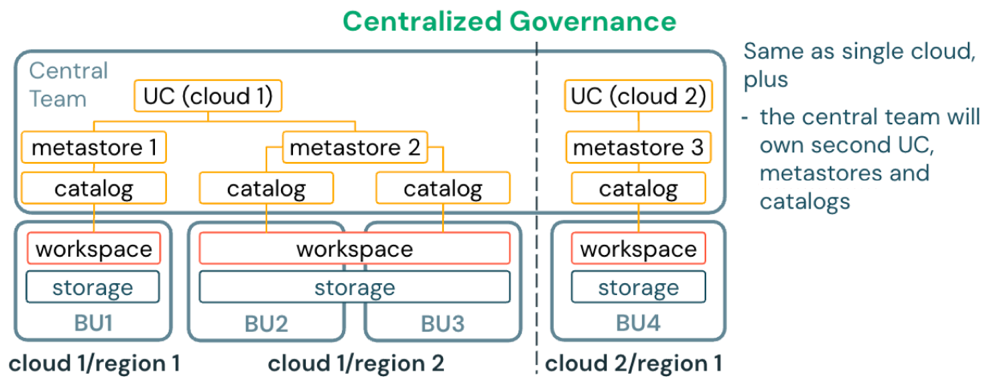
For organizations operating across multiple cloud providers and regions, deploy one metastore per region in each cloud. Use Databricks-managed (D2D) OpenSharing to share data between metastores across clouds and regions.
Alternative patterns
- One metastore per business unit: Appropriate when business units require complete isolation with no data sharing.
- One metastore per environment: Less common pattern where dev, staging, and production use separate metastores for strict environment isolation.
Multi-region design considerations
If multiple regions use Databricks, a single Unity Catalog metastore must be deployed in each region. Users can work with the metastore in the same region as the workspace they are logged in to. To access data defined in a metastore of another region, Databricks-managed (D2D) OpenSharing is recommended.
Do not register shared tables as external tables in more than one metastore. The risk is that any changes to the schema, table properties, and comments that occur as a result of writes to metastore A will not register at all with metastore B. Tables in metastore B would have to be recreated to have the correct schema, and table properties and comments would be entirely disconnected. This can also cause consistency issues with the Delta Commit service. Use D2D OpenSharing for sharing data between metastores.
Best practices for multi-region design
- Deploy one metastore per region as the default pattern.
- Use Databricks-managed OpenSharing to share tables across regions.
- Evaluate the frequency and volume of data access across cloud regions. If the cost gets too high, consider setting up a pipeline to synchronize tables between regions.
- For cross-region setups, store metastore root storage in the same region as the metastore for performance.
Best practices for metastore design
- Use one metastore per region as the default pattern for operational simplicity.
- Assign workspaces in the same region to the same metastore.
- Use catalogs within a metastore to separate data by environment or domain.
- Create an administrative workspace per region for managing Unity Catalog resources.
- Document metastore assignments and regional boundaries in your runbook.
For new accounts created after November 8, 2023, metastores are automatically created and assigned.
For detailed information about Unity Catalog storage architecture including managed, external, and foreign objects, see Phase 4: Design storage architecture.
Design catalog structure
Catalogs are the first organizational layer within a metastore. They contain schemas, which contain tables, views, volumes, and functions. Your catalog design determines how data assets are organized and accessed.
Catalog design patterns
Environment-based catalogs
Separate catalogs for software development lifecycle (SDLC) environments such as development, staging, and production (for example, dev, staging, prod). This pattern supports environment promotion workflows and prevents accidental production changes.
Isolate the environments at the catalog level of the 3-level namespace that Unity Catalog provides:
devcatalog covers development data locations.prodcatalog covers production data locations.- Catalogs can be combinations of SDLC and business or organizational unit names, for example:
sales_dev,sales_prod,engineering_dev
Domain-based catalogs
Separate catalogs for business domains or organizational units (for example, sales, marketing, finance, engineering). This pattern aligns with data mesh architectures and domain ownership.
Hybrid catalogs
Combines environment and domain patterns (for example, sales_prod, sales_dev, finance_prod, finance_dev). This provides both isolation and clear ownership.
Data lifecycle catalogs
Separate catalogs for different data maturity stages (for example, raw, curated, analytics). This pattern follows medallion architecture principles at the catalog level.
Sandbox and development areas
Many teams need sandbox areas to create temporary datasets for internal use. Provide individuals or teams their own sandboxed schemas where they can add tables, but cannot share with anyone outside their team since they do not own the containing schema and catalog.
Catalog naming conventions
Choose a naming convention for your catalogs that aligns with certain configurations, for example, by software development lifecycle environment (Dev, Test, Prod), medallion layer (Bronze, Silver, Gold), or business unit (Billing, Customer, Sales). The exact naming conventions should be defined by your architecture team.
Best practices for catalog design
- Use environment-based catalogs as the default for most organizations.
- Use domain-based catalogs for data mesh or federated governance models.
- Limit the number of catalogs to reduce administrative overhead (typically 3-10 per metastore).
- Use consistent naming conventions across all catalogs.
- Document catalog purposes and data ownership in catalog comments.
- Use catalog grants to control who can create schemas and tables within each catalog.
- Avoid creating separate catalogs for individual teams or projects (use schemas instead).
Design storage credential strategy
Storage credentials are authentication objects that allow Unity Catalog to access cloud storage on behalf of users. They provide a secure way to grant Databricks access to customer-managed cloud storage without sharing long-term credentials with end users.
When storage credentials are required
- Creating external locations that point to cloud storage (for example, S3, ADLS Gen2, GCS).
- Accessing customer-managed storage for external tables and volumes.
- Reading data from cloud storage that is not managed by Unity Catalog.
When storage credentials are not required
- Accessing Unity Catalog managed tables and volumes (storage managed by Databricks).
- Using default storage in serverless workspaces.
AWS storage credential architecture
AWS storage credentials use cross-account IAM roles with trust policies that allow Databricks to assume the role. The IAM role must have policies granting S3 permissions (for example, s3:GetObject, s3:PutObject, s3:ListBucket) to specific S3 buckets or prefixes.
The authentication flow:
- Unity Catalog assumes the IAM role using the trust relationship
- AWS validates the trust policy and returns temporary credentials
- Unity Catalog uses temporary credentials to access S3 on behalf of the user
- Access is granted or denied based on IAM policies attached to the role
Storage credential design patterns
- Use separate IAM roles for different storage buckets or data domains (for example,
uc-prod-sales-role,uc-dev-engineering-role). - Apply least-privilege permissions (only grant access to specific S3 prefixes).
- Create one storage credential per environment (for example, dev, staging, production).
- Create one storage credential per business unit when data segregation is required.
Best practices for AWS storage credentials
- Use separate IAM roles for different storage buckets or data domains.
- Apply least-privilege permissions (only grant access to specific S3 prefixes).
- Enable AWS CloudTrail to audit access to S3 buckets.
- Use bucket policies as an additional security layer.
Design external location strategy
External locations map storage credentials to specific cloud storage paths, enabling Unity Catalog to govern access to data stored outside of Unity Catalog-managed storage. Each external location combines a storage credential with a cloud storage URL prefix.
External location use cases
- Accessing existing data in cloud storage that predates Unity Catalog adoption.
- Creating external tables that reference data files managed by other systems.
- Sharing data with external systems that require direct file access.
- Storing large unstructured data (for example, videos, images, PDFs) in Unity Catalog volumes.
External location design patterns
- Create external locations at the highest common path prefix to minimize the number of locations.
- Use external locations that align with catalog or schema boundaries (for example, one external location per catalog).
- Separate external locations by environment (for example, dev, staging, production).
- Separate external locations by business unit or data domain when required.
Best practices for external locations
- Use external locations for data that must remain in specific cloud storage paths.
- Use Unity Catalog managed tables instead of external locations when possible (simpler governance and optimization).
- Use descriptive names that indicate the storage path and purpose (for example,
s3-sales-data-prod,adls-finance-reports-dev). - Grant access to external locations only to users who need to create external tables.
- Document external location purposes and data ownership.
Design permission model
Every organization has different requirements for data access control. A common permission model involves defining clear roles with specific privileges.
Example permission model
- Data curators: Manage all data assets (for example, ownership, create, modify, delete privileges).
- Data consumers: Read-only access to most data assets (select privileges).
- Data engineers: Read-write access to development and staging environments.
- Analysts: Read-only access to production analytics data.
Permission delegation
The metastore administrator establishes and enforces permission policies by assigning and delegating access rights to users or groups based on their responsibilities. For example:
- Data curators may be granted ownership or write privileges for managing datasets.
- Consumers receive read-level permissions through group membership.
- This structure ensures consistent governance, simplifies maintenance, and supports compliance with organizational data policies.
Best practices for permission models
- Grant privileges to groups rather than individual users for easier management.
- Use least-privilege access (grant only the minimum permissions required).
- Document access control policies and review regularly with security teams.
- Use catalog and schema grants for coarse-grained access control.
- Use table and view grants for fine-grained access control.
- Use dynamic views and row/column filters for sensitive data.
- Audit access using system tables (
system.access.audit).
Hub-and-spoke design pattern
The hub-and-spoke design pattern is a common architecture for enterprise Unity Catalog deployments. This pattern centralizes shared data assets in a hub catalog while allowing domain-specific data in spoke catalogs.
Hub-and-spoke characteristics
- Hub catalog: Contains organization-wide shared data assets (for example, customer master data, reference data, centrally curated datasets).
- Spoke catalogs: Contain domain-specific data owned and managed by business units (for example, sales analytics, marketing campaigns).
- Storage separation: Hub and domain catalogs use dedicated storage with separate storage credentials.
- Managed tables preference: For structured data in the lakehouse, use managed tables.
- Volumes for raw data: Use volumes to access landing, raw, or unstructured data (which can sit outside the lakehouse because third parties usually require access to these storage locations directly).
- External tables for sharing: Use external tables to share data outside of the lakehouse (to other systems not able to use OpenSharing or that need direct access to the storage location).
Example hub-and-spoke design
Metastore (region: us-east-1)
├── Hub Catalog (prod_hub)
│   ├── Storage credential: hub-prod-credential
│   ├── External location: s3://company-hub-prod/
│   └── Schemas: customers, products, reference_data
│
├── Sales Domain Catalog (sales_prod)
│   ├── Storage credential: sales-prod-credential
│   ├── External location: s3://company-sales-prod/
│   └── Schemas: transactions, forecasts, reports
│
└── Engineering Domain Catalog (engineering_prod)
    ├── Storage credential: engineering-prod-credential
    ├── External location: s3://company-engineering-prod/
    └── Schemas: telemetry, monitoring, logs
Best practices for hub-and-spoke design
- Use the hub catalog for organization-wide shared data that multiple domains consume.
- Use spoke catalogs for domain-specific data owned by business units.
- Separate storage credentials and external locations for hub and each spoke.
- Use Databricks-managed OpenSharing to share data from hub to spokes.
- Document data ownership and lineage for hub and spoke catalogs.
- Note: The metastore storage is now optional and recommended not to be used.
Unity Catalog architecture recommendations
Recommended
- Segregate SDLC environments in Unity Catalog metastore on the catalog level of the 3-level namespace.
- Use the isolation levels of Unity Catalog to segregate workloads, teams, and business units.
- Use Databricks-managed OpenSharing to share tables across clouds and regions.
- For cross-region setups, evaluate the frequency and volume of data access across cloud regions. If the cost gets too high, consider setting up a pipeline to synchronize tables between regions.
- Use Unity Catalog managed tables and do not provide storage-level access to buckets.
- Use volumes for Unity Catalog-secured Portable Operating System Interface (POSIX)-style file paths.
- Avoid legacy data access patterns such as mounting cloud storage and instance profiles wherever possible.
- Evaluate whether customer-managed encryption keys (for both managed services and storage) are needed for increased control over data at rest.
Avoid
- Do not use access modes other than standard or dedicated for Unity Catalog-enabled workspaces.
- Do not store production data on DBFS (Databricks File System).
- Do not register external tables across regions (metastores).
- Do not use the root bucket (DBFS) for storage of customer data. Make sure to understand the risks and workarounds for the root bucket.
Phase 3 outcomes
After completing Phase 3, you should have:
- Governance model selected based on organizational structure (centralized, decentralized, federated, or hybrid).
- Metastore architecture designed (typically one per region).
- Unity Catalog storage architecture designed (managed vs external vs foreign objects).
- Catalog structure defined using environment-based, domain-based, or hybrid patterns.
- Storage credential strategy designed with separate credentials for different environments or domains.
- External location strategy designed for existing cloud storage that requires Unity Catalog governance.
- Permission model designed with clear roles (for example, curators, consumers, engineers, analysts).
- Hub-and-spoke design evaluated for enterprise deployments with shared and domain-specific data.
Next phase: Phase 4: Design network architecture
Implementation guidance: For step-by-step instructions to implement your Unity Catalog design, see What is Unity Catalog?.