Transform unstructured data using AI Functions
AI Functions are built-in functions that you can use to apply LLMs or state-of-the-art research techniques on data stored on Databricks for data transformation and analysis. They can be run from Databricks SQL, notebooks, Lakeflow pipelines, and Workflows.
AI Functions are simple to use, fast, and scalable. Analysts can use them to apply data intelligence to their proprietary data, while data engineers, data scientists, and machine learning engineers can use them to build production-grade batch pipelines.
When you call an AI Function, your query runs on the compute you submit it from, such as a SQL warehouse, notebook, cluster, or pipeline. Depending on the function, the model inference may run on separate Databricks-managed infrastructure that is billed in addition to that compute. See View costs for AI Function workloads.
Requirements
- AI Functions are not available on Classic SQL warehouses.
- Databricks Runtime 15.4 LTS or above is required. Databricks Runtime 18.2 or above is recommended for the best performance and access to the latest features.
Task specific and general-purpose
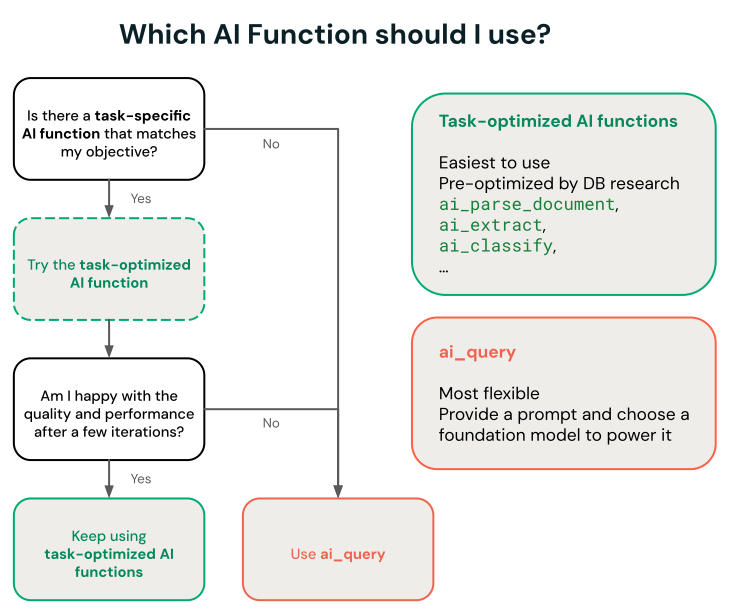
AI Functions has task-specific and general-purpose functions:
- Task-specific AI Functions — Purpose-built functions optimized for a specific task, such as document parsing, entity extraction, classification, and sentiment analysis. These functions are powered by Databricks-managed, research-back systems. Some functions include UI experiences. See Task-specific AI functions for supported functions and models.
ai_query— The general-purpose function for task and model flexibility. Provide a prompt and choose any supported Foundation Model API. See Useai_query.
To restrict which task-specific AI Functions your organization can access, see AI Functions Unity Catalog permissions.
Task-specific AI functions
Task-specific functions are scoped for a certain task so you can automate routine transformations, like entity extraction, translation, and classification. Databricks recommends these functions for getting started because they invoke a state-of-the-art research techniques maintained by Databricks and do not require any customization.
See Analyze customer reviews using AI Functions for an example.
The following functions are grouped by task. Use the SQL and REST API columns to open the reference for each interface. A dash in the REST API column means no dedicated REST API reference is listed.
Intelligent document processing:
Function | Description | SQL | REST API |
|---|---|---|---|
| Parse structured content (text, tables, figure descriptions) and layout from unstructured documents using state-of-the-art research techniques. | ||
| Extract structured fields from documents or text using a schema you define. | ||
| Classify input text according to labels you provide using state-of-the-art research techniques. | ||
| Transform parsed documents or plain text and markdown into search-ready chunks optimized for AI Search and RAG pipelines. | — | |
| Retrieve ranked, deduplicated documents and a grounded answer for a natural-language query over one or more knowledge sources. | — | |
| Generate new columns for each row from a schema you define, optionally grounded in AI Search indexes or web search. | — |
Transcribe audio:
Function | Description | SQL | REST API |
|---|---|---|---|
| Transcribe an audio file to text, with per-segment timestamps and automatic speaker labeling when enabled. | — |
Transform text:
Function | Description | SQL | REST API |
|---|---|---|---|
| Correct grammatical errors in text using a state-of-the-art AI model. | — | |
| Translate text to a specified target language using a state-of-the-art AI model. | — | |
| Generate a summary of text using SQL and a state-of-the-art AI model. | — | |
| Mask specified entities in text using a state-of-the-art AI model. | — |
Analyze unstructured text:
Function | Description | SQL | REST API |
|---|---|---|---|
| Evaluate questions against text or structured data and return probabilities, choices, or scores. | ||
| Perform sentiment analysis on input text using a state-of-the-art AI model. | — | |
| Compare two strings and compute the semantic similarity score using a state-of-the-art AI model. | — |
Generate content. For custom prompts or a specific model, see Use ai_query:
Function | Description | SQL | REST API |
|---|---|---|---|
| Answer a user-provided prompt using a state-of-the-art AI model. | — |
Predict outcomes:
Function | Description | SQL | REST API |
|---|---|---|---|
| Train a classification model and predict class labels for rows where the target column is | — | |
| Train a regression model and predict numeric values for rows where the target column is | — |
Forecast time series:
Function | Description | SQL | REST API |
|---|---|---|---|
| Forecast data up to a specified horizon. This table-valued function is designed to extrapolate time series data into the future. | — | |
| Identify anomalous values in historical time series data and return expected values, prediction bounds, and anomaly scores. | — |
Analyze metric changes:
Function | Description | SQL | REST API |
|---|---|---|---|
| Rank dimension values that contribute most to a change in a metric between a control group and a test group. | — |
Search with AI Search embeddings:
Function | Description | SQL | REST API |
|---|---|---|---|
| Search and query an AI Search index using a state-of-the-art AI model. |
Use AI Functions in production workflows
For large-scale batch inference, you can integrate task-specific AI Functions, or the general-purpose function ai_query into your production workflows, like Lakeflow pipelines, Databricks workflows and Structured Streaming. This enables production-grade processing at scale.
Best practices for AI functions in production:
Let AI Functions handle your workload at scale: AI Functions automatically manage parallelization, retries, and scaling. It is advised to submit your full dataset in a single query rather than manually splitting it into small batches. Performance may not scale linearly from very small workloads to large-scale workloads.
Use Databricks-hosted foundation models: When using the ai_query AI Function, use Databricks-hosted foundation models (prefixed with databricks-), not provisioned throughput. These provisionless endpoints are fully managed and work best for batch processing.
See Deploy batch inference pipelines for examples and details.
Monitor AI Functions progress
To understand how many inferences have completed or failed and troubleshoot performance, you can monitor the progress of AI Functions using the query profile feature.
In Databricks Runtime 16.1 ML and above, from the SQL editor query window in your workspace:
- Select the link, Running--- at the bottom of the Raw results window. The performance window appears on the right.
- Click See query profile to view performance details.
- Click AI Query to see metrics for that particular query including the number of completed and failed inferences and the total time the request took to complete.
View costs for AI Function workloads
The compute that runs your query is always billed, for example a SQL warehouse or job cluster. Whether there is an additional model inference cost depends on the function:
- Task-specific functions (for example,
ai_classify,ai_summarize,ai_translate) run inference on Databricks-managed serverless GPU infrastructure through Model Serving. You don't provision this infrastructure, but it is billed in addition to your query compute. ai_queryis billed for the Model Serving endpoint you specify. Databricks-hosted foundation model endpoints are billed like the task-specific functions; custom model and provisioned throughput endpoints run on their own dedicated serving compute and are billed accordingly.ai_forecast,ai_detect_anomalies,ai_predict_class,ai_predict_value, andai_top_driversrun entirely on the compute you submit them from, with no separate inference cost.vector_searchqueries your AI Search index through the Databricks-managed AI Search service.
AI Function inference costs are recorded in the system.billing.usage table under one of two products:
ai_similarity,ai_analyze_sentiment,ai_summarize,ai_translate,ai_fix_grammar, andai_maskare recorded under theMODEL_SERVINGproduct with theBATCH_INFERENCEoffering type.- Other task-specific AI Functions that incur separate inference costs are recorded under the
AI_FUNCTIONSproduct, includingai_classify,ai_extract,ai_parse_document, andai_search.
View costs for batch inference workloads
The following examples show how to filter MODEL_SERVING records with the BATCH_INFERENCE offering type based on job, compute, SQL warehouses, and Lakeflow pipelines. These records include ai_query workloads and the task-specific functions that are recorded under MODEL_SERVING.
See Monitor model serving costs for general examples on how to view costs for your batch inference workloads that use AI Functions.
- Jobs
- Compute
- Lakeflow Spark Declarative Pipelines
- SQL warehouse
The following query shows which jobs are being used for batch inference using the system.workflow.jobs systems table. See Monitor job costs & performance with system tables.
SELECT *
FROM system.billing.usage u
  JOIN system.workflow.jobs x
    ON u.workspace_id = x.workspace_id
    AND u.usage_metadata.job_id = x.job_id
  WHERE u.usage_metadata.workspace_id = <workspace_id>
    AND u.billing_origin_product = "MODEL_SERVING"
    AND u.product_features.model_serving.offering_type = "BATCH_INFERENCE";
The following shows which clusters are being used for batch inference using the system.compute.clusters systems table.
SELECT *
FROM system.billing.usage u
  JOIN system.compute.clusters x
    ON u.workspace_id = x.workspace_id
    AND u.usage_metadata.cluster_id = x.cluster_id
  WHERE u.usage_metadata.workspace_id = <workspace_id>
    AND u.billing_origin_product = "MODEL_SERVING"
    AND u.product_features.model_serving.offering_type = "BATCH_INFERENCE";
The following shows which Lakeflow pipelines are being used for batch inference using the system.lakeflow.pipelines systems table.
SELECT *
FROM system.billing.usage u
  JOIN system.lakeflow.pipelines x
    ON u.workspace_id = x.workspace_id
    AND u.usage_metadata.dlt_pipeline_id = x.pipeline_id
  WHERE u.usage_metadata.workspace_id = <workspace_id>
    AND u.billing_origin_product = "MODEL_SERVING"
    AND u.product_features.model_serving.offering_type = "BATCH_INFERENCE";
The following shows which SQL warehouses are being used for batch inference using the system.compute.warehouses systems table.
SELECT *
FROM system.billing.usage u
  JOIN system.compute.clusters x
    ON u.workspace_id = x.workspace_id
    AND u.usage_metadata.cluster_id = x.cluster_id
  WHERE u.workspace_id = <workspace_id>
    AND u.billing_origin_product = "MODEL_SERVING"
    AND u.product_features.model_serving.offering_type = "BATCH_INFERENCE";
View costs recorded under the AI_FUNCTIONS product
The following example shows how to query costs recorded under the AI_FUNCTIONS product. To filter for a specific function, use the product_features.ai_functions.ai_function field. For example, to see only ai_parse_document costs, add AND u.product_features.ai_functions.ai_function = "AI_PARSE_DOCUMENT".
SELECT *
FROM system.billing.usage u
WHERE u.workspace_id = <workspace_id>
  AND u.billing_origin_product = "AI_FUNCTIONS";
View total AI Function cost by user
To calculate total AI Function inference cost, include usage from both products. The following query returns monthly list cost by user for the current month and the previous 12 months:
SELECT
  DATE_TRUNC('MONTH', u.usage_date)::DATE AS usage_month,
  COALESCE(
    u.identity_metadata.run_as,
    u.identity_metadata.run_by,
    'UNATTRIBUTED'
  ) AS principal,
  ROUND(
    SUM(u.usage_quantity * p.pricing.effective_list.default),
    2
  ) AS list_cost_usd
FROM system.billing.usage u
JOIN system.billing.list_prices p
  ON u.cloud = p.cloud
  AND u.sku_name = p.sku_name
  AND u.usage_unit = p.usage_unit
  AND u.usage_end_time >= p.price_start_time
  AND (p.price_end_time IS NULL OR u.usage_end_time < p.price_end_time)
WHERE p.currency_code = 'USD'
  AND u.usage_date >= ADD_MONTHS(DATE_TRUNC('MONTH', CURRENT_DATE()), -12)
  AND (
    (
      u.billing_origin_product = 'MODEL_SERVING'
      AND u.product_features.model_serving.offering_type = 'BATCH_INFERENCE'
    )
    OR u.billing_origin_product = 'AI_FUNCTIONS'
  )
GROUP BY 1, 2
ORDER BY 1 DESC, 3 DESC;