Use ai_query
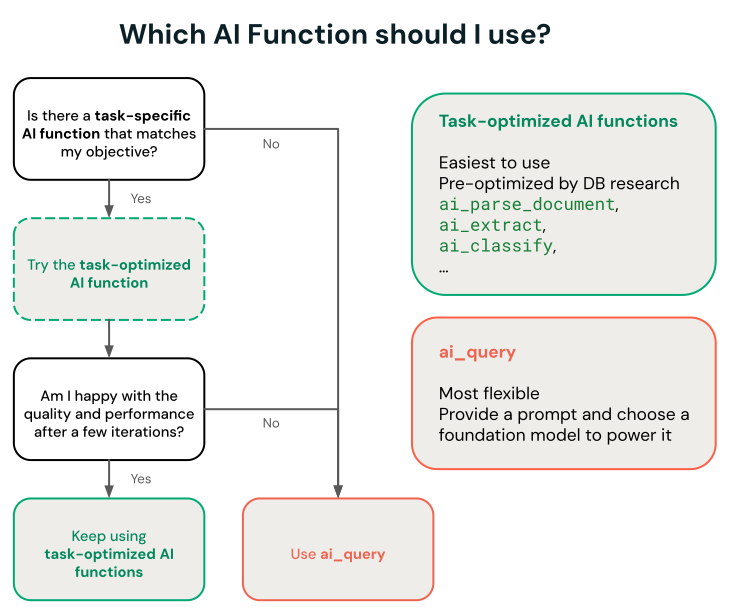
ai_query is a general-purpose AI Function that lets you query any supported AI model directly from SQL or Python. Unlike task-specific AI Functions, which are purpose-built and optimized for a single task, ai_query gives you full control over the model, prompt, and parameters.
For full syntax and parameter reference, see ai_query function.
Requirements
- This function is not available on Classic SQL warehouses.
- Databricks Runtime 15.4 LTS or above is required. Databricks Runtime 18.2 or above is recommended for the best performance and access to the latest features.
When to use ai_query
Databricks recommends starting with a task-specific AI Function when one matches your objective. Use ai_query when a task-specific function doesn't meet your needs. For example, when you need to:
- Control the prompt, model parameters, or output format more precisely
- Query a custom, fine-tuned, or external model
- Need flexibility to further optimize for throughput or quality
Best practices
- Use Databricks-hosted models. Use
system.aimodel services instead of provisioned throughput endpoints. These model services are fully managed and scale automatically without provisioning or configuration. - Select a model optimized for batch inference. Databricks optimizes specific models for high-throughput batch workloads. Using a non-optimized model can result in reduced throughput and longer job completion times. See Supported models for the full list of batch-optimized models.
- Submit your full dataset in a single query. AI Functions automatically handle parallelization, retries, and scaling. Manually splitting data into small batches can reduce throughput.
- Set
failOnErrortofalsefor large workloads. This allows the job to complete and return error messages for failed rows, so you retain successful results without reprocessing the entire dataset.
Unity Gateway governance
ai_query requests to system.ai model services (for example, system.ai.gpt-5-4) are automatically routed through Unity Gateway. Model services that you create in Unity Gateway are not yet supported. Only a subset of Unity Gateway features applies to routed requests:
- Supported: usage tracking, budget integration (including hard spend caps), and permission checks on the model service.
- Not supported: guardrails (service policies), inference tables, tracing tables, rate limits, fallbacks, and external model providers.
See Query endpoints with ai_query for details.
Supported models
ai_query supports Databricks-hosted models, provisioned throughput models, custom models, and external models.
The following table summarizes the supported model types, the associated models, and model serving endpoint configuration requirements for each.
Type | Description | Supported models | Requirements |
|---|---|---|---|
Databricks-hosted models | Databricks hosts these foundation models and offers | See Databricks-hosted inference for the full list of supported foundation models on Model Serving. These models are supported and optimized for getting started with batch inference and production workflows:
Other Databricks-hosted models are available for use with AI Functions, but are not recommended for batch inference production workflows at scale. These other models are made available for real-time inference using Foundation Model APIs pay-per-token. | Databricks Runtime 15.4 LTS or above is required to use this functionality. Requires no endpoint provisioning or configuration. Your use of these models is subject to the Applicable model terms and AI Functions region availability. |
Provisioned throughput models | AI Functions works with provisioned throughput models deployed on Model Serving. |
|
|
Custom models and external models | You can bring your own custom or external models and query them using AI Functions. AI Functions offers flexibility so you can query models for real-time inference or batch inference scenarios. |
|
|
Use ai_query with foundation models
The following example demonstrates how to use ai_query with a foundation model hosted by Databricks.
- See
ai_queryfunction for syntax details and parameters. - See Multimodal inputs for multimodal input query examples.
- See Examples for advanced scenarios for guidance on how to configure parameters for advanced use cases such as:
- Handle errors using
failOnError - Structured outputs on Databricks for how to specify structured output for your query responses.
- Handle errors using
- SQL
- Python
SELECT text, ai_query(
    "system.ai.gpt-oss-120b",
    "Summarize the given text comprehensively, covering key points and main ideas concisely while retaining relevant details and examples. Ensure clarity and accuracy without unnecessary repetition or omissions: " || text
) AS summary
FROM uc_catalog.schema.table;
df_out = df.selectExpr(
  "ai_query('system.ai.gpt-oss-120b', CONCAT('Please provide a summary of the following text: ', text), modelParameters => named_struct('max_tokens', 100, 'temperature', 0.7)) as summary"
)
df_out.write.mode("overwrite").saveAsTable('output_table')
Example notebook: Batch inference and structured data extraction
The following example notebook demonstrates how to perform basic structured data extraction using ai_query to transform raw, unstructured data into organized, usable information through automated extraction techniques. This notebook also shows how to leverage Agent Evaluation to evaluate the accuracy using ground truth data.
Batch inference and structured data extraction notebook
Use ai_query with traditional ML models
ai_query supports traditional ML models, including fully custom ones. These models must be deployed on Model Serving endpoints. For syntax details and parameters, see ai_query function.
SELECT text, ai_query(
  endpoint => "spam-classification",
  request => named_struct(
    "timestamp", timestamp,
    "sender", from_number,
    "text", text),
  returnType => "BOOLEAN") AS is_spam
FROM catalog.schema.inbox_messages
LIMIT 10
Example notebook: Batch inference using BERT for named entity recognition
The following notebook shows a traditional ML model batch inference example using BERT.