Use Genie Code for intelligent document processing
Genie Code builds document processing pipelines end-to-end by orchestrating parsing, classification, extraction, and validation. Point it at unstructured PDFs, contracts, or invoices, and it evaluates quality against labeled data and iterates to improve it, so you can judge when a pipeline is production-ready.
Requirements
To use Genie Code for document processing:
- Meet the requirements for Genie Code agentic capabilities.
- Meet the requirements for AI Functions. The document processing functions (
ai_parse_document,ai_extract, andai_classify) run on serverless compute or a SQL warehouse in a supported region. - Have Unity Catalog access to a volume for your source documents and a schema for the results.
Build a document processing pipeline with Genie Code
-
Open Genie Code on the Jobs & Pipelines page or the SQL editor.
-
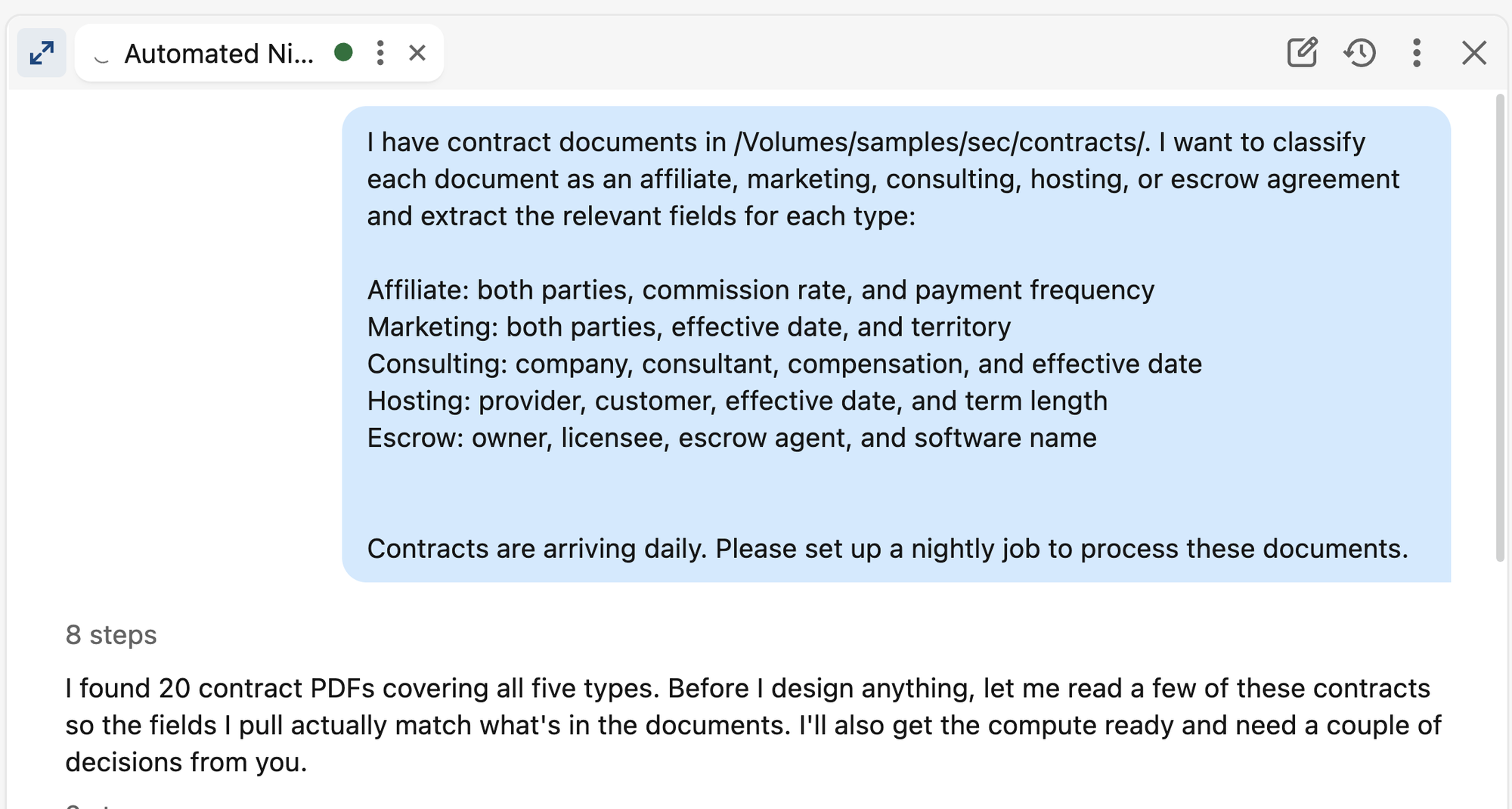
State your goal and point at your sources. Reference your volumes, tables, and files.
-
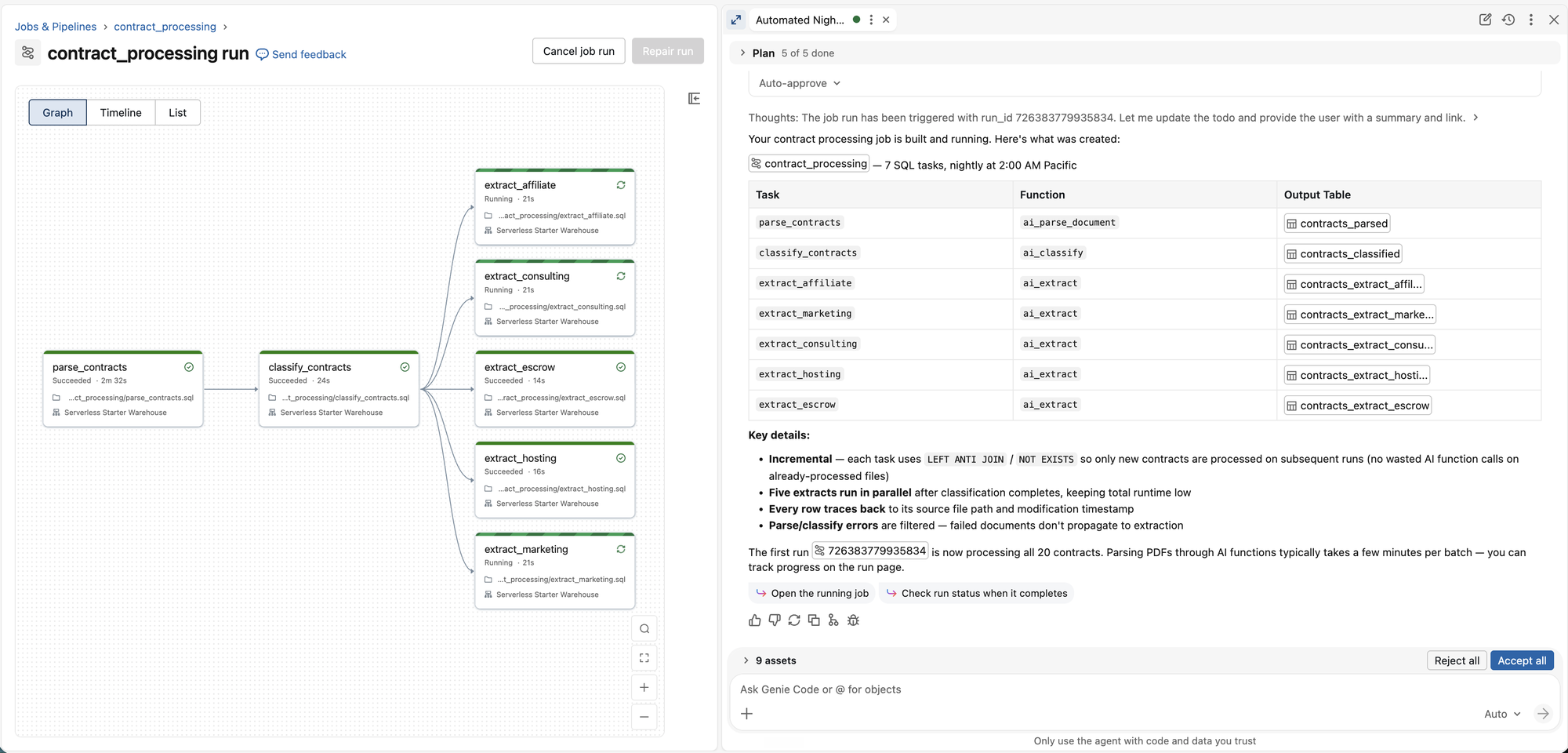
Let it build. After Genie Code has enough to work with, it builds the Lakeflow job using best practices.
-
Review and run. Look over the generated SQL and tasks, edit anything you want, and run the job when you're ready.
-
Start small, then scale. Run on a sample, review the output, evaluate quality, and iterate before processing the full dataset.
What can Genie Code help with?
Build an end-to-end document processing job
Describe the outcome, and Genie Code builds a complete Lakeflow job, using only the stages your goal needs:
- Discover source files in a volume and track their identity and changes.
- Parse documents into structured content with
ai_parse_document(text, tables, figures, and page layout). - Classify each document into your own labels with
ai_classify(for example, affiliate, marketing, or consulting contracts). - Extract structured fields against a schema with
ai_extract, including citations and confidence scores. - Publish clean, structured output to a Unity Catalog table.
Each AI function is its own task, so the job stays modular and you can re-run, backfill, or edit it later.
Improve extraction quality with evaluation and hill climbing
Genie Code treats quality as something you measure, not guess at. Given a labeled table of expected outputs, it runs a field-level evaluation, then closes the loop:
- Measure. Score the current extraction field by field so you can see exactly which fields are weak.
- Improve. Genie Code proposes a fix, most often a sharper field description, shown as a reviewable diff you approve before it applies.
- Re-evaluate. Every accepted change re-runs the eval set and shows before-and-after results, so improvements and regressions are both visible.
The loop repeats until quality meets your bar, so you judge readiness from scores and confidence, not from output that looks plausible.
Validate results and route exceptions
Genie Code builds quality gates into the pipeline. It combines deterministic checks (schemas, required fields, totals), model confidence, and business rules to decide what passes, and keeps failed rows visible.
Debug your documents visually
Genie Code opens the Document Parsing UI to show the rendered pages next to the parsed content and extracted fields. Use it to locate a bad result: if text is missing or garbled in the parsed output, the problem is the parse or the source file. If the text parsed but a field is wrong, the problem is extraction. Either way, confirm on real documents before scaling up.
Inspect and troubleshoot existing pipelines
Genie Code works on pipelines you already have, not just new ones. It can explain a job, review its design and cost without changing anything, find the root cause of a failed or slow stage, and make the smallest fix while leaving the working parts alone.
Example prompts
Build an end-to-end pipeline
- "Contracts land in
@my_catalog.raw.contracts. Build a daily job that classifies each into affiliate, marketing, consulting, hosting, and escrow; extracts the fields that matter for each type of contract; and writes gold tables." - "I have a volume of scanned invoices at
@my_catalog.raw.invoices. Build a job that parses them, extracts the vendor, invoice number, line items, and total, and writes the results to a table."
Improve quality with evaluation and hill climbing
- "How do I know this is good enough to run on millions of rows? Evaluate the extraction against my labeled table
@my_catalog.default.eval_tableand tell me which fields are weakest." - "Accuracy on the
invoice_totalfield could be higher. Iteratively improve the schema and instructions, re-run the evaluation, and show me the before and after." - "Set confidence thresholds per field from the evaluation results and route low-confidence rows to review."
Validate results and route exceptions
- "Add validation that checks required fields and that line items sum to the invoice total, and keep the rows that fail."
- "Quarantine documents that fail a business rule (for example, tax paid greater than salary) in a separate table for human review."
Debug your documents visually
- "Show me the parsed results for these PDFs next to the original pages so I can check the parsed results."
- "The effective date is wrong on some consulting contracts. Open the parsed view so I can tell whether it's a parsing or an extraction problem."
Inspect and troubleshoot existing pipelines
- "Explain what each task in this document processing job does and where the results are written."
- "This parsing task started failing. Find the cause from the recent run output and recommend the smallest fix."
- "Review this document processing pipeline design against best practices and tell me whether it's ready to run on the full dataset."