Streaming tables
A streaming table is a Delta table with additional support for streaming or incremental data processing. A streaming table can be targeted by one or more flows in a pipeline.
For guidance on when to use streaming tables versus materialized views or views, see What are pipelines?.
Streaming tables are a good choice for data ingestion for the following reasons:
- Each input row is handled only once, which models the vast majority of ingestion workloads (that is, by appending or upserting rows into a table).
- They can handle large volumes of append-only data.
Streaming tables are also a good choice for low-latency streaming transformations because they can reason over rows and windows of time, handle high volumes of data, and provide low-latency processing.
The following diagram shows how flows read from streaming sources and write incrementally to a Streaming table within a pipeline.
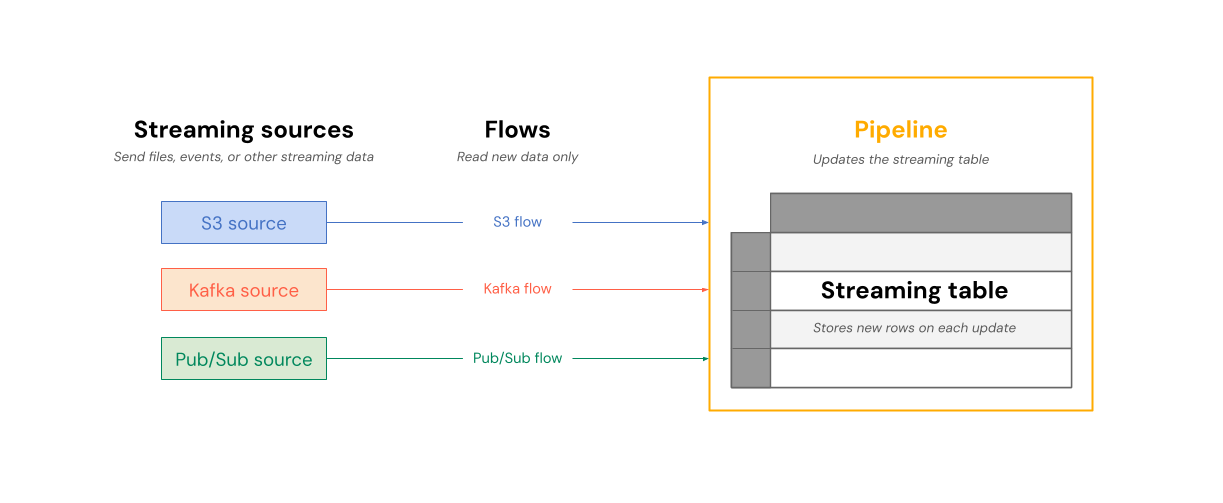
On each update, the flows associated with a streaming table read the changed information in a streaming source, and append new information to that table.
Streaming tables are owned and updated by a single pipeline. You explicitly define streaming tables in the source code of the pipeline. Tables defined by a pipeline can't be changed or updated by any other pipeline. You can define multiple flows to append to a single streaming table.
Databricks creates internal tables to support streaming table processing. These tables appear in system.information_schema.tables but are not visible in Catalog Explorer or other workspace UI pages.
When you create a standalone streaming table, outside of a Lakeflow pipeline, Databricks creates a pipeline that is used to update the table. You can see the pipeline by selecting Jobs & Pipelines from the left navigation in your workspace. You can add the Pipeline type column to your view. Streaming tables defined in a pipeline have a type of ETL. Standalone streaming tables have a type of MV/ST.
For more information about flows, see Load and process data incrementally with Lakeflow pipeline flows.
Streaming tables for ingestion
Streaming tables are designed for append-only data sources and process inputs only once. This makes them well-suited for ingestion workloads where data arrives continuously and must be reliably captured without reprocessing existing records. Databricks supports ingesting into streaming tables from cloud object storage (using Auto Loader) and from streaming message buses such as Apache Kafka, Azure Event Hubs, and Google Pub/Sub. For ingestion how-tos and code examples, see Load data in pipelines.
To stream source data that changes over time (for example, records that are updated or deleted at the source), use AUTO CDC to apply those changes to a streaming table instead of appending them. See Change data capture and snapshots.
The following diagram illustrates how append-only streaming tables work.
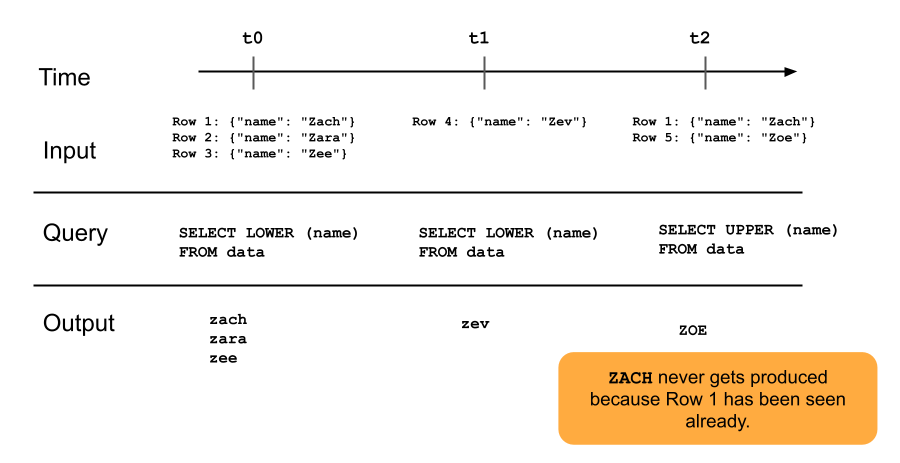
A row that has already been appended to a streaming table will not be re-queried with later updates to the pipeline. If you modify the query (for example, from SELECT LOWER (name) to SELECT UPPER (name)), existing rows will not update to be uppercase, but new rows will be uppercase. You can trigger a full refresh to requery all previous data from the source table to update all rows in the streaming table.
Streaming tables and low-latency streaming
Streaming tables are designed for low-latency streaming over bounded state. Streaming tables use checkpoint management, which makes them well-suited for low-latency streaming. However, they expect streams that are naturally bounded or bounded with a watermark.
A naturally bounded stream is produced by a streaming data source that has a well-defined start and end. An example of a naturally bounded stream is reading data from a directory of files where no new files are being added after an initial batch of files is placed. The stream is considered bounded because the number of files is finite, and the stream ends after all of the files have been processed.
You can also use a watermark to bound a stream. A watermark in Structured Streaming is a mechanism that helps handle late data by specifying how long the system should wait for delayed events before considering the window of time as complete. An unbounded stream that does not have a watermark can cause a pipeline to fail due to memory pressure.
For operational workloads that need the lowest possible latency, you can run the pipeline in real-time mode to process records with sub-second, end-to-end latency.
For more information, see:
Streaming table limitations
Streaming tables have the following limitations:
- Limited evolution: You can change the query without recomputing the entire dataset. Without a full refresh, a streaming table only sees each row once, so different queries will have processed different rows. For example, if you add
UPPER()to a field in the query, only rows processed after the change will be in uppercase. This means you must be aware of all previous versions of the query that are running on your dataset. To reprocess existing rows that were processed prior to the change, a full refresh is required. - State management: Streaming tables are low-latency and require streams that are naturally bounded or bounded with a watermark. For more information, see Optimize stateful processing with watermarks.
- Joins don't recompute: Joins in streaming tables do not recompute when dimensions change. This characteristic can be good for “fast-but-wrong” scenarios. If you want your view to always be correct, you might want to use a materialized view. Materialized views are always correct because they automatically recompute joins when dimensions change. For more information, see Materialized views. For an example of joining a stream to a static dimension table, see Stream-static joins.
- No
CLONEsupport: Streaming tables cannot be used as the source or target of a deep or shallow clone. For other unsupported commands, see Limitations. REFRESHprivilege required to view the pipeline: To view the pipeline that backs a streaming table, a non-admin user needs theREFRESHprivilege on the streaming table in addition to permissions on the pipeline. See Who can view a pipeline and its output?.