Tutorial: Create multiple flows with different parameters
A pipeline might contain multiple flows that are almost identical, differing only by a few parameters. Defining these flows explicitly is error-prone, redundant, and difficult to maintain. Metaprogramming with Python inner functions generates repetitive flows dynamically, with each invocation supplying a different set of parameters.
Metaprogramming overview
Metaprogramming in Lakeflow pipelines uses Python inner functions. Because these functions are lazily evaluated by the pipeline runtime, you can wrap @dp.table decorators inside a factory function and call that factory multiple times with different arguments. Each call registers a new flow without duplicating code.
For details on using for loops with Lakeflow pipelines, see Create tables in a for loop.
Example: fire department response times
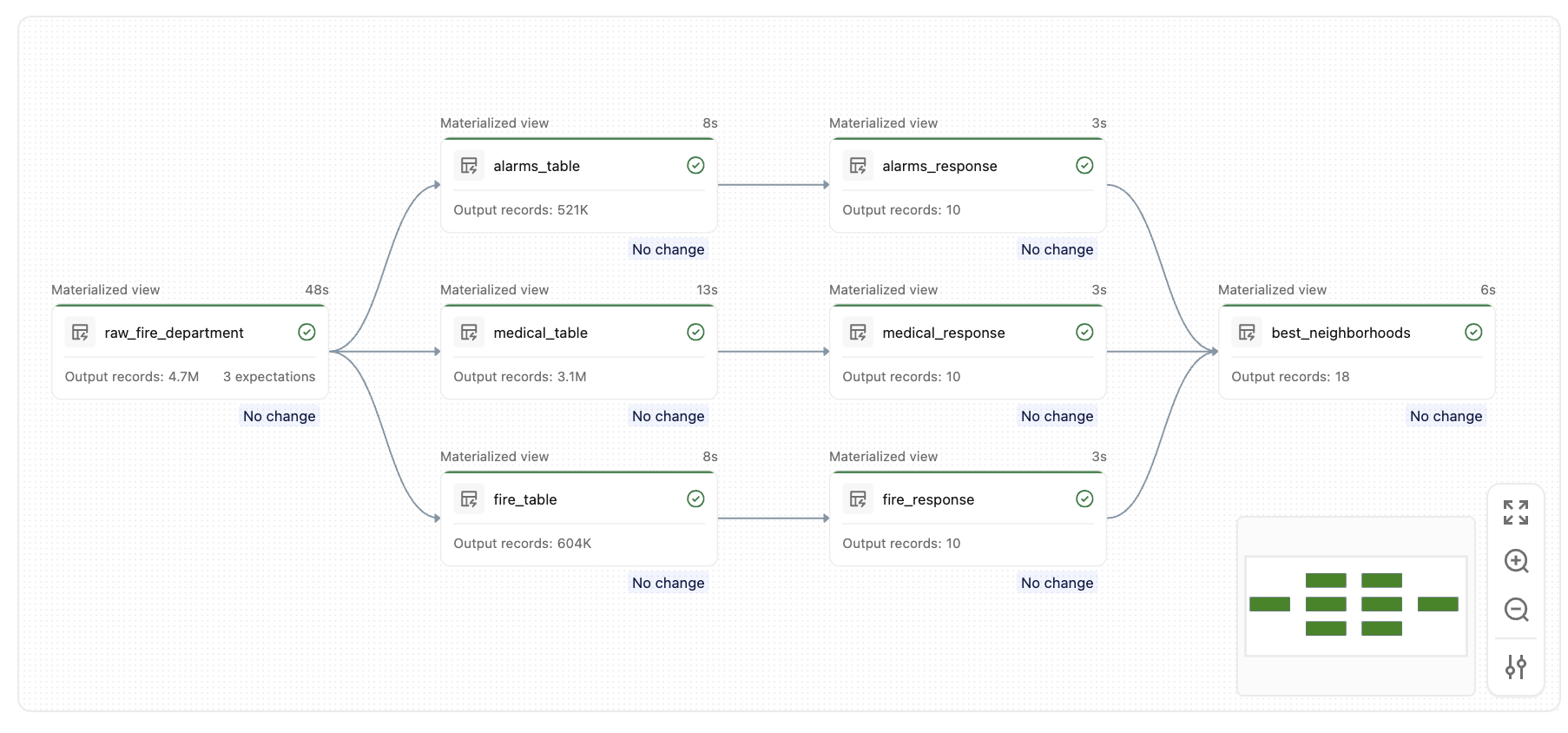
The following example uses the built-in fire department dataset to find the neighborhoods with the fastest emergency response times for each call type. Without metaprogramming, you must write nearly identical table definitions for each call type (Alarms, Structure Fire, Medical Incident). With metaprogramming, a single factory function generates all of them.
Step 1: Define the raw ingestion table
import functools
from pyspark import pipelines as dp
from pyspark.sql.functions import *

@dp.table(
  name="raw_fire_department",
  comment="raw table for fire department response"
)
@dp.expect_or_drop("valid_received", "received IS NOT NULL")
@dp.expect_or_drop("valid_response", "responded IS NOT NULL")
@dp.expect_or_drop("valid_neighborhood", "neighborhood != 'None'")
def get_raw_fire_department():
  return (
    spark.read.format('csv')
      .option('header', 'true')
      .option('multiline', 'true')
      .load('/databricks-datasets/timeseries/Fires/Fire_Department_Calls_for_Service.csv')
      .withColumnRenamed('Call Type', 'call_type')
      .withColumnRenamed('Received DtTm', 'received')
      .withColumnRenamed('Response DtTm', 'responded')
      .withColumnRenamed('Neighborhooods - Analysis Boundaries', 'neighborhood')
      .select('call_type', 'received', 'responded', 'neighborhood')
  )
Step 2: Define the flow factory function
The generate_tables factory function registers two tables for each call type: a filtered call table and a ranked response-time table. Both are created as inner functions decorated with @dp.table.
all_tables = []

def generate_tables(call_table, response_table, filter):
  @dp.table(
    name=call_table,
    comment="top level tables by call type"
  )
  def create_call_table():
    return spark.sql("""
      SELECT
        unix_timestamp(received,'M/d/yyyy h:m:s a') as ts_received,
        unix_timestamp(responded,'M/d/yyyy h:m:s a') as ts_responded,
        neighborhood
      FROM raw_fire_department
      WHERE call_type = '{filter}'
    """.format(filter=filter))

  @dp.table(
    name=response_table,
    comment="top 10 neighborhoods with fastest response time"
  )
  def create_response_table():
    return spark.sql("""
      SELECT
        neighborhood,
        AVG((ts_received - ts_responded)) as response_time
      FROM {call_table}
      GROUP BY 1
      ORDER BY response_time
      LIMIT 10
    """.format(call_table=call_table))

  all_tables.append(response_table)
Step 3: Invoke the factory and define the summary table
Call the factory once for each call type, then define a summary table that unions the results to find the neighborhoods that appear most often across all categories.
generate_tables("alarms_table", "alarms_response", "Alarms")
generate_tables("fire_table", "fire_response", "Structure Fire")
generate_tables("medical_table", "medical_response", "Medical Incident")

@dp.table(
  name="best_neighborhoods",
  comment="which neighbor appears in the best response time list the most"
)
def summary():
  target_tables = [dp.read(t) for t in all_tables]
  unioned = functools.reduce(lambda x, y: x.union(y), target_tables)
  return (
    unioned.groupBy(col("neighborhood"))
      .agg(count("*").alias("score"))
      .orderBy(desc("score"))
  )
After you run this pipeline, you create a set of similar tables, like this graph:
Key concepts
- Inner functions are lazily registered: The
@dp.tabledecorator does not run the function immediately. It registers the function with the pipeline runtime, which resolves the full dataflow graph before execution begins. - Closures capture parameters: Each inner function closes over the parameters passed to the factory (
call_table,response_table,filter), so each registered flow uses its own isolated set of values. - Dynamic table lists: Using a list like
all_tablesto track programmatically generated table names makes it straightforward to reference them later (for example, in a union or join).