Expectation recommendations and advanced patterns
Advanced expectation patterns combine expectations across multiple datasets to enforce data quality at scale. These patterns assume you understand the syntax and semantics of materialized views, streaming tables, and expectations.
For a basic overview of expectations behavior and syntax, see Manage data quality with pipeline expectations.
Portable and reusable expectations
Databricks recommends the following best practices when implementing expectations to improve portability and reduce maintenance burdens:
Recommendation | Impact |
|---|---|
Store expectation definitions separately from pipeline logic. | Easily apply expectations to multiple datasets or pipelines. Update, audit, and maintain expectations without modifying pipeline source code. |
Add custom tags to create groups of related expectations. | Filter expectations based on tags. |
Apply expectations consistently across similar datasets. | Use the same expectations across multiple datasets and pipelines to evaluate identical logic. |
The following examples demonstrate using a Delta table or dictionary to create a central expectation repository. Custom Python functions then apply these expectations to datasets in an example pipeline:
Dynamically loading expectations from a file is not supported in SQL.
- Delta Table
- Python Module
The following example creates a table named rules to maintain rules:
CREATE OR REPLACE TABLE
  rules
AS SELECT
  col1 AS name,
  col2 AS constraint,
  col3 AS tag
FROM (
  VALUES
  ("website_not_null","Website IS NOT NULL","validity"),
  ("fresh_data","to_date(updateTime,'M/d/yyyy h:m:s a') > '2010-01-01'","maintained"),
  ("social_media_access","NOT(Facebook IS NULL AND Twitter IS NULL AND Youtube IS NULL)","maintained")
)
The following Python example defines data quality expectations based on the rules in the rules table. The get_rules() function reads the rules from the rules table and returns a Python dictionary containing rules matching the tag argument passed to the function.
In this example, the dictionary is applied using @dp.expect_all_or_drop() decorators to enforce data quality constraints.
For example, any records that fail the rules tagged with validity are dropped from the raw_farmers_market table:
from pyspark import pipelines as dp
from pyspark.sql.functions import expr, col

def get_rules(tag):
  """
    loads data quality rules from a table
    :param tag: tag to match
    :return: dictionary of rules that matched the tag
  """
  df = spark.read.table("rules").filter(col("tag") == tag).collect()
  return {
      row['name']: row['constraint']
      for row in df
  }

@dp.table
@dp.expect_all_or_drop(get_rules('validity'))
def raw_farmers_market():
  return (
    spark.read.format('csv').option("header", "true")
      .load('/databricks-datasets/data.gov/farmers_markets_geographic_data/data-001/')
  )

@dp.table
@dp.expect_all_or_drop(get_rules('maintained'))
def organic_farmers_market():
  return (
    spark.read.table("raw_farmers_market")
      .filter(expr("Organic = 'Y'"))
  )
The following example creates a Python module to maintain rules. For this example, store this code in a file named rules_module.py in the same folder as the notebook used as source code for the pipeline:
def get_rules_as_list_of_dict():
  return [
    {
      "name": "website_not_null",
      "constraint": "Website IS NOT NULL",
      "tag": "validity"
    },
    {
      "name": "fresh_data",
      "constraint": "to_date(updateTime,'M/d/yyyy h:m:s a') > '2010-01-01'",
      "tag": "maintained"
    },
    {
      "name": "social_media_access",
      "constraint": "NOT(Facebook IS NULL AND Twitter IS NULL AND Youtube IS NULL)",
      "tag": "maintained"
    }
  ]
The following Python example defines data quality expectations based on the rules defined in the rules_module.py file. The get_rules() function returns a Python dictionary containing rules matching the tag argument passed to it.
In this example, the dictionary is applied using @dp.expect_all_or_drop() decorators to enforce data quality constraints.
For example, any records that fail the rules tagged with validity are dropped from the raw_farmers_market table:
from pyspark import pipelines as dp
from rules_module import *
from pyspark.sql.functions import expr, col

def get_rules(tag):
  """
    loads data quality rules from a table
    :param tag: tag to match
    :return: dictionary of rules that matched the tag
  """
  return {
    row['name']: row['constraint']
    for row in get_rules_as_list_of_dict()
    if row['tag'] == tag
  }

@dp.table
@dp.expect_all_or_drop(get_rules('validity'))
def raw_farmers_market():
  return (
    spark.read.format('csv').option("header", "true")
      .load('/databricks-datasets/data.gov/farmers_markets_geographic_data/data-001/')
  )

@dp.table
@dp.expect_all_or_drop(get_rules('maintained'))
def organic_farmers_market():
  return (
    spark.read.table("raw_farmers_market")
      .filter(expr("Organic = 'Y'"))
  )
Validation tables and pipeline control flow
Some patterns in this section, such as row count validation and primary key uniqueness, define a separate dataset, a validation table, that checks a property across other tables and uses expect_or_fail to surface problems. Before you rely on a validation table to gate a pipeline, understand what expectations can and can't control:
- Expectations enforce data quality, not orchestration. Within a pipeline, expectations determine which records reach a target dataset:
warnkeeps invalid records and records metrics,dropremoves them, andfailstops the offending flow. The goal is to make sure that only clean data flows through, not to conditionally run or skip other parts of the pipeline. expect_or_failbehavior depends on the pipeline's run mode. In a triggered pipeline, a failed expectation fails and rolls back only that flow's update; other flows in the same pipeline continue to update independently. In a continuous pipeline, a failed expectation stops the flow and all dependent flows. See Fail on invalid records.- A validation table doesn't gate its downstream tables. Reading a validation table from another dataset doesn't make that dataset wait for the validation result, so a failed validation doesn't prevent downstream tables from updating.
To stop downstream processing when a validation fails, split the validation logic and the downstream work into separate pipelines and orchestrate them with a job, making the downstream pipeline's task depend on the validation pipeline's task. Because a pipeline task fails when its update fails, the downstream task doesn't run unless the validation pipeline succeeds. More generally, when you need conditional execution or complex dependencies, coordinate multiple pipelines with a job instead of building the logic into a single pipeline. See Run pipelines in a workflow.
Row count validation
The following example validates row count equality between table_a and table_b to check that no data is lost during transformations:

- Python
- SQL
@dp.materialized_view(
  name="count_verification",
  comment="Validates equal row counts between tables"
)
@dp.expect_or_fail("no_rows_dropped", "a_count == b_count")
def validate_row_counts():
  return spark.sql("""
    SELECT * FROM
      (SELECT COUNT(*) AS a_count FROM table_a),
      (SELECT COUNT(*) AS b_count FROM table_b)""")
CREATE OR REFRESH MATERIALIZED VIEW count_verification(
  CONSTRAINT no_rows_dropped EXPECT (a_count == b_count)
) AS SELECT * FROM
  (SELECT COUNT(*) AS a_count FROM table_a),
  (SELECT COUNT(*) AS b_count FROM table_b)
Missing record detection
The following example validates that all expected records are present in the report table:

- Python
- SQL
@dp.materialized_view(
  name="report_compare_tests",
  comment="Validates no records are missing after joining"
)
@dp.expect_or_fail("no_missing_records", "r_key IS NOT NULL")
def validate_report_completeness():
  return (
    spark.read.table("validation_copy").alias("v")
      .join(
        spark.read.table("report").alias("r"),
        on="key",
        how="left_outer"
      )
      .selectExpr(
        "v.*",
        "r.key as r_key"
      )
  )
CREATE OR REFRESH MATERIALIZED VIEW report_compare_tests(
  CONSTRAINT no_missing_records EXPECT (r_key IS NOT NULL)
)
AS SELECT v.*, r.key as r_key FROM validation_copy v
  LEFT OUTER JOIN report r ON v.key = r.key
Primary key uniqueness
The following example validates primary key constraints across tables:

- Python
- SQL
@dp.materialized_view(
  name="report_pk_tests",
  comment="Validates primary key uniqueness"
)
@dp.expect_or_fail("unique_pk", "num_entries = 1")
def validate_pk_uniqueness():
  return (
    spark.read.table("report")
      .groupBy("pk")
      .count()
      .withColumnRenamed("count", "num_entries")
  )
CREATE OR REFRESH MATERIALIZED VIEW report_pk_tests(
  CONSTRAINT unique_pk EXPECT (num_entries = 1)
)
AS SELECT pk, count(*) as num_entries
  FROM report
  GROUP BY pk
Schema evolution pattern
The following example shows how to handle schema evolution for additional columns. Use this pattern when you're migrating data sources or handling multiple versions of upstream data, ensuring backward compatibility while enforcing data quality:

- Python
- SQL
@dp.table
@dp.expect_all_or_fail({
  "required_columns": "col1 IS NOT NULL AND col2 IS NOT NULL",
  "valid_col3": "CASE WHEN col3 IS NOT NULL THEN col3 > 0 ELSE TRUE END"
})
def evolving_table():
  # Legacy data (V1 schema)
  legacy_data = spark.read.table("legacy_source")

  # New data (V2 schema)
  new_data = spark.read.table("new_source")

  # Combine both sources
  return legacy_data.unionByName(new_data, allowMissingColumns=True)
CREATE OR REFRESH MATERIALIZED VIEW evolving_table(
  -- Merging multiple constraints into one as expect_all is Python-specific API
  CONSTRAINT valid_migrated_data EXPECT (
    (col1 IS NOT NULL AND col2 IS NOT NULL) AND (CASE WHEN col3 IS NOT NULL THEN col3 > 0 ELSE TRUE END)
  ) ON VIOLATION FAIL UPDATE
) AS
  SELECT * FROM new_source
  UNION
  SELECT *, NULL as col3 FROM legacy_source;
Range-based validation pattern
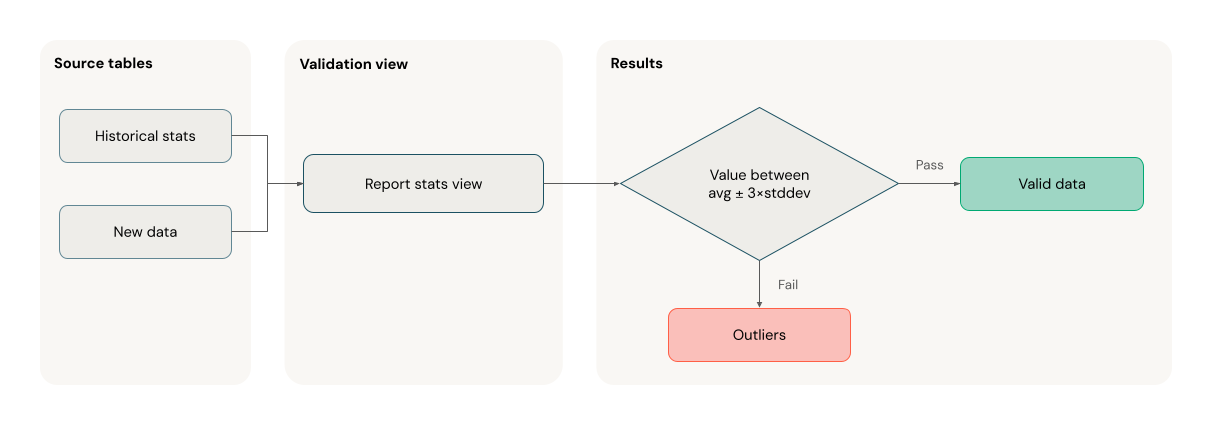
The following example demonstrates how to validate new data points against historical statistical ranges, helping identify outliers and anomalies in your data flow:
- Python
- SQL
@dp.view
def stats_validation_view():
  # Calculate statistical bounds from historical data
  bounds = spark.sql("""
    SELECT
      avg(amount) - 3 * stddev(amount) as lower_bound,
      avg(amount) + 3 * stddev(amount) as upper_bound
    FROM historical_stats
    WHERE
      date >= CURRENT_DATE() - INTERVAL 30 DAYS
  """)

  # Join with new data and apply bounds
  return spark.read.table("new_data").crossJoin(bounds)

@dp.table
@dp.expect_or_drop(
  "within_statistical_range",
  "amount BETWEEN lower_bound AND upper_bound"
)
def validated_amounts():
  return spark.read.table("stats_validation_view")
CREATE OR REFRESH MATERIALIZED VIEW stats_validation_view AS
  WITH bounds AS (
    SELECT
    avg(amount) - 3 * stddev(amount) as lower_bound,
    avg(amount) + 3 * stddev(amount) as upper_bound
    FROM historical_stats
    WHERE date >= CURRENT_DATE() - INTERVAL 30 DAYS
  )
  SELECT
    new_data.*,
    bounds.*
  FROM new_data
  CROSS JOIN bounds;

CREATE OR REFRESH MATERIALIZED VIEW validated_amounts (
  CONSTRAINT within_statistical_range EXPECT (amount BETWEEN lower_bound AND upper_bound)
)
AS SELECT * FROM stats_validation_view;
Quarantine invalid records
This pattern combines expectations with temporary tables and views to track data quality metrics during pipeline updates and enable separate processing paths for valid and invalid records in downstream operations.

- Python
- SQL
from pyspark import pipelines as dp
from pyspark.sql.functions import expr

rules = {
  "valid_pickup_zip": "(pickup_zip IS NOT NULL)",
  "valid_dropoff_zip": "(dropoff_zip IS NOT NULL)",
}
quarantine_rules = "NOT({0})".format(" AND ".join(rules.values()))

@dp.view
def raw_trips_data():
  return spark.readStream.table("samples.nyctaxi.trips")

@dp.table(
  temporary=True,
  partition_cols=["is_quarantined"],
)
@dp.expect_all(rules)
def trips_data_quarantine():
  return (
    spark.readStream.table("raw_trips_data").withColumn("is_quarantined", expr(quarantine_rules))
  )

@dp.view
def valid_trips_data():
  return spark.read.table("trips_data_quarantine").filter("is_quarantined=false")

@dp.view
def invalid_trips_data():
  return spark.read.table("trips_data_quarantine").filter("is_quarantined=true")
CREATE TEMPORARY STREAMING LIVE VIEW raw_trips_data AS
  SELECT * FROM STREAM(samples.nyctaxi.trips);

CREATE OR REFRESH TEMPORARY STREAMING TABLE trips_data_quarantine(
  -- Option 1 - merge all expectations to have a single name in the pipeline event log
  CONSTRAINT quarantined_row EXPECT (pickup_zip IS NOT NULL OR dropoff_zip IS NOT NULL),
  -- Option 2 - Keep the expectations separate, resulting in multiple entries under different names
  CONSTRAINT invalid_pickup_zip EXPECT (pickup_zip IS NOT NULL),
  CONSTRAINT invalid_dropoff_zip EXPECT (dropoff_zip IS NOT NULL)
)
PARTITIONED BY (is_quarantined)
AS
  SELECT
    *,
    NOT ((pickup_zip IS NOT NULL) and (dropoff_zip IS NOT NULL)) as is_quarantined
  FROM STREAM(raw_trips_data);

CREATE TEMPORARY LIVE VIEW valid_trips_data AS
SELECT * FROM trips_data_quarantine WHERE is_quarantined=FALSE;

CREATE TEMPORARY LIVE VIEW invalid_trips_data AS
SELECT * FROM trips_data_quarantine WHERE is_quarantined=TRUE;