Unit testing for pipelines
This feature is in Beta.
For general information about Python unit testing in Databricks, see Python unit testing.
Lakeflow pipelines support writing Python unit tests in the web-based Lakeflow Pipelines Editor. This enables you to validate Python or SQL transformation logic using mock data. With the pipeline testing framework, you can test edge cases, validate proprietary pipeline APIs (Auto CDC, streaming tables, expectations, append flows), and iterate using mock inputs for supported table-identifier operations. Review the isolation limitations before running tests.
- Isolated test execution: The framework provides a SparkSession that redirects table operations to a temporary test schema in the pipeline's default catalog, so you can mock input data and write test outputs without affecting production tables. Isolation applies to operations that reference a table by name; see Limitations.
- Flexible test scope: Execute a subset of a pipeline (individual tables, chains of dependent tables, or entire pipelines) on the pipeline's compute using the test SparkSession.
- Result validation: Verify the results of isolated output tables created in a test using standard pytest assertions.
When to use unit testing
Typical use cases include:
- Validating new transformation logic: Test that your transformation produces the expected schema, row counts, aggregations, and business logic before running against production data.
- Testing Auto CDC specifications: Validate that your Auto CDC flow definitions correctly process change events, handling inserts, updates, deletes, and SCD (Slowly Changing Dimension) types, using mock data.
- Testing expectations and data quality rules: Verify that expectations fail when they should and pass when data is valid.
- Testing across dependent tables: Test chains of transformations (for example, bronze, silver, and gold) to validate that data flows correctly through your pipeline graph.
Requirements
-
Pipeline
Ownerpermission, plus theUSE CATALOGandCREATE SCHEMAprivileges on the pipeline's default catalog. The framework needs these privileges to create the temporary test schema where tests run.To check or set the pipeline permission, open the pipeline and click Share. You must be the pipeline
Owner(IS OWNER);CAN RUNandCAN MANAGEare not sufficient to run tests. See Configure pipeline permissions.To check or set the catalog privileges, open the catalog in Catalog Explorer, select the Permissions tab, and confirm you have
USE CATALOGandCREATE SCHEMA. A catalog owner, a metastore admin, or a user with theMANAGEprivilege can grant them, including with SQL:SQLGRANT USE CATALOG, CREATE SCHEMA ON CATALOG <catalog_name> TO `<principal>`;For more information, see Unity Catalog privileges reference.
-
Pipeline must be configured in triggered (non-continuous) mode.
-
Pipeline must run on Databricks Runtime 18.1 or above. Earlier runtimes do not include the unit testing module. To check what runtime version an update ran on, query the pipeline event log. See Runtime information.
-
Spark Connect is not supported.
Test isolation covers table operations that reference a table by name. Operations that bypass isolation can occur both in your test code and in any pipeline code executed by the outputs you select, including its transitive dependencies. A test file that looks safe can still run a pipeline flow that reads or writes by path or connector, which acts on production data. To keep tests from affecting production data or metadata, follow these rules:
- Reference every table by name (
catalog.schema.table), and mock all inputs by name. Do not read or write by path (/Volumes/...,dbfs:/...,s3://...,abfss://...) and do not read from connectors such as Kafka or Auto Loader. These bypass isolation and act on real production systems. - Do not run governance or ownership statements, such as
GRANT,REVOKE,ALTER ... OWNER TO,SET/UNSET TAGS, orCREATE/DROP POLICY. These execute against the real production securable. - Do not create catalogs or schemas (
CREATE CATALOG,CREATE SCHEMA). These reach your real Unity Catalog metastore. - Do not run the entire pipeline if its graph includes path-based inputs, connectors, imperative writes, or other external side effects. Select only outputs whose dependencies use supported catalog-table operations and have been replaced with mock inputs.
See Limitations for details.
Limitations
Some operations bypass test isolation and can act on real production data or metadata. Review the following limitations before you run tests.
Test isolation is by table name only
-
Do not read or write by path or connector. Isolation redirects only operations that reference a table by name (for example,
spark.read.table("catalog.schema.table")ordf.write.saveAsTable("catalog.schema.table")). Operations addressed by a path or through a connector bypass isolation and act directly on real production systems:- Writing by path (for example,
df.write.save("/Volumes/..."), adbfs:/path, or a cloud or external-location path such ass3://...orabfss://...) writes to real production storage and can overwrite production data. - Reading by path (for example,
spark.read.load(path)orspark.read.format("delta").load(path)) returns real production data instead of your mock. - Reading from a connector connects to the real production source. This includes Kafka (reads from the real brokers) and Auto Loader (
cloudFiles, which reads from the real cloud storage path). Neither is redirected to your mock data.
- Writing by path (for example,
-
Do not use the
event_log()table-valued function from a pipeline unit test. In test mode,event_log()is not redirected to your test run's event log. It can return the production or previously registered event log, so assertions against it might read production data. In unit tests, the event log is returned as a DataFrame by the run, already filtered to that run. Usestatus.event_logto access the results. It remains readable after the test schema is dropped. It can beNone(for example, if the event-log table name cannot be resolved), so check it before querying:Pythonstatus = test_pipeline.run(test_spark, set(["catalog.schema.table"]))
assert status.event_log is not None
flow_progress = status.event_log.filter("event_type = 'flow_progress'")To assert across every run in the test rather than a single run, use
test_pipeline.event_log. See Testing APIs for the full set of properties a run returns.Do not assert
status.is_successbefore reading the event log if your goal is to diagnose a failed update. The event log is often what you inspect to understand why an update failed.
Governance and DDL operations
- Catalog, schema, permission, ownership, tag, and policy mutations are unsupported. This includes
CREATE/DROP/ALTER CATALOG,CREATE/DROP/ALTER SCHEMA(includingSET MANAGED LOCATION),GRANT/REVOKE,ALTER ... OWNER TO,SET/UNSET TAGS, andCREATE/DROP POLICY. Some SQL forms executed throughtest_sparkare rejected as defense in depth; other forms, or the same operations invoked through direct APIs, can reach real production objects. Do not rely on these guards as an isolation boundary. Keep these statements out of your test code and out of any pipeline code executed by the selected outputs.
Operational limitations
- Concurrent execution is unsupported: Running a test and a pipeline update at the same time is not supported, and the system does not prevent it. There is no coordination between the two, so running them concurrently can contend for resources, severely degrading the performance of your production update or causing the test to fail to start. Do not start a test while the pipeline is running an update (or start an update while a test is running); wait for any in-progress update to finish before running tests.
- Temporary schemas after abnormal termination: Each test run creates a temporary schema (named
redirecting_<id>) in the pipeline's default catalog and drops it automatically when the run finishes. If a run ends abnormally (for example, the compute is lost mid-run), the temporary schema can be left behind, holding the run's mock and output tables. It does not affect production data. To reclaim storage, manually drop any leftover schemas whose names begin withredirecting_in the pipeline's default catalog. - Test runs consume compute: Test runs execute on the pipeline's compute and are billed as normal pipeline updates. There is no separate metering for test runs.
- Full refresh is not supported: Only selective refresh is available.
test_pipeline.run()refreshes the outputs you select (or all outputs when you pass no selection); full refresh and full-refresh selection are not implemented.
Authoring and fidelity limitations
- Editor-only execution: Tests must be run from the web-based Lakeflow Pipelines Editor.
- Python tests only: Tests must be written in Python. You can test SQL pipelines, but the tests themselves must be written in Python.
- Governance fidelity: Mock data does not inherit row filters or column masks defined on the production tables it replaces. Test results reflect the mock inputs exactly as you provide them and can differ from how the same query behaves on governed production data.
Step 1: Update pipeline settings
Configure the pipeline to run in triggered mode.
- In the UI, open your pipeline and click Settings.
- Set Pipeline mode to Triggered (do not use Continuous).
Alternatively, edit the pipeline settings JSON directly:
"continuous": false
Step 2: Create a test file
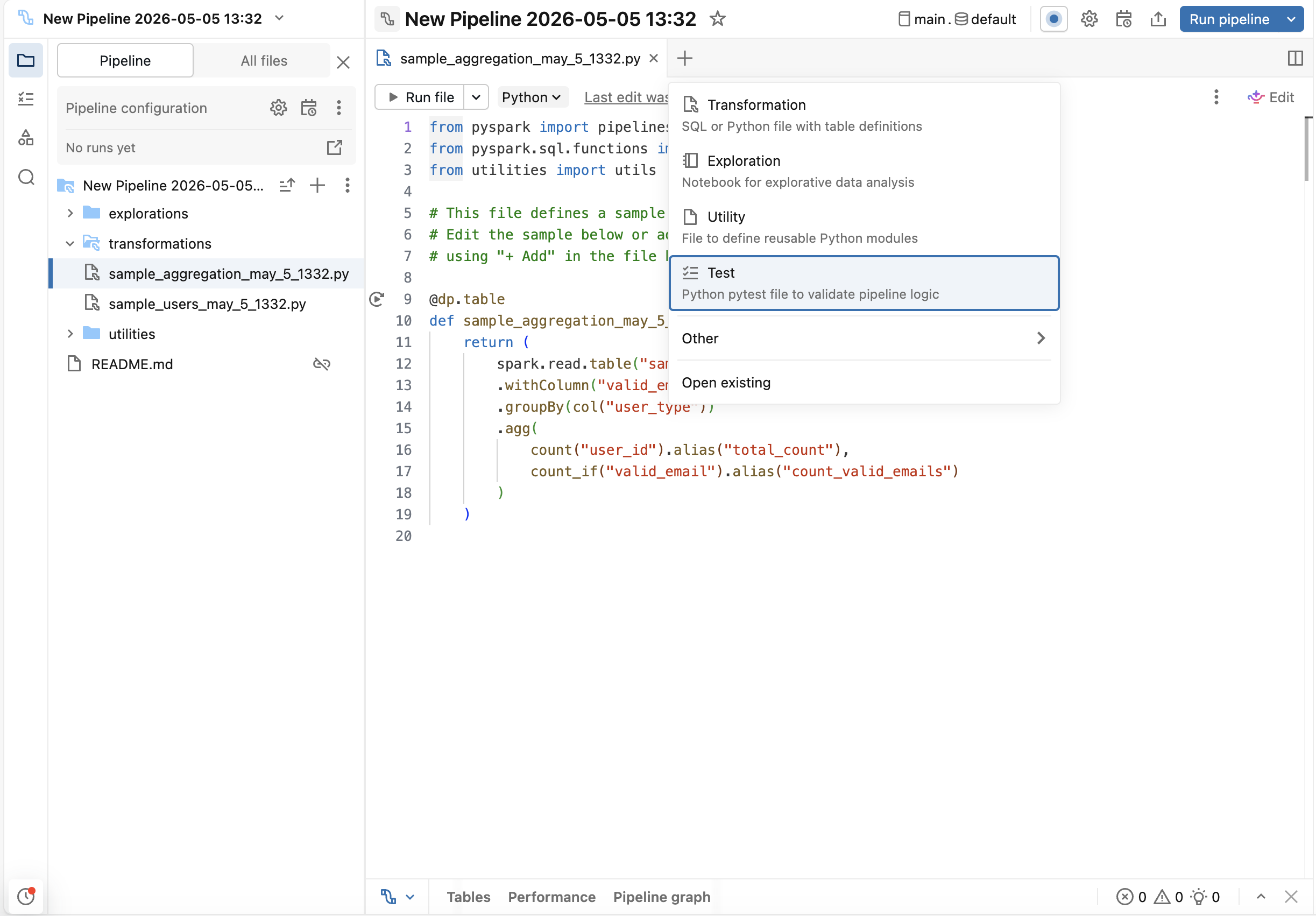
In the Lakeflow Pipelines Editor, click the + (add) button and select Test. This creates a test file (and the tests folder, if it does not already exist) that is not included in your pipeline source code. You don't need to create the tests folder yourself.
Step 3: Generate tests
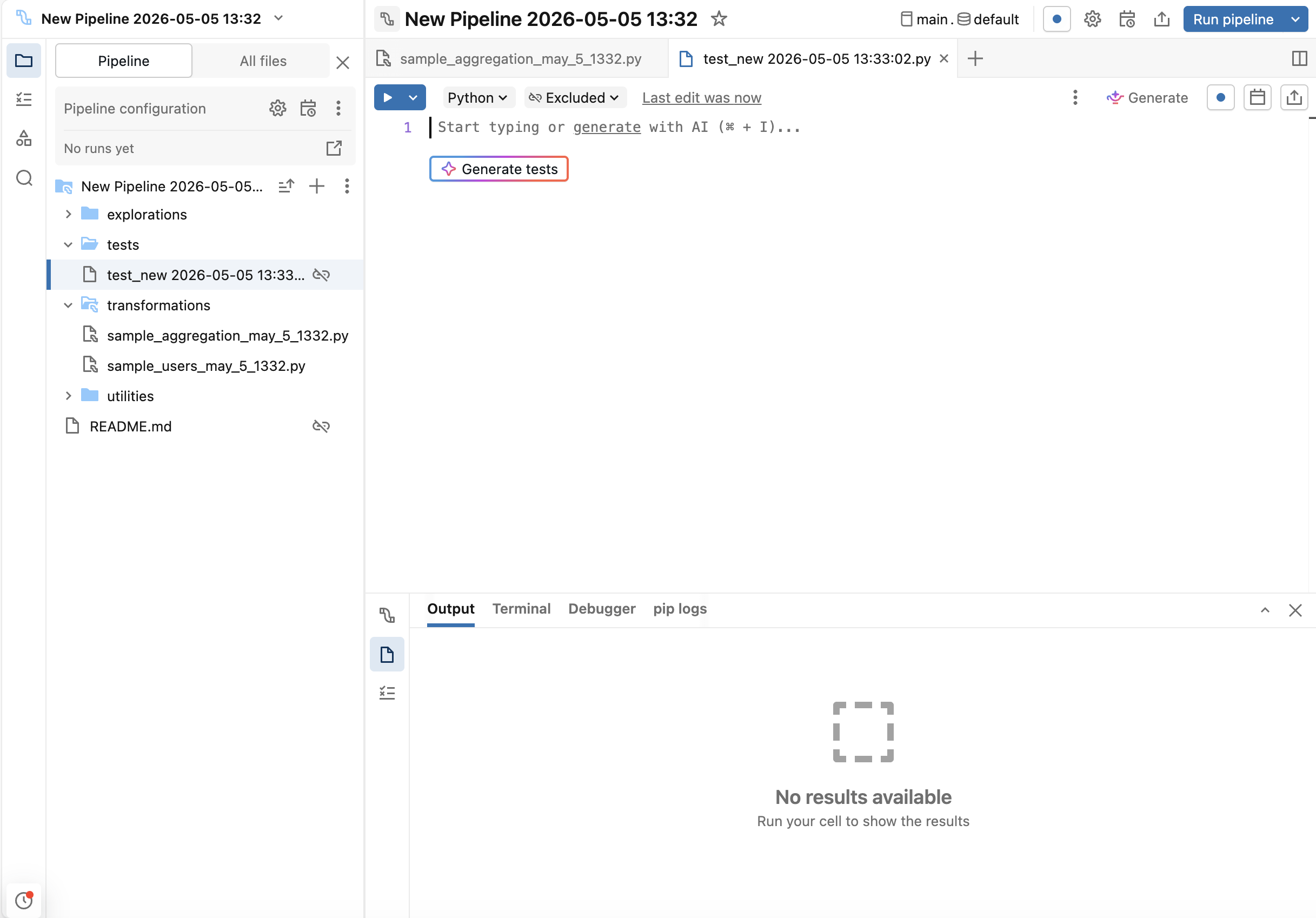
Genie Code can generate test scaffolding:
-
Inside the test file, click the Generate tests button.
-
Alternatively, use
/testsinside Genie Code.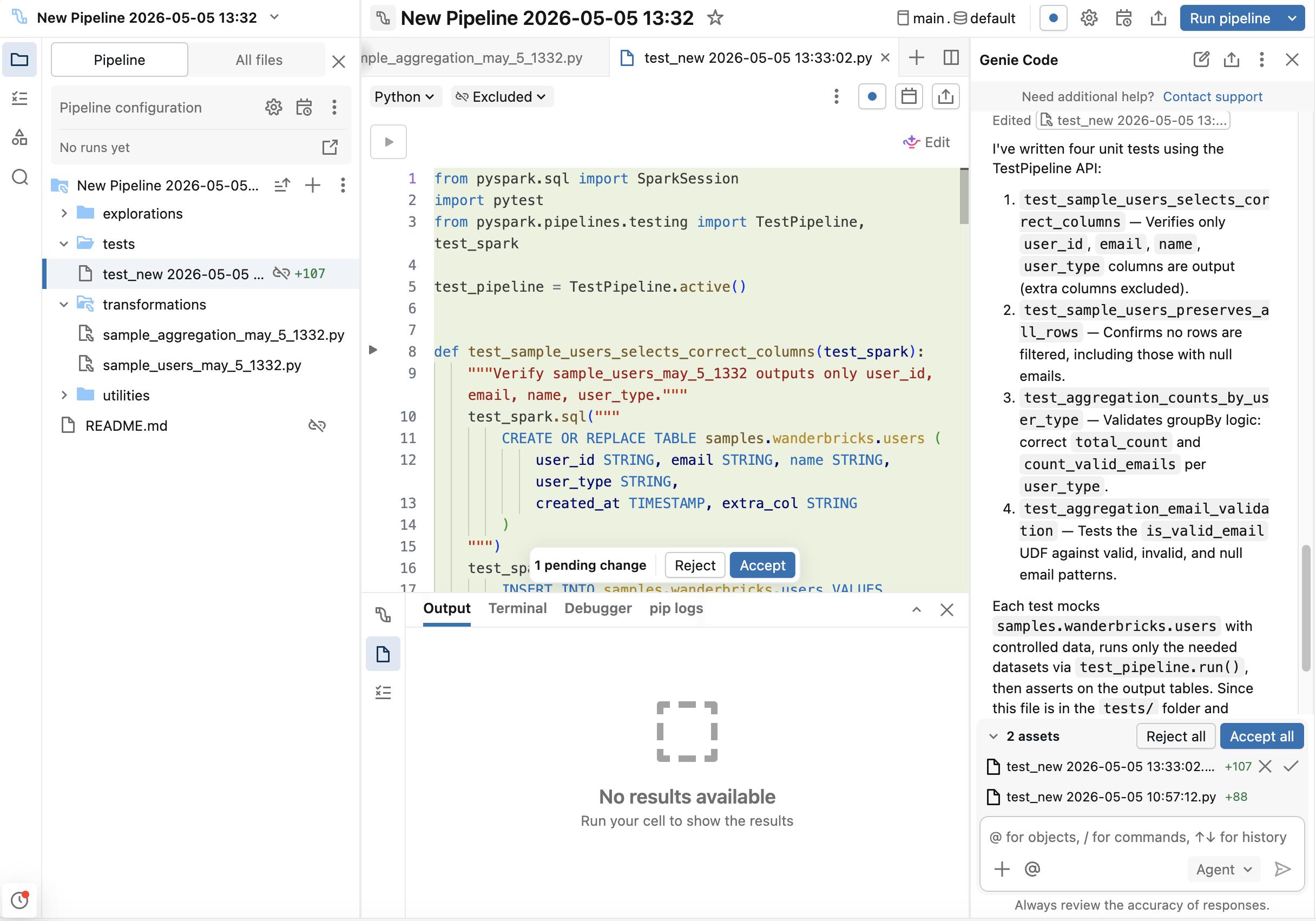
Use Genie Code to generate boilerplate, then customize for your edge cases.
Alternatively, you can write the test code yourself. Add the following imports to the top of each test file:
import pytest
from pyspark.pipelines.testing import TestPipeline, test_spark

test_pipeline = TestPipeline.active()
Step 4: Run tests
Run tests from the Lakeflow Pipelines Editor:
- Click the
 (play) button in the gutter next to a test function to run an individual test.
 - Click Run tests in file at the top of the test file to run all tests in that file.
Test results (success or failure) appear in the Editor lower panel. Review assertion errors to debug failures.
Testing APIs
API | Description |
|---|---|
| Returns a |
| Synchronously executes an update of the pipeline, performing a selective refresh if table names are specified. Returns after pipeline execution succeeds or terminates with an exception. Returns a |
|
|
| The event log for this run, as a DataFrame filtered to this run's update. Use it to assert on the events the update emitted, such as flow progress or data quality expectations. Can be |
| The event log for every run in the current test, as a DataFrame. Runs accumulate across each |
| A dictionary keyed by flow name, with one |
| Creates a test SparkSession with catalog-table redirection that automatically redirects table reads and writes that reference a table by name (for example, |
Create mock data
You can mock input data using either SQL or createDataFrame:
# Option 1: Using SQL
test_spark.sql("""
    CREATE TABLE catalog.schema.table_name AS
    SELECT * FROM VALUES
        (1, 'value1'),
        (2, 'value2')
    AS t(id, name)
""")

# Option 2: Using createDataFrame
df = test_spark.createDataFrame(
    [(1, 'value1'), (2, 'value2')],
    schema=["id", "name"]
)
df.write.saveAsTable("catalog.schema.table_name")
To generate larger volumes of realistic synthetic data, you can use the Faker library. Run %pip install faker in your pipeline first, then build a DataFrame from Faker-backed UDFs:
# Option 3: Using Faker for synthetic data
from pyspark.sql import functions as F
from faker import Faker

fake = Faker()
fake_firstname = F.udf(fake.first_name)
fake_lastname = F.udf(fake.last_name)
fake_email = F.udf(fake.ascii_company_email)

df = (
    test_spark.range(0, 100)
    .withColumn("firstname", fake_firstname())
    .withColumn("lastname", fake_lastname())
    .withColumn("email", fake_email())
)
df.write.saveAsTable("catalog.schema.table_name")
Run the pipeline or specific tables
# Run specific tables
test_pipeline.run(test_spark, set(["catalog.schema.table1", "catalog.schema.table2"]))

# Run all tables in the pipeline
test_pipeline.run(test_spark)
Examples
Example 1: Testing aggregations with row count, schema, and null handling
Goal: Validate user aggregation correctly counts users by type, handles null emails, and produces the expected schema.
Pipeline transformations:
These transformations create a simple two-table pipeline: users selects user data, and counts groups users by type and counts total users and valid emails.
from pyspark import pipelines as dp
from pyspark.sql.functions import col, count, count_if

@dp.table
def users():
    return (
        spark.read.table("catalog.schema.wanderbricks_users")
        .select("user_id", "email", "name", "user_type")
    )

@dp.table
def counts():
    return (
        spark.read.table("catalog.schema.users")
        .withColumn("valid_email", col("email").isNotNull())
        .groupBy("user_type")
        .agg(
            count("user_id").alias("total_count"),
            count_if("valid_email").alias("count_valid_emails")
        )
    )
Tests:
These tests validate row counts, schema structure, null handling, and aggregation logic by creating mock user data with intentional nulls and running the pipeline in isolation.
import pytest
from pyspark.pipelines.testing import TestPipeline, test_spark
from pyspark.testing import assertDataFrameEqual

test_pipeline = TestPipeline.active()

# Mock data fixture
def mock_users(session):
    session.sql("""
        CREATE TABLE catalog.schema.wanderbricks_users AS
        SELECT * FROM VALUES
            (1, 'alice@example.com', 'Alice', 'admin'),
            (2, NULL, 'Bob', 'user'),
            (3, 'charlie@example.com', 'Charlie', 'user'),
            (4, NULL, 'Dana', 'admin')
        AS t(user_id, email, name, user_type)
    """)

# Test 1: Row count
def test_users_row_count(test_spark):
    mock_users(test_spark)
    status = test_pipeline.run(test_spark, set(["catalog.schema.users"]))
    assert status.is_success
    result = test_spark.table("catalog.schema.users")
    assert result.count() == 4

# Test 2: Schema validation
def test_users_schema(test_spark):
    mock_users(test_spark)
    status = test_pipeline.run(test_spark, set(["catalog.schema.users"]))
    assert status.is_success
    result = test_spark.table("catalog.schema.users")
    expected_fields = {"user_id", "email", "name", "user_type"}
    actual_fields = set(f.name for f in result.schema.fields)
    assert expected_fields == actual_fields

# Test 3: Null handling
def test_users_null_handling(test_spark):
    mock_users(test_spark)
    status = test_pipeline.run(test_spark, set(["catalog.schema.users"]))
    assert status.is_success
    result = test_spark.table("catalog.schema.users")
    null_emails = result.filter("email IS NULL").count()
    assert null_emails == 2

# Test 4: Aggregation
def test_counts(test_spark):
    mock_users(test_spark)
    # Run both tables since counts depends on users
    status = test_pipeline.run(test_spark, set(["catalog.schema.users", "catalog.schema.counts"]))
    assert status.is_success
    result = test_spark.table("catalog.schema.counts")
    # Check counts for each user_type
    admin_row = result.filter("user_type = 'admin'").collect()[0]
    user_row = result.filter("user_type = 'user'").collect()[0]
    assert admin_row["total_count"] == 2
    assert admin_row["count_valid_emails"] == 1
    assert user_row["total_count"] == 2
    assert user_row["count_valid_emails"] == 1

# Test 5: Full DataFrame comparison with assertDataFrameEqual
def test_counts_full_dataframe(test_spark):
    mock_users(test_spark)
    status = test_pipeline.run(test_spark, set(["catalog.schema.users", "catalog.schema.counts"]))
    assert status.is_success
    result = test_spark.table("catalog.schema.counts")
    expected = test_spark.createDataFrame(
        [("admin", 2, 1), ("user", 2, 1)],
        schema=["user_type", "total_count", "count_valid_emails"]
    )
    assertDataFrameEqual(result, expected)
Example 2: Testing Auto CDC
Goal: Validate that Auto CDC correctly processes change feed with inserts and updates.
Pipeline transformation:
This transformation sets up Auto CDC from a change feed, which reads streaming changes and applies them to the target table as SCD Type 1 (keeps only the latest version).
from pyspark import pipelines as dp
from pyspark.sql.functions import col

@dp.view
def users():
    return spark.readStream.table("catalog.schema.change_feed")

dp.create_streaming_table("target_autocdc")
dp.create_auto_cdc_flow(
    target="target_autocdc",
    source="users",
    keys=["userId"],
    sequence_by=col("ts"),
    stored_as_scd_type=1
)
Tests:
The first test creates a mock change feed with multiple records for the same userId (simulating an update) and verifies that only the latest record is retained in the target. The second test simulates late-arriving and out-of-order events by running the pipeline, appending more events to the change feed, and running the pipeline again.
import pytest
from pyspark.pipelines.testing import TestPipeline, test_spark

test_pipeline = TestPipeline.active()

# Test 1: Standard inserts and updates
def test_auto_cdc_flow(test_spark):
    # Create a mock change feed table
    test_spark.sql("""
        CREATE TABLE catalog.schema.change_feed AS
        SELECT * FROM VALUES
            (1, 'Alice', 1000),
            (2, 'Bob', 1001),
            (1, 'Alice Updated', 1002)
        AS t(userId, name, ts)
    """)
    # Run the pipeline
    status = test_pipeline.run(test_spark, set(["catalog.schema.target_autocdc"]))
    assert status.is_success
    # Read the output
    result = test_spark.table("catalog.schema.target_autocdc")
    # Verify two users exist
    user_ids = set(row["userId"] for row in result.collect())
    assert user_ids == {1, 2}
    # Verify latest record for userId=1 has ts=1002
    latest_user1 = result.filter("userId = 1").collect()[0]
    assert latest_user1["ts"] == 1002
    assert latest_user1["name"] == "Alice Updated"
    # Verify userId=2 has ts=1001
    user2 = result.filter("userId = 2").collect()[0]
    assert user2["ts"] == 1001

# Test 2: Late-arriving and out-of-order events
def test_auto_cdc_late_arriving(test_spark):
    # First batch of change events
    test_spark.sql("""
        CREATE TABLE catalog.schema.change_feed AS
        SELECT * FROM VALUES
            (1, 'Alice', 1000),
            (2, 'Bob', 1001)
        AS t(userId, name, ts)
    """)
    # Run the pipeline with the initial batch
    status = test_pipeline.run(test_spark, set(["catalog.schema.target_autocdc"]))
    assert status.is_success

    # Append late-arriving events to the change feed:
    # - A newer event for userId=1 (ts=1003) that arrived after the first run
    # - A stale event for userId=2 (ts=999) with a timestamp older than what is already applied
    test_spark.sql("""
        INSERT INTO catalog.schema.change_feed VALUES
            (1, 'Alice Updated', 1003),
            (2, 'Bob (stale)', 999)
    """)
    # Re-run the pipeline. sequence_by=ts ensures stale events do not overwrite newer state.
    status = test_pipeline.run(test_spark, set(["catalog.schema.target_autocdc"]))
    assert status.is_success

    result = test_spark.table("catalog.schema.target_autocdc")
    # userId=1 should reflect the newer late-arriving event
    alice = result.filter("userId = 1").collect()[0]
    assert alice["ts"] == 1003
    assert alice["name"] == "Alice Updated"
    # userId=2 should be unchanged: the stale event with an older ts is ignored
    bob = result.filter("userId = 2").collect()[0]
    assert bob["ts"] == 1001
    assert bob["name"] == "Bob"
Example 3: Testing Auto CDC from snapshot
Goal: Validate that CDC correctly processes snapshot changes including inserts, updates, and deletes.
Pipeline transformation:
This transformation sets up Auto CDC from snapshot, which reads from a snapshot table and tracks changes over time as SCD Type 2 (maintains full history).
from pyspark import pipelines as dp

@dp.view(name="source")
def source():
    return spark.read.table("catalog.schema.snapshot")

dp.create_streaming_table("catalog.schema.target")
dp.create_auto_cdc_from_snapshot_flow(
    target="target",
    source="source",
    keys=["userId"],
    stored_as_scd_type=2
)
Test:
This test creates an initial snapshot, runs the pipeline, then simulates a snapshot update by truncating and inserting new data to verify that CDC captures all changes.
import pytest
from pyspark.pipelines.testing import TestPipeline, test_spark

test_pipeline = TestPipeline.active()

def test_auto_cdc_from_snapshot_flow(test_spark):
    # Create initial snapshot
    test_spark.sql("""
        CREATE TABLE catalog.schema.snapshot AS
        SELECT * FROM VALUES
            (1, 'Alice', '2024-01-01'),
            (2, 'Bob', '2024-01-02')
        AS t(userId, name, created_at)
    """)
    # Run the pipeline
    status = test_pipeline.run(test_spark, set(["catalog.schema.target"]))
    assert status.is_success
    # Simulate a new snapshot by truncating and inserting updated data
    test_spark.sql("TRUNCATE TABLE catalog.schema.snapshot")
    test_spark.sql("INSERT INTO catalog.schema.snapshot VALUES (2, 'Bob', '2024-01-03')")
    status = test_pipeline.run(test_spark, set(["catalog.schema.target"]))
    assert status.is_success
    # Verify SCD Type 2: should have 3 rows (original Alice, original Bob, updated Bob)
    result = test_spark.table("catalog.schema.target")
    assert result.count() == 3
    user_ids = [row["userId"] for row in result.collect()]
    assert set(user_ids) == {1, 2}
Example 4: Testing joins and expectations
Goal: Validate that joins work correctly and expectations filter out invalid data.
Pipeline transformation:
This transformation joins property images with amenities and applies an expectation to filter out images uploaded before January 2024.
from pyspark import pipelines as dp

@dp.table
@dp.expect_or_drop("uploaded after Jan 2024", "uploaded_at > '2024-01-01'")
def property_images_amenities_join():
    return (
        spark.read.table("catalog.schema.property_images")
        .join(
            spark.read.table("catalog.schema.property_amenities"),
            on="property_id",
            how="inner"
        )
    )
Tests:
These tests verify that the join produces the correct number of rows and that the expectation successfully filters out records with invalid upload dates.
import pytest
from pyspark.pipelines.testing import TestPipeline, test_spark

test_pipeline = TestPipeline.active()

# Mock property datasets
def mock_properties(session):
    session.sql("""
        CREATE TABLE catalog.schema.property_images AS
        SELECT * FROM VALUES
            (101, 'img1.jpg', '2024-02-01'),
            (102, 'img2.jpg', '2024-01-15'),
            (103, 'img3.jpg', '2024-12-20')
        AS t(property_id, image_url, uploaded_at)
    """)
    session.sql("""
        CREATE TABLE catalog.schema.property_amenities AS
        SELECT * FROM VALUES
            (101, 'wifi'),
            (102, 'pool'),
            (103, 'parking')
        AS t(property_id, amenity)
    """)

# Test 1: Join
def test_property_join(test_spark):
    mock_properties(test_spark)
    status = test_pipeline.run(test_spark, set(["catalog.schema.property_images_amenities_join"]))
    assert status.is_success
    result = test_spark.table("catalog.schema.property_images_amenities_join")
    # Should have 3 rows after join
    assert result.count() == 3
    # Check all property_ids are present
    property_ids = set(row["property_id"] for row in result.collect())
    assert property_ids == {101, 102, 103}

# Test 2: Expectation
def test_property_expectation(test_spark):
    mock_properties(test_spark)
    # Add a row with uploaded_at before Jan 2024
    test_spark.sql("""
        INSERT INTO catalog.schema.property_images VALUES (104, 'img4.jpg', '2023-12-31')
    """)
    # Add a matching row in the amenities table for the join
    test_spark.sql("""
        INSERT INTO catalog.schema.property_amenities VALUES (104, 'gym')
    """)
    status = test_pipeline.run(test_spark, set(["catalog.schema.property_images_amenities_join"]))
    assert status.is_success
    result = test_spark.table("catalog.schema.property_images_amenities_join")
    # Only property_ids with uploaded_at > '2024-01-01' should be present
    valid_ids = set(row["property_id"] for row in result.collect())
    assert 104 not in valid_ids
    assert valid_ids == {101, 102, 103}
Example 5: Asserting on a flow with flow_info
Goal: Verify how many rows a flow wrote, using the run's per-flow results rather than the output table.
status.flow_info reports what each flow did during the run, keyed by flow name. Each entry exposes records_written, duration, and recompute_type, so you can assert on a flow's outcome without parsing the event log. To assert on lower-level events, read the raw status.event_log DataFrame directly. See Testing APIs.
This example reuses the pipeline and mock_properties fixture from Example 4, where @dp.expect_or_drop filters out images uploaded before January 2024.
Test:
records_written counts the rows the flow wrote, so it reflects the expectation dropping a record.
import pytest
from pyspark.pipelines.testing import TestPipeline, test_spark

test_pipeline = TestPipeline.active()

def test_flow_wrote_expected_row_count(test_spark):
    mock_properties(test_spark)
    # A fourth image uploaded before Jan 2024, which the expectation drops, plus a
    # matching amenities row so it survives the join and reaches the expectation.
    test_spark.sql("""
        INSERT INTO catalog.schema.property_images VALUES (104, 'img4.jpg', '2023-12-31')
    """)
    test_spark.sql("""
        INSERT INTO catalog.schema.property_amenities VALUES (104, 'gym')
    """)
    status = test_pipeline.run(test_spark, set(["catalog.schema.property_images_amenities_join"]))
    assert status.is_success
    # Four images are joined, but the expectation drops the one uploaded before Jan 2024,
    # so the flow reports three rows written.
    assert status.flow_info["property_images_amenities_join"].records_written == 3