Code-based scorer reference
Define custom code-based scorers in MLflow using the @scorer decorator or the Scorer class. This reference covers their function and class signatures, inputs, outputs, metric naming, error handling, and how to access secrets.
@scorer decorator
Most code-based scorers should be defined using the @scorer decorator. The signature for such scorers is as follows:
from mlflow.genai.scorers import scorer
from typing import Optional, Any
from mlflow.entities import Feedback

@scorer
def my_custom_scorer(
    *,  # All arguments are keyword-only
    inputs: Optional[dict[str, Any]],       # App's raw input, a dictionary of input argument names and values
    outputs: Optional[Any],                 # App's raw output
    expectations: Optional[dict[str, Any]], # Ground truth, a dictionary of label names and values
    trace: Optional[mlflow.entities.Trace]  # Complete trace with all spans and metadata
) -> Union[int, float, bool, str, Feedback, List[Feedback]]:
    # Your evaluation logic here
For more flexibility than the @scorer decorator allows, define scorers using the Scorer class.
Inputs
Scorers receive the complete MLflow trace containing all spans, attributes, and outputs. MLflow also extracts commonly needed data and passes it as named arguments. All input arguments are optional, so declare only what your scorer needs:
inputs: The request sent to your app (for example, user query, context).outputs: The response from your app (for example, generated text, tool calls).expectations: Ground truth or labels (for example, expected response, guidelines).trace: The complete MLflow trace including all spans, allowing analysis of intermediate steps, latency, tool usage, and more. The trace is passed to the custom scorer as an instantiatedmlflow.entities.traceclass.
When running mlflow.genai.evaluate(), the inputs, outputs, and expectations parameters can be specified in the data argument, or parsed from the trace.
Registered scorers for production monitoring always parse the inputs and outputs parameters from the trace. expectations is not available.
Outputs
Scorers can return different types of simple values or rich Feedback objects depending on your evaluation needs.
Simple values
Simple values are used for straightforward pass/fail or numeric assessments. The following examples show simple scorers for an agent that returns a string as a response.
@scorer
def response_length(outputs: str) -> int:
    # Return a numeric metric
    return len(outputs.split())

@scorer
def contains_citation(outputs: str) -> str:
    # Return pass/fail string
    return "yes" if "[source]" in outputs else "no"
Rich feedback
Return a Feedback object or list of Feedback objects for detailed assessments with scores, rationales, and metadata.
from mlflow.entities import Feedback, AssessmentSource

@scorer
def content_quality(outputs):
    return Feedback(
        value=0.85,  # Can be numeric, boolean, string, or other types
        rationale="Clear and accurate, minor grammar issues",
        # Optional: source of the assessment. Several source types are supported,
        # such as "HUMAN", "CODE", "LLM_JUDGE".
        source=AssessmentSource(
            source_type="HUMAN",
            source_id="grammar_checker_v1"
        ),
        # Optional: additional metadata about the assessment.
        metadata={
            "annotator": "me@example.com",
        }
    )
Multiple feedback objects can be returned as a list. Each feedback should have the name field specified, and those names are displayed as separate metrics in the evaluation results.
@scorer
def comprehensive_check(inputs, outputs):
    return [
        Feedback(name="relevance", value=True, rationale="Directly addresses query"),
        Feedback(name="tone", value="professional", rationale="Appropriate for audience"),
        Feedback(name="length", value=150, rationale="Word count within limits")
    ]
Metric naming behavior
As you define scorers, use clear, consistent names that indicate the scorer's purpose. These names appear as metric names in your evaluation and monitoring results and dashboards. Follow MLflow naming conventions such as safety_check or relevance_monitor.
When you define scorers using either the @scorer decorator or the Scorer class, the metric names in the traces created by evaluation and monitoring follow these rules:
- If the scorer returns one or more
Feedbackobjects, thenFeedback.namefields take precedence, if specified. - For primitive return values or unnamed
Feedbacks, the function name (for the@scorerdecorator) or theScorer.namefield (for theScorerclass) is used.
The following table summarizes metric naming behavior:
Return value |
|
|
|---|---|---|
Primitive value ( | Function name |
|
Feedback without name | Function name |
|
Feedback with name |
|
|
|
|
|
For evaluation and monitoring, all metrics must have distinct names. If a scorer returns List[Feedback], then each Feedback in the List must have a distinct name.
For examples of naming behavior, see Naming conventions in scorers.
Access secrets in scorers
Custom scorers can access Databricks secrets to securely use API keys and credentials. This is useful when integrating external services, such as custom LLM endpoints that require authentication, like Azure OpenAI, AWS Bedrock, and others. This approach works for both development evaluation and production monitoring.
By default, dbutils isn't available in the scorer runtime environment. To access secrets in the scorer runtime environment, call from databricks.sdk.runtime import dbutils from inside the scorer function.
The following example shows how to access a secret in a custom scorer:
import mlflow
from mlflow.genai.scorers import scorer, ScorerSamplingConfig
from mlflow.entities import Trace, Feedback

@scorer
def custom_llm_scorer(trace: Trace) -> Feedback:
    # Explicitly import dbutils to access secrets
    from databricks.sdk.runtime import dbutils

    # Retrieve your API key from Databricks secrets
    api_key = dbutils.secrets.get(scope='my-scope', key='api-key')

    # Use the API key to call your custom LLM endpoint
    # ... your custom evaluation logic here ...

    return Feedback(
        value="yes",
        rationale="Evaluation completed using custom endpoint"
    )

# Register and start the scorer
custom_llm_scorer.register()
custom_llm_scorer.start(sampling_config = ScorerSamplingConfig(sample_rate=1))
Error handling
When a scorer encounters an error for a trace, MLflow can capture error details for that trace and then continue executing gracefully. For capturing error details, MLflow provides two approaches:
- Let exceptions propagate (recommended) so that MLflow can capture error messages for you.
- Handle exceptions explicitly.
Let exceptions propagate (recommended)
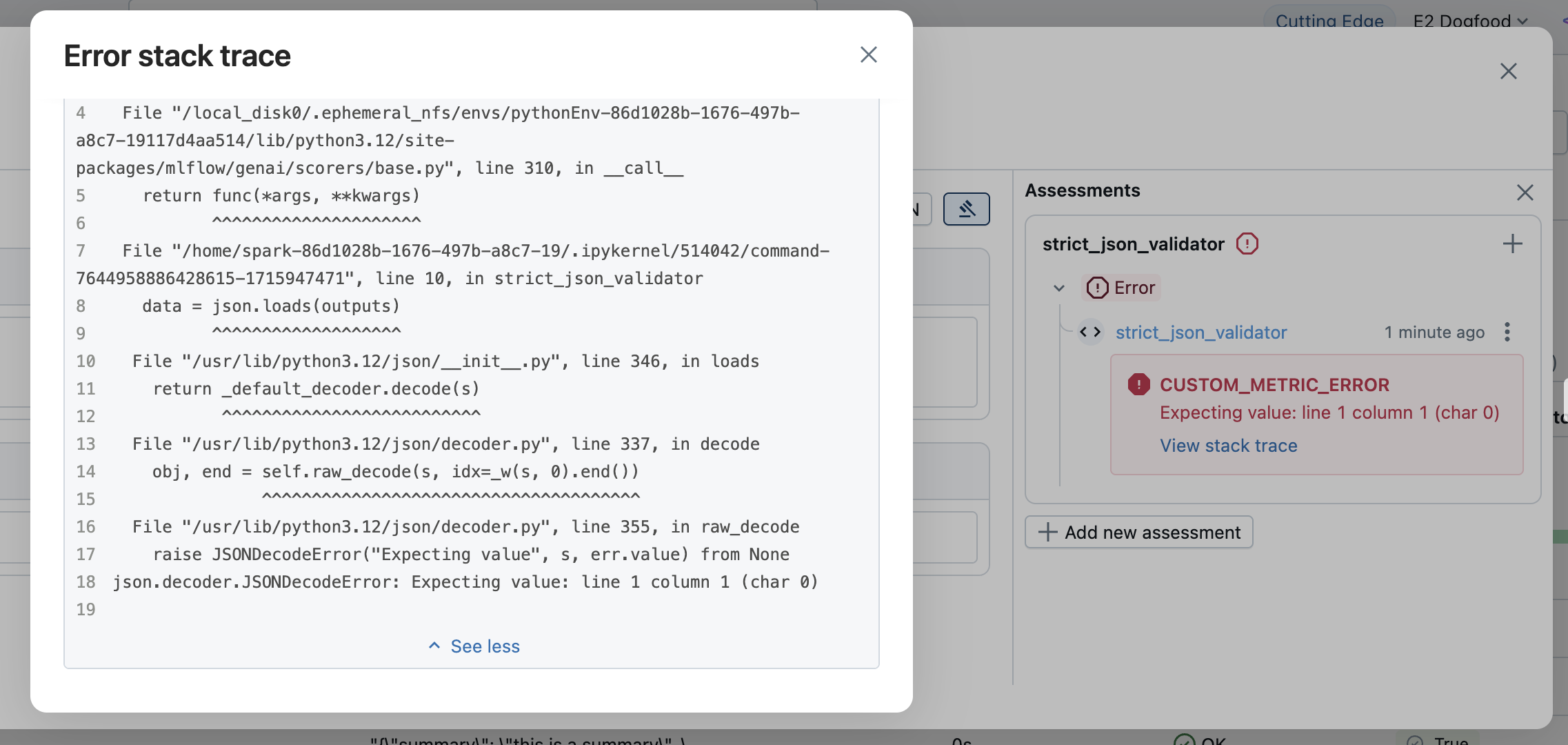
The simplest approach is to let exceptions throw naturally. MLflow automatically captures the exception and creates a Feedback object with the following error details:
value:Noneerror: The exception details, such as exception object, error message, and stack trace
The error information is displayed in the evaluation results. Open the corresponding row to see the error details.
Handle exceptions explicitly
For custom error handling or to provide specific error messages, catch exceptions and return a Feedback with None value and error details:
from mlflow.entities import AssessmentError, Feedback

@scorer
def is_valid_response(outputs):
    import json

    try:
        data = json.loads(outputs)
        required_fields = ["summary", "confidence", "sources"]
        missing = [f for f in required_fields if f not in data]

        if missing:
            return Feedback(
                error=AssessmentError(
                    error_code="MISSING_REQUIRED_FIELDS",
                    error_message=f"Missing required fields: {missing}",
                ),
            )

        return Feedback(
            value=True,
            rationale="Valid JSON with all required fields"
        )

    except json.JSONDecodeError as e:
        return Feedback(error=e)  # Can pass exception object directly to the error parameter
The error parameter accepts the following types of errors:
- Python Exception: Pass the exception object directly.
AssessmentError: For structured error reporting with error codes.
Scorer class
For most cases, the @scorer decorator is recommended. If your logic requires internal state or additional customization, instead use the Scorer base class. The Scorer class is a Pydantic object, so you can define additional fields and use them in the __call__ method.
Scorers defined using the Scorer class are not supported for production monitoring. For details, see Code-based scorers.
You must define the name field to set the metric name. If you return a list of Feedback objects, then you must set the name field in each Feedback to avoid naming conflicts.
from mlflow.genai.scorers import Scorer
from mlflow.entities import Feedback
from typing import Optional

# Scorer class is a Pydantic object
class CustomScorer(Scorer):
    # The `name` field is mandatory
    name: str = "response_quality"
    # Define additional fields
    my_custom_field_1: int = 50
    my_custom_field_2: Optional[list[str]] = None

    # Override the __call__ method to implement the scorer logic
    def __call__(self, outputs: str) -> Feedback:
        # Your logic here
        return Feedback(
            value=True,
            rationale="Response meets all quality criteria"
        )
State management
When writing scorers using the Scorer class, be aware of rules for managing state with Python classes. In particular, be sure to use instance attributes, not mutable class attributes. The example below illustrates mistakenly sharing state across scorer instances.
from mlflow.genai.scorers import Scorer
from mlflow.entities import Feedback

# WRONG: Don't use mutable class attributes
class BadScorer(Scorer):
    results = []  # Shared across all instances!

    name: str = "bad_scorer"

    def __call__(self, outputs, **kwargs):
        self.results.append(outputs)  # Causes issues
        return Feedback(value=True)

# CORRECT: Use instance attributes
class GoodScorer(Scorer):
    results: list[str] = None

    name: str = "good_scorer"

    def __init__(self):
        self.results = []  # Per-instance state

    def __call__(self, outputs, **kwargs):
        self.results.append(outputs)  # Safe
        return Feedback(value=True)