Lakebase Postgres
Lakebase is a fully managed Postgres database integrated into the Databricks platform. Build real-time transactional applications alongside your lakehouse data, with automatic scaling, instant branching, and native Unity Catalog integration.
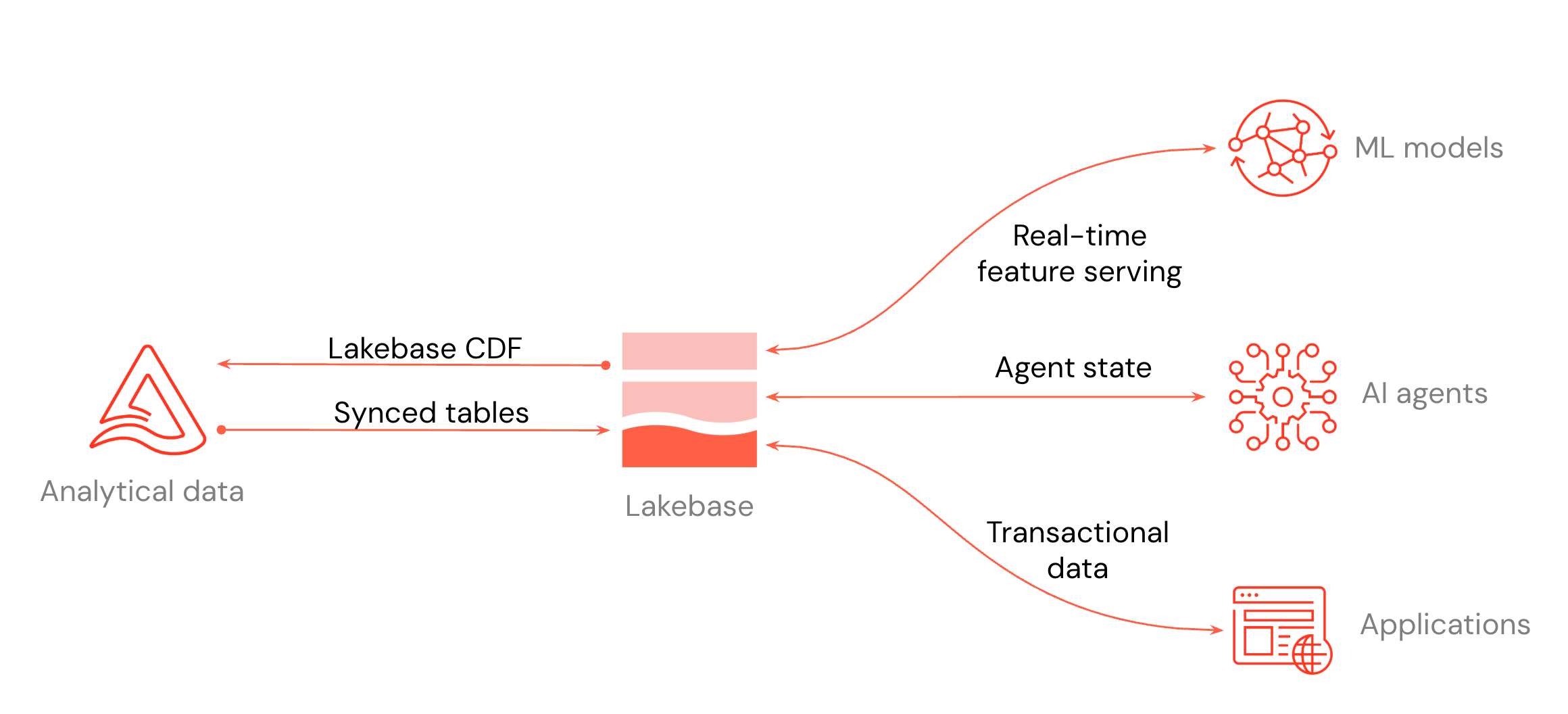
- Build low-latency apps: Connect Databricks Apps or any application to Lakebase for transactional workloads.
- Serve lakehouse data: Sync Unity Catalog tables into Lakebase so applications can query them at low latency.
- Store Postgres changes: Store Postgres changes as Delta tables for downstream pipelines and audit.
- AI and ML: Use Lakebase as an online feature store for ML models, or as a state store for agents.
Get started
-
- Get a Postgres database
- Create a project, branch, and database. Connect with
psqlor any Postgres driver.
-
- Serve lakehouse data
- Sync Unity Catalog tables into Postgres for low-latency app reads.
-
- Store Postgres changes in the lakehouse
- (Public Preview) Store Postgres changes as Delta with full change history.
-
- Build applications
- Build apps backed by Lakebase using Databricks Apps, external integrations, or the Data API.
Key features
Explore features that optimize performance, reduce costs, and enable flexible development workflows.
-
- Autoscaling
- Automatically adjust compute resources based on workload demand.
-
- Scale to zero
- Automatically suspend inactive computes to minimize costs.
-
- Branches
- Create isolated branches for development and testing.
-
- Read replicas
- Create read-only replicas to scale read operations.
-
- Instant restore
- Create a new branch from any point in time within your history window.
-
- High availability
- Configure automatic failover to keep your database available during compute failures.
-
- Disaster recovery
- Replicate to a Secondary Workspace in another region for manual failover.
Connect and query
Use various tools and interfaces to connect to and query your database.
-
- Connect to your database
- Learn different ways to connect to your Lakebase database.
-
- Query with SQL Editor
- Use the built-in SQL Editor to query and manage your database.
-
- Tables editor
- Use the visual interface to view, edit, and manage data and schemas.
-
- Postgres clients
- Connect using standard Postgres clients and tools.
-
- Querying data at a point in time
- Query data using point-in-time branches.
Additional resources
-
- Use cases
- Lakebase patterns: serve lakehouse data, replicate to the lakehouse, application backend, agents and ML.
-
- Region availability
- Supported regions for Lakebase Postgres.
note
Lakebase Postgres is also available on the Neon.com platform. For documentation on using Lakebase Postgres through Neon.com, see the Neon documentation.