Use connection pooling
Lakebase includes a built-in PgBouncer connection pooler that maintains a pool of server connections and shares them across many client connections. The pooler supports up to 10,000 concurrent client connections, making it a good fit for serverless functions, web APIs, and other applications that open many short-lived connections.
Connection pooling requires native Postgres password authentication. It is not available for OAuth roles.
How connection pooling works
Each Postgres connection consumes server resources because Postgres creates a separate process for each client. As concurrent connections grow, they can exhaust the server's connection limit quickly.
The connection pooler sits between your application and Postgres. Clients connect to the pooler, and the pooler forwards queries to a smaller pool of actual server connections. Lakebase runs PgBouncer in transaction mode, so a server connection is held only for the duration of a single transaction and then returned to the pool. This allows many clients to share a small pool of server connections.
Connection pools
PgBouncer creates a separate pool for each database and user combination. Two users connecting to the same database get independent pools. The size of each pool is approximately 90% of the Postgres max_connections limit, which varies by compute size.
When all connections in a pool are in use, new client requests wait in a queue. If a server connection doesn't become available within 2 minutes, the client receives a timeout error.
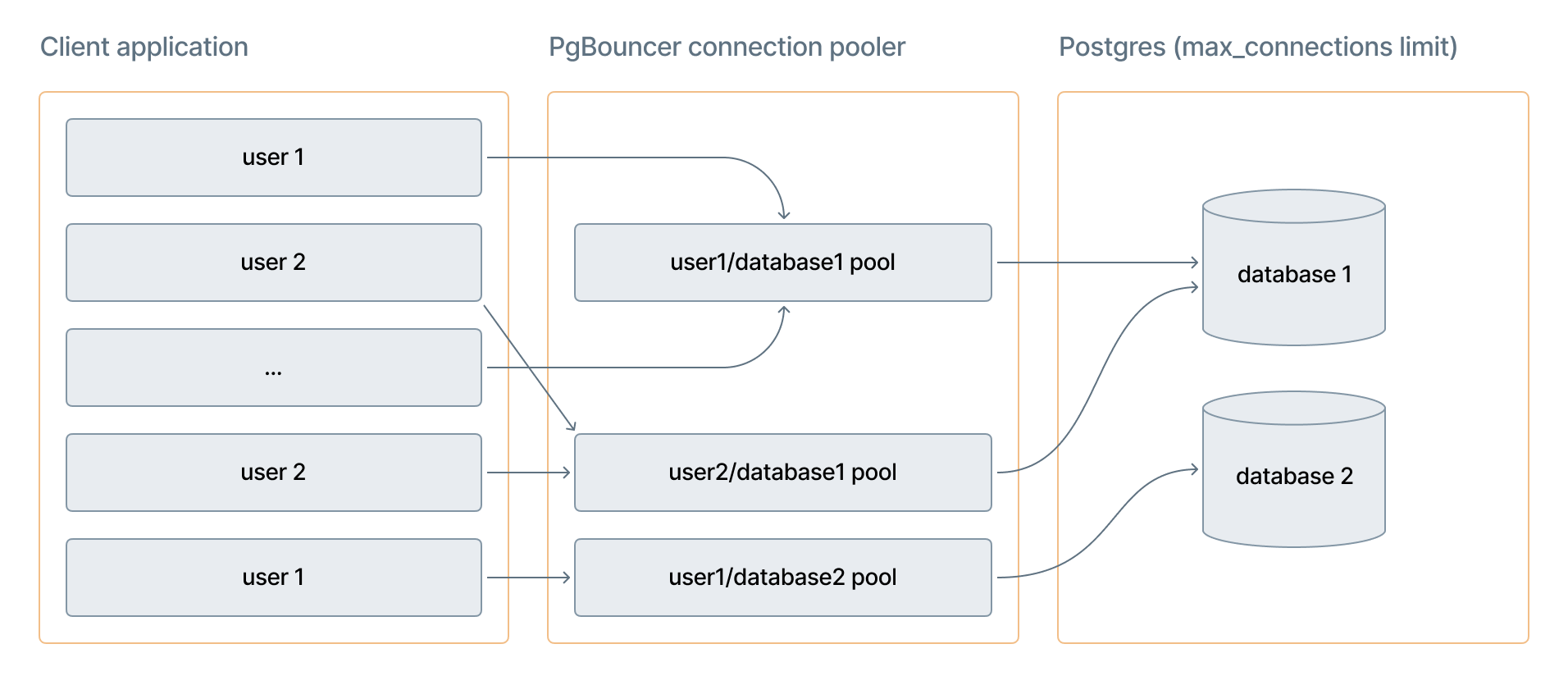
The diagram shows how multiple client connections from different users route through separate PgBouncer pools (one per user/database combination), which share a limited number of actual Postgres connections.
Connection limits
Three limits govern connection pooling:
Limit | Value | What it controls |
|---|---|---|
Client connections ( | 10,000 | Maximum connections from your application to PgBouncer |
Pool size ( | ~90% of | Active server connections per (user, database) pair |
Direct connections ( | Varies by compute size | Maximum direct Postgres connections |
The direct connection limit depends on your compute size. For example, an 8 CU compute supports 1,678 direct connections and a 16 CU compute supports 3,357. For the full list, see Compute specifications.
The 10,000 client connection limit does not mean 10,000 simultaneous query results. It represents the maximum number of client connections PgBouncer accepts. The number of concurrent active transactions is bounded by the pool size, which is approximately 90% of max_connections.
Enable connection pooling
Prerequisites
- Your Lakebase project must be active.
- You must have a native Postgres password role in the project. For instructions, see Create a native Postgres password role.
- To use connection pooling with read-only compute instances, you must have a high availability endpoint with Allow access to read-only compute instances enabled. See High availability.
Steps
- In the Lakebase App, go to your project and click Connect.
- Select the branch and compute you want to connect to.
- From the Role drop-down, select a native Postgres password role. The Connection pooling switch is only visible when a password role is selected. It is hidden for OAuth roles.
- Turn on Connection pooling.
- Copy the connection string and use it in your application.
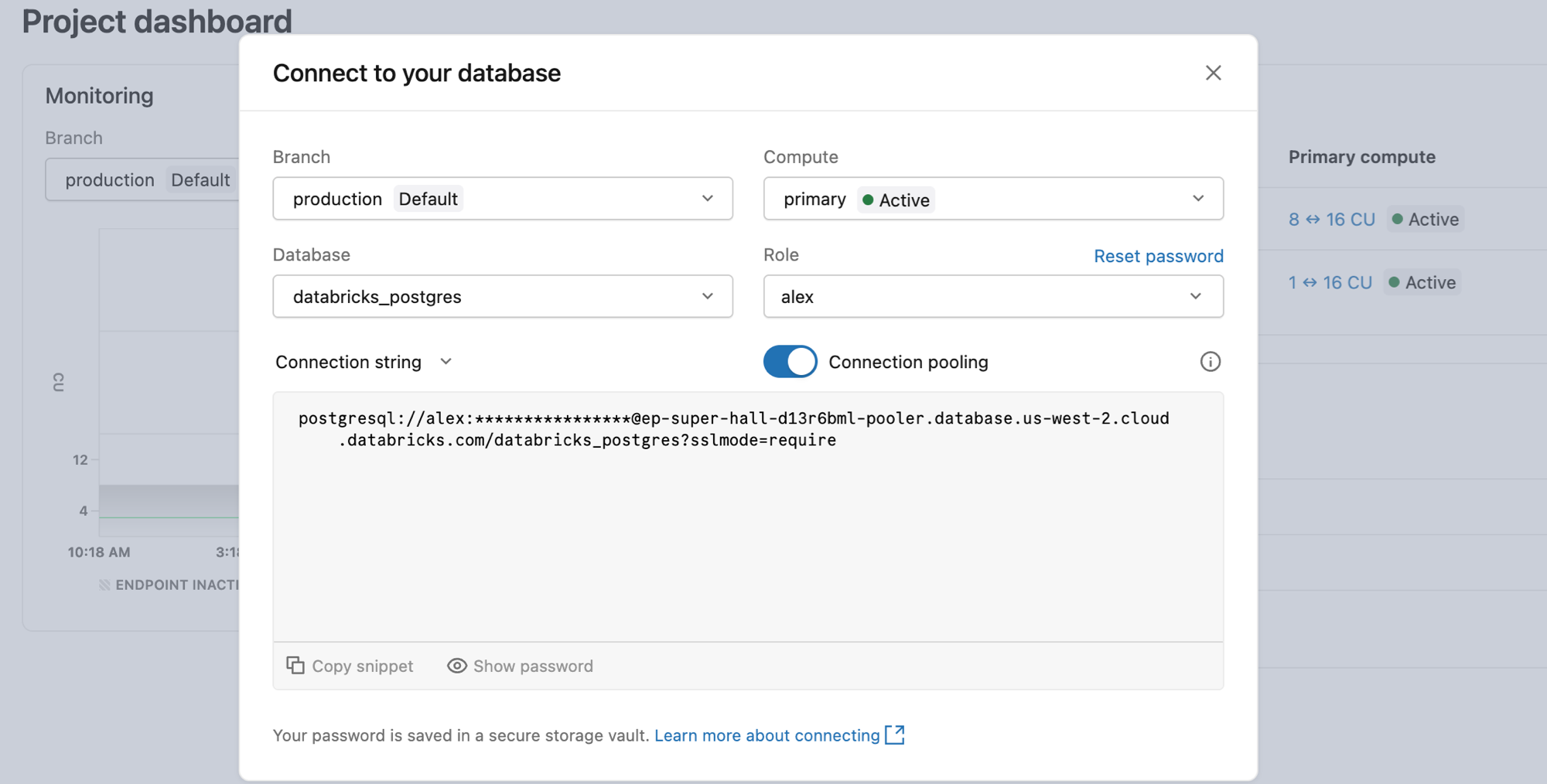
Connection string formats
Pooler connection strings use a different hostname than direct database connections. The hostname includes -pooler after the endpoint ID for read-write compute, or -ro-pooler for read-only compute:
Compute type | Hostname format | When to use |
|---|---|---|
Read-write compute |
| All write and read traffic |
Read-only compute |
| Read traffic only. Requires a high availability endpoint with read access enabled. |
Both use port 5432.
Copy your pooler connection string directly from the Connect dialog in the Lakebase App to get the correct hostname for your endpoint, region, and cloud.
PgBouncer configuration
Lakebase manages PgBouncer with the following settings. These settings are fixed and cannot be customized.
[pgbouncer]
pool_mode=transaction
max_client_conn=10000
default_pool_size=0.9 * max_connections
max_prepared_statements=1000
query_wait_timeout=120
Setting | Description |
|---|---|
| Server connections return to the pool after each transaction. See Transaction mode. |
| Maximum concurrent client connections PgBouncer accepts. |
| Active server connections per (user, database) pair. Varies by compute size. |
| Allows protocol-level prepared statements in transaction mode. Limits tracked statements to 1,000 per client connection. |
| Seconds a client waits for a server connection before receiving a timeout error. |
Transaction mode
Transaction mode improves connection efficiency but restricts certain Postgres features that require a persistent server connection. The following features aren't available when using the connection pooler:
-
SQL-level prepared statements:
PREPAREandDEALLOCATEstatements are not supported in transaction mode. Driver-level prepared statements (used internally by psycopg, node-postgres, JDBC, and similar libraries) work correctly through PgBouncer's protocol-level support. For JDBC, if you see errors related to prepared statements, setprepareThreshold=0to disable named server-side prepared statement caching. -
Session-level settings:
SETcommands do not persist across transactions because each transaction may use a different server connection. For example:SQLBEGIN;
SET search_path TO myschema;
SELECT * FROM mytable; -- works in this transaction
COMMIT;
-- connection returns to pool after COMMIT
SELECT * FROM mytable; -- ERROR: relation "mytable" does not existTo apply a setting permanently, use
ALTER ROLEinstead:SQLALTER ROLE myrole SET search_path TO myschema, public; -
Session-held temporary tables: Temporary tables that persist across transactions are not available. A connection returned to the pool may be assigned to a different client in the next transaction.
-
WITH HOLDcursors: Cursors declared withWITH HOLDrequire a persistent connection and are not supported. -
Advisory locks: PgBouncer doesn't support advisory locks. Advisory locks require a persistent server connection, which isn't available in transaction mode.
-
LISTEN/NOTIFY: Not supported. Use a direct (non-pooled) connection for applications that require pub/sub messaging. -
pg_dumpand schema migrations: Use a direct connection forpg_dump, schema migrations, and other tools that rely on session-level state.
For applications that require session-level Postgres features, use a direct connection string from the Connect dialog without enabling the Connection pooling switch.