Lakebase Disaster Recovery (DR)
Disaster recovery is in Private Preview. During Private Preview, it provides cross-region replication. To enable disaster recovery for your account, ask your workspace admin to reach out to your Databricks account representative.
During the Private Preview, disaster recovery is not intended for production use.
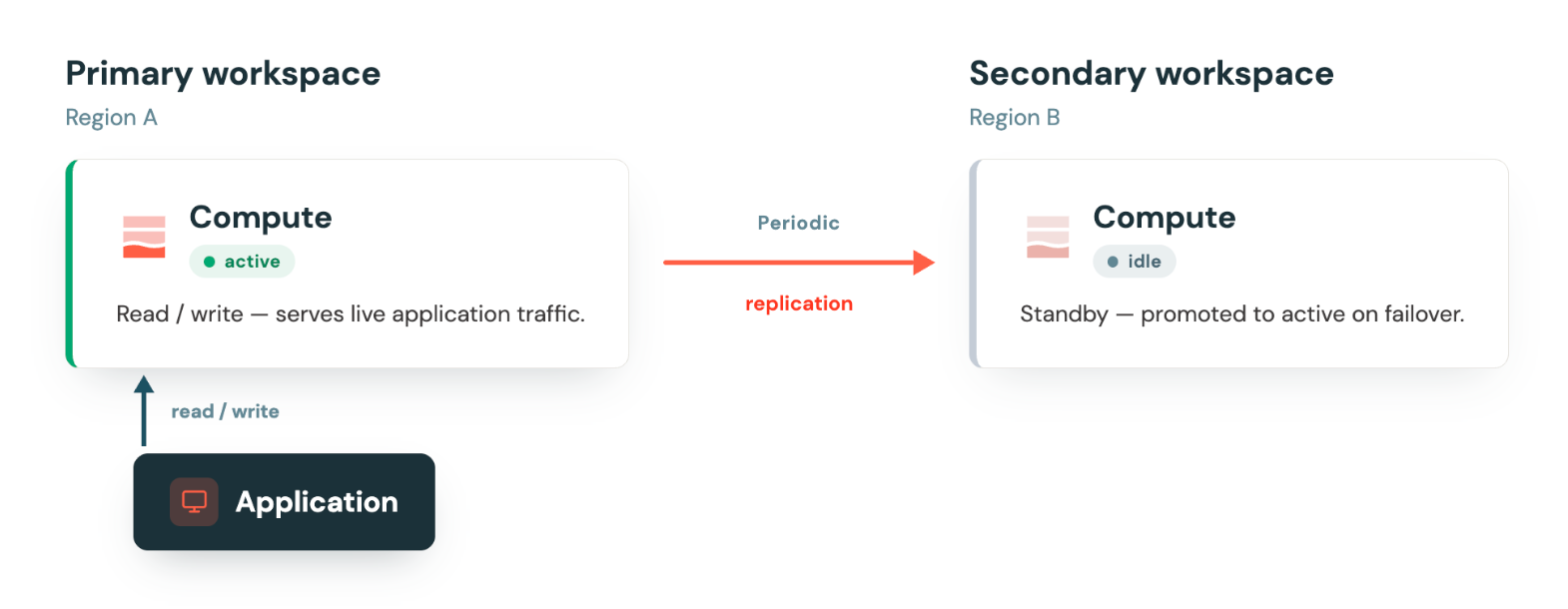
Lakebase Disaster Recovery (DR) replicates the data in your project to a Secondary Workspace in a different region, protecting against full region failures, including outages, rather than a single compute failure or availability zone (AZ) failure. Lakebase currently offers periodic replication, which synchronizes your data into another region without having to run additional compute. Periodic mode is for use cases where you need to protect against regional outages, but your use case isn't as sensitive to regional unavailability (for example, RPO windows in the minutes range). You must manually trigger a failover if you want to promote a secondary project to become a primary, though you can choose to build scripts for this behavior.
This page explains how Lakebase Disaster Recovery works. To enable it and trigger a failover or failback, see Manage disaster recovery.
During the Private Preview, you manage disaster recovery from the project's settings in the UI. Disaster recovery APIs are available but subject to change.
How disaster recovery works
Disaster recovery pairs your project's Primary Workspace with a Secondary Workspace in another region, forming a replication group. Lakebase periodically replicates committed data from the Primary to the Secondary. The Secondary's compute stays idle until a failover, so you aren't paying for an always-on standby. Replication happens at the storage layer, so the Secondary's compute doesn't need to run to receive replicated data.
Lakebase exposes a replication lag metric that shows how far the Secondary is behind the Primary. Lag tells you how much data you'd lose if you failed over right now, and it's how you confirm that replication has fully caught up (RPO=0) before a planned failback.
Disaster recovery vs. high availability
Disaster recovery and high availability protect against different failure domains, and most production workloads use both. High availability keeps redundant compute running, so a compute or availability zone failure doesn't take your database offline. Disaster recovery keeps a replicated copy of your data in another region, so you can resume your Lakebase operations in case of a regional failure.
You can combine high availability and disaster recovery for production and critical applications to build a more resilient deployment model for your Lakebase project.
High availability | Disaster recovery | |
|---|---|---|
Protects against | Compute or availability zone failure within a region | Regional impairments, including outages |
Scope | Across availability zones in one region | Across regions |
Redundant resource | Standby compute instances, already running in other zones | A replicated data copy in a Secondary Workspace |
Standby compute | Always running, ready to take over instantly | Periodic mode: idle until failover, so you don't pay for standby compute |
Data loss on failover | None (RPO = 0), replication is synchronous | Data is reserved in the primary region; data may be inconsistent until later reconciled through recovery branches |
Trigger | Automatic | Manual (you can choose to automate it, based on your requirements) |
Application impact | Reconnect to the same connection string | Reconnect using the new primary region's connection string |
Your high availability configuration is copied to the secondary project as part of the replication group, so high availability is preserved after a failover. You don't need to reconfigure it on the new Primary.
Failover and failback
Failover switches writes from the Primary to the Secondary and promotes the Secondary to be the new Primary. The original Primary stops accepting writes. Because each region has its own endpoints, the new Primary has a different connection string. After a failover, update your application to use the new Primary's connection string, along with a new authentication token, before resuming traffic.
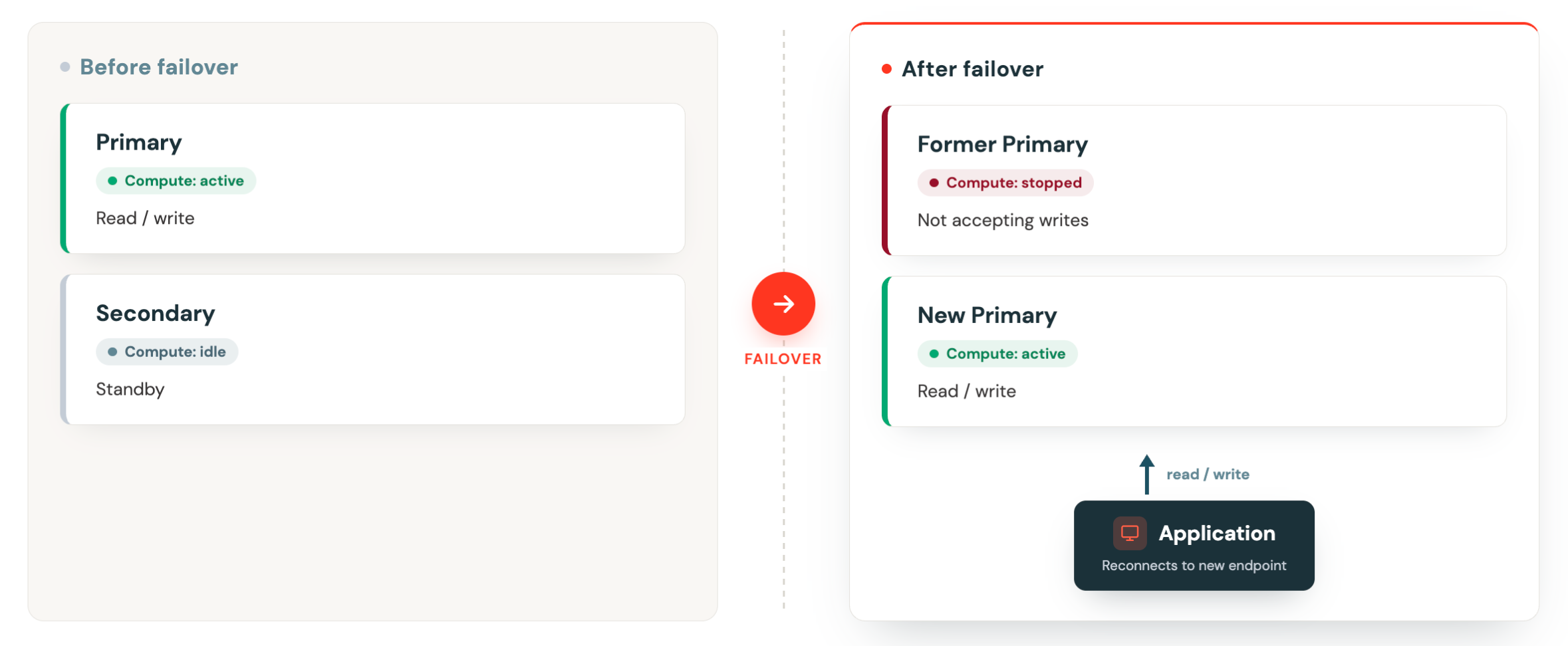
Failover is always manual. Because replication is periodic, the data in the Secondary may be behind the Primary, so at any moment it might not have the most recently committed transactions. Promoting it is therefore a business decision: you're choosing to resume service on a slightly stale copy and accept that recent transactions are deferred to a recovery branch until you reconcile them. Lakebase doesn't make that trade-off for you, so a Lakebase Project Admin triggers every failover.
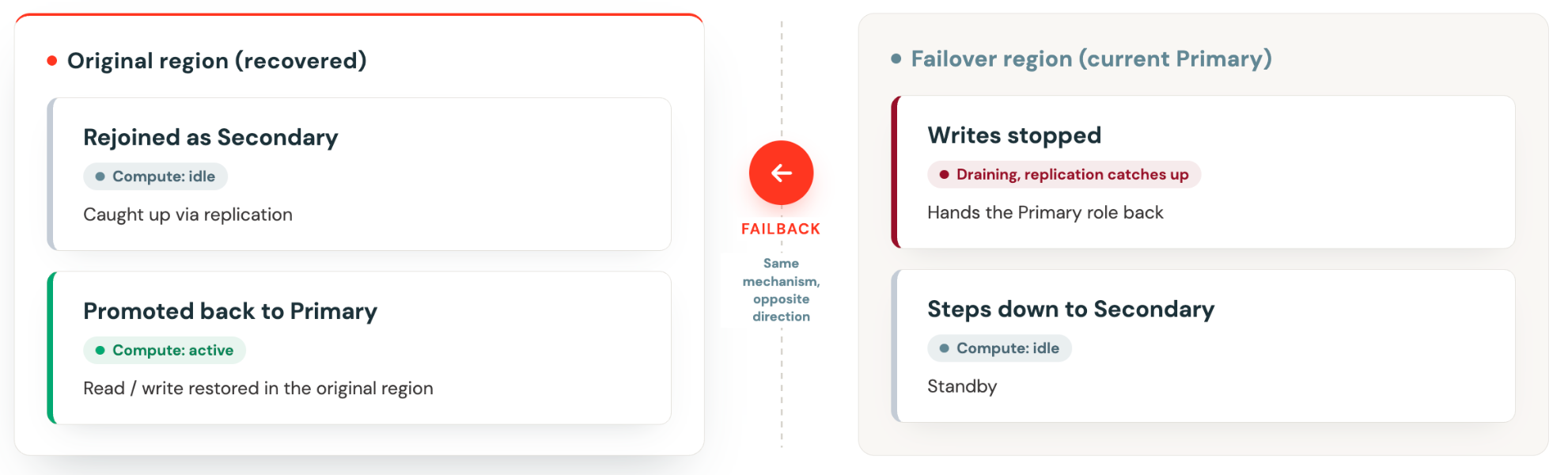
Failback uses the same failover mechanism, run in the opposite direction, once the original primary region recovers and rejoins the replication group as a Secondary. To reach RPO=0 during failback, stop write traffic on the current Primary first, so replication can fully catch up before you fail back.
Recovery branches
If a region becomes unavailable before all transactions replicate to the Secondary, those unreplicated transactions are preserved. Lakebase preserves the divergent timeline as a recovery branch on the original Primary. Recovery branches stay hidden until divergence is detected, and become accessible after failback, when the original Primary comes back online. Lakebase then surfaces a notification so you can inspect the divergent timeline. You decide when to reconcile the data, and Lakebase never automatically merges or deletes a recovery branch.
To inspect and reconcile a recovery branch, see Inspect and reconcile recovery branches.
What's not supported
The following table lists features and configurations that are limited or not yet available during Private Preview. Some are planned for a later release, and others are out of scope for disaster recovery.
Feature | Status |
|---|---|
CLI and API | Preview APIs are available but subject to change during the Private Preview. |
Cross-region read replicas | Not yet available. The Secondary's compute stays idle in periodic mode and can't serve reads until a failover. |
Switchover (RPO=0 controlled failover) | Not yet supported. You must plan for a controlled failover. |
Global endpoint | Not yet supported. You must manage connecting to the regional endpoints after a failover. |
Same-region, cross-Workspace replication | Not supported. The Primary and Secondary must be in different regions. |
PrivateLink | Not yet supported. Replication traffic between the Primary and Secondary Workspaces travels over the public internet, encrypted in transit. |
Lakehouse integrations on failover
Synced tables and Lakebase CDF pipelines both terminate on failover and don't resume automatically. Reconfigure them manually after a failover. The data they handle behaves differently:
- Synced tables (lakehouse to Lakebase). The synced data is replicated to the secondary project, so it's present on the new Primary after failover. Only the pipeline needs to be reconfigured.
- Lakebase CDF (Lakebase to lakehouse). The Delta data isn't replicated, because disaster recovery doesn't replicate Delta tables.
Additional resources
- Manage disaster recovery to enable disaster recovery and trigger a failover
- High availability for in-region automatic failover
- Database branches to understand how recovery branches relate to regular branches