Connect external app to Lakebase using SDK
This guide shows how to connect external applications to Lakebase using standard Postgres drivers (psycopg, pgx, JDBC) with OAuth token rotation. You use the Databricks SDK with a service principal and a connection pool that calls generate_database_credential() when opening each new connection, so you get a new token (60-minute lifetime) each time you connect. Examples are provided for Python, Java, and Go. For easier setup with automatic credential management, consider Databricks Apps instead.
What you'll build: A connection pattern that uses OAuth token rotation to connect to Lakebase from an external application, then verify the connection works.
You need the Databricks SDK (Python v0.89.0+, Java v0.73.0+, or Go v0.109.0+). Complete the following steps in order:
For languages without Databricks SDK support (Node.js, Ruby, PHP, Elixir, Rust, etc.), see Connect external app to Lakebase using API.
How it works
The Databricks SDK simplifies OAuth authentication by handling workspace token management automatically:
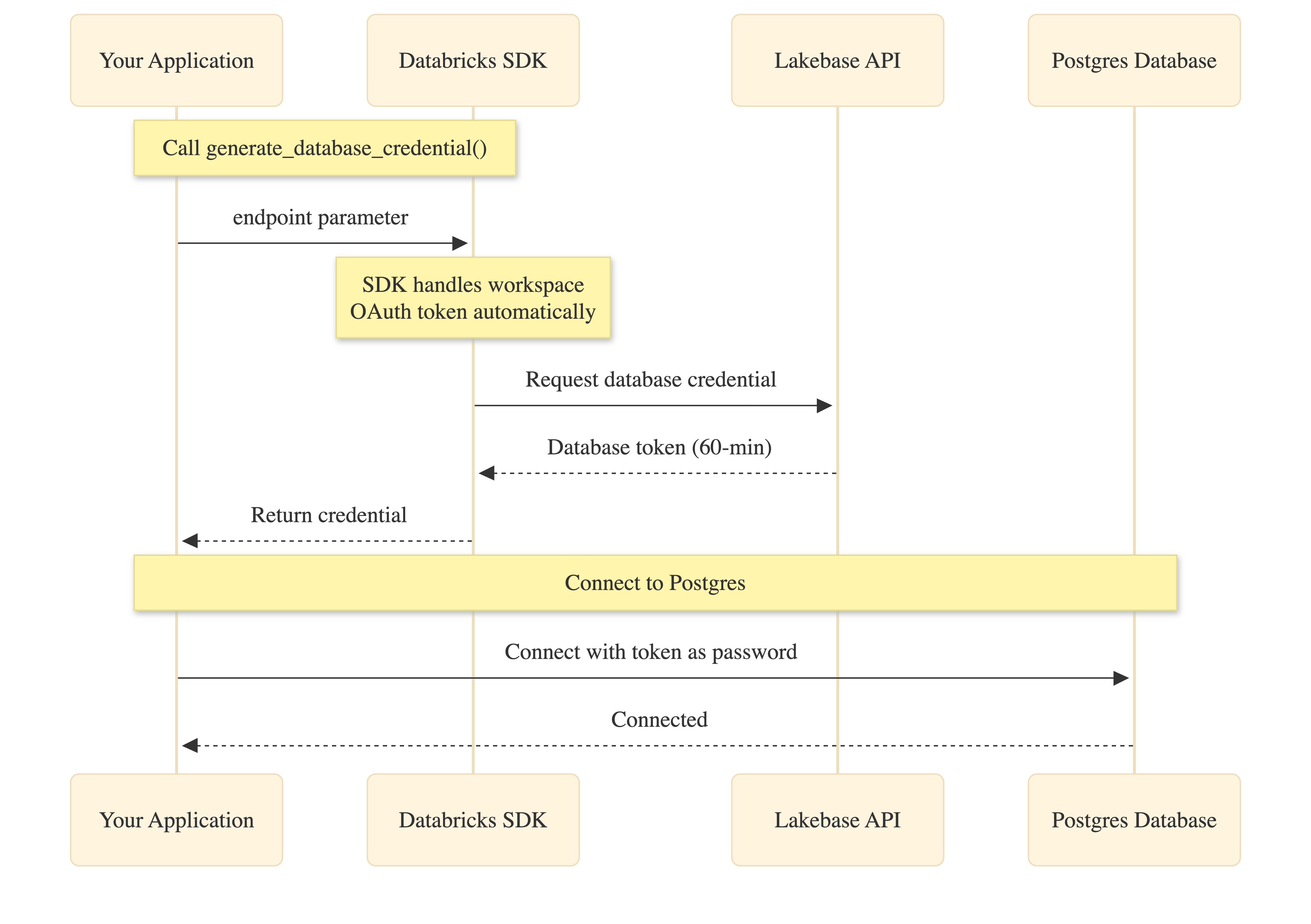
Your application calls generate_database_credential() with the endpoint parameter. The SDK obtains the workspace OAuth token internally (no code needed), requests the database credential from the Lakebase API, and returns it to your application. You then use this credential as the password when connecting to Postgres.
Both the workspace OAuth token and database credential expire after 60 minutes. Connection pools handle automatic refresh by calling generate_database_credential() when creating new connections.
1. Create service principal with OAuth secret
Create a Databricks service principal with an OAuth secret. Full details are in Authorize service principal access. For building an external app, keep in mind:
- Set your secret to your preferred lifetime, up to 730-days. This defines how often you need to refresh the secret, which is used to generate database credentials via rotation.
- Enable "Workspace access" for the service principal (Settings → Identity and access → Service principals →
{name}→ Configurations tab). It is required for generating new database credentials. - Note the client ID (a UUID). You use it when creating the matching Postgres role in your app setup and for
PGUSER.
2. Create Postgres role for the service principal
Create an OAuth role for the service principal. You can do this in the Lakebase UI (using the Add role dialog's OAuth tab) or in the Lakebase SQL Editor using the client ID from step 1 (not the display name; role name is case-sensitive):
-- Enable the auth extension (if not already enabled)
CREATE EXTENSION IF NOT EXISTS databricks_auth;

-- Create OAuth role using the service principal client ID
SELECT databricks_create_role('{client-id}', 'SERVICE_PRINCIPAL');

-- Grant database permissions
GRANT CONNECT ON DATABASE databricks_postgres TO "{client-id}";
GRANT USAGE ON SCHEMA public TO "{client-id}";
GRANT SELECT, INSERT, UPDATE, DELETE ON ALL TABLES IN SCHEMA public TO "{client-id}";
ALTER DEFAULT PRIVILEGES IN SCHEMA public
  GRANT SELECT, INSERT, UPDATE, DELETE ON TABLES TO "{client-id}";
Replace {client-id} with your service principal client ID. See Create OAuth roles.
3. Get connection details
From your project in the Lakebase Console, click Connect, select branch and endpoint, and note host, database (usually databricks_postgres), and endpoint name (format: projects/<project-id>/branches/<branch-id>/endpoints/<endpoint-id>).
Or use the CLI:
databricks postgres list-endpoints projects/<project-id>/branches/<branch-id>
See Connection strings for details.
4. Set environment variables
Set these environment variables before running your application:
# Databricks workspace authentication
export DATABRICKS_HOST="https://your-workspace.databricks.com"
export DATABRICKS_CLIENT_ID="<service-principal-client-id>"
export DATABRICKS_CLIENT_SECRET="<your-oauth-secret>"

# Lakebase connection details (from step 3)
export ENDPOINT_NAME="projects/<project-id>/branches/<branch-id>/endpoints/<endpoint-id>"
export PGHOST="<endpoint-id>.database.<region>.cloud.databricks.com"
export PGDATABASE="databricks_postgres"
export PGUSER="<service-principal-client-id>"   # Same UUID as step 1
export PGPORT="5432"
export PGSSLMODE="require"   # Python only
5. Add connection code
- Python
- Go
- Java
This example uses psycopg3 with a custom connection class that generates a fresh token when the pool creates each new connection.
import os
from databricks.sdk import WorkspaceClient
import psycopg
from psycopg_pool import ConnectionPool

# Initialize Databricks SDK
workspace_client = None

def _get_workspace_client():
    """Get or create the workspace client for OAuth."""
    global workspace_client
    if workspace_client is None:
        workspace_client = WorkspaceClient(
            host=os.environ["DATABRICKS_HOST"],
            client_id=os.environ["DATABRICKS_CLIENT_ID"],
            client_secret=os.environ["DATABRICKS_CLIENT_SECRET"],
        )
    return workspace_client

def _get_endpoint_name():
    """Get endpoint name from environment."""
    name = os.environ.get("ENDPOINT_NAME")
    if not name:
        raise ValueError(
            "ENDPOINT_NAME must be set (format: projects/<id>/branches/<id>/endpoints/<id>)"
        )
    return name

class OAuthConnection(psycopg.Connection):
    """Custom connection class that generates a fresh OAuth token per connection."""

    @classmethod
    def connect(cls, conninfo="", **kwargs):
        endpoint_name = _get_endpoint_name()
        client = _get_workspace_client()
        # Generate database credential (tokens are workspace-scoped)
        credential = client.postgres.generate_database_credential(
            endpoint=endpoint_name
        )
        kwargs["password"] = credential.token
        return super().connect(conninfo, **kwargs)

# Create connection pool with OAuth token rotation
def get_connection_pool():
    """Get or create the connection pool."""
    database = os.environ["PGDATABASE"]
    user = os.environ["PGUSER"]
    host = os.environ["PGHOST"]
    port = os.environ.get("PGPORT", "5432")
    sslmode = os.environ.get("PGSSLMODE", "require")

    conninfo = f"dbname={database} user={user} host={host} port={port} sslmode={sslmode}"

    return ConnectionPool(
        conninfo=conninfo,
        connection_class=OAuthConnection,
        min_size=1,
        max_size=10,
        open=True,
    )

# Use the pool in your application
pool = get_connection_pool()
with pool.connection() as conn:
    with conn.cursor() as cur:
        cur.execute("SELECT current_user, current_database()")
        print(cur.fetchone())
Dependencies: databricks-sdk>=0.89.0, psycopg[binary,pool]>=3.1.0
This example uses pgxpool with a BeforeConnect callback that generates a fresh token for each new connection.
package main

import (
	"context"
	"fmt"
	"log"
	"os"
	"time"

	"github.com/databricks/databricks-sdk-go"
	"github.com/databricks/databricks-sdk-go/service/postgres"
	"github.com/jackc/pgx/v5"
	"github.com/jackc/pgx/v5/pgxpool"
)

func createConnectionPool(ctx context.Context) (*pgxpool.Pool, error) {
	// Initialize Databricks workspace client
	w, err := databricks.NewWorkspaceClient(&databricks.Config{
		Host:         os.Getenv("DATABRICKS_HOST"),
		ClientID:     os.Getenv("DATABRICKS_CLIENT_ID"),
		ClientSecret: os.Getenv("DATABRICKS_CLIENT_SECRET"),
	})
	if err != nil {
		return nil, err
	}

	// Build connection string
	connStr := fmt.Sprintf("host=%s port=%s dbname=%s user=%s sslmode=require",
		os.Getenv("PGHOST"),
		os.Getenv("PGPORT"),
		os.Getenv("PGDATABASE"),
		os.Getenv("PGUSER"))

	config, err := pgxpool.ParseConfig(connStr)
	if err != nil {
		return nil, err
	}

	// Configure pool
	config.MaxConns = 10
	config.MinConns = 1
	config.MaxConnLifetime = 45 * time.Minute
	config.MaxConnIdleTime = 15 * time.Minute

	// Generate fresh token for each new connection
	config.BeforeConnect = func(ctx context.Context, connConfig *pgx.ConnConfig) error {
		credential, err := w.Postgres.GenerateDatabaseCredential(ctx,
			postgres.GenerateDatabaseCredentialRequest{
				Endpoint: os.Getenv("ENDPOINT_NAME"),
			})
		if err != nil {
			return err
		}
		connConfig.Password = credential.Token
		return nil
	}

	return pgxpool.NewWithConfig(ctx, config)
}

func main() {
	ctx := context.Background()
	pool, err := createConnectionPool(ctx)
	if err != nil {
		log.Fatal(err)
	}
	defer pool.Close()

	var user, database string
	err = pool.QueryRow(ctx, "SELECT current_user, current_database()").Scan(&user, &database)
	if err != nil {
		log.Fatal(err)
	}

	fmt.Printf("Connected as: %s to database: %s\n", user, database)
}
Dependencies: Databricks SDK for Go v0.109.0+ (github.com/databricks/databricks-sdk-go), pgx driver (github.com/jackc/pgx/v5)
Note: The BeforeConnect callback ensures fresh OAuth tokens for each new connection, handling automatic token rotation for long-running applications.
This example uses JDBC with HikariCP and a custom DataSource that generates a fresh token when the pool creates each new connection.
import java.sql.*;
import javax.sql.DataSource;
import com.databricks.sdk.WorkspaceClient;
import com.databricks.sdk.core.DatabricksConfig;
import com.databricks.sdk.service.postgres.*;
import com.zaxxer.hikari.HikariConfig;
import com.zaxxer.hikari.HikariDataSource;

public class LakebaseConnection {

    private static WorkspaceClient workspaceClient() {
        String host = System.getenv("DATABRICKS_HOST");
        String clientId = System.getenv("DATABRICKS_CLIENT_ID");
        String clientSecret = System.getenv("DATABRICKS_CLIENT_SECRET");

        return new WorkspaceClient(new DatabricksConfig()
            .setHost(host)
            .setClientId(clientId)
            .setClientSecret(clientSecret));
    }

    private static DataSource createDataSource() {
        WorkspaceClient w = workspaceClient();
        String endpointName = System.getenv("ENDPOINT_NAME");
        String host = System.getenv("PGHOST");
        String database = System.getenv("PGDATABASE");
        String user = System.getenv("PGUSER");
        String port = System.getenv().getOrDefault("PGPORT", "5432");

        String jdbcUrl = "jdbc:postgresql://" + host + ":" + port +
                         "/" + database + "?sslmode=require";

        // DataSource that returns a new connection with a fresh token (tokens are workspace-scoped)
        DataSource tokenDataSource = new DataSource() {
            @Override
            public Connection getConnection() throws SQLException {
                DatabaseCredential cred = w.postgres().generateDatabaseCredential(
                    new GenerateDatabaseCredentialRequest().setEndpoint(endpointName)
                );
                return DriverManager.getConnection(jdbcUrl, user, cred.getToken());
            }

            @Override
            public Connection getConnection(String u, String p) {
                throw new UnsupportedOperationException();
            }
            // ... other DataSource methods (getLogWriter, etc.)
        };

        // Wrap in HikariCP for connection pooling
        HikariConfig config = new HikariConfig();
        config.setDataSource(tokenDataSource);
        config.setMaximumPoolSize(10);
        config.setMinimumIdle(1);
        // Recycle connections before 60-min token expiry
        config.setMaxLifetime(45 * 60 * 1000L);

        return new HikariDataSource(config);
    }

    public static void main(String[] args) throws SQLException {
        DataSource pool = createDataSource();

        try (Connection conn = pool.getConnection();
             Statement st = conn.createStatement();
             ResultSet rs = st.executeQuery("SELECT current_user, current_database()")) {
            if (rs.next()) {
                System.out.println("User: " + rs.getString(1));
                System.out.println("Database: " + rs.getString(2));
            }
        }
    }
}
Dependencies: Databricks SDK for Java v0.73.0+ (com.databricks:databricks-sdk-java), PostgreSQL JDBC driver (org.postgresql:postgresql), HikariCP (com.zaxxer:HikariCP)
6. Run and verify the connection
- Python
- Java
- Go
Install dependencies:
pip install databricks-sdk psycopg[binary,pool]
Run:
# Save all the code from step 5 (above) as db.py, then run:
from db import get_connection_pool

pool = get_connection_pool()
with pool.connection() as conn:
    with conn.cursor() as cur:
        cur.execute("SELECT current_user, current_database()")
        print(cur.fetchone())
Expected output:
('c00f575e-d706-4f6b-b62c-e7a14850571b', 'databricks_postgres')
If current_user matches your service principal client ID from step 1, OAuth token rotation is working.
Note: This assumes you have a Maven project with the dependencies from the Java example above in your pom.xml.
Install dependencies:
mvn install
Run:
mvn exec:java -Dexec.mainClass="com.example.LakebaseConnection"
Expected output:
User: c00f575e-d706-4f6b-b62c-e7a14850571b
Database: databricks_postgres
If the user matches your service principal client ID from step 1, OAuth token rotation is working.
Install dependencies:
go mod init myapp
go get github.com/databricks/databricks-sdk-go
go get github.com/jackc/pgx/v5
Run:
go run main.go
Expected output:
Connected as: c00f575e-d706-4f6b-b62c-e7a14850571b to database: databricks_postgres
If the user matches your service principal client ID from step 1, OAuth token rotation is working.
Note: First connection after idle may take longer as Lakebase starts compute from zero.
Troubleshooting
Error | Fix |
|---|---|
"API is disabled for users without workspace-access entitlement" | Enable "Workspace access" for the service principal (step 1). |
"Role does not exist" or auth fails | Create the OAuth role via SQL (step 2), not the UI. |
"Connection refused" or "Endpoint not found" | Use |
"Invalid user" or "User not found" | Set |