Lakebase Search
Lakebase Search adds hybrid vector and keyword search to Lakebase projects. Enable it in your project settings, then install the extensions you need: lakebase_vector for vector search, lakebase_text for BM25 keyword search, and optionally lakebase_tokenizer for configurable tokenization.
Vector, keyword, and hybrid search
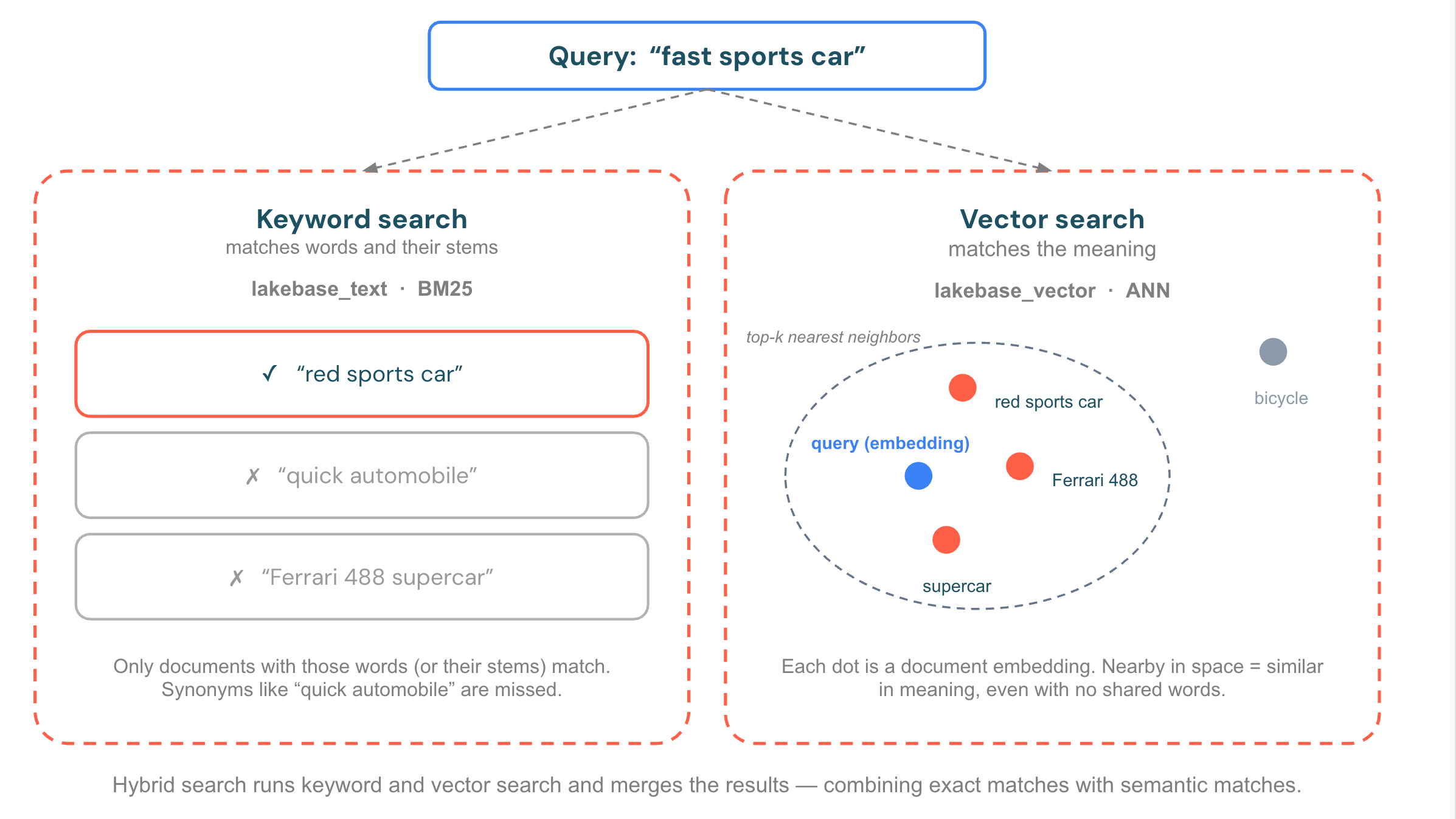
Lakebase Search provides two complementary search methods. Use either on its own, or combine them for hybrid search:
- Vector (semantic) search finds rows whose meaning is closest to your query, even when they share no words. You query with an embedding (a numeric vector produced by a model), and the index returns the nearest vectors by distance. Use it for natural-language questions, recommendations, and retrieval-augmented generation (RAG). Powered by
lakebase_vector. - Keyword (full-text) search ranks rows by how well they match the exact terms in your query, using BM25 relevance scoring. Use it for names, codes, and exact-term lookups where wording matters. Powered by
lakebase_text. - Hybrid search runs both searches and combines the results into one ranked list, so you get semantically similar and exact-term matches together. Use it when queries mix intent with specific terms, the most common case in real-world search.
How it works
Under the hood, Lakebase Search is built on three Postgres extensions:
-
lakebase_vector adds approximate nearest-neighbor (ANN) vector search via the
lakebase_annindex type. It is a drop-in companion to pgvector: the same vector types, distance operators, and query syntax work without modification. Internally, it uses IVF partitioning with RaBitQ quantization, which supports indexes over 1 billion vectors on a single index and builds up to 50-100x faster than HNSW. Indexes are storage-backed and survive scale-to-zero without warmup. -
lakebase_text adds BM25 full-text search via the
lakebase_bm25index type. It is compatible with PostgreSQL's standardtsvectortypes and query operators. BM25 ranking accounts for term frequency, document length, and corpus-wide statistics simultaneously. Top-K pushdown (Block-Max WAND) retrieves only the K most relevant results from the index instead of scoring every match. -
lakebase_tokenizer adds configurable whole-word tokenization and Chinese, Japanese, and Korean (CJK) morphological analysis through PostgreSQL's text-search dictionary interface. It produces standard PostgreSQL
tsvectorvalues that work with GIN indexes andlakebase_bm25indexes. See lakebase_tokenizer for supported options and configuration.
Serve lakehouse data for search
You can serve search over data that originates in the lakehouse, not just data written directly to Postgres. Use synced tables to sync a Unity Catalog table into Lakebase, and map its columns to search-ready Postgres types during the sync:
- Map an embedding column to a
vector(n)column for vector search. - Generate a
tsvectorcolumn from source text for keyword search.
After the sync completes, build a lakebase_ann or lakebase_bm25 index on the synced column and serve low-latency search to your applications alongside your operational data. For the mapping configuration, see Custom type mapping for Lakebase Search.
Requirements
- Postgres 16 or later
- Enabling Lakebase Search on a project is irreversible
Enable Lakebase Search
Enable Lakebase Search in your project settings:
- In your Lakebase project, click Settings in the left navigation.
- Under Lakebase Search, click Enable Lakebase Search.
Enabling Lakebase Search:
- Restarts all computes in your project, dropping any active connections
- Makes the
lakebase_vector,lakebase_text, andlakebase_tokenizerextensions available to install - Cannot be turned off once enabled
Install extensions
After enabling Lakebase Search, install the extensions in your database:
-- Required: vector search (CASCADE installs pgvector as a dependency)
CREATE EXTENSION IF NOT EXISTS lakebase_vector CASCADE;

-- Required: BM25 full-text search
CREATE EXTENSION IF NOT EXISTS lakebase_text;

-- Optional: configurable tokenization
CREATE SCHEMA IF NOT EXISTS tokenizer_ext;
CREATE EXTENSION IF NOT EXISTS lakebase_tokenizer WITH SCHEMA tokenizer_ext;
Get started
The following example creates a documents table with both a vector column and a full-text search column, then runs vector and keyword queries:
These examples use small literal vectors like '[0.1, 0.2, 0.3]' for illustration. In a real application, generate embeddings externally with an embedding model, then store the result in the VECTOR column. On Databricks, you can query an embedding model using Model Serving, for example, with ai_query in a notebook or Databricks SQL, and then insert the resulting vectors into Lakebase. The VECTOR(n) column and index must use the same dimension n as your model's output (commonly 384 to 1536).
-- Create a table with a vector column and a tsvector column
CREATE TABLE documents (
  id        SERIAL PRIMARY KEY,
  title     TEXT NOT NULL,
  body      TEXT NOT NULL,
  embedding VECTOR(3),
  body_tsv  TSVECTOR
);

-- Create a vector search index
CREATE INDEX documents_embedding_idx ON documents
  USING lakebase_ann (embedding vector_cosine_ops);

-- Insert sample data and populate the tsvector column
INSERT INTO documents (title, body, embedding, body_tsv) VALUES
  ('Postgres overview', 'Postgres is an open-source relational database.', '[0.1, 0.2, 0.3]', to_tsvector('english', 'Postgres is an open-source relational database.')),
  ('Vector search guide', 'Vector search finds semantically similar results.', '[0.4, 0.5, 0.6]', to_tsvector('english', 'Vector search finds semantically similar results.')),
  ('Full-text search', 'BM25 ranking improves keyword search relevance.', '[0.7, 0.8, 0.9]', to_tsvector('english', 'BM25 ranking improves keyword search relevance.'));

-- Build the BM25 index after inserting data
-- BM25 computes corpus statistics at build time, not incrementally
CREATE INDEX documents_body_bm25 ON documents USING lakebase_bm25 (body_tsv);

-- Vector similarity search
SELECT id, title
FROM documents
ORDER BY embedding <=> '[0.1, 0.2, 0.3]'
LIMIT 5;

-- BM25 keyword search (lower score = more relevant)
SELECT id, title,
  body_tsv <@> to_bm25query(to_tsvector('english', 'database'), 'documents_body_bm25') AS score
FROM documents
ORDER BY score
LIMIT 5;
Combine results with hybrid search
The following hybrid search example reuses the documents table and indexes from Get started. It retrieves the top candidates from each search independently, then combines them into a single ranking using Reciprocal Rank Fusion (RRF): results that rank well in either or both searches score higher.
WITH vector_ranked AS (
  SELECT id, RANK() OVER (ORDER BY dist) AS rank
  FROM (
    SELECT id, embedding <=> '[0.1, 0.2, 0.3]' AS dist
    FROM documents
    ORDER BY dist
    LIMIT 40
  ) v
),
keyword_ranked AS (
  SELECT id, RANK() OVER (ORDER BY score) AS rank
  FROM (
    SELECT id, body_tsv <@> to_bm25query(to_tsvector('english', 'database'), 'documents_body_bm25') AS score
    FROM documents
    ORDER BY score
    LIMIT 40
  ) k
)
SELECT d.id, d.title,
  COALESCE(1.0 / (60 + v.rank), 0) + COALESCE(1.0 / (60 + k.rank), 0) AS rrf_score
FROM documents d
LEFT JOIN vector_ranked v ON d.id = v.id
LEFT JOIN keyword_ranked k ON d.id = k.id
WHERE v.id IS NOT NULL OR k.id IS NOT NULL
ORDER BY rrf_score DESC, d.id
LIMIT 10;
Each CTE retrieves its own top 40 candidates. RANK() assigns the same rank to tied scores. The constant 60 dampens the influence of low-ranked results, and d.id breaks ties for stable pagination. Tune the per-list LIMIT and the RRF constant for your data. Other fusion methods, such as weighted scoring, are also valid.
Extensions
Extension | Purpose | Index type |
|---|---|---|
ANN vector search, pgvector-compatible |
| |
BM25 full-text search, FTS-compatible |
| |
Configurable tokenization | Not applicable |