Manage project permissions
Project permissions control who can access and manage your Lakebase project resources. Use project permissions to grant access to Databricks identities, groups, and service principals for performing actions such as creating branches, managing computes, and viewing connection details.
Project permissions are separate from database access permissions. Project permissions control Lakebase platform actions, while Postgres role permissions control database access. See Understanding permission levels for more information.
For a step-by-step tutorial on granting both project and database access to users, see Tutorial: Grant project and database access to a new user.
Authentication architecture
Lakebase uses two separate authentication layers that serve different purposes:
Workspace Layer (Platform Management)
Use workspace-level authentication to manage Lakebase infrastructure programmatically:
- Purpose: Create and manage projects, branches, and computes
- Authentication: Workspace OAuth tokens
- Required permissions:
CAN_MANAGE,CAN_USE, orCAN_CREATEproject ACLs (CAN_CREATEis inherited by all workspace users by default) - Interfaces: REST API, Databricks CLI, Databricks SDKs (Python, Java, Go), Terraform
- Documentation: See API, CLI, and Terraform
Workspace tokens can also generate database OAuth tokens using the generate_database_credential operation.
Database Layer (Data Access)
Use database-level authentication to connect to your Postgres database and work with data:
- Purpose: Query tables, insert/update/delete data, manage schemas
- Authentication: OAuth database tokens OR Postgres passwords
- Required permissions: Postgres roles and GRANT permissions
- Interfaces: Postgres clients (psql, pgAdmin), drivers (psycopg, JDBC), Data API
- Documentation: See About authentication
Key distinction: Workspace tokens manage platform resources but are not used directly for database connections. Database connections require either an OAuth database token (generated from workspace token) or a Postgres password.
When to use each layer
Both layers together: Developers who need to automate infrastructure provisioning AND access data (e.g., CI/CD pipelines that create test branches and run queries)
Platform management only: Platform engineers or automation scripts that provision infrastructure but don't need data access
Database access only: Data analysts, applications, or services that query/modify data using pre-provisioned infrastructure
Permission types
Lakebase projects support three permission levels:
- CAN CREATE: View and create project resources
- CAN USE: View and use project resources (connect, list, view) without creating or managing them
- CAN MANAGE: Full control over project configuration and resources
For a detailed breakdown of what actions each permission allows, see Project permission capabilities.
Default permissions
When you create a Lakebase project, the following permissions are automatically assigned to identities in the workspace where the project was created:
Identity/Group | Permission | Description |
|---|---|---|
Workspace users | CAN CREATE | All workspace users can view and create projects |
Project owner | CAN MANAGE | The user who created the project has full control |
Workspace admins | CAN MANAGE | All workspace admins have full control |
These default permissions ensure that the project creator and workspace admins have full control, while all workspace users can discover and create project resources. To grant access to others, you must explicitly grant CAN USE or CAN MANAGE permissions to specific users, groups, or service principals.
About workspace users and admins:
- Workspace users are all users in the workspace, who are members of the
usersgroup. See Default workspace permissions. - Workspace admins have elevated privileges and can manage all projects in the workspace. See Create a workspace.
- Project permissions are scoped to the workspace where the project was created. Users from other workspaces don't automatically have access to your project.
Grant project permissions
To grant project permissions to other users, groups, or service principals:
- Navigate to your project in the Lakebase App.
- Click Settings in the left sidebar.
- Scroll to the Project permissions section.
- Click Grant permission.
- Select the identity, group, or service principal you want to grant access to.
- Choose the permission level: CAN USE or CAN MANAGE.
- Click Grant.
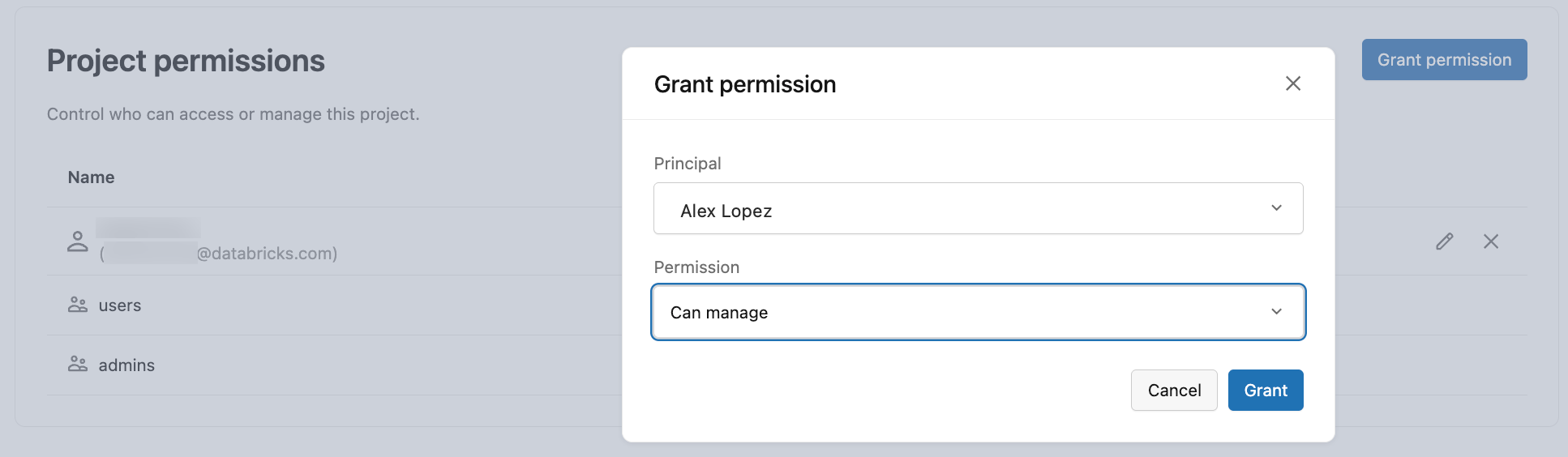
Only users with CAN MANAGE permission on the project can grant or modify permissions.
About permission enforcement:
Project permissions are enforced through the API. If you attempt to perform an action you don't have permission for (such as creating a branch without CAN MANAGE), the operation will fail.
Currently, the Lakebase UI does not yet hide features or disable buttons based on your permission level. You may see options for actions you cannot perform. When you attempt these actions, you'll receive a permission error.
Modify or revoke permissions
To modify or revoke permissions:
- Navigate to your project's Settings in the Lakebase App.
- In the Project permissions section, find the user, group, or service principal.
- To modify permissions: Click
 the edit icon next to the identity and select a different permission level.
 - To revoke access: Click the delete icon next to the identity and confirm the deletion.
You cannot modify or remove permissions for workspace admins or the project owner. These permissions are set by default and cannot be changed.
To manage project permissions using the REST API, CLI, SDKs, or Terraform, see Grant permissions programmatically.
Project permission capabilities
Each permission level (CAN CREATE, CAN USE, CAN MANAGE) allows different actions on project resources including projects, branches, snapshots, compute endpoints, and operations.
For a complete list of what actions each permission level allows, see Lakebase project ACLs.
Understanding permission levels
Lakebase Postgres uses two layers of permissions:
Project permissions
Project permissions control platform-level actions, such as creating branches, managing computes, and managing project settings.
Managed through: Lakebase App UI (Project Settings > Project permissions)
Grant to: Databricks identities, groups, and service principals
Project permissions vs database access: Project permissions control platform management operations (creating branches, managing computes). To manage project permissions programmatically, see Grant permissions programmatically. For programmatic management of project resources (branches, computes, etc.), see Lakebase API guide and Databricks CLI for Lakebase.
Database permissions
Postgres role permissions control who can access data within the database itself.
Managed through: Postgres SQL commands (GRANT, REVOKE)
Grant to: Postgres roles
These systems have no automatic synchronization.
You can grant these permissions independently or together, depending on your organization's requirements:
- Grant both layers to users who need platform access and database access.
- Grant only project permissions to users who manage infrastructure but don't need to query data.
- Grant only database access to users who need to query data but don't need to manage Lakebase resources (they can connect using tools like
psqlwith connection details).
To set up database access for users, see Create Postgres roles and Manage database permissions. For a complete tutorial, see Tutorial: Grant project and database access to a new user.