Upgrade to Autoscaling
Lakebase Provisioned instances have been upgraded to Autoscaling, unifying Lakebase on a single Autoscaling platform.
The upgrade of Lakebase Provisioned instances to Autoscaling completed in July 2026. New Lakebase instances are now created as Autoscaling projects. The Provisioned UI remains available until September 1, 2026, providing time to transition to using the Lakebase Autoscaling UI. This page remains as a reference for the differences between Autoscaling and Provisioned.
- New instances are created as Autoscaling projects. Since March 12, 2026, new Lakebase instances are created as Autoscaling projects, not Provisioned instances.
- Upgrade of existing Provisioned instances to Autoscaling. All existing Lakebase Provisioned instances have been upgraded to the Autoscaling platform.
New instances are created as Autoscaling projects
When you create a new Lakebase instance, it is now created as a Lakebase Autoscaling project and appears on the Autoscaling page in the Lakebase app, not on the Provisioned page. Existing Provisioned instances are not affected and continue running exactly as before.
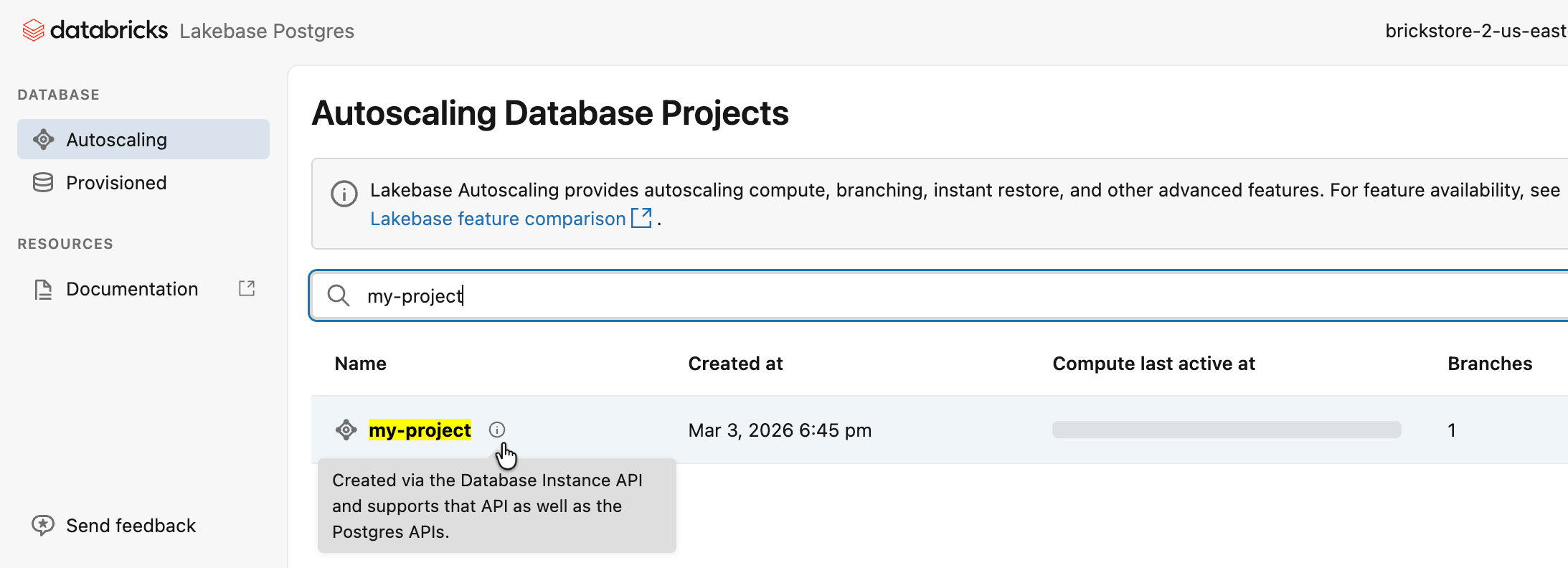
On the Autoscaling page, the new projects are marked with an information icon.
Hover over the icon to see a tooltip explaining that the project was created using the Database instance API, and that it supports both Database instance and Postgres APIs.
What this means for you
- Lakebase instance creation. Any new Lakebase instance is created as a Lakebase Autoscaling project and appears on the Autoscaling page in the Lakebase app. You can manage these projects with both the Database instance API and the Postgres API.
- Create button in the UI. The Create button (including in the Provisioned tab) now opens the Autoscaling project creation flow.
- Autoscaling features. New projects get autoscaling features, including autoscaling compute, scale-to-zero (enabled by default with a 24-hour inactivity timeout), branching, and instant restore. You can access these features from the Lakebase Autoscaling UI and Postgres API when you're ready.
- Existing Provisioned instances are unchanged. They stay on the Provisioned page in the UI with the same behavior as before. Provisioned instances, connection strings, and APIs all continue working.
- Your existing automation continues to work. Existing automations keep working without modification, but new instances are created as Autoscaling projects.
APIs
New instances created through the Database instance API support both APIs, so existing automation continues without modification.
Instance or project | API to use |
|---|---|
New projects created via the Database instance API | Both APIs. You can manage the same project with either. |
Projects created in the Autoscaling UI or with the Postgres API | Postgres API only. |
Existing Provisioned instances before upgrade to Autoscaling | Database instance API only. |
Existing Provisioned instances after upgrade to Autoscaling | Both APIs. You can manage the same instance with either. |
Existing DABs automation using database_instances continues to work. However, new instances created by database_instances are created as Autoscaling projects. For new Lakebase work, Databricks recommends using postgres_projects instead. See bundle resources.
Differences for new Lakebase instances
Compute size
Lakebase instances created as Autoscaling projects use Autoscaling compute units (CUs) instead of Lakebase Provisioned capacity units. When you create a project using the Database instance API, Lakebase maps your chosen Provisioned capacity unit to a min and max autoscaling CU range as follows:
RAM per unit: In Lakebase Provisioned, one capacity unit has 16 GB RAM. In Lakebase Autoscaling, one CU has 2 GB RAM.
Provisioned capacity | Autoscaling min CU | Autoscaling max CU |
|---|---|---|
1 (16 GB) | 4 (8 GB) | 8 (16 GB) |
2 (32 GB) | 8 (16 GB) | 16 (32 GB) |
4 (64 GB) | 16 (32 GB) | 32 (64 GB) |
8 (128 GB) | 48 (96 GB) | 64 (128 GB) |
For example, if your automation creates Lakebase instances with capacity 1, new Lakebase Autoscaling projects are created with min CU 4 and max CU 8 settings. You can change min/max later using the Postgres API or in the Lakebase Autoscaling UI.
All new instances, including those created using the Database instance API, run on the Autoscaling platform and use Lakebase Autoscaling pricing. With elastic compute replacing fixed-capacity billing, most customers see a reduction in compute costs. Existing Provisioned instances remain on their current pricing until upgraded. See Upgrade of existing Provisioned instances to Autoscaling.
Scale-to-zero
The read/write endpoint for new projects has scale-to-zero enabled by default with a 24-hour inactivity timeout, so your compute automatically suspends after 24 hours of inactivity to reduce costs. You can adjust the timeout, or disable scale-to-zero to keep compute always running, in the Lakebase Autoscaling UI or using the Postgres API. See Scale to zero for details.
History window
On Lakebase Provisioned (database instances), the restore window can be set up to 35 days. On Lakebase Autoscaling (new projects), the history window setting has a maximum of 30 days.
PostgreSQL version
New projects created through the Database instance API or Lakehouse/Provisioned UI use PostgreSQL 16, aligned with Lakebase Provisioned. That means automation using the Database instance API creates projects with the same PostgreSQL version (16) as before. The default for projects created using the Autoscaling UI or Postgres API is PostgreSQL 17.
Connection details and hostnames
Connection details for new projects use a different hostname format than Lakebase Provisioned. Provisioned instances use a global hostname (no region in the hostname). Newly created projects use a regional hostname (region included). Both read-write and read-only endpoints use the regional hostname format for new projects.
Provisioned (global hostname):
host=instance-a1b2c3d4-e5f6-7890-abcd-ef1234567890.database.cloud.databricks.com
Autoscaling (regional hostname):
host=ep-example-endpoint-a1b2c3d4.database.<region>.cloud.databricks.com
The regional hostname includes the region code for your cloud and region (for example, us-east-1 on AWS or eastus on Azure).
If you use IP allowlists, you must allow the regional ingress IPs for your region for new projects. See Create IP access lists for workspaces.
Private Link
Lakebase Autoscaling uses two Private Link endpoints: front-end Private Link for API access (workspace-level connectivity, unchanged) and inbound Private Link for performance-intensive services (inbound Private Link for performance-intensive services) for Postgres client connections. Whether you need inbound Private Link for performance-intensive services depends on how your applications connect.
Your situation | What you need |
|---|---|
You use Private Link, create a new instance, and connect from outside the Databricks workspace using a Postgres client | Add inbound Private Link for performance-intensive services. |
You already use Lakebase Autoscaling or other services that use inbound Private Link for performance-intensive services | No change. |
You only use existing Provisioned instances and do not create new ones | No change. |
Permissions (ACLs)
Permissions on new Lakebase instances are stored on the Lakebase project ACL resource. You can manage them through the standard Permissions API with request_object_type=database-projects, the Lakebase Autoscaling UI, or the Postgres API. Existing automation that uses the Database instance API continues to work because those calls are proxied to the same database-projects resource. Reads and writes stay consistent across both API surfaces.
Earlier permissions model
Lakebase projects created with the Database instance API or related tools (CLI, SDKs, Terraform, DABs) between March 12 and May 11, 2026 used an earlier permissions model where two independent ACL sets applied:
- Database instance ACLs: Set and evaluated through the Database instance API.
- Lakebase project ACLs: Set and evaluated through the Lakebase Autoscaling UI or the Postgres API.
The two sets can grant different levels of access. Review both Database instance and Lakebase project ACL sets to understand the effective permissions. Databricks plans to unify permissions on these instances in a future update.
Project names and instance names
When you create a Lakebase instance through the Database instance API or the Lakehouse/Provisioned UI, the instance name you specify becomes the project ID (project_id) of the resulting Lakebase Autoscaling project. The root branch is always created with the ID production.
Instance names and project IDs must be DNS compliant. Project ID uniqueness is case insensitive, which means you cannot have both ABC and abc as project IDs in the same workspace. When using the Postgres API, use the lowercase project ID. Creation fails if the project ID collides with an existing project ID.
Projects also have a display name (display_name), which is independent of the project ID and is not subject to the DNS compliance requirement.
In the Postgres API, the project resource name is returned in the path format projects/{project_id} (for example, projects/my-instance), rather than the bare instance name used by the Database instance API. See List projects.
Branch and project rename
Like instance names, project IDs and branch IDs cannot be changed after creation. However, projects also have a display name (display_name) that you can update at any time.
Child database instances
For child database instances (a child instance corresponds to a branch on the Autoscaling project):
- Branch ID. The child instance name you specify in the Database instance API becomes the branch ID in the Autoscaling UI.
- Branch limit. With the Postgres API or the Autoscaling UI, you can create any number of branches. With the Database instance API, you can create only one parent instance (one root branch) and one child instance (one child branch), which matches the previous Database instance API behavior.
- Tags and budget. Custom tags and usage policies are inherited from the parent branch. This is a change from the previous Database instance API behavior, where child instances had their own separate values.
- Deleting a child instance. If you create additional branches using the Lakebase Autoscaling UI or Postgres API on a project that corresponds to a child instance, you cannot delete that child instance through the Lakehouse/Provisioned UI or API until all of those branches are deleted. Delete the branches first (using the Autoscaling UI or Postgres API), then delete the child instance.
Protected branches
If you protect a branch on a project created using the Database instance API (whether the branch corresponds to a child instance or any other branch you created), you cannot delete that child instance or the root (parent) instance through the Lakehouse/Provisioned UI or API until the branch is unprotected. Unprotect the branch in the Lakebase Autoscaling UI first, then delete the instance. See Protected branches.
Private preview features
Newly created projects are Lakebase Autoscaling projects and do not support the Lakebase Provisioned Data API or Forward ETL private preview features. Those were separate offerings on Provisioned.
- REST API access (PostgREST-style): Lakebase Autoscaling has its own Data API for PostgREST-compatible REST access (CRUD, query, RPC).
- Syncing data to the Lakehouse: Lakebase Autoscaling has Lakebase Change Data Feed, which is different from the private preview Forward ETL on Lakebase Provisioned.
Upgrade of existing Provisioned instances to Autoscaling
Databricks has upgraded all Lakebase Provisioned instances to the Lakebase Autoscaling platform. The upgrade completed in July 2026.
The upgrade is automatic. Connections restart briefly during the transition. Your existing connection strings, API calls, Declarative Automation Bundles, and Terraform configurations continue to work without modification.
The upgrade changes only the compute platform, not your data. All database objects are preserved: schemas, tables, indexes, primary keys, foreign keys, Postgres roles, and grants. DLT pipeline IDs are also preserved.
After the upgrade, the following changes apply:
-
Compute sizing. Your instance's Provisioned capacity maps to an Autoscaling min/max CU range. See Compute size for the mapping table. You can change min/max CU after the upgrade using the Lakebase Autoscaling UI or the Postgres API.
-
Both UIs available. Your instances can be managed through both the new Autoscaling UI and the familiar Provisioned UI, which remains available until September 1, 2026.
-
Project name and display name. The upgrade preserves your project ID and UID. The display name (
display_name) receives an(upgraded)suffix, so an instance namedmy-instanceappears asmy-instance (upgraded)in the Autoscaling UI and the Postgres API. The upgraded instance appears in both the Database instance API and the Postgres API, with the same UID in each. -
New regional connection string. Each instance receives a new regional connection string that has optimized ingress. Your existing global connection string is available in the Provisioned UI; your new regional connection string is available in the Autoscaling UI.
- Existing connection strings. Provisioned connection strings (without a region) continue to work over existing Inbound PrivateLink and do not require Service Direct Private Link.
- New regional connection string. If you use Private Link and connect to Lakebase from outside the Databricks workspace, you must configure inbound Private Link for performance-intensive services to use the new regional connection string.
-
DABs and Terraform. To use new autoscaling features such as scale-to-zero, update your bundles to use
postgres_projects(see bundle resources) or your Terraform to use the databricks_postgres_project resource. For step-by-step Terraform instructions, see Update your Terraform configuration to use Autoscaling resources. -
Forward ETL (private preview). The Forward ETL private preview feature on Lakebase Provisioned is no longer supported and will be unavailable in a future update. To continue syncing data to the Lakehouse after the upgrade, set up Lakebase Change Data Feed on the Autoscaling platform.
-
REST API, PostgREST (private preview). The REST API (PostgREST) private preview feature on Lakebase Provisioned continues to work after the upgrade but is no longer supported and will be unavailable in a future update. Its replacement, the Data API, is available on the Autoscaling platform.
-
High availability. If high availability was enabled on your Provisioned instance, it is retained after the upgrade.
-
Autoscaling enhancements. Your instances support autoscaling features. Lakebase Autoscaling adds autoscaling, scale-to-zero, point-in-time restore, snapshots, maintenance window scheduling, database branching, and other enhancements. For more information, see Lakebase Autoscaling.
noteScale-to-zero is not enabled by default for upgraded instances. Unlike new instances, which have scale-to-zero enabled by default with a 24-hour inactivity timeout, upgraded instances require you to manually enable scale-to-zero. See Scale to zero.
-
Optimized storage caching. After the upgrade, Lakebase prioritizes data for your project's root branch in its storage cache, optimizing for query latency. You can prioritize a different branch after the upgrade by marking it as a protected branch.
-
Roles and databases per branch. Lakebase Autoscaling has a limit of 500 Postgres roles and 500 databases per branch. Lakebase Provisioned had no such limit. The upgrade completes normally for instances that exceed these limits, but you cannot create additional roles or databases afterward. If you believe your instance is affected, contact your account team or Databricks Support.
-
Paused instances. After the upgrade, connecting to a paused instance returns the error
The endpoint has been disabled. Enable it using the API and retry. To restore access, re-enable the compute by settingspec.disabled: falsewithupdate_mask=spec.disabled. See Disable or enable a compute. -
Pricing. Lakebase GA pricing applies after the upgrade. With elastic compute replacing fixed-size instances, most customers see a reduction in compute costs. Lakebase Autoscaling also includes always-on compute pricing. For current rates, see the Lakebase pricing page.
-
Feature Store and Model Serving. Databricks Online Feature Stores are backed by Lakebase Autoscaling. Your existing feature serving and model serving workloads continue working with no action required. The
create_online_storeandupdate_online_storeinterfaces need no changes for online stores you manage through the Feature Engineering client. See Feature Store and Model Serving. -
Databricks Apps. Apps that use a Lakebase
databaseresource continue to work after the upgrade. Connection details, environment variables, and Postgres roles are unchanged. Do not changedatabasetopostgresin your app configuration. Doing so creates a new Postgres role and breaks access to existing data. For new apps, useapp.resources.postgres. See Add a Lakebase resource to a Databricks app. -
Agents on Model Serving. Agents with Lakebase connections continue to work after the upgrade. Databricks recommends migrating agents to Databricks Apps to take advantage of Autoscaling features. See Migrate an agent from Model Serving to Databricks Apps.
To request an expedited upgrade or if you have questions, contact your account team or Databricks Support.