Network reference architecture overview
Different organizations have different network isolation requirements. This page outlines three reference architectures for common requirements. Identify the architecture that best fits your network topology, data governance needs, and egress control policies.
Databricks architecture
Databricks operates out of a control plane and a compute plane.
- The control plane includes the backend services that Databricks manages in your Databricks account. The web application is in the control plane.
- The compute plane is where your data is processed. There are two types of compute planes depending on the compute that you are using.
- For classic Databricks compute, the compute resources are in your AWS account in what is called the classic compute plane. This refers to the network in your AWS account and its resources. Classic compute plane resources are in the same region as your workspace.
- For serverless compute, the serverless compute resources run in a serverless compute plane in your Databricks account. Serverless compute plane resources are in the same cloud region as your workspace's classic compute plane. You select this region when creating a workspace.
To learn more about classic compute and serverless compute, see Compute. For additional architecture information, see High-level architecture.
Types of network connectivity
Databricks provides a secure networking environment by default, but if your organization has additional needs, you can configure network connectivity features between the different networking connections. Each architecture configures features across three types of network connectivity:
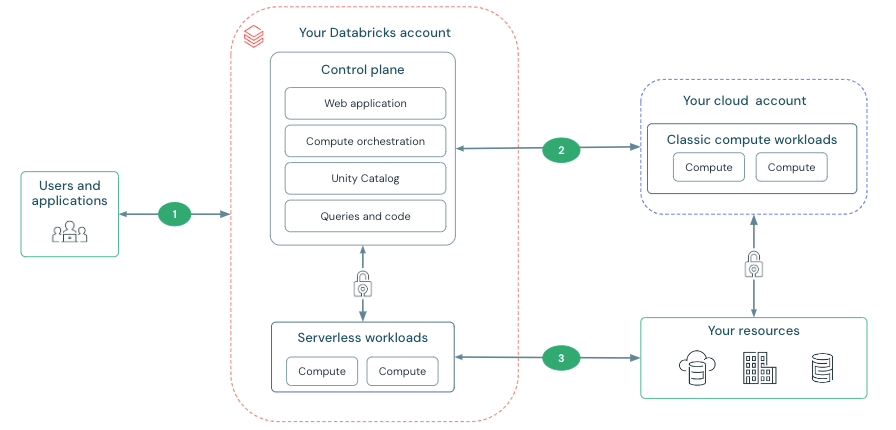
- Inbound: Users and applications to Databricks: You can configure features to control access and provide private connectivity between users and their Databricks workspaces. See Users to Databricks networking.
- Classic: The control plane and the classic compute plane: Classic compute resources, such as clusters, are deployed in your AWS account and connect to the control plane. You can use classic network connectivity features to deploy classic compute plane resources in your own virtual network and to enable private connectivity from the clusters to the control plane. See Classic compute plane networking.
- Outbound: The serverless compute plane and storage: You can configure firewalls on your resources to allow access from the Databricks serverless compute plane. See Serverless compute plane networking.
Use the following diagram to visualize the way data flows through Databricks.
Choose your network architecture
These architectures provide network security for each type of connectivity in a progression. Start with Managed security as your baseline and layer on controls as your requirements increase. Most organizations harden ingress and egress before moving to full private connectivity.
-
 Managed security
- Your starting point. Databricks-managed infrastructure with secure defaults. Apply Unity Catalog controls on top of this baseline for data governance.
-
 Hardened connectivity
- Hardens ingress and egress on top of Managed security. Best for organizations that must have auditability and access control without eliminating public endpoints.
-
 Isolated environment
- Makes all access private on top of Hardened connectivity. For regulated industries (financial services, healthcare, government) with strict data exfiltration requirements.
Feature matrix
The following table shows which network security features apply to each architecture:
Connectivity | Feature | Managed security | Hardened connectivity | Isolated environment |
|---|---|---|---|---|
Classic compute | Secure Cluster Connectivity (SCC) |
|
|
|
Classic compute | Customer-managed VPC |
|
|
|
Classic compute | Classic compute plane PrivateLink | Optional |
|
|
Inbound | Workspace inbound PrivateLink |
|
|
|
Inbound | Inbound PrivateLink for performance-intensive services |
|
|
|
Inbound | Workspace IP access lists |
|
|
|
Inbound | Account-level IP access lists |
|
|
|
Inbound | OpenSharing IP access lists |
|
|
|
Outbound | Serverless egress control |
|
|
|
Outbound | Serverless PrivateLink (NCC private endpoints) |
|
|
|
Outbound | Serverless stable IPs |
|
|
|
Outbound | External firewall | Optional | Optional |
|


Additional resources
-
- Databricks security best practices
- Security reference architectures, Security Analysis Tool (SAT), and the AWS security white paper.
-
- Networking costs
- Plan and manage networking costs across Databricks deployments.