Unity Gateway concepts
Unity Gateway brings registration, discovery, and access to AI models and tools into one place. Control who can use them, monitor usage, and manage cost across applications and agents.
Unity Gateway uses these concepts to manage models, model providers, tools, skills, and guardrails implemented with service policies:
Concept | What it does | Example |
|---|---|---|
An LLM or embedding model. A registered model needs a model service to serve requests. |
| |
An endpoint that translates and routes inference requests to one or more models, with traffic splitting and fallbacks. Supports real-time requests, plus batch inference. |
| |
A connection that routes requests to an external model provider using centrally managed credentials. |
| |
An interface for agents to discover and call tools through the Model Context Protocol (MCP). |
| |
Reusable instructions and files an agent loads to guide its work. |
| |
Implements guardrails that check requests and responses to AI services, using built-in, custom, or external policies. | The built-in |
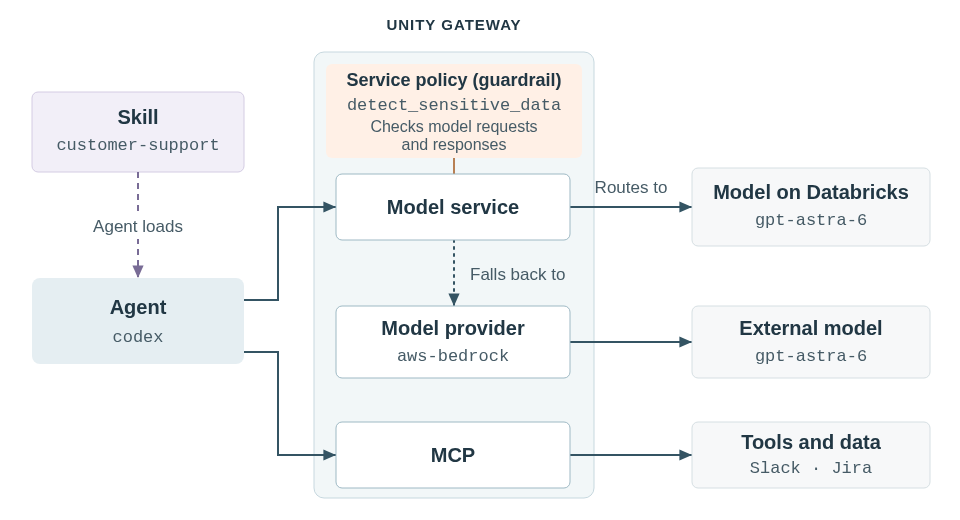
How the pieces fit together
Call a model service to reach gpt-astra-6 on Databricks, with the same model available through aws-bedrock as a fallback. You can change models or fallbacks without changing the name your application calls. Attach the built-in Sensitive Data Detection service policy to the model service to check requests and responses for configured sensitive-data categories.
Call models and tools
Replace <workspace-url> and the illustrative names with your own. See the quickstart to set DATABRICKS_TOKEN.
- Model service
- Model provider
- MCP
Model services support unified APIs such as OpenAI-compatible Chat Completions and provider-native APIs such as Anthropic Messages for compatible models.
Call frontier-model with the unified Chat Completions API. The service chooses the model:
curl "https://<workspace-url>/ai-gateway/mlflow/v1/chat/completions" \
  -H "Authorization: Bearer $DATABRICKS_TOKEN" \
  -H "Content-Type: application/json" \
  -d '{
    "model": "production.ai.frontier-model",
    "max_tokens": 256,
    "messages": [{"role": "user", "content": "Hello!"}]
  }'
See Query foundation and embedding models for SDK examples and other APIs.
Call an external model through anthropic-prod using the Anthropic Messages API. The header selects the connection, and Unity Gateway supplies its credentials:
curl "https://<workspace-url>/ai-gateway/anthropic/v1/messages" \
  -H "Authorization: Bearer $DATABRICKS_TOKEN" \
  -H "Databricks-Model-Provider-Service: production.ai.anthropic-prod" \
  -H "Content-Type: application/json" \
  -d '{
    "model": "claude-opus-5",
    "max_tokens": 256,
    "messages": [{"role": "user", "content": "Hello!"}]
  }'
See Query external model providers (model provider services) for supported provider APIs.
List the tools available through support-tools:
curl "https://<workspace-url>/ai-gateway/mcp-services/production.ai.support-tools" \
  -H "Authorization: Bearer $DATABRICKS_TOKEN" \
  -H "Content-Type: application/json" \
  -H "Accept: application/json, text/event-stream" \
  -d '{
    "jsonrpc": "2.0",
    "id": 1,
    "method": "tools/list",
    "params": {}
  }'
See Use MCP tools in a Python agent for tool calls and agent integrations.
Unity Catalog and access control
Unity Gateway integrates with Unity Catalog to control who creates services, onboards model providers, calls them, or shares access. Unity Catalog also governs registered models, skills, and who can attach service policies.
Unity Catalog securables
Models, model services, model providers, MCPs, and skills are Unity Catalog securables: objects you can grant permissions on. Their names follow catalog.schema.name, such as production.ai.frontier-model. Databricks-provided model services are registered in system.ai.
A model provider is registered as a model provider service in Unity Catalog. Service policies attach to services and aren't standalone securables.
In Unity Catalog, a model is an asset at rest: versions, metadata, and artifacts. Registering it doesn't make it callable. For external models, register the model provider connection instead of the model.
Key permissions
Grant permissions to users, groups, or service principals. For model services, model providers, and MCPs, the main permissions separate use from administration:
Privilege | What it allows |
|---|---|
| Call a model service, a model provider, or an MCP. |
| Create services and onboard model providers in a schema. |
| Inspect configuration. |
| Change configuration and grant access to others. |
Callers also need USE CATALOG and USE SCHEMA on the parent catalog and schema. Service policies constrain authorized calls. They don't grant access. See each concept's page for its full permission requirements.
Get started
Start with a ready-to-use model service from system.ai, or connect your coding agent:
-
- Send your first request
- Query a model and see its usage in the gateway.
-
- Connect a coding agent
- Use your preferred coding agent with models provided by Databricks.
-
- Monitor usage
- Inspect model and tool activity, performance, and cost.
-
- Set up governance
- Configure access and policies for your organization's AI usage.