Databricks Voices content is authored and published by Databricks employees that want to share their own individual learnings and Databricks knowledge. This content supplements the official Databricks product documentation found in other sections of this site.
Managed Disaster Recovery for Databricks: How It Works, and What It Means for Your Network
For years, disaster recovery (DR) on Databricks meant assembling your own. Managed disaster recovery moves that responsibility into the platform. Databricks runs the replication pipeline, holds the secondary in a controlled standby state, and handles the mechanics of a failover. It's available on AWS and Azure, and isn't available on GCP. Access is gated, so you apply through your Databricks account team before it's enabled on your account.
This page walks through how it works, then spends most of its time on the part platform and network engineers care about: how traffic reaches the right workspace, and what has to be true of your network for replication to run.
The failover group is the unit of everything
Managed DR is organized around a single object, the failover group. A failover group pairs one primary workspace with one secondary workspace, in the same Databricks account and on the same cloud, and defines which Unity Catalog catalogs are in scope. Each region keeps its own metastore, and the two regions don't share one.
After the group exists, a Databricks-managed serverless replication service copies in-scope data to the secondary on a continuous schedule. Two categories are independently optional: Unity Catalog metadata plus managed table data, and workspace assets such as notebooks, jobs, SQL warehouses, clusters, and their access control lists (ACLs). The secondary workspace and its in-scope catalogs are read-only, and with workspace replication turned on, the secondary workspace can't run compute. Databricks suggests a separate, small, read-only monitor workspace in the secondary region if you want to run validation queries.

Figure 1. A failover group pairs two workspaces and two metastores, replicated by a Databricks-managed service.
One detail is worth knowing early. Replication is measured by a single replication point: the point up to which the in-scope resources have been copied together. Data written after that point can be lost in an unplanned failover, so it's the number to watch. Managed DR is designed to recover from a regional outage in minutes.
What replicates, and what you still own
A useful mental model: what Databricks manages for you generally replicates, and what lives in your own storage or secrets systems is yours to handle.
Area | Behavior |
|---|---|
Managed tables | Data and metadata are replicated between the two metastores. |
External tables and volumes | Metadata only. The underlying data is your responsibility, typically through your cloud's native cross-region replication. |
Views, functions, and grants | Replicated along with the catalog, including permission grants and the catalog's isolation mode. |
Workspace assets | Notebooks, jobs, SQL warehouses, clusters, draft dashboards, files, queries, and libraries, with ACLs. Jobs arrive with schedules paused, warehouses |
Not replicated or in preview | Some components aren't replicated by managed DR, and some are in Private Preview. See the managed DR limitations, or contact your Databricks account team. |
One consequence deserves emphasis. Managed DR doesn't replicate external locations or storage credentials, so you create those in both metastores yourself. On AWS, the storage credentials on the local and remote external locations in each metastore must reference the same AWS Identity and Access Management (IAM) role, with write access to the local-region buckets and read access to the remote ones. On Azure, you create an access connector in the secondary region with the Storage Blob Data Contributor role on the secondary storage accounts, and register it as a storage credential.
You then tell the failover group where things go with storage mappings. Each mapping pairs a source path with a path under an external location in the secondary, and you can use a trailing * for prefix matching. For example, map an S3 prefix in the primary bucket to the matching prefix in the secondary bucket, or an abfss:// container path on Azure. Mappings appear in Catalog Explorer, and deleting them breaks replication, so treat them as part of the plumbing.
Life of a failover group
A new failover group moves from CREATING into INITIAL_REPLICATION, where it copies everything in scope and doesn't have a replication point. Failover and failback are unavailable during this phase, and for large workspaces the initial workspace asset bootstrap can take up to five days. When the first replication point exists, the group becomes ACTIVE and replicates continuously.

Figure 2. Failover group states. A failover sends the group back through initial replication in the reverse direction.
What it leaves for you is deliberate. Replicated clusters and warehouses arrive stopped, so you start the compute that was running, and you resume the job schedules you want in the new primary. For a planned failover, you first stop writes and let the replication point catch up. For an unplanned one, you accept whatever the last replication point was. Databricks recommends rehearsing failover regularly, such as every quarter.
The network story
Managed DR touches the network in several places, and it helps to keep them apart: how users and tools reach the active workspace, how replication moves data between regions, and what you must mirror in the secondary region.
1. Reaching the active workspace: the stable URL
Before managed DR, failing over meant telling every business intelligence (BI) tool, JDBC string, and bookmark to use a different workspace URL. The stable URL replaces that layer. It's built from your account's custom URL plus a stable connection ID, and it resolves to whichever workspace is the current primary. Clients that use it don't need reconfiguration after a failover.
In practice, that means using the custom URL host and passing the stable connection ID in the w query parameter, with account-level OAuth for authentication. For a SQL warehouse, the HTTP path gains the parameter:
/sql/1.0/warehouses/<warehouse-id>?w=<stable_connection_id>
Because workspace asset IDs are preserved across the pair, warehouse, job, and notebook URLs keep working through the stable URL. Infrastructure tooling gets the same treatment: each stable URL has a stable workspace ID that resolves to the current primary, so Terraform and other automation tools point at the custom URL, and that ID keeps deploying to the active workspace after a failover. The original per-workspace URL still works, but it stays tied to its workspace, so after a failover it points at the old primary.
2. AWS: inbound Private Link with a failover endpoint
For private deployments, the stable URL rides on front-end Private Link, and the design is more flexible than you might expect. Databricks documents that a General Access virtual private cloud (VPC) endpoint in any region can serve workspaces in any region. That one property shapes the whole failover design.
You resolve your custom URL to a registered General Access endpoint, and use context-based ingress to allowlist that endpoint to both the primary and secondary workspaces. You then create a second, failover General Access endpoint in another region (ideally the secondary workspace's region) and allowlist it to both workspaces too. Both endpoints have to be allowed before an incident, because you don't want to be editing ingress policy during one.

Figure 3. AWS inbound Private Link with a stable custom URL, a failover record in a Route 53 private hosted zone, and two allowlisted General Access endpoints.
This gives two distinct failure behaviors:
- Primary workspace down, primary endpoint still reachable: The stable URL continues to work through that same endpoint, and the control plane routes to the secondary workspace. No DNS change is needed.
- Entire primary region down: The endpoint in that region is gone too, and your custom URL must resolve to the failover endpoint. You can change the record by hand, or automate it with a Route 53 failover record in a private hosted zone. We recommend Route 53 Global Resolver, to help keep DNS resolution working if your Route 53 Resolver endpoints go down.
We recommend performing a manual failover rather than relying on an automated health check, because a disaster declaration can have a lot of nuance. Also keep in mind that if your custom URL serves other workspaces that are not part of a DR pair, their ingress policies must allow the failover endpoint as well, or their access breaks when the active endpoint changes.
3. Azure: general_access private endpoints
The Azure design follows the same shape with different parts. Your hub or transit VNet hosts a general_access private endpoint, a private DNS zone for your custom URL holds an A record that points at its IP address, and context-based ingress allowlists that endpoint to both workspaces. As on AWS, a general access endpoint in any region can serve workspaces in any region, so you create a failover endpoint in another region and allowlist it to both workspaces in advance.

Figure 4. Azure inbound Private Link with a stable custom URL. The browser_authentication endpoint supports single sign-on (SSO) on the private path.
Using browser SSO securely over a private path needs a browser_authentication private endpoint, which Databricks recommends hosting on a dedicated, delete-locked authentication workspace in the transit VNet, so that deleting a production workspace doesn't take sign-in down with it. Your DNS forwards resolution to Azure DNS to resolve the workspace URL, the SSO URLs, and the custom URL to private IPs. In our experience, conditional forwarding of the Databricks domains to Azure DNS is the most reliable way to do that. We also recommend using context-based ingress on Azure to allow traffic only to the proper endpoints.
4. Replication traffic and the storage firewall
The good news is that, unless you use Private Link to your storage, you don't build a network path for replication. The replication service runs on serverless compute in the secondary workspace, reads changes from the source storage, and copies data files to the destination. Depending on your account and storage configuration, the cloud provider copies the data files directly between the storage locations, or the replication job copies them itself. If you use Private Link to the buckets that hold your data, contact your Databricks account team before you set up replication, because replication over Private Link isn't supported by default. See how managed table data replication works.
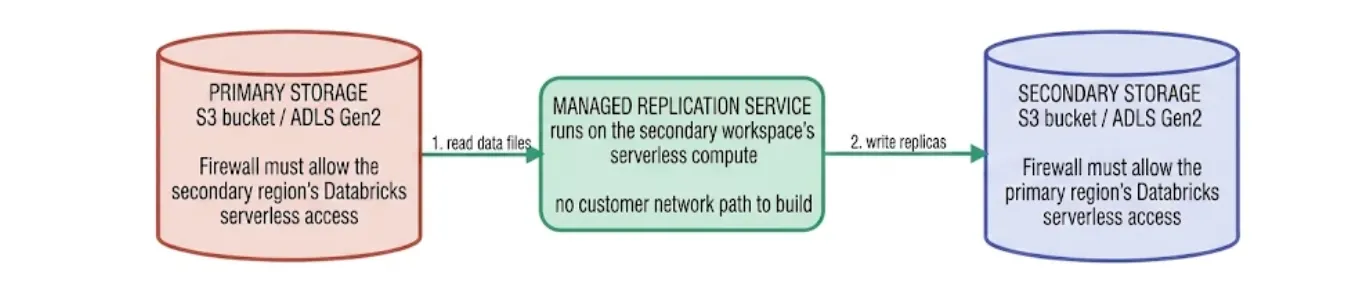
Figure 5. Replication reads from primary storage and writes to secondary storage. After a failover, the roles reverse, and so does the traffic.
Both the source and the secondary storage must therefore allow Databricks serverless network access, in both directions, because failback reverses the flow. Where you restrict storage with firewalls or bucket policies, make sure the secondary has the same allow lists as the primary. If you restrict access to your workspace storage root, the same reasoning applies there. If you use a network connectivity configuration (NCC), make sure it's configured in both regions.
If you also run classic compute, remember that each workspace still needs its own VPC or VNet and back-end private connectivity in its own region. Serverless must be enabled on both workspaces regardless, because the replication service depends on it.
Operating it day to day
Most of the operational surface is observability. The Failover groups page shows state, replication point, and active errors, and the system.replication.states system table gives you history and the resource-level errors that are holding the replication point back.
Closing thoughts
Managed DR changes the shape of the work. The replication engine, the standby enforcement, and the failover mechanics become Databricks' problem, which is the part that used to be the most fragile. What stays with platform and network teams is the foundation underneath:
- External locations, and IAM roles or access connectors, in both regions.
- Storage firewalls that admit replication in both directions.
- A stable URL path through private connectivity that survives the loss of a region.
- A failover that has been rehearsed.
Get those right, and the failover itself can be a few minutes of platform work, with the rest of your recovery time being a procedure you control.