Mémoire de l'agent IA (Model Serving)
Aperçu
Cette fonctionnalité est en aperçu public.
Pour les nouveaux cas d’utilisation, Databricks recommande de déployer des agents sur Databricks Apps pour un contrôle total sur le code d’agent, la configuration du serveur et le workflow de déploiement. Consultez Créer un agent IA et le déployer sur Databricks Apps. Pour migrer un agent existant, consultez Migrer un agent de Model Serving vers Databricks Apps.
La mémoire permet aux agents d'IA de se souvenir des informations des conversations précédentes ou antérieures. Cela permet aux agents de fournir des réponses contextuelles et de créer des expériences personnalisées au fil du temps. Utilisez Databricks Lakebase, une base de données Postgres OLTP entièrement managée, pour gérer l'état et l'historique des conversations.
Exigences
- Une instance Lakebase, consultez Créer et gérer une instance de base de données.
Mémoire à court terme et à long terme
La mémoire à court terme capture le contexte d'une seule session de conversation, tandis que la mémoire à long terme extrait et stocke les informations clés à travers plusieurs conversations. Vous pouvez créer votre agent avec l'un ou l'autre type de mémoire, ou les deux.
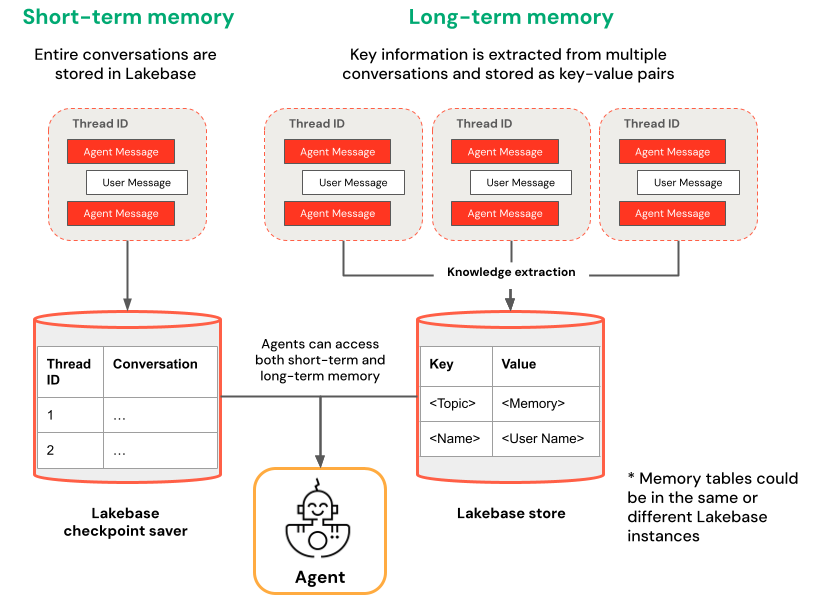
Mémoire à court terme | Mémoire à long terme |
|---|---|
Capturez le contexte dans une seule session de conversation à l'aide d'ID de thread et de la création de points de contrôle. Maintenir le contexte pour les questions de suivi au sein d'une session Déboguer et tester les flux de conversation à l'aide de time travel | Extrayez et stockez automatiquement les insights clés sur plusieurs sessions Personnalisez les interactions en fonction des préférences passées Élaborez une base de connaissances sur les utilisateurs qui améliore les réponses au fil du temps |
Exemples de Notebooks
Agent doté d'une mémoire à court terme
Agent avec mémoire à long terme
Interrogez votre agent déployé
Après avoir déployé votre agent sur un Endpoint Model Serving, consultez Interroger un agent déployé sur Databricks pour les instructions de query.
Pour transmettre un ID de thread, utilisez le param extra_body. L’exemple suivant vous montre comment transmettre un ID de thread à un endpoint ResponsesAgent :
   response1 = client.responses.create(
    model=endpoint,
    input=[{"role": "user", "content": "What are stateful agents?"}],
    extra_body={
        "custom_inputs": {"thread_id": thread_id}
    }
)
Si vous utilisez un client qui transmet automatiquement ChatContext comme l'application Playground ou Review, l'ID de conversation et l'ID utilisateur seront automatiquement transmis pour les cas d'utilisation de mémoire à court/long terme.
time travel de la mémoire à court terme
Pour les agents à mémoire à court terme, utilisez le time travel de LangGraph pour reprendre l'exécution à partir des points de contrôle. Vous pouvez rejouer la conversation ou la modifier pour explorer des chemins alternatifs. Chaque fois que vous reprenez à partir d'un point de contrôle, LangGraph crée une nouvelle bifurcation dans l'historique de la conversation, préservant l'original tout en permettant l'expérimentation.
-
Dans le code de l'agent, créez des fonctions qui récupèrent l'historique des points de contrôle et mettent à jour l'état des points de contrôle dans la classe
LangGraphResponsesAgent:Pythonfrom typing import List, Dict
def get_checkpoint_history(self, thread_id: str, limit: int = 10) -> List[Dict[str, Any]]:
"""Retrieve checkpoint history for a thread.
Args:
thread_id: The thread identifier
limit: Maximum number of checkpoints to return
Returns:
List of checkpoint information including checkpoint_id, timestamp, and next nodes
"""
config = {"configurable": {"thread_id": thread_id}}
with CheckpointSaver(instance_name=LAKEBASE_INSTANCE_NAME) as checkpointer:
graph = self._create_graph(checkpointer)
history = []
for state in graph.get_state_history(config):
if len(history) >= limit:
break
history.append({
"checkpoint_id": state.config["configurable"]["checkpoint_id"],
"thread_id": thread_id,
"timestamp": state.created_at,
"next_nodes": state.next,
"message_count": len(state.values.get("messages", [])),
# Include last message summary for context
"last_message": self._get_last_message_summary(state.values.get("messages", []))
})
return history
def _get_last_message_summary(self, messages: List[Any]) -> Optional[str]:
"""Get a snippet of the last message for checkpoint identification"""
return getattr(messages[-1], "content", "")[:100] if messages else None
def update_checkpoint_state(self, thread_id: str, checkpoint_id: str,
new_messages: Optional[List[Dict]] = None) -> Dict[str, Any]:
"""Update state at a specific checkpoint (used for modifying conversation history).
Args:
thread_id: The thread identifier
checkpoint_id: The checkpoint to update
new_messages: Optional new messages to set at this checkpoint
Returns:
New checkpoint configuration including the new checkpoint_id
"""
config = {
"configurable": {
"thread_id": thread_id,
"checkpoint_id": checkpoint_id
}
}
with CheckpointSaver(instance_name=LAKEBASE_INSTANCE_NAME) as checkpointer:
graph = self._create_graph(checkpointer)
# Prepare the values to update
values = {}
if new_messages:
cc_msgs = self.prep_msgs_for_cc_llm(new_messages)
values["messages"] = cc_msgs
# Update the state (creates a new checkpoint)
new_config = graph.update_state(config, values=values)
return {
"thread_id": thread_id,
"checkpoint_id": new_config["configurable"]["checkpoint_id"],
"parent_checkpoint_id": checkpoint_id
} -
Mettez à jour les fonctions
predictetpredict_streampour prendre en charge le passage de points de contrôle :
- Predict
- Predict_stream
def predict(self, request: ResponsesAgentRequest) -> ResponsesAgentResponse:
    """Non-streaming prediction"""
    # The same thread_id is used by BOTH predict() and predict_stream()
    ci = dict(request.custom_inputs or {})
    if "thread_id" not in ci:
        ci["thread_id"] = str(uuid.uuid4())
    request.custom_inputs = ci

    outputs = [
        event.item
        for event in self.predict_stream(request)
        if event.type == "response.output_item.done"
    ]

    # Include thread_id and checkpoint_id in custom outputs
    custom_outputs = {
        "thread_id": ci["thread_id"]
    }
    if "checkpoint_id" in ci:
        custom_outputs["parent_checkpoint_id"] = ci["checkpoint_id"]

    try:
        history = self.get_checkpoint_history(ci["thread_id"], limit=1)
        if history:
            custom_outputs["checkpoint_id"] = history[0]["checkpoint_id"]
    except Exception as e:
        logger.warning(f"Could not retrieve new checkpoint_id: {e}")

    return ResponsesAgentResponse(output=outputs, custom_outputs=custom_outputs)
def predict_stream(
    self,
    request: ResponsesAgentRequest,
) -> Generator[ResponsesAgentStreamEvent, None, None]:
    """Streaming prediction with PostgreSQL checkpoint branching support.

    Accepts in custom_inputs:
    - thread_id: Conversation thread identifier for session
    - checkpoint_id (optional): Checkpoint to resume from (for branching)
    """
    # Get thread ID and checkpoint ID from custom inputs
    custom_inputs = request.custom_inputs or {}
    thread_id = custom_inputs.get("thread_id", str(uuid.uuid4()))  # generate new thread ID if one is not passed in
    checkpoint_id = custom_inputs.get("checkpoint_id")  # Optional for branching

    # Convert incoming Responses messages to LangChain format
    langchain_msgs = self.prep_msgs_for_cc_llm([i.model_dump() for i in request.input])

    # Build checkpoint configuration
    checkpoint_config = {"configurable": {"thread_id": thread_id}}
    # If checkpoint_id is provided, we're branching from that checkpoint
    if checkpoint_id:
        checkpoint_config["configurable"]["checkpoint_id"] = checkpoint_id
        logger.info(f"Branching from checkpoint: {checkpoint_id} in thread: {thread_id}")

    # DATABASE CONNECTION POOLING LOGIC FOLLOWS
    # Use connection from pool
Ensuite, testez votre branchement de point de contrôle :
-
Démarrez un fil de discussion conversationnel et ajoutez quelques messages :
Pythonfrom agent import AGENT
# Initial conversation - starts a new thread
response1 = AGENT.predict({
"input": [{"role": "user", "content": "I'm planning for an upcoming trip!"}],
})
print(response1.model_dump(exclude_none=True))
thread_id = response1.custom_outputs["thread_id"]
# Within the same thread, ask a follow-up question - short-term memory will remember previous messages in the same thread/conversation session
response2 = AGENT.predict({
"input": [{"role": "user", "content": "I'm headed to SF!"}],
"custom_inputs": {"thread_id": thread_id}
})
print(response2.model_dump(exclude_none=True))
# Within the same thread, ask a follow-up question - short-term memory will remember previous messages in the same thread/conversation session
response3 = AGENT.predict({
"input": [{"role": "user", "content": "Where did I say I'm going?"}],
"custom_inputs": {"thread_id": thread_id}
})
print(response3.model_dump(exclude_none=True)) -
Récupérer l'historique des points de contrôle et bifurquer la conversation avec un message différent :
Python# Get checkpoint history to find branching point
history = AGENT.get_checkpoint_history(thread_id, 20)
# Retrieve checkpoint at index - indices count backward from most recent checkpoint
index = max(1, len(history) - 4)
branch_checkpoint = history[index]["checkpoint_id"]
# Branch from node with next_node = `('__start__',)` to re-input message to agent at certain part of conversation
# I want to update the information of which city I am going to
# Within the same thread, branch from a checkpoint and override it with different context to continue the conversation in a new fork
response4 = AGENT.predict({
"input": [{"role": "user", "content": "I'm headed to New York!"}],
"custom_inputs": {
"thread_id": thread_id,
"checkpoint_id": branch_checkpoint # Branch from this checkpoint!
}
})
print(response4.model_dump(exclude_none=True))
# Thread ID stays the same even though it branched from a checkpoint:
branched_thread_id = response4.custom_outputs["thread_id"]
print(f"original thread id was {thread_id}")
print(f"new thread id after branching is the same as original: {branched_thread_id}")
# Continue the conversation in the same thread and it will pick up from the information you tell it in your branch
response5 = AGENT.predict({
"input": [{"role": "user", "content": "Where am I going?"}],
"custom_inputs": {
"thread_id": thread_id,
}
})
print(response5.model_dump(exclude_none=True))