Nommer une table de destination
S'applique à :  connecteurs SaaS connecteurs de base de données connecteurs basés sur la query
By default, une table de destination créée lors de l'ingestion gérée de Lakeflow Connect prend le nom de la table source correspondante. Cependant, vous pouvez éventuellement spécifier un nom différent pour la table de destination. Par exemple, si vous ingérez un objet dans deux tables du même schéma, vous devez spécifier un nom unique pour l'une des tables afin de les différencier. Les connecteurs d'ingestion gérée ne prennent pas en charge les noms de table de destination en double dans le même schéma.
Nommez une table de destination dans l'interface utilisateur
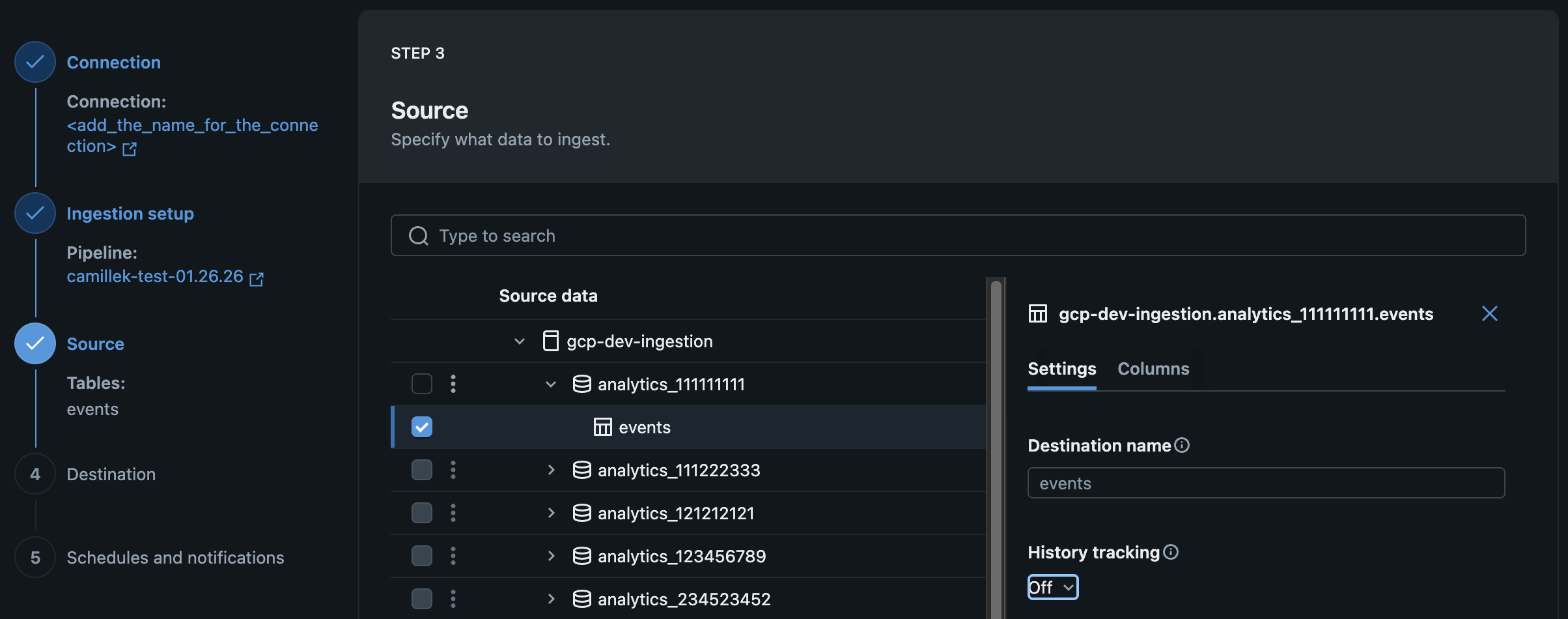
Vous pouvez nommer une table de destination lorsque vous créez ou modifiez votre pipeline d'ingestion géré dans l'interface utilisateur de Databricks.
Sur la page Source de l'assistant d'ingestion de données, saisissez un nom pour la table de destination .
Nommez une table de destination à l’aide de l’API
Vous pouvez nommer une table de destination lorsque vous créez ou modifiez votre pipeline d'ingestion géré à l'aide de Declarative Automation Bundles, de Notebooks ou de la CLI Databricks. Pour ce faire, définissez le destination_table paramètre. Par exemple :
Exemples : Google Analytics
- Declarative Automation Bundles
- Databricks notebook
- Databricks CLI
resources:
  pipelines:
    pipeline_ga4:
      name: <pipeline-name>
      catalog: <target-catalog>	# Location of the pipeline event log
      schema: <target-schema> # Location of the pipeline event log
      ingestion_definition:
        connection_name: <connection-name>
        objects:
	        - table:
              source_url: <project-id>
              source_schema: <property-name>
              destination_catalog: <target-catalog>
              destination_schema: <target-schema>
              destination_table: <custom-target-table-name> # Specify destination table name
pipeline_spec = """
{
  "name": "<pipeline-name>",
  "ingestion_definition": {
    "connection_name": "<connection-name>",
    "objects": [
      {
        "table": {
          "source_catalog": "<project-id>",
          "source_schema": "<property-name>",
          "source_table": "<source-table>",
          "destination_catalog": "<target-catalog>",
          "destination_schema": "<target-schema>",
          "destination_table": "<custom-target-table-name>",
        }
      }
    ]
  }
}
"""
{
  "resources": {
    "pipelines": {
      "pipeline_ga4": {
        "name": "<pipeline-name>",
        "catalog": "<target-catalog>",
        "schema": "<target-schema>",
        "ingestion_definition": {
          "connection_name": "<connection-name>",
          "objects": [
            {
              "table": {
                "source_url": "<project-id>",
                "source_schema": "<property-name>",
                "destination_catalog": "<destination-catalog>",
                "destination_schema": "<destination-schema>",
                "destination_table": "<custom-destination-table-name>"
              }
            }
          ]
        }
      }
    }
  }
}
Exemples : Salesforce
- Declarative Automation Bundles
- Databricks notebook
- Databricks CLI
resources:
  pipelines:
    pipeline_sfdc:
      name: <pipeline-name>
      catalog: <target-catalog>	# Location of the pipeline event log
      schema: <target-schema> # Location of the pipeline event log
      ingestion_definition:
        connection_name: <connection-name>
        objects:
	        - table:
              source_schema: <source-schema>
              source_table: <source-table>
              destination_catalog: <target-catalog>
              destination_schema: <target-schema>
              destination_table: <custom-target-table-name> # Specify destination table name
pipeline_spec = """
{
  "name": "<pipeline-name>",
  "ingestion_definition": {
    "connection_name": "<connection-name>",
    "objects": [
      {
        "table": {
          "source_catalog": "<source-catalog>",
          "source_schema": "<source-schema>",
          "source_table": "<source-table>",
          "destination_catalog": "<target-catalog>",
          "destination_schema": "<target-schema>",
          "destination_table": "<custom-target-table-name>",
        }
      }
    ]
  }
}
"""
{
  "resources": {
    "pipelines": {
      "pipeline_sfdc": {
        "name": "<pipeline-name>",
        "catalog": "<target-catalog>",
        "schema": "<target-schema>",
        "ingestion_definition": {
          "connection_name": "<connection-name>",
          "objects": [
            {
              "table": {
                "source_schema": "<source-schema>",
                "source_table": "<source-table>",
                "destination_catalog": "<destination-catalog>",
                "destination_schema": "<destination-schema>",
                "destination_table": "<custom-destination-table-name>"
              }
            }
          ]
        }
      }
    }
  }
}
Exemples : Workday
- Declarative Automation Bundles
- Databricks notebook
- Databricks CLI
resources:
  pipelines:
    pipeline_workday:
      name: <pipeline-name>
      catalog: <target-catalog>	# Location of the pipeline event log
      schema: <target-schema> # Location of the pipeline event log
      ingestion_definition:
        connection_name: <connection-name>
        objects:
	        - report:
              source_url: <report-url>
              destination_catalog: <target-catalog>
              destination_schema: <target-schema>
              destination_table: <custom-target-table-name> # Specify destination table name
pipeline_spec = """
{
  "name": "<pipeline-name>",
  "ingestion_definition": {
    "connection_name": "<connection-name>",
    "objects": [
      {
        "report": {
          "source_url": "<report-url>",
          "destination_catalog": "<target-catalog>",
          "destination_schema": "<target-schema>",
          "destination_table": "<custom-target-table-name>",
        }
      }
    ]
  }
}
"""
{
  "resources": {
    "pipelines": {
      "pipeline_workday": {
        "name": "<pipeline-name>",
        "catalog": "<target-catalog>",
        "schema": "<target-schema>",
        "ingestion_definition": {
          "connection_name": "<connection-name>",
          "objects": [
            {
              "report": {
                "source_url": "<report-url>",
                "destination_catalog": "<destination-catalog>",
                "destination_schema": "<destination-schema>",
                "destination_table": "<custom-destination-table-name>"
              }
            }
          ]
        }
      }
    }
  }
}