Traçage txtai

txtai est une base de données d'embeddings tout-en-un pour la recherche sémantique, l'orchestration LLM et les workflows de modèles linguistiques.
MLflow Tracing fournit une capacité de traçage automatique pour txtai. Le traçage automatique pour txtai peut être activé en appelant la fonction mlflow.autolog, MLflow capturera les traces pour l'invocation de LLM, les embeddings, la recherche AI et les enregistrera dans l'Experimentation MLflow actif.
Prérequis
Pour utiliser MLflow Tracing avec txtai, vous devez installer MLflow, la bibliothèque txtai et l'extension mlflow-txtai.
- Development
- Production
Pour les environnements de développement, installez le package MLflow complet avec les extras Databricks, txtai et mlflow-txtai:
pip install --upgrade "mlflow[databricks]>=3.14.0" txtai mlflow-txtai
Le package mlflow[databricks] complet inclut toutes les fonctionnalités pour le développement local et l’expérimentation sur Databricks.
Pour les déploiements de production, installez mlflow-tracing, txtai et mlflow-txtai:
pip install --upgrade mlflow-tracing txtai mlflow-txtai
Le mlflow-tracing package est optimisé pour une utilisation en production.
MLflow 3 est fortement recommandé pour la meilleure expérience de traçage avec txtai.
Avant d'exécuter les exemples, vous devrez configurer votre environnement :
Pour les utilisateurs en dehors des notebooks Databricks : Définissez vos variables d'environnement Databricks :
export DATABRICKS_HOST="https://your-workspace.cloud.databricks.com"
export DATABRICKS_TOKEN="your-personal-access-token"
Pour les utilisateurs dans les Notebooks Databricks : ces identifiants sont définis automatiquement pour vous.
Clés API : Assurez-vous que les clés API de votre fournisseur LLM sont définies :
export OPENAI_API_KEY="your-openai-api-key"
# Add other provider keys as needed if using txtai with different models
Exemple de base
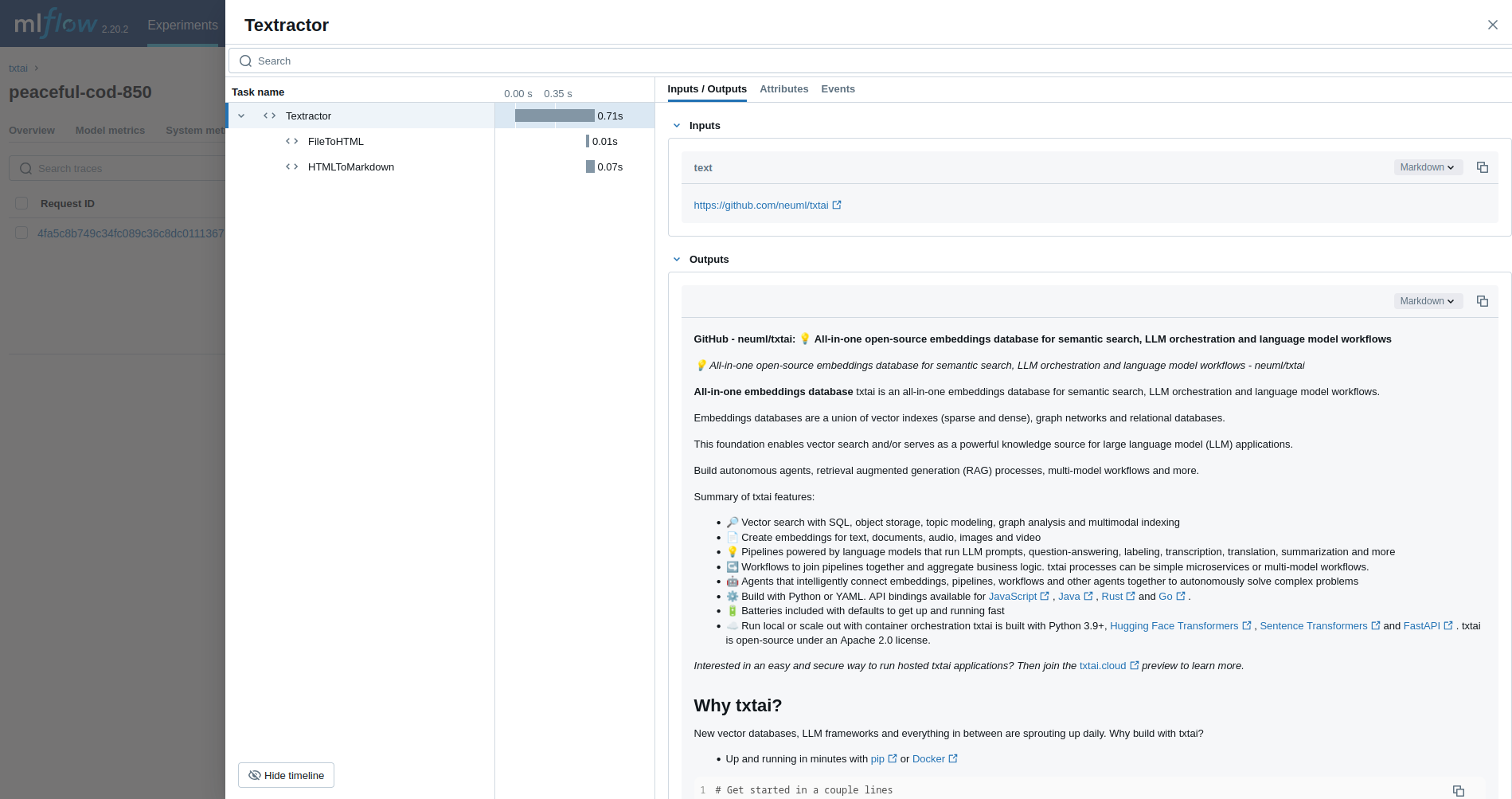
Le premier exemple retrace un pipeline Textractor.
Sur les clusters de compute Serverless, la journalisation automatique pour les cadres de traçage genAI n'est pas activée automatiquement. Vous devez activer explicitement l'autologging en appelant la fonction mlflow.<library>.autolog() appropriée pour les intégrations spécifiques que vous souhaitez suivre.
import mlflow
from mlflow.entities.trace_location import UnityCatalog
from txtai.pipeline import Textractor
import os

# Ensure any necessary LLM provider API keys are set in your environment if Textractor uses one
# For example, if it internally uses OpenAI:
# os.environ["OPENAI_API_KEY"] = "your-openai-key"

# Enable MLflow auto-tracing for txtai
mlflow.txtai.autolog()

# Set up MLflow tracking to Databricks
mlflow.set_tracking_uri("databricks")
mlflow.set_experiment(
    experiment_name="/Shared/txtai-demo",
    trace_location=UnityCatalog(
        catalog_name="<UC_CATALOG_NAME>",
        schema_name="<UC_SCHEMA_NAME>",
        table_prefix="<UC_TABLE_PREFIX>",
    ),
)

# Define and run a simple Textractor pipeline.
textractor = Textractor()
textractor("https://github.com/neuml/txtai")
Génération augmentée de récupération (RAG)
L'exemple suivant trace un pipeline RAG.
import mlflow
from txtai import Embeddings, RAG
import os

# Ensure your LLM provider API key (e.g., OPENAI_API_KEY for the Llama model via some services) is set
# os.environ["OPENAI_API_KEY"] = "your-key" # Or HUGGING_FACE_HUB_TOKEN, etc.

# Enable MLflow auto-tracing for txtai
mlflow.txtai.autolog()

# Set up MLflow tracking to Databricks if not already configured
# mlflow.set_tracking_uri("databricks")
# mlflow.set_experiment("/Shared/txtai-rag-demo")

wiki = Embeddings()
wiki.load(provider="huggingface-hub", container="neuml/txtai-wikipedia-slim")

# Define prompt template
template = """
Answer the following question using only the context below. Only include information
specifically discussed.

question: {question}
context: {context} """

# Create RAG pipeline
rag = RAG(
    wiki,
    "hugging-quants/Meta-Llama-3.1-8B-Instruct-AWQ-INT4",
    system="You are a friendly assistant. You answer questions from users.",
    template=template,
    context=10,
)

rag("Tell me about the Roman Empire", maxlength=2048)
Agent
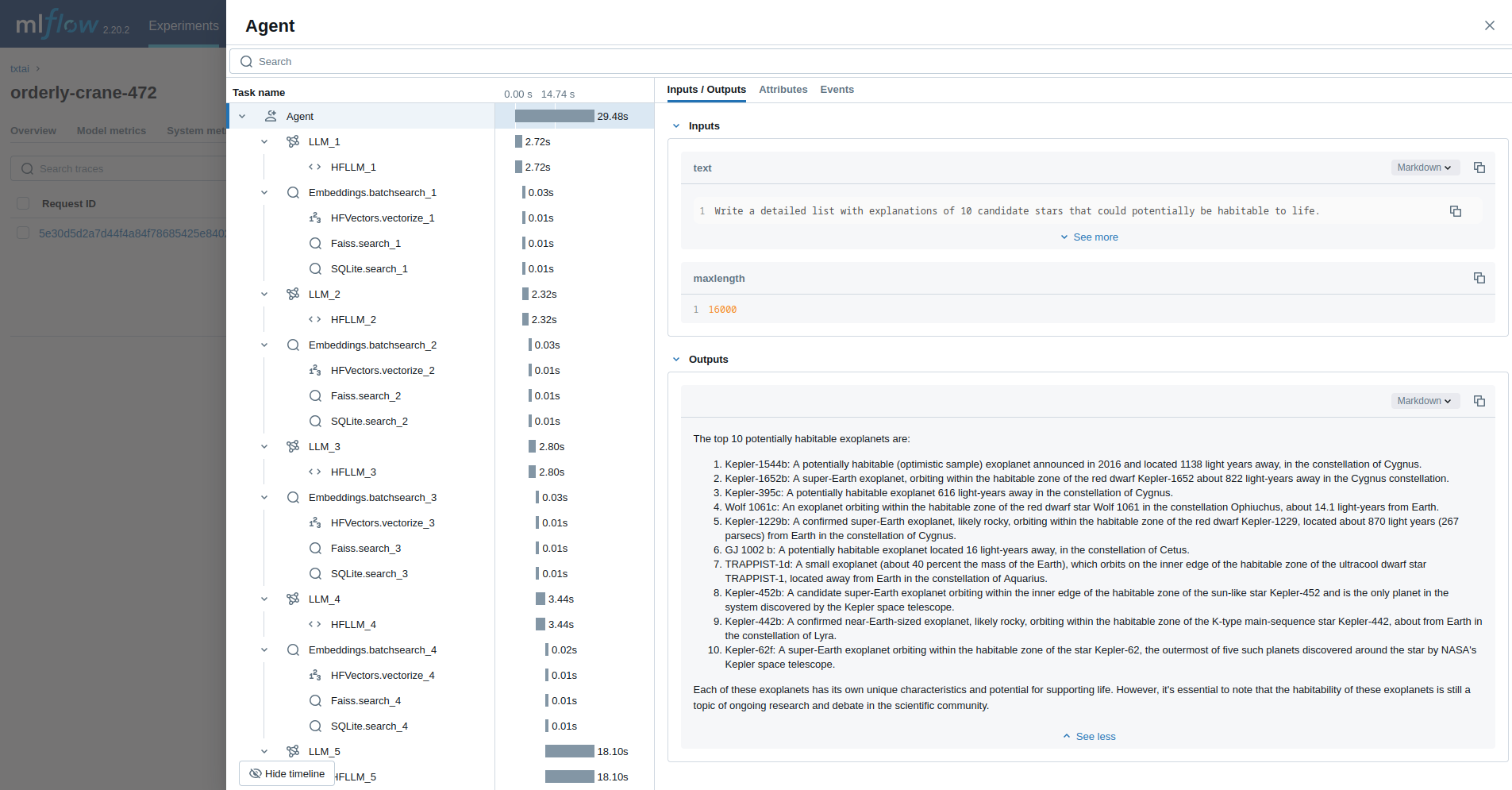
Le dernier exemple exécute un agent txtai conçu pour rechercher des questions sur l'astronomie.
import mlflow
from txtai import Agent, Embeddings
import os

# Ensure your LLM provider API key (e.g., OPENAI_API_KEY for the Llama model via some services) is set
# os.environ["OPENAI_API_KEY"] = "your-key" # Or HUGGING_FACE_HUB_TOKEN, etc.

# Enable MLflow auto-tracing for txtai
mlflow.txtai.autolog()

# Set up MLflow tracking to Databricks if not already configured
# mlflow.set_tracking_uri("databricks")
# mlflow.set_experiment("/Shared/txtai-agent-demo")

def search(query):
    """
    Searches a database of astronomy data.

    Make sure to call this tool only with a string input, never use JSON.

    Args:
        query: concepts to search for using similarity search

    Returns:
        list of search results with for each match
    """

    return embeddings.search(
        "SELECT id, text, distance FROM txtai WHERE similar(:query)",
        10,
        parameters={"query": query},
    )


embeddings = Embeddings()
embeddings.load(provider="huggingface-hub", container="neuml/txtai-astronomy")

agent = Agent(
    tools=[search],
    llm="hugging-quants/Meta-Llama-3.1-8B-Instruct-AWQ-INT4",
    max_iterations=10,
)

researcher = """
{command}

Do the following.
 - Search for results related to the topic.
 - Analyze the results
 - Continue querying until conclusive answers are found
 - Write a Markdown report
"""

agent(
    researcher.format(
        command="""
Write a detailed list with explanations of 10 candidate stars that could potentially be habitable to life.
"""
    ),
    maxlength=16000,
)
Ressources supplémentaires
Pour plus d'exemples et de conseils sur l'utilisation de txtai avec MLflow, consultez la documentation sur l'extension txtai de MLflow.
Ressources supplémentaires
- Comprendre les concepts de traçage – Découvrez comment MLflow capture et organise les données de trace pour les workflows RAG et d'agents.
- Déboguer et observer votre application – Utilisez l’interface utilisateur de Trace pour analyser le comportement de votre application txtai.
- Évaluez la qualité de votre application - Configurez l’évaluation de la qualité pour votre recherche sémantique et vos applications RAG.