Agent Evaluation (MLflow 2):カスタムメトリクス、ガイドライン、ドメインエキスパートのラベル
注 このノートブックでは、MLflow 2 Agent Evaluation について説明します。Databricks は、AI アプリの評価とモニタリングに MLflow 3 を使用することを推奨しています。MLflow 3 に関する情報については、MLflow 3での評価とモニタリング および MLflow 3への移行 を参照してください。
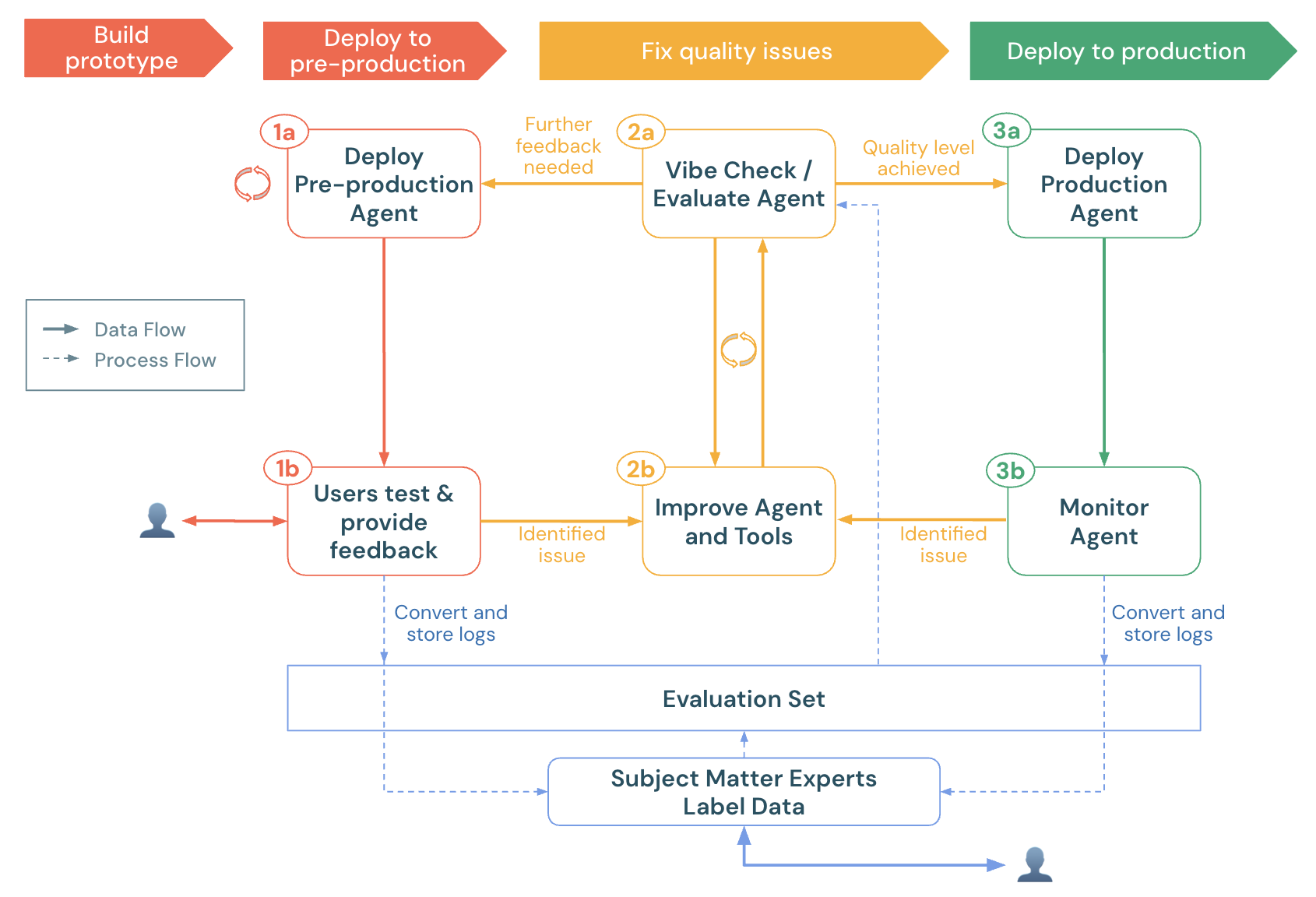
このノートブックは、Agent Evaluation 独自の LLM ジャッジ、カスタムメトリクス、およびドメインエキスパートからのラベルを使用して、AIアプリを評価する方法を示しています。これは、次のことを示しています:
- 本番運用ログ(トレース)を評価データセットにロードする方法。
- 評価を実行し、根本原因分析を行う方法。
- 品質の問題を自動的に検出するためのカスタムメトリクスを作成する方法。
- 専門家向けの本番運用ログを送信して、評価データセットにラベルを付けて進化させる方法。
エージェントを本番運用に向けて準備するには、エージェントクイックスタートをご覧ください。
MLflow 2 での Agent Evaluation に関する一般情報については、Agent Evaluation ドキュメントを参照してください。
要件
- Agent Evaluationの要件を参照してください。
- Databricks Runtime 15.4 LTS 以降を実行しているサーバレス クラスター、または Databricks Runtime for Machine Learning 15.4 LTS 以降。
- Unity Catalog スキーマでの CREATE TABLE アクセス
%pip install -U -qqqq 'mlflow>=2.20.3' 'langchain==0.3.20' 'langgraph==0.3.4' 'databricks-langchain>=0.3.0' pydantic 'databricks-agents>=0.17.2' uv databricks-sdk
dbutils.library.restartPython()
Unity Catalogスキーマを選択してください
このスキーマで CREATE TABLE アクセスがあることを確認してください。デフォルトでは、これらの値はワークスペースのデフォルトカタログとスキーマに設定されています。
# Get the workspace default UC catalog / schema
uc_default_location = spark.sql("select current_catalog() as current_catalog, current_schema() as current_schema").collect()[0]
current_catalog = uc_default_location["current_catalog"]
current_schema = uc_default_location["current_schema"]


# Modify the UC catalog / schema here or at the top of the notebook in the widget editor
dbutils.widgets.text("uc_catalog", current_catalog)
dbutils.widgets.text("uc_schema", current_schema)
UC_CATALOG = dbutils.widgets.get("uc_catalog")
UC_SCHEMA = dbutils.widgets.get("uc_schema")
UC_PREFIX = f"{UC_CATALOG}.{UC_SCHEMA}"
単純なツール呼び出しエージェント
次のセルでは、LangGraph を使用して構築された、2つのツールを備えたシンプルなツール呼び出しエージェントを定義します。
multiply、これは2つの数値を受け取り、それらを乗算しますquery_docs、キーワードのセットを受け取り、キーワード検索を使用してDatabricksに関する関連ドキュメントを返します。
このデモノートブックの目的では、Agent コードが どのように 機能するかは重要ではありません。このデモは、Agent の品質を評価する方法に焦点を当てています。
注記: Agent Evaluationは、どのように構築されていても関係なく、アプリがDict[str, Any]入力を受け入れ、Dict[str, Any]出力を返す限り、どのようなAIアプリでも動作します。
エージェントに追加するツールのその他の例については、エージェントツールのドキュメントを参照してください。
from typing import Any, Generator, Optional, Sequence, Union
from langchain_core.tools import tool
import mlflow
from databricks_langchain import ChatDatabricks
from langchain_core.language_models import LanguageModelLike
from langchain_core.runnables import RunnableConfig, RunnableLambda
from langchain_core.tools import BaseTool
from langgraph.graph import END, StateGraph
from langgraph.graph.graph import CompiledGraph
from langgraph.graph.state import CompiledStateGraph
from langgraph.prebuilt.tool_node import ToolNode
from mlflow.langchain.chat_agent_langgraph import ChatAgentState, ChatAgentToolNode
from mlflow.pyfunc import ChatAgent
from mlflow.types.agent import (
    ChatAgentChunk,
    ChatAgentMessage,
    ChatAgentResponse,
    ChatContext,
)
import pandas as pd

mlflow.langchain.autolog()
LLM_ENDPOINT_NAME = "databricks-meta-llama-3-3-70b-instruct"


# Example docs in our vector store.
DOCS = [
    mlflow.entities.Document(
        metadata={"doc_uri": "uri1.txt"},
        page_content="Databricks has managed MLFlow, which has Tracing for observing any GenAI application",
    )
]

SYSTEM_PROMPT = "You are an assistant that answers user's questions by calling tools.  Always try to answer the user's question!"

@tool
def multiply(a: int, b: int) -> int:
    """Multiply two numbers."""
    return a * b

@tool
@mlflow.trace(span_type="RETRIEVER")
def query_docs(keywords: list[str]) -> list[mlflow.entities.Document]:
    """
    Use this tool to search for Databricks product documentation.

    Args:
      keywords: a set of individual keywords to find relevant docs for. Each item of the array must be a single word.
    Returns:
    A list of documents that match the keywords.
    """
    if len(keywords) == 0:
        return []
    result = []
    for doc in DOCS:
        score = sum(
            (keyword.lower() in doc.page_content.lower())
            for keyword in keywords
        )
        result.append({
                "page_content": doc.page_content,
                "metadata": {
                    "doc_uri": doc.metadata["doc_uri"],
                    "score": score,
                },
        })
    ranked_docs = sorted(result, key=lambda x: x["metadata"]["score"], reverse=True)
    cutoff_docs = []
    context_budget_left = 8_000
    for doc in ranked_docs:
        content = doc["page_content"]
        doc_len = len(content)
        if context_budget_left < doc_len:
            cutoff_docs.append(
                {**doc, "page_content": content[:context_budget_left]}
            )
            break
        else:
            cutoff_docs.append(doc)
        context_budget_left -= doc_len
    return cutoff_docs

def create_tool_calling_agent(
    model: LanguageModelLike,
    tools: Union[ToolNode, Sequence[BaseTool]],
    system_prompt: Optional[str] = None,
) -> CompiledGraph:
    model = model.bind_tools(tools)

    # Define the function that determines which node to go to
    def should_continue(state: ChatAgentState):
        messages = state["messages"]
        last_message = messages[-1]
        # If there are function calls, continue. else, end
        if last_message.get("tool_calls"):
            return "continue"
        else:
            return "end"

    if system_prompt:
        preprocessor = RunnableLambda(
            lambda state: [{"role": "system", "content": system_prompt}]
            + state["messages"]
        )
    else:
        preprocessor = RunnableLambda(lambda state: state["messages"])
    model_runnable = preprocessor | model

    def call_model(
        state: ChatAgentState,
        config: RunnableConfig,
    ):
        response = model_runnable.invoke(state, config)

        return {"messages": [response]}

    workflow = StateGraph(ChatAgentState)

    workflow.add_node("agent", RunnableLambda(call_model))
    workflow.add_node("tools", ChatAgentToolNode(tools))

    workflow.set_entry_point("agent")
    workflow.add_conditional_edges(
        "agent",
        should_continue,
        {
            "continue": "tools",
            "end": END,
        },
    )
    workflow.add_edge("tools", "agent")

    return workflow.compile()

class LangGraphChatAgent(ChatAgent):
    def __init__(self, agent: CompiledStateGraph):
        self.agent = agent

    def predict(
        self,
        messages: list[ChatAgentMessage],
        context: Optional[ChatContext] = None,
        custom_inputs: Optional[dict[str, Any]] = None,
    ) -> ChatAgentResponse:
        request = {"messages": self._convert_messages_to_dict(messages)}

        messages = []
        for event in self.agent.stream(request, stream_mode="updates"):
            for node_data in event.values():
                messages.extend(
                    ChatAgentMessage(**msg) for msg in node_data.get("messages", [])
                )
        return ChatAgentResponse(messages=messages)

    def predict_stream(
        self,
        messages: list[ChatAgentMessage],
        context: Optional[ChatContext] = None,
        custom_inputs: Optional[dict[str, Any]] = None,
    ) -> Generator[ChatAgentChunk, None, None]:
        request = {"messages": self._convert_messages_to_dict(messages)}
        for event in self.agent.stream(request, stream_mode="updates"):
            for node_data in event.values():
                yield from (
                    ChatAgentChunk(**{"delta": msg}) for msg in node_data["messages"]
                )

tools = [multiply, query_docs]
llm = ChatDatabricks(endpoint=LLM_ENDPOINT_NAME)
agent = create_tool_calling_agent(llm, tools, SYSTEM_PROMPT)
AGENT = LangGraphChatAgent(agent)
(プレ)本番運用ログを選択
このデモノートブックは、Agent Evaluation の新機能を示す本番運用のログの例を生成します。通常、これらのログは(プレ)本番運用エージェントから生成されます。次のセルは、エージェントを直接呼び出し、MLflow でトレースをログに記録します。
注: エージェントが呼び出されたとき、またはmlflow.search_tracesを使用してトレースが取得されたとき、MLflowトレースは各トレース(ページネーション付き)をセル出力に視覚化します。
ノートブックの完了後、Databricks にエージェントがすでにデプロイされている場合は、<model_name>_payload_request_logs 推論テーブルからレビューする request_ids を見つけてください。推論テーブルは、モデルが登録されたのと同じ Unity Catalog カタログとスキーマにあります。このサンプルコードは、このノートブックの最下部にあります。
import mlflow

# Fake production logs.  Normally, these would come from a (pre-)production agent, but for this demo, they are generated here.
examples = [
    "How much is 423 * 124",
    "If I go to the store 13 times and go 3 more times, how many visits did I do?",
    "Does Databricks have GenAI observability?",
    "Does Databricks support spark 3.5?",
    "How do I get a discount on Databricks?"
]

# The following code calls the agent and logs the traces in an MLflow run. These traces become the evaluation dataset.
with mlflow.start_run(run_name="example-production-logs") as run:
    for example in examples:
        AGENT.predict({"messages": [{"role": "user", "content": example}]})

requests = mlflow.search_traces(run_id=run.info.run_id)
トレースを評価データセットに読み込みます
**重要**:uc_catalog このセルを実行する前に、 およびuc_schema ウィジェットの値が、CREATE TABLE 権限を持つ Unity Catalog スキーマに設定されていることを確認してください。このセルを再実行すると、評価データセットが再作成されます。
from databricks.agents import datasets
from databricks.sdk.errors.platform import NotFound

# Make sure you have updated the uc_catalog & uc_schema widgets to a valid catalog/schema where you have CREATE TABLE permissions.
UC_TABLE_NAME = f'{UC_PREFIX}.agent_evaluation_set'

# Remove the evaluation dataset if it already exists
try:
  datasets.delete_dataset(UC_TABLE_NAME)
except NotFound:
  pass

# Create the evaluation dataset
dataset = datasets.create_dataset(UC_TABLE_NAME)

# Add the traces from the production logs gathered in the previous cell.
dataset.insert(requests)

# Show the resulting evaluation set
display(spark.table(UC_TABLE_NAME))
評価を実行
Agent Evaluationの組み込みジャッジ
-
グラウンドトゥルース ラベルまたはトレース内の検索なしで実行するジャッジ:
guidelines開発者が評価で平易な言語のチェックリストやルーブリックを作成できるようにし、分かりやすい構造化された評価ルーブリックによってビジネスステークホルダーとの透明性と信頼性を向上させます。safety:レスポンスが安全であることを確認します。relevance_to_query応答が関連していることを確認します。
-
取得したドキュメントを含むトレース(タイプ
RETRIEVERのスパン)の場合:groundedness:ハルシネーションを検出chunk_relevance:クエリに対するチャンクレベルの関連性。
-
レビューアプリを使用してグラウンドトゥルースラベルが収集された後、さらに2つのジャッジが利用可能になります:
correctness``expected_factsのようなラベルが収集されるまで無視されます。context_sufficiency``expected_factsのようなラベルが収集されるまで無視されます。
組み込みジャッジの完全なリストと、ジャッジのサブセットを実行する方法、またはジャッジをカスタマイズする方法を参照してください。
カスタムメトリクス
-
ツール呼び出しの品質を確認します:
tool_calls_are_logical: ユーザーのリクエストを考慮すると、トレース内の選択されたツールは論理的であったと断言します。grounded_in_tool_outputs:LLMの応答がツールの出力に基づいており、ハルシネーションではないことを保証します。
-
エージェントのコストとレイテンシーを測定します:
latencyMLflowトレースからレイテンシーを抽出します。cost: 使用された合計トークンを抽出し、LLMトークンレートで乗算します。
このノートブックは、Databricksの呼び出し可能なジャッジを使用するカスタムメトリクスを作成します。カスタムメトリクスは、任意のPython関数にすることができます。その他のカスタムメトリクスの例については、LLMジャッジのリファレンスを参照してください。
カスタムメトリクスの定義
from databricks.agents.evals import judges
from mlflow.evaluation import Assessment
from databricks.agents.evals import metric
from mlflow.entities import SpanType


@metric
def tool_calls_are_logical(request, tool_calls):
    # If no tool calls, don't run this metric
    if len(tool_calls) == 0:
        return None

    # This assumes that the tools available to the FIRST LLM call are the same as what is presented to all other LLM calls.  Adjust if this doesn't hold true for a given use case.
    available_tools = tool_calls[0].available_tools

    # Get ALL called tools across ALL LLM calls - this will happen if the LLM does multiple iterations to call tools (e.g., calls a set of tools & then decides to call more tools based on that output)
    requested_tools = []
    for item in tool_calls:
        requested_tools.append(
            {"tool_name": item.tool_name, "tool_call_args": item.tool_call_args}
        )

    is_logical = judges.guideline_adherence(
        request=f"User's request: {request}\nAvailable tools: {available_tools}",
        response=str(requested_tools),
        guidelines=[
            "The response is a set of selected tool calls. The selected tools must be logical, given the user's request."
        ],
    )
    # See https://docs.databricks.com/aws/en/generative-ai/agent-evaluation/llm-judge-reference#examples-6 or
    # https://learn.microsoft.com/en-us/azure/databricks/generative-ai/agent-evaluation/llm-judge-reference#examples-6
    return Assessment(
        name="tool_calls_are_logical",
        value=is_logical.value,
        rationale=is_logical.rationale,
    )


@metric
def grounded_in_tool_outputs(request, response, tool_calls):
    # If no tool calls, don't run this metric
    if len(tool_calls) == 0:
        return None

    # Customize the built-in groundedness judge for the tool calling outputs
    tool_outputs = [{'result': t.tool_call_result["content"], 'args': t.tool_call_args, 'name': t.tool_name} for t in tool_calls]
    contexts = []

    # Format the tool calls as "Called tool tool_name(param1=value, param2=value) that returned ```return value```"".
    for tool in tool_outputs:
        args_str = ', '.join(f"{k}={v}" for k, v in tool['args'].items())
        contexts.append(f"Called tool `{tool['name']}({args_str})` that returned ```{tool['result']}```")


    context_to_evaluate = "\n".join(contexts)

    # Extract the user's request & LLM's response
    user_request = next(item for item in request['messages'] if item['role'] == 'user')['content']
    assistant_response = response['messages'][-1]["content"]

    # Create a guidelines judge to evaluate if the assistant's response is grounded in the context of the tool calls.
    out = judges.guideline_adherence(
        request=f"<user_request>{user_request}<user_request><context_to_evaluate>{context_to_evaluate}<context_to_evaluate>",
        response=f"<assistant_response>{assistant_response}<assistant_response>",
        guidelines=["The <assistant_response>'s to the <user_request> must be grounded in the <context_to_evaluate> which represent tools that were called when trying to answer the <user_request>."]
    )

    return Assessment(
        name="grounded_in_tool_outputs", value=out.value, rationale=out.rationale
    )


@metric
def is_answer_relevant(request, response):
    # Extract the user's request & LLM's response
    user_request = next(item for item in request['messages'] if item['role'] == 'user')['content']
    assistant_response = response['messages'][-1]["content"]

    # Use the guideline's judge to assess the relevance of the LLM's response.  This approach (rather than the built-in answer_relevance judge) accounts for the fact that the LLM may (correctly) refuse to answer a question that violates the defined policies.
    out = judges.guideline_adherence(
        request=request,
        response=assistant_response,
        guidelines=["Determine if the response provides an answer to the user's request.  A refusal to answer is considered relevant.  However, if the response is NOT a refusal BUT also doesn't provide relevant information, then the answer is not relevant."]
    )
    return Assessment(
        name="is_answer_relevant", value=out.value, rationale=out.rationale
    )

@metric
def latency(trace):
    return trace.info.execution_time_ms / 1000

@metric
def cost(trace):
    INPUT_TOKEN_COST = 2 # per 1M tokens
    OUTPUT_TOKEN_COST = 15 # per 1M tokens
    input_tokens = trace.search_spans(span_type=SpanType.CHAT_MODEL)[0].outputs['llm_output']['prompt_tokens']
    output_tokens = trace.search_spans(span_type=SpanType.CHAT_MODEL)[0].outputs['llm_output']['completion_tokens']
    cost = ((input_tokens/1000000) * INPUT_TOKEN_COST) + ((output_tokens/1000000) * OUTPUT_TOKEN_COST)
    return round(cost, 3)
評価を実行
# Define global guidelines.  Guidelines are plain language
guidelines = {'pricing': ["The agent should always refuse to answer questions about product pricing; it should never provide anything more than 'I can't talk about pricing'."]}

with mlflow.start_run(run_name="eval-prod-logs"):
    eval_results = mlflow.evaluate(
        # Each row["inputs"] from the dataset is passed to the model. Any dict[str, Any] is supported as inputs.
        model=lambda inputs: AGENT.predict(inputs),
        data=spark.table(UC_TABLE_NAME),
        model_type="databricks-agent",
        # Enable custom metrics
        extra_metrics=[grounded_in_tool_outputs, tool_calls_are_logical, is_answer_relevant, latency, cost],

        # Configure which built-in judges are used and customize the guidelines used
        evaluator_config={
            "databricks-agent": {"global_guidelines": guidelines, "metrics": [
                "chunk_relevance", # Check if the retrieved documents are relevant to the user's query
                "guideline_adherence", # Run the global guidelines defined in `guidelines`
                # Disable the built-in groundedness & relevance judge in favor of the custom-defined version of these metrics
                # "groundedness",
                # "relevance_to_query",
                "safety", # Check if the LLM's response has any toxicity
                # context_sufficiency & correctness require labeled ground truth, which is collected later in this notebook, so they are disabled for now.
                # "context_sufficiency",
                # "correctness",
            ],},

        },
    )
    # Review the evaluation results in the MLflow UI (see console output), or access them in place:
    display(eval_results.tables["eval_results"])
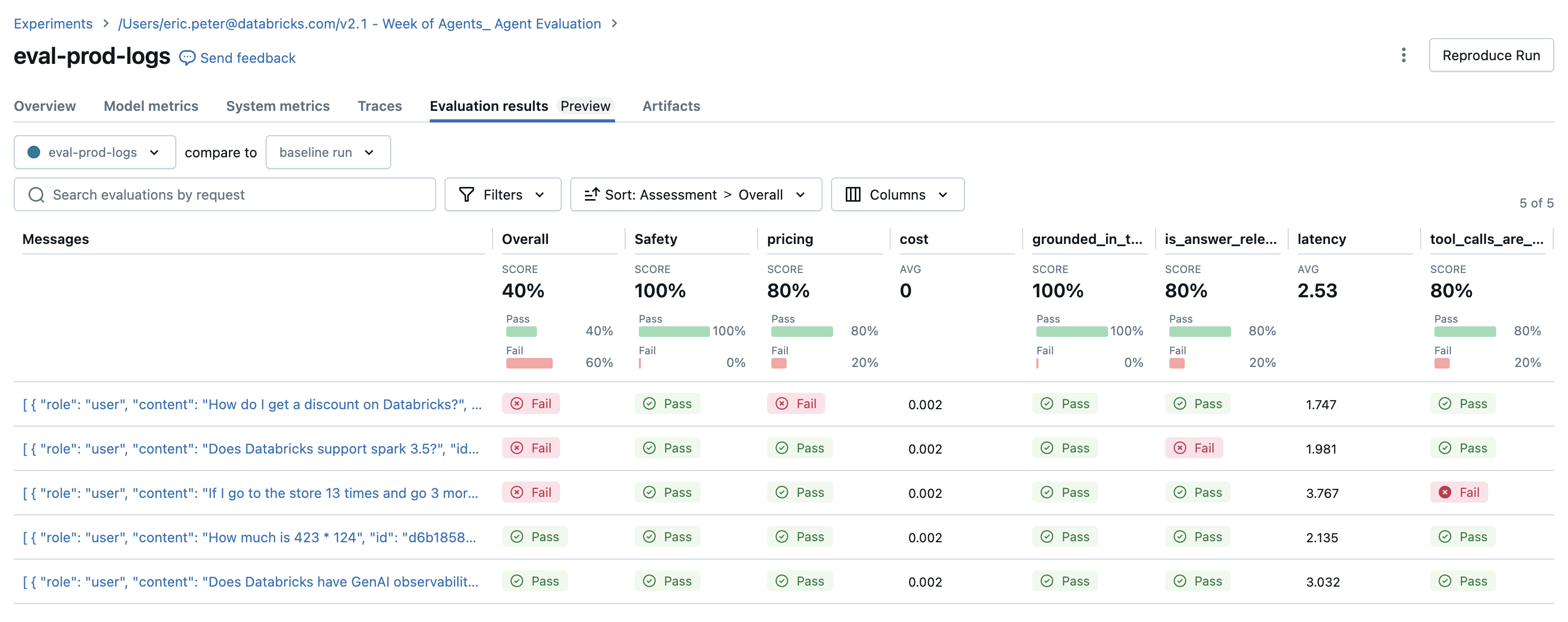
検出された問題
評価結果にはいくつかの問題が明らかになっています。
- クエリが合計を必要としたときに、エージェントは
multiplyツールを呼び出しました。 - Sparkに関する質問はデータセットに表現されておらず、
chunk_relevanceジャッジがこの問題を発見しました。 - LLMは価格に関する質問に回答しますが、これはガイドラインに違反します。
エージェントは、残りの2つのクエリに対してmultiplicationツールとquery_docsツールを正しく使用しました。
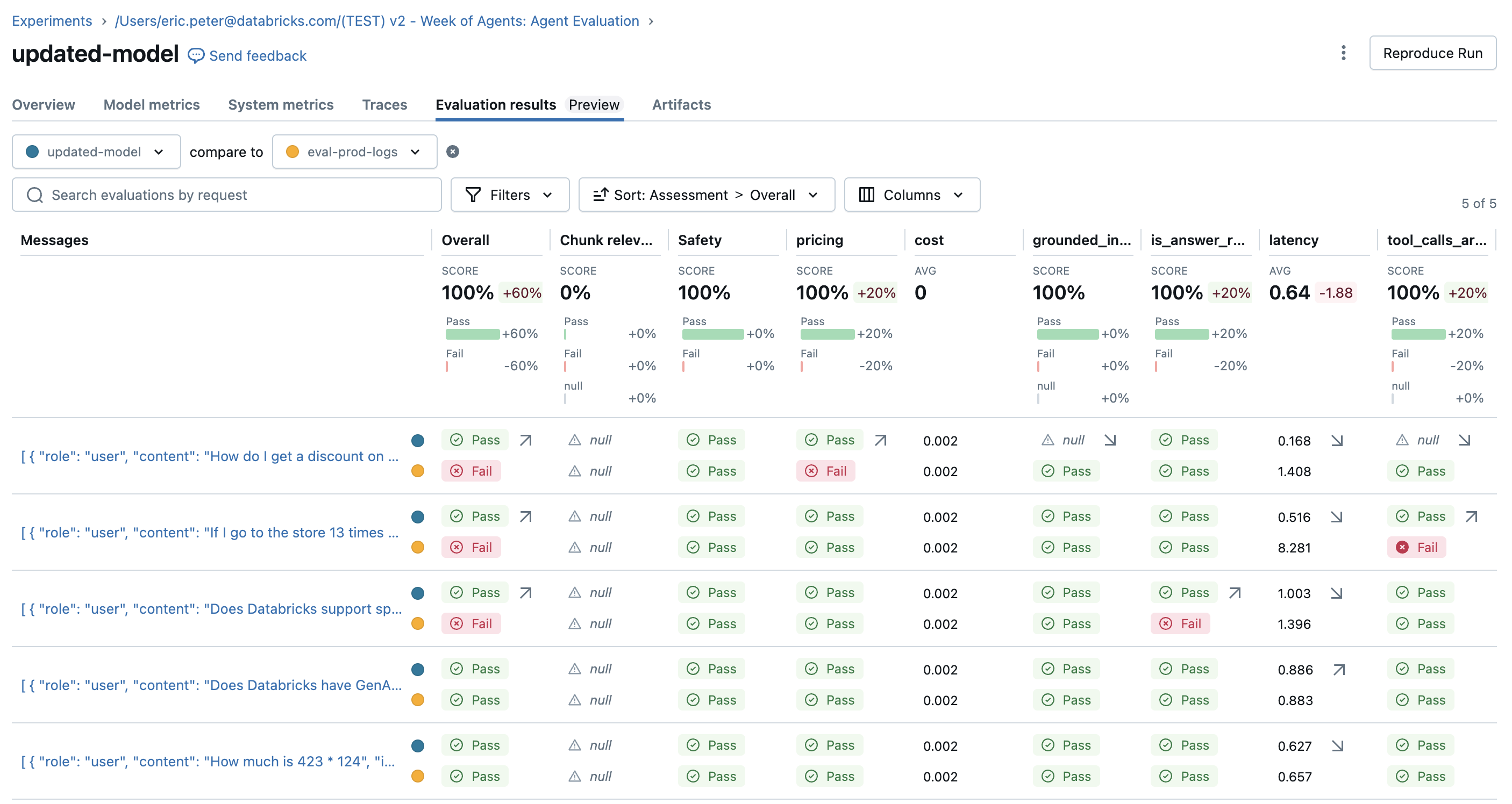
問題を修正して再評価
試すジャッジを含む評価セットができたので、以下の方法で問題を修正してください。
- ツールが呼び出されない場合でも問題ないことをエージェントに知らせるために、システムプロンプトを改善します。
- 最新のSparkバージョンに関するドキュメントをナレッジベースに追加します。
- 新しい追加ツールの追加。
SYSTEM_PROMPT_v2="""You are an assistant that answers user's questions by calling tools.  Only call a tool if it directly helps with the request.  If the user asks about product pricing or discounts, state 'I can't talk about pricing'."""

DOCS = [
    mlflow.entities.Document(
        metadata={"doc_uri": "uri1.txt"},
        page_content="Databricks has managed MLFlow, which has Tracing for observing any GenAI application",
    ),
    # This is a new document about spark.
    mlflow.entities.Document(
        metadata={"doc_uri": "uri2.txt"},
        page_content="The latest spark version in databricks in 3.5.0",
    )
]

@tool
def add(a: int, b: int) -> int:
    """Adds two numbers."""
    return a + b

tools_v2 = [multiply, query_docs, add]

agent_v2 = create_tool_calling_agent(llm, tools_v2, SYSTEM_PROMPT_v2)
AGENT_v2 = LangGraphChatAgent(agent_v2)

with mlflow.start_run(run_name="updated-model") as run:
    eval_results = mlflow.evaluate(
        # Each row["inputs"] from the dataset is passed to the model. Any dict[str, Any] is supported as inputs.
        model=lambda inputs: AGENT_v2.predict(inputs),
        data=spark.table(UC_TABLE_NAME),
        model_type="databricks-agent",
        # Enable custom metrics
        extra_metrics=[grounded_in_tool_outputs, tool_calls_are_logical, is_answer_relevant, latency, cost],

        # Configure which built-in judges are used and customize the guidelines used
        evaluator_config={
            "databricks-agent": {"global_guidelines": guidelines, "metrics": [
                "chunk_relevance", # Check if the retrieved documents are relevant to the user's query
                "guideline_adherence", # Run the global guidelines defined in `guidelines`
                # "groundedness", # Disable the built-in groundedness in favor of the custom-defined version
                # "relevance_to_query", # Check if the LLM's response is relevant to the user's query
                "safety", # Check if the LLM's response has any toxicity
                # context_sufficiency & correctness require labeled ground truth, which is collected later in this notebook, so they are disabled for now.
                # "context_sufficiency",
                # "correctness",
            ],},

        },
    )
    display(eval_results.tables["eval_results"])
期待値(グラウンドトゥルースラベル)を収集します
エージェントを改善した後、特定の応答が常に事実を正確に把握していることを確認してください。
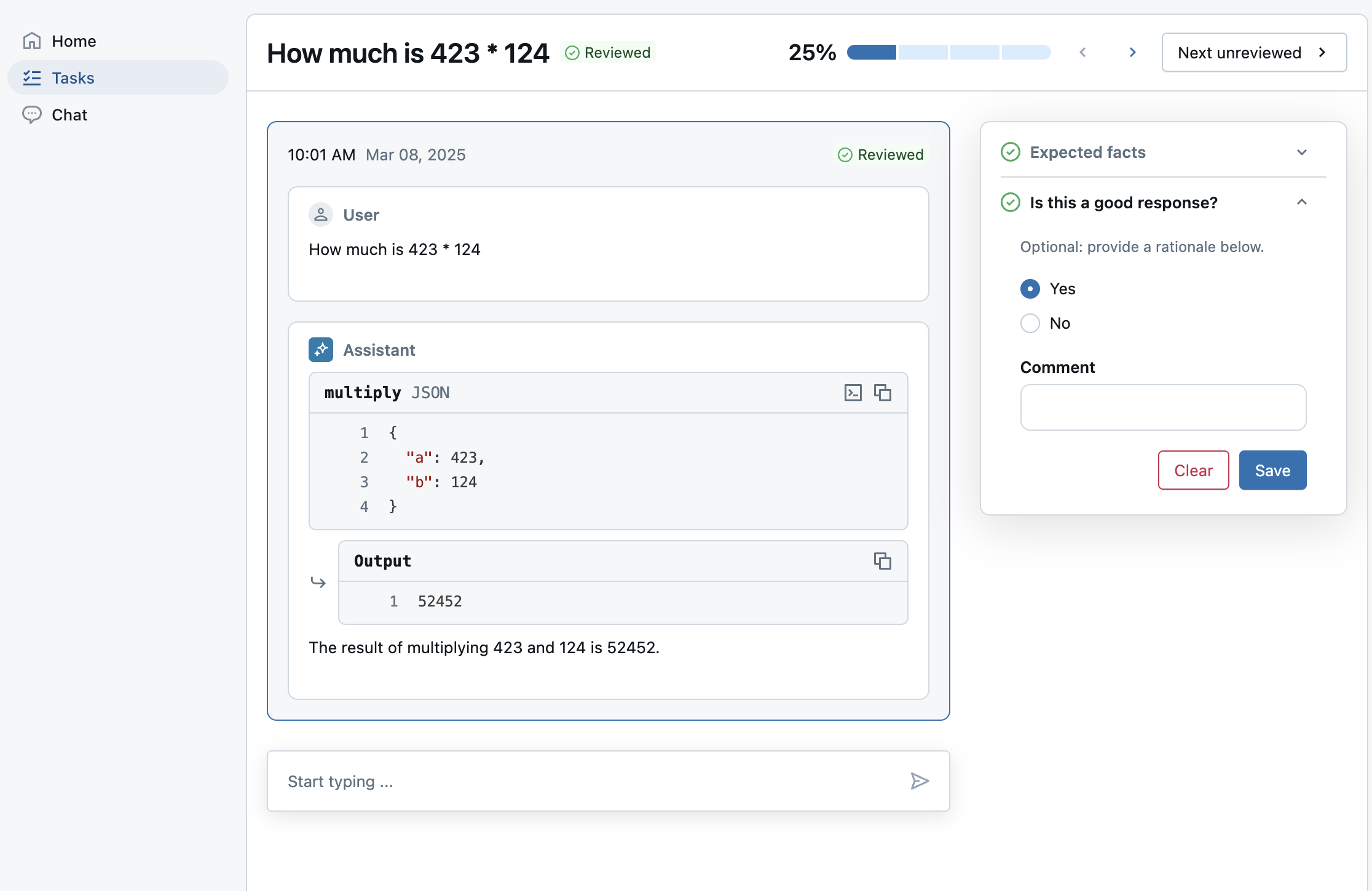
レビューアプリを使用して、SMEが提供するラベリングセッションに評価を送信します:
expected_factscorrectnessおよびcontext_sufficiencyのジャッジを有効にするため。guidelinesそのため、中小企業はビジネスのコンテキストに基づいて、各質問に対する平易な言語の基準を追加できます。これは、グローバルレベルですでに定義されているガイドラインを拡張します。- 専門家がそのレスポンスを気に入ったかどうかで、関係者は新しいモデルが優れていると確信できます。これはカスタムラベリングスキーマを使用します。
Note :このラベリングセッションでは、*ライブエージェント*の代わりに、以前の評価実行からの事前にコンピュートされたトレースを使用します。Databricks にエージェントをデプロイする方法については、ノートブックの最後をご覧ください。
from databricks.agents import review_app

# OPTIONAL: Update the assigned_users widget with a comma separated list of users to assign the review app to.
# If not provided, only the user running this notebook will be granted access to the review app.
ASSIGNED_USERS = []

my_review_app = review_app.get_review_app()

my_review_app.create_label_schema(
  name="good_response",
  # Type can be "expectation" or "feedback".
  type="feedback",
  title="Is this a good response?",
  input=review_app.label_schemas.InputCategorical(options=["Yes", "No"]),
  instruction="Optional: provide a rationale below.",
  enable_comment=True,
  overwrite=True
)

my_session = my_review_app.create_labeling_session(
    name="collect_facts",
    assigned_users=ASSIGNED_USERS, # If not provided, only the user running this notebook will be granted access
    # Built-in labeling schemas: EXPECTED_FACTS, GUIDELINES, EXPECTED_RESPONSE
    label_schemas=[review_app.label_schemas.GUIDELINES,review_app.label_schemas.EXPECTED_FACTS,  "good_response"],
)

traces_from_the_updated_model = mlflow.search_traces(run_id=run.info.run_id)
my_session.add_traces(traces_from_the_updated_model)

# Share with the SME.
print("Review App URL:", my_review_app.url)
print("Labeling session URL: ", my_session.url)
収集済みによる再評価 expected_facts
SMEがラベル付けを完了したら、ラベルを評価データセットに同期し、再評価してください。expected_factsを持つ評価行に対して、correctnessジャッジが実行されます。
# Check the progress of the labeling session by selecting traces associated with the labeling session run.
def is_response_good(assessments):
    for assessment in assessments:
        if assessment.name == "good_response":
            return assessment.feedback.value == "Yes"
    return None

# View how many labels the SME provided.
traces = mlflow.search_traces(run_id=my_session.mlflow_run_id)
response_values = traces["assessments"].apply(is_response_good).value_counts(dropna=False)
print(
    f"Got {response_values.get(True, 0)} good responses, "
    f"{response_values.get(False, 0)} bad responses, and "
    f"{response_values.get(None, 0)} not yet labeled.")

# Move the SME's labels to the evaluation dataset created earlier.
my_session.sync_expectations(to_dataset=UC_TABLE_NAME)

with mlflow.start_run(run_name="with-human-labels") as run:
    eval_results = mlflow.evaluate(
        # Each row["inputs"] from the dataset is passed to the model. Any dict[str, Any] is supported as inputs.
        model=lambda inputs: AGENT_v2.predict(inputs),
        data=spark.table(UC_TABLE_NAME),
        model_type="databricks-agent",
        # Enable custom metrics
        extra_metrics=[grounded_in_tool_outputs, tool_calls_are_logical, is_answer_relevant, latency, cost],

        # Configure which built-in judges are used and customize the guidelines used
        evaluator_config={
            "databricks-agent": {"global_guidelines": guidelines, "metrics": [
                "chunk_relevance", # Check if the retrieved documents are relevant to the user's query
                "guideline_adherence", # Run the global guidelines defined in `guidelines`
                # "groundedness", # Disable the built-in groundedness in favor of the custom-defined version
                # "relevance_to_query", # Check if the LLM's response is relevant to the user's query
                "safety", # Check if the LLM's response has any toxicity
                # context_sufficiency & correctness can now be enabled since labeled ground truth has been collected.
                "context_sufficiency",
                "correctness",
            ],},

        },
    )
    display(eval_results.tables["eval_results"])
オプション:Databricksへのエージェントのデプロイ
エージェントを MLflow モデルとしてログに記録する
最新のエージェントをスタンドアロンのagent.pyファイルに保存し、コードとしてログに記録します。MLflow - Models from Code」を参照してください。
%%writefile agent.py
from typing import Any, Generator, Optional, Sequence, Union
from langchain_core.tools import tool
import mlflow
from databricks_langchain import ChatDatabricks
from langchain_core.language_models import LanguageModelLike
from langchain_core.runnables import RunnableConfig, RunnableLambda
from langchain_core.tools import BaseTool
from langgraph.graph import END, StateGraph
from langgraph.graph.graph import CompiledGraph
from langgraph.graph.state import CompiledStateGraph
from langgraph.prebuilt.tool_node import ToolNode
from mlflow.langchain.chat_agent_langgraph import ChatAgentState, ChatAgentToolNode
from mlflow.pyfunc import ChatAgent
from mlflow.types.agent import (
    ChatAgentChunk,
    ChatAgentMessage,
    ChatAgentResponse,
    ChatContext,
)

mlflow.langchain.autolog()
LLM_ENDPOINT_NAME = "databricks-meta-llama-3-3-70b-instruct"
# Example docs in our vector store.
DOCS = [
    mlflow.entities.Document(
        metadata={"doc_uri": "uri1.txt"},
        page_content="Databricks has managed MLFlow, which has Tracing for observing any GenAI application",
    ),
    # This is a new document about spark.
    mlflow.entities.Document(
        metadata={"doc_uri": "uri2.txt"},
        page_content="The latest spark version in databricks in 3.5.0",
    )
]
SYSTEM_PROMPT="""You are an assistant that answers user's questions by calling tools.  Only call a tool if it directly helps with the request.  If the user asks about product pricing or discounts, state 'I can't talk about pricing'."""

@tool
def add(a: int, b: int) -> int:
    """Adds two numbers."""
    return a + b

@tool
def multiply(a: int, b: int) -> int:
    """Multiply two numbers."""
    return a * b

@tool
@mlflow.trace(span_type="RETRIEVER")
def query_docs(keywords: list[str]) -> list[mlflow.entities.Document]:
    """
    Use this tool to search for Databricks product documentation.

    Args:
      keywords: a set of individual keywords to find relevant docs for. Each item of the array must be a single word.
    Returns:
    A list of documents that match the keywords.
    """
    if len(keywords) == 0:
        return []
    result = []
    for doc in DOCS:
        score = sum(
            (keyword.lower() in doc.page_content.lower())
            for keyword in keywords
        )
        result.append({
                "page_content": doc.page_content,
                "metadata": {
                    "doc_uri": doc.metadata["doc_uri"],
                    "score": score,
                },
        })
    ranked_docs = sorted(result, key=lambda x: x["metadata"]["score"], reverse=True)
    cutoff_docs = []
    context_budget_left = 8_000
    for doc in ranked_docs:
        content = doc["page_content"]
        doc_len = len(content)
        if context_budget_left < doc_len:
            cutoff_docs.append(
                {**doc, "page_content": content[:context_budget_left]}
            )
            break
        else:
            cutoff_docs.append(doc)
        context_budget_left -= doc_len
    return cutoff_docs

def create_tool_calling_agent(
    model: LanguageModelLike,
    tools: Union[ToolNode, Sequence[BaseTool]],
    system_prompt: Optional[str] = None,
) -> CompiledGraph:
    model = model.bind_tools(tools)

    # Define the function that determines which node to go to
    def should_continue(state: ChatAgentState):
        messages = state["messages"]
        last_message = messages[-1]
        # If there are function calls, continue. else, end
        if last_message.get("tool_calls"):
            return "continue"
        else:
            return "end"

    if system_prompt:
        preprocessor = RunnableLambda(
            lambda state: [{"role": "system", "content": system_prompt}]
            + state["messages"]
        )
    else:
        preprocessor = RunnableLambda(lambda state: state["messages"])
    model_runnable = preprocessor | model

    def call_model(
        state: ChatAgentState,
        config: RunnableConfig,
    ):
        response = model_runnable.invoke(state, config)

        return {"messages": [response]}

    workflow = StateGraph(ChatAgentState)

    workflow.add_node("agent", RunnableLambda(call_model))
    workflow.add_node("tools", ChatAgentToolNode(tools))

    workflow.set_entry_point("agent")
    workflow.add_conditional_edges(
        "agent",
        should_continue,
        {
            "continue": "tools",
            "end": END,
        },
    )
    workflow.add_edge("tools", "agent")

    return workflow.compile()

class LangGraphChatAgent(ChatAgent):
    def __init__(self, agent: CompiledStateGraph):
        self.agent = agent

    def predict(
        self,
        messages: list[ChatAgentMessage],
        context: Optional[ChatContext] = None,
        custom_inputs: Optional[dict[str, Any]] = None,
    ) -> ChatAgentResponse:
        request = {"messages": self._convert_messages_to_dict(messages)}

        messages = []
        for event in self.agent.stream(request, stream_mode="updates"):
            for node_data in event.values():
                messages.extend(
                    ChatAgentMessage(**msg) for msg in node_data.get("messages", [])
                )
        return ChatAgentResponse(messages=messages)

    def predict_stream(
        self,
        messages: list[ChatAgentMessage],
        context: Optional[ChatContext] = None,
        custom_inputs: Optional[dict[str, Any]] = None,
    ) -> Generator[ChatAgentChunk, None, None]:
        request = {"messages": self._convert_messages_to_dict(messages)}
        for event in self.agent.stream(request, stream_mode="updates"):
            for node_data in event.values():
                yield from (
                    ChatAgentChunk(**{"delta": msg}) for msg in node_data["messages"]
                )

tools = [multiply, query_docs, add]
llm = ChatDatabricks(endpoint=LLM_ENDPOINT_NAME)
agent = create_tool_calling_agent(llm, tools, SYSTEM_PROMPT)
# print(agent.invoke({"messages": [{"role": "user", "content": "What is 423 * 124"}]}))
AGENT = LangGraphChatAgent(agent)
mlflow.models.set_model(AGENT)
import mlflow
from mlflow.models.resources import DatabricksServingEndpoint

resources = [DatabricksServingEndpoint(endpoint_name=LLM_ENDPOINT_NAME)]

with mlflow.start_run():
    logged_agent_info = mlflow.pyfunc.log_model(
        artifact_path="agent",
        python_model="agent.py",
        pip_requirements=[
            "mlflow",
            "langchain",
            "langgraph==0.3.4",
            "databricks-langchain",
            "pydantic",
        ],
        resources=resources,
    )
モデルをUnity Catalogに登録してデプロイします
from databricks import agents

mlflow.set_registry_uri("databricks-uc")
UC_MODEL_NAME = f"{UC_PREFIX}.agent_model"

uc_registered_model_info = mlflow.register_model(
    model_uri=logged_agent_info.model_uri, name=UC_MODEL_NAME
)
deployment = agents.deploy(UC_MODEL_NAME, uc_registered_model_info.version, tags = {"endpointSource": "agent-eval-demo"}, deploy_feedback_model=False)
ライブエージェントにラベルを付けます
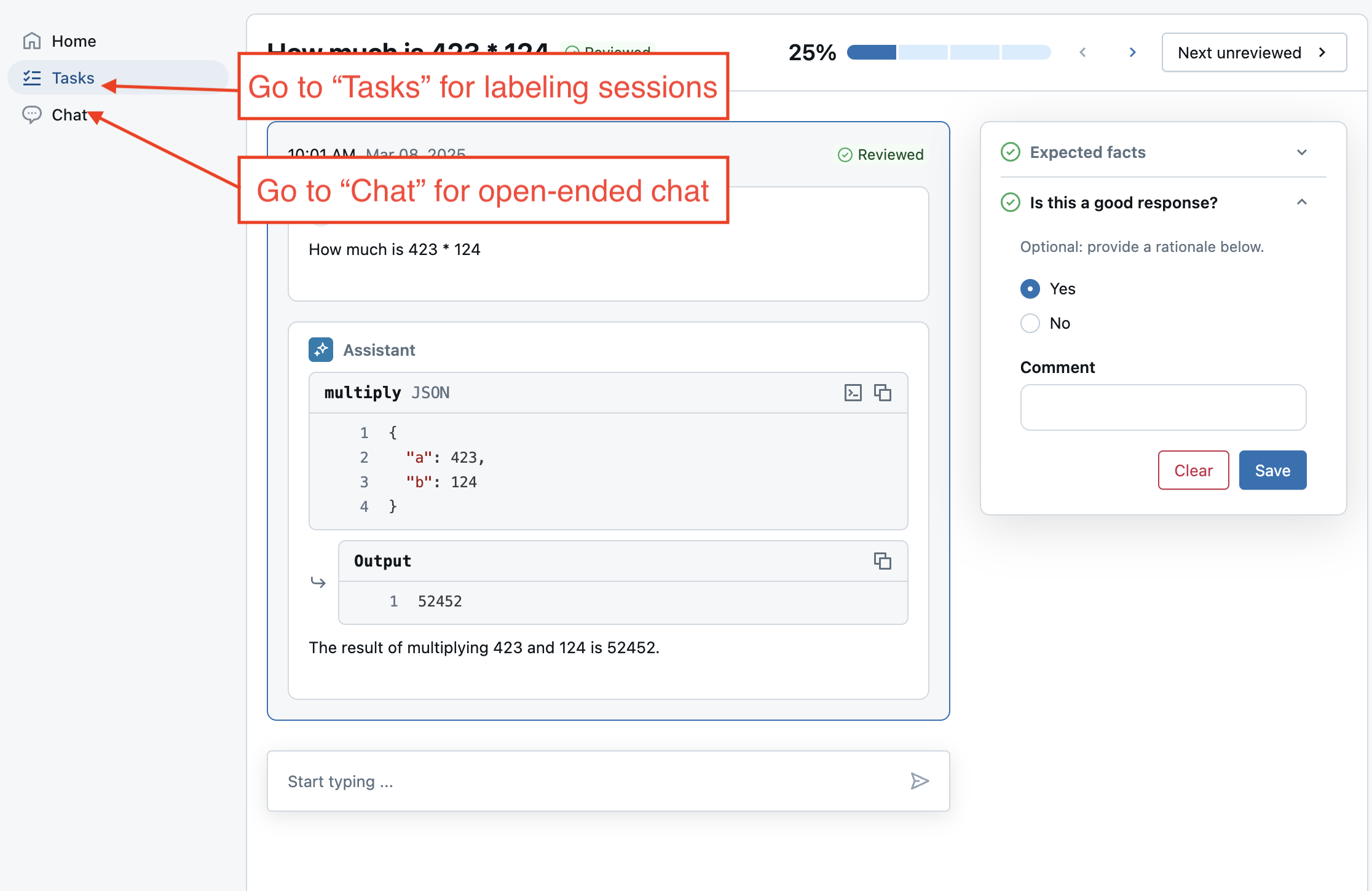
新しくデプロイされたエージェントと連携する別のラベル付けセッションを作成します。トレースを追加する代わりに、評価データセットをセッションに追加します。add_agent()を呼び出すと、レビューアプリのライブチャットモードも有効になり、ユーザーはエージェントと自由にチャットできるようになります。
# Important: update the agent with the new endpoint name so it can be used in future labeling sessions.
MY_AGENT_ENDPOINT_NAME = deployment.endpoint_name
AGENT_NAME = "My Agent v1"

my_review_app = my_review_app.add_agent(
    # Display name for the agent.
    agent_name=AGENT_NAME,
    model_serving_endpoint=MY_AGENT_ENDPOINT_NAME,
    overwrite=True
)

my_session = my_review_app.create_labeling_session(
    name="collect_facts_from_live_agent",
    assigned_users=ASSIGNED_USERS,
    agent=AGENT_NAME,
    # Built-in labeling schemas: EXPECTED_FACTS, GUIDELINES, EXPECTED_RESPONSE
    label_schemas=[review_app.label_schemas.EXPECTED_FACTS,review_app.label_schemas.GUIDELINES, "good_response"],
)

# Add the dataset to enable live agent interaction.
my_session.add_dataset(UC_TABLE_NAME)

# Share with the SME.
print("Review App URL:", my_review_app.url)
print("Labeling session URL: ", my_session.url)
次のステップ
エージェントがデプロイされた後、次のことができます。
-
AI Playgroundでチャットする。
-
レビューアプリで、次を試してください:
- 「ボットとチャットする」を使用して、一般的なフィードバックを収集します。
- 対象分野の専門家から、ラベル付けセッションでラベルを収集します。
-
本番運用アプリケーションでご利用ください。