レガシー入力/出力エージェントスキーマ(Model Serving)
新しいユースケースの場合、Databricksは、エージェントのコード、サーバー設定、およびデプロイワークフローを完全に制御するために、Databricks Appsへのエージェントのデプロイを推奨しています。AIエージェントを作成してDatabricks Appsにデプロイするを参照してください。既存のエージェントを移行するには、Model ServingからDatabricks Appsにエージェントを移行するを参照してください。
Databricksでは、エージェントを作成するためにResponsesAgentスキーマへの移行をお勧めします。AIエージェントを作成してDatabricks Appsにデプロイするを参照してください。
AIエージェントは、Databricksの他の機能と互換性を持つために、特定の入力および出力スキーマ要件に準拠する必要があります。このページでは、レガシーエージェント作成のシグネチャとインターフェイス(ChatAgent インターフェイス、ChatModel インターフェイス、SplitChatMessageRequest 入力スキーマ、StringResponse 出力スキーマ)を使用する方法について説明します。
レガシーChatAgentエージェントを作成する
MLflow ChatAgent インターフェースは、OpenAI ChatCompletion スキーマと似ていますが、厳密には互換性がありません。
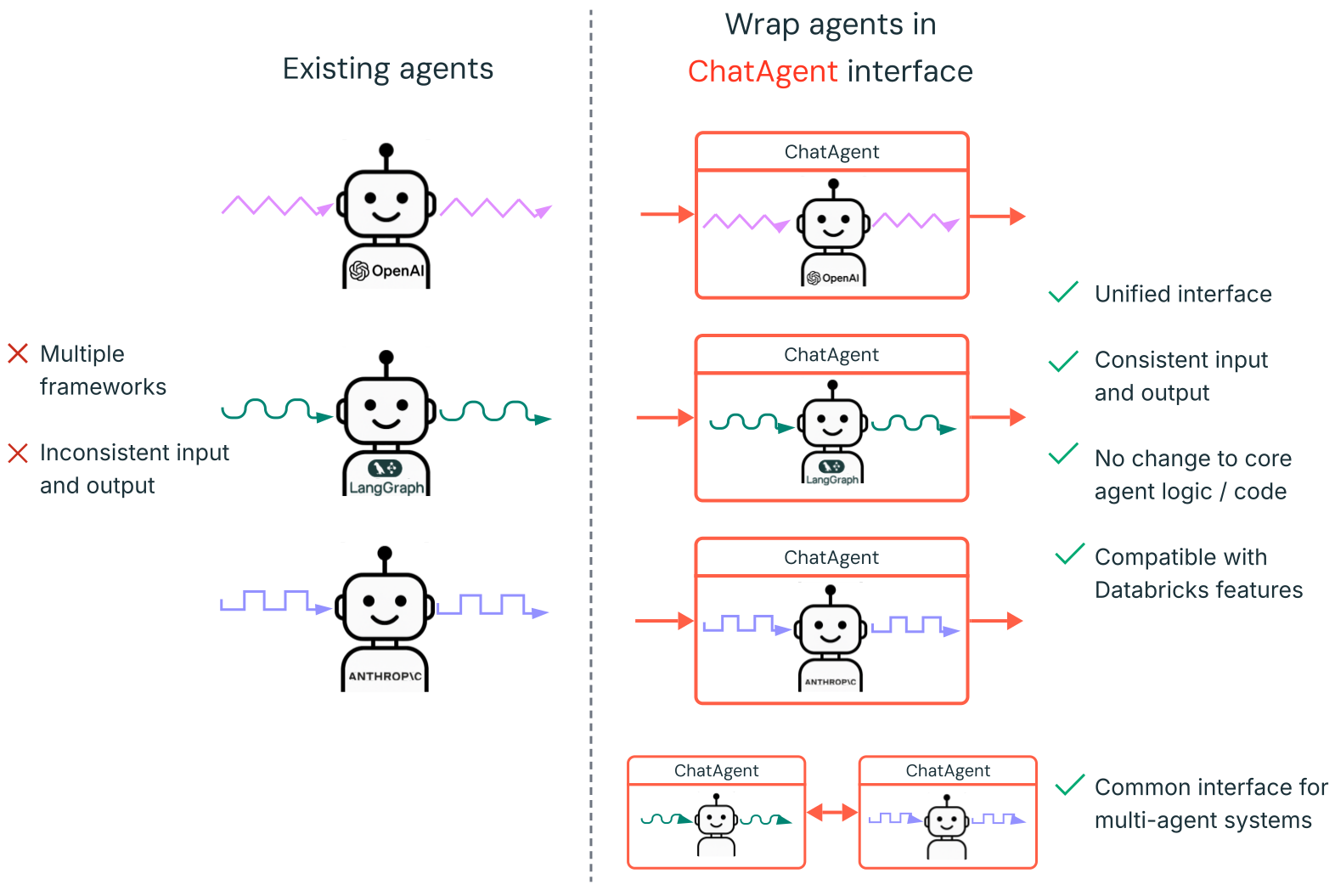
ChatAgentを作成する方法については、次のセクションの例とMLflow ドキュメント - ChatAgent インターフェースを参照してください。
ChatAgentを使用してエージェントをオーサリングしてデプロイするには、次のものをインストールします。
databricks-agents0.16.0以上mlflow2.20.2以上- Python 3.10 以降。
- この要件を満たすには、サーバレスコンピュートまたはDatabricks Runtime 13.3 LTS以降を使用できます。
%pip install -U -qqqq databricks-agents==0.16.0 mlflow==2.20.2
すでにエージェントがある場合はどうなりますか?
LangChain、LangGraph、または類似のフレームワークで構築されたエージェントが既にある場合、Databricksでそれを使用するためにエージェントを書き直す必要はありません。代わりに、既存のエージェントをMLflow ChatAgentインターフェイスでラップするだけです。
-
mlflow.pyfunc.ChatAgentを継承するPythonラッパークラスを記述します。ラッパークラス内で、既存のエージェントを属性
self.agent = your_existing_agentとして保持します。 -
ChatAgentクラスでは、非ストリーミングリクエストを処理するためにpredictメソッドを実装する必要があります。predict同意が必要です:-
messages: list[ChatAgentMessage]、これはChatAgentMessageのリストであり、それぞれにロール(「ユーザー」や「アシスタント」など)、プロンプト、IDが含まれます。 -
(任意) 追加データ用の
context: Optional[ChatContext]とcustom_inputs: Optional[dict]
Pythonimport uuid
# input example
[
ChatAgentMessage(
id=str(uuid.uuid4()), # Generate a unique ID for each message
role="user",
content="What's the weather in Paris?"
)
]predictChatAgentResponseを返す必要があります。Pythonimport uuid
# output example
ChatAgentResponse(
messages=[
ChatAgentMessage(
id=str(uuid.uuid4()), # Generate a unique ID for each message
role="assistant",
content="It's sunny in Paris."
)
]
) -
-
形式間の変換
predictで、list[ChatAgentMessage]からの受信メッセージをエージェントが期待する入力形式に変換します。エージェントが応答を生成した後、その出力を1つ以上の
ChatAgentMessageオブジェクトに変換し、それらをChatAgentResponseでラップします。
LangChain出力を自動的に変換
LangChainエージェントをラップしている場合は、mlflow.langchain.output_parsers.ChatAgentOutputParserを使用してLangChainの出力をMLflow ChatAgentMessageおよびChatAgentResponseスキーマに自動的に変換できます。
以下は、エージェントを変換するための簡略化されたテンプレートです:
from mlflow.pyfunc import ChatAgent
from mlflow.types.agent import ChatAgentMessage, ChatAgentResponse, ChatAgentChunk
import uuid


class MyWrappedAgent(ChatAgent):
  def __init__(self, agent):
    self.agent = agent

  def predict(self, messages, context=None, custom_inputs=None):
    # Convert messages to your agent's format
    agent_input = ... # build from messages
    agent_output = self.agent.invoke(agent_input)
    # Convert output to ChatAgentMessage
    return ChatAgentResponse(
      messages=[ChatAgentMessage(role="assistant", content=agent_output, id=str(uuid.uuid4()),)]
    )

  def predict_stream(self, messages, context=None, custom_inputs=None):
    # If your agent supports streaming
    for chunk in self.agent.stream(...):
      yield ChatAgentChunk(delta=ChatAgentMessage(role="assistant", content=chunk, id=str(uuid.uuid4())))
完全な例については、次のセクションのノートブックを参照してください。
ChatAgent の例
次のノートブックは、一般的なライブラリである OpenAI、LangGraph、AutoGen を使用して、ストリーミングおよび非ストリーミングの ChatAgents を作成する方法を示しています。
- LangGraph
- OpenAI
- AutoGen
- DSPy
LangChainエージェントをラップしている場合は、mlflow.langchain.output_parsers.ChatAgentOutputParserを使用してLangChainの出力をMLflow ChatAgentMessageおよびChatAgentResponseスキーマに自動的に変換できます。
LangGraph ツール呼び出しエージェント
OpenAIツール呼び出しエージェント
OpenAI Responses API ツール呼び出しエージェント
OpenAIチャット専用エージェント
AutoGenツール呼び出しエージェント
DSPy チャット専用エージェント
ツールを追加してこれらのエージェントの機能を拡張する方法については、エージェントをツールに接続するをご覧ください。
ストリーミングChatAgent応答
ストリーミングエージェントは、より小さな増分チャンクの連続したストリームで応答を配信します。ストリーミングは知覚されるレイテンシーを削減し、会話型エージェントのユーザーエクスペリエンスを向上させます。
ストリーミングChatAgentを作成するには、ChatAgentChunkオブジェクトを生成するジェネレーターを返すpredict_streamメソッドを定義します。各ChatAgentChunkにはレスポンスの一部が含まれます。MLflow ドキュメントで、理想的なChatAgentストリーミングの動作について詳しくお読みください。
次のコードは predict_stream 関数の例を示しています。ストリーミングエージェントの完全な例については、ChatAgent の例を参照してください。
def predict_stream(
  self,
  messages: list[ChatAgentMessage],
  context: Optional[ChatContext] = None,
  custom_inputs: Optional[dict[str, Any]] = None,
) -> Generator[ChatAgentChunk, None, None]:
  # Convert messages to a format suitable for your agent
  request = {"messages": self._convert_messages_to_dict(messages)}

  # Stream the response from your agent
  for event in self.agent.stream(request, stream_mode="updates"):
    for node_data in event.values():
      # Yield each chunk of the response
      yield from (
        ChatAgentChunk(**{"delta": msg}) for msg in node_data["messages"]
      )
レガシーChatModelエージェントを作成する
Databricks では、ChatAgent インターフェイスを使用してエージェントまたは生成AIアプリを作成することをお勧めします。ChatModel から ChatAgent に移行するには、MLflow documentation - Migrate from ChatModel to ChatAgentを参照してください。
ChatModelは、MLflowにおけるレガシーエージェントオーサリングインターフェイスであり、OpenAIのChatCompletionスキーマを拡張し、ChatCompletion標準をサポートするプラットフォームとの互換性を維持しながら、カスタム機能を追加できます。詳細については、MLflow: ChatModel の概要を参照してください。
エージェントをmlflow.pyfunc.ChatModel のサブクラスとして作成すると、次の利点があります。
-
提供されるエージェントを呼び出す際にストリーミングエージェント出力を有効にします (リクエストボディ内の
{stream: true}をバイパスして)。 -
エージェントが提供されると、AI Gateway推論テーブルが自動的に有効になり、リクエスター名などの強化されたリクエストログメタデータにアクセスできるようになります。
リクエストログと評価ログは非推奨であり、将来のリリースで削除されます。移行ガイダンスについては、リクエストログと評価ログの非推奨化を参照してください。
-
型付きPythonクラスを使用して、ChatCompletionスキーマと互換性のあるエージェントコードを記述できます。
-
MLflow は、エージェントのログを記録するときに、
input_exampleがなくても、チャットコンプリーションと互換性のあるシグネチャを自動的に推論します。 これにより、エージェントの登録とデプロイのプロセスが簡素化されます。 ログ記録中のモデルシグネチャの推論を参照してください。
次のコードはDatabricksノートブックで実行するのが最適です。ノートブックは、エージェントを開発、テスト、および反復するための便利な環境を提供します。
MyAgent クラスは mlflow.pyfunc.ChatModel を拡張し、必要な predict メソッドを実装します。これにより、カスタムエージェントとの互換性が確保されます。
このクラスには、ストリーミング出力を処理するためのオプションのメソッド _create_chat_completion_chunk と predict_stream も含まれています。
# Install a pinned version of mlflow
%pip install -U mlflow==2.20.2
dbutils.library.restartPython()
import re
from typing import Optional, Dict, List, Generator
from mlflow.pyfunc import ChatModel
from mlflow.types.llm import (
  # Non-streaming helper classes
  ChatCompletionRequest,
  ChatCompletionResponse,
  ChatCompletionChunk,
  ChatMessage,
  ChatChoice,
  ChatParams,
  # Helper classes for streaming agent output
  ChatChoiceDelta,
  ChatChunkChoice,
)

class MyAgent(ChatModel):
  """
  Defines a custom agent that processes ChatCompletionRequests
  and returns ChatCompletionResponses.
  """
  def predict(self, context, messages: list[ChatMessage], params: ChatParams) -> ChatCompletionResponse:
    last_user_question_text = messages[-1].content
    response_message = ChatMessage(
      role="assistant",
      content=(
        f"I will always echo back your last question. Your last question was: {last_user_question_text}. "
      )
    )
    return ChatCompletionResponse(
      choices=[ChatChoice(message=response_message)]
    )

  def _create_chat_completion_chunk(self, content) -> ChatCompletionChunk:
    """Helper for constructing a ChatCompletionChunk instance for wrapping streaming agent output"""
    return ChatCompletionChunk(
      choices=[ChatChunkChoice(
        delta=ChatChoiceDelta(
          role="assistant",
          content=content
        )
      )]
    )

  def predict_stream(
    self, context, messages: List[ChatMessage], params: ChatParams
  ) -> Generator[ChatCompletionChunk, None, None]:
    last_user_question_text = messages[-1].content
    yield self._create_chat_completion_chunk(f"Echoing back your last question, word by word.")
    for word in re.findall(r"\S+\s*", last_user_question_text):
      yield self._create_chat_completion_chunk(word)

agent = MyAgent()
model_input = ChatCompletionRequest(
  messages=[ChatMessage(role="user", content="What is Databricks?")]
)
response = agent.predict(context=None, messages=model_input.messages, params=None)
print(response)
エージェントクラスMyAgentを1つのノートブックで定義しますが、個別のドライバーノートブックを作成することをお勧めします。このドライバーノートブックは、エージェントをModel Registryに記録し、Model Servingを使用してエージェントをデプロイします。
この分離は、MLflow の Models from Code メソドロジーを使用してモデルをログに記録するために Databricks が推奨するワークフローに従っています。
SplitChatMessageRequest 入力スキーマ (非推奨)
SplitChatMessagesRequest 現在のクエリと履歴をエージェントの入力として個別に渡すことができます。
  question = {
    "query": "What is MLflow",
    "history": [
      {
        "role": "user",
        "content": "What is Retrieval-augmented Generation?"
      },
      {
        "role": "assistant",
        "content": "RAG is"
      }
    ]
  }
StringResponse 出力スキーマ (非推奨)。
StringResponse エージェントの応答を単一の文字列 content フィールドを持つオブジェクトとして返すことができます。
{"content": "This is an example string response"}