AI エージェント メモリ(Model Serving)
プレビュー
この機能は パブリック プレビュー段階です。
新しいユースケースの場合、Databricksは、エージェントのコード、サーバー設定、およびデプロイワークフローを完全に制御するために、Databricks Appsへのエージェントのデプロイを推奨しています。AIエージェントを作成してDatabricks Appsにデプロイするを参照してください。既存のエージェントを移行するには、Model ServingからDatabricks Appsにエージェントを移行するを参照してください。
メモリを使用すると、AIエージェントは会話の初期段階や以前の会話からの情報を記憶できます。これにより、エージェントはコンテキストに応じた応答を提供し、時間とともにパーソナライズされたエクスペリエンスを構築できます。Databricks Lakebase(フルマネージドのPostgres OLTPデータベース)を使用して、会話の状態と履歴を管理します。
要件
- Lakebase インスタンス。詳細はデータベース インスタンスの作成と管理を参照してください。
短期メモリと長期メモリ
短期記憶は単一の会話セッションでコンテキストを捕捉し、一方、長期記憶は複数の会話から主要な情報を抽出して保存します。両方のタイプまたはどちらか一方のタイプの記憶を使用して、エージェントを構築できます。
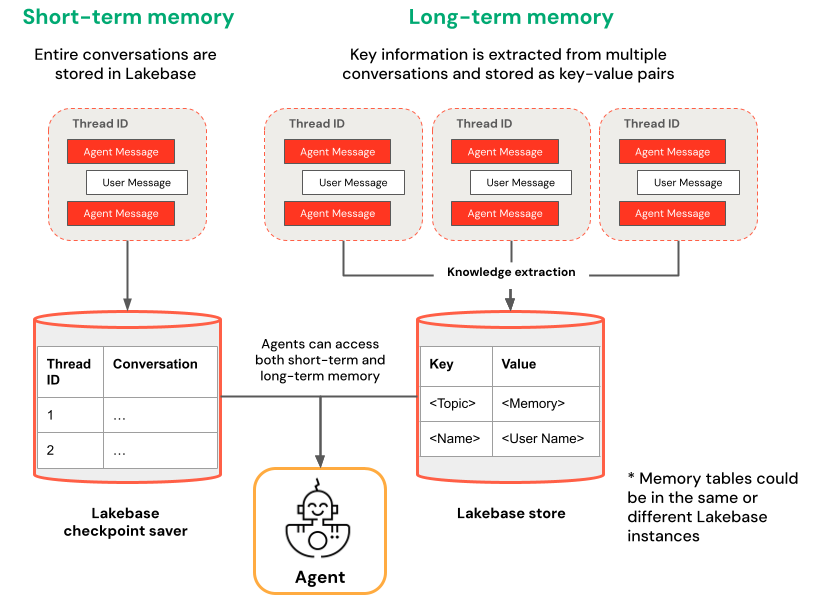
短期記憶 | 長期メモリ |
|---|---|
スレッドIDとチェックポイントを使用して、単一の会話セッションでコンテキストをキャプチャする。 セッション内でフォローアップの質問のコンテキストを維持します。 タイムトラベルを使用して会話フローをデバッグおよびテストします | 複数のセッション間で主要な知見を自動的に抽出して保存します。 過去の設定に基づいてやり取りをパーソナライズします ユーザーに関するナレッジベースを構築し、応答が時間の経過とともに改善されるようにします。 |
ノートブックの例
短期記憶を備えたエージェント
長期メモリを持つエージェント
デプロイされたエージェントをクエリします
エージェントをModel Servingエンドポイントにデプロイした後、クエリ手順についてはDatabricksにデプロイされたエージェントのクエリを参照してください。
スレッドIDを渡すには、extra_bodyパラメーターを使用します。次の例は、スレッド ID を ResponsesAgent エンドポイントに渡す方法を示しています。
   response1 = client.responses.create(
    model=endpoint,
    input=[{"role": "user", "content": "What are stateful agents?"}],
    extra_body={
        "custom_inputs": {"thread_id": thread_id}
    }
)
PlaygroundやReview appのようにChatContextを自動的に渡すクライアントを使用している場合、conversation idとuser idは短期/長期メモリのユースケースで自動的に渡されます。
短期メモリのタイムトラベル
短期記憶を持つエージェントの場合、チェックポイントから実行を再開するには、LangGraphのタイムトラベルを使用します。会話を再生するか、または会話を変更して代替パスを探索できます。チェックポイントから再開するたびに、LangGraphは会話履歴に新しいフォークを作成し、元の履歴を保持しながら実験を可能にします。
-
エージェントコードで、チェックポイント履歴を取得し、
LangGraphResponsesAgentクラスでチェックポイントの状態を更新する関数を作成します:Pythonfrom typing import List, Dict
def get_checkpoint_history(self, thread_id: str, limit: int = 10) -> List[Dict[str, Any]]:
"""Retrieve checkpoint history for a thread.
Args:
thread_id: The thread identifier
limit: Maximum number of checkpoints to return
Returns:
List of checkpoint information including checkpoint_id, timestamp, and next nodes
"""
config = {"configurable": {"thread_id": thread_id}}
with CheckpointSaver(instance_name=LAKEBASE_INSTANCE_NAME) as checkpointer:
graph = self._create_graph(checkpointer)
history = []
for state in graph.get_state_history(config):
if len(history) >= limit:
break
history.append({
"checkpoint_id": state.config["configurable"]["checkpoint_id"],
"thread_id": thread_id,
"timestamp": state.created_at,
"next_nodes": state.next,
"message_count": len(state.values.get("messages", [])),
# Include last message summary for context
"last_message": self._get_last_message_summary(state.values.get("messages", []))
})
return history
def _get_last_message_summary(self, messages: List[Any]) -> Optional[str]:
"""Get a snippet of the last message for checkpoint identification"""
return getattr(messages[-1], "content", "")[:100] if messages else None
def update_checkpoint_state(self, thread_id: str, checkpoint_id: str,
new_messages: Optional[List[Dict]] = None) -> Dict[str, Any]:
"""Update state at a specific checkpoint (used for modifying conversation history).
Args:
thread_id: The thread identifier
checkpoint_id: The checkpoint to update
new_messages: Optional new messages to set at this checkpoint
Returns:
New checkpoint configuration including the new checkpoint_id
"""
config = {
"configurable": {
"thread_id": thread_id,
"checkpoint_id": checkpoint_id
}
}
with CheckpointSaver(instance_name=LAKEBASE_INSTANCE_NAME) as checkpointer:
graph = self._create_graph(checkpointer)
# Prepare the values to update
values = {}
if new_messages:
cc_msgs = self.prep_msgs_for_cc_llm(new_messages)
values["messages"] = cc_msgs
# Update the state (creates a new checkpoint)
new_config = graph.update_state(config, values=values)
return {
"thread_id": thread_id,
"checkpoint_id": new_config["configurable"]["checkpoint_id"],
"parent_checkpoint_id": checkpoint_id
} -
predictおよびpredict_stream関数を更新して、チェックポイントの受け渡しをサポートします:
- Predict
- Predict_stream
def predict(self, request: ResponsesAgentRequest) -> ResponsesAgentResponse:
    """Non-streaming prediction"""
    # The same thread_id is used by BOTH predict() and predict_stream()
    ci = dict(request.custom_inputs or {})
    if "thread_id" not in ci:
        ci["thread_id"] = str(uuid.uuid4())
    request.custom_inputs = ci

    outputs = [
        event.item
        for event in self.predict_stream(request)
        if event.type == "response.output_item.done"
    ]

    # Include thread_id and checkpoint_id in custom outputs
    custom_outputs = {
        "thread_id": ci["thread_id"]
    }
    if "checkpoint_id" in ci:
        custom_outputs["parent_checkpoint_id"] = ci["checkpoint_id"]

    try:
        history = self.get_checkpoint_history(ci["thread_id"], limit=1)
        if history:
            custom_outputs["checkpoint_id"] = history[0]["checkpoint_id"]
    except Exception as e:
        logger.warning(f"Could not retrieve new checkpoint_id: {e}")

    return ResponsesAgentResponse(output=outputs, custom_outputs=custom_outputs)
def predict_stream(
    self,
    request: ResponsesAgentRequest,
) -> Generator[ResponsesAgentStreamEvent, None, None]:
    """Streaming prediction with PostgreSQL checkpoint branching support.

    Accepts in custom_inputs:
    - thread_id: Conversation thread identifier for session
    - checkpoint_id (optional): Checkpoint to resume from (for branching)
    """
    # Get thread ID and checkpoint ID from custom inputs
    custom_inputs = request.custom_inputs or {}
    thread_id = custom_inputs.get("thread_id", str(uuid.uuid4()))  # generate new thread ID if one is not passed in
    checkpoint_id = custom_inputs.get("checkpoint_id")  # Optional for branching

    # Convert incoming Responses messages to LangChain format
    langchain_msgs = self.prep_msgs_for_cc_llm([i.model_dump() for i in request.input])

    # Build checkpoint configuration
    checkpoint_config = {"configurable": {"thread_id": thread_id}}
    # If checkpoint_id is provided, we're branching from that checkpoint
    if checkpoint_id:
        checkpoint_config["configurable"]["checkpoint_id"] = checkpoint_id
        logger.info(f"Branching from checkpoint: {checkpoint_id} in thread: {thread_id}")

    # DATABASE CONNECTION POOLING LOGIC FOLLOWS
    # Use connection from pool
次に、チェックポイント分岐をテストします:
-
会話スレッドを開始し、いくつかのメッセージを追加します。
Pythonfrom agent import AGENT
# Initial conversation - starts a new thread
response1 = AGENT.predict({
"input": [{"role": "user", "content": "I'm planning for an upcoming trip!"}],
})
print(response1.model_dump(exclude_none=True))
thread_id = response1.custom_outputs["thread_id"]
# Within the same thread, ask a follow-up question - short-term memory will remember previous messages in the same thread/conversation session
response2 = AGENT.predict({
"input": [{"role": "user", "content": "I'm headed to SF!"}],
"custom_inputs": {"thread_id": thread_id}
})
print(response2.model_dump(exclude_none=True))
# Within the same thread, ask a follow-up question - short-term memory will remember previous messages in the same thread/conversation session
response3 = AGENT.predict({
"input": [{"role": "user", "content": "Where did I say I'm going?"}],
"custom_inputs": {"thread_id": thread_id}
})
print(response3.model_dump(exclude_none=True)) -
チェックポイント履歴を取得し、異なるメッセージで会話を分岐させます。
Python# Get checkpoint history to find branching point
history = AGENT.get_checkpoint_history(thread_id, 20)
# Retrieve checkpoint at index - indices count backward from most recent checkpoint
index = max(1, len(history) - 4)
branch_checkpoint = history[index]["checkpoint_id"]
# Branch from node with next_node = `('__start__',)` to re-input message to agent at certain part of conversation
# I want to update the information of which city I am going to
# Within the same thread, branch from a checkpoint and override it with different context to continue the conversation in a new fork
response4 = AGENT.predict({
"input": [{"role": "user", "content": "I'm headed to New York!"}],
"custom_inputs": {
"thread_id": thread_id,
"checkpoint_id": branch_checkpoint # Branch from this checkpoint!
}
})
print(response4.model_dump(exclude_none=True))
# Thread ID stays the same even though it branched from a checkpoint:
branched_thread_id = response4.custom_outputs["thread_id"]
print(f"original thread id was {thread_id}")
print(f"new thread id after branching is the same as original: {branched_thread_id}")
# Continue the conversation in the same thread and it will pick up from the information you tell it in your branch
response5 = AGENT.predict({
"input": [{"role": "user", "content": "Where am I going?"}],
"custom_inputs": {
"thread_id": thread_id,
}
})
print(response5.model_dump(exclude_none=True))