エージェントを作成し、Model Servingにデプロイする
新しいエージェントの場合、DatabricksではAgent Bricks CLIの使用をお勧めします。CLIは、Agent ランタイム 上の Agent Bricksエージェントサーバー とともにエージェントをデプロイします。Databricksへのエージェントのデプロイを参照してください。既存のエージェントをModel ServingからDatabricks Appsに移行する方法については、Model ServingからDatabricks Appsへのエージェントの移行を参照してください。
このページでは、Custom Agents や LangGraph、OpenAI などの一般的なエージェント オーサリング ライブラリを使用して Python でエージェントを作成する方法を説明します。
要件
エージェントを開発する際は、MLflow Python クライアントの最新バージョンをインストールすることをDatabricksでお勧めします。
このページのアプローチを使用してエージェントを作成してデプロイするには、以下をインストールします。
databricks-agents1.2.0以降mlflow3.1.3以上- Python 3.10 以降。
- この要件を満たすには、Serverless コンピュートまたはDatabricks Runtime 13.3 LTS以降を使用します。
%pip install -U -qqqq databricks-agents mlflow
Databricks では、エージェントを作成するために Databricks AI Bridge 統合パッケージをインストールすることもお勧めします。これらの統合パッケージは、Genie Agents や AI Search などの Databricks AI 機能と、エージェント作成フレームワークおよび SDK をまたいで対話するための APIs の共有レイヤーを提供します。
- OpenAI
- LangChain/LangGraph
- DSPy
- Pure Python agents
%pip install -U -qqqq databricks-openai
%pip install -U -qqqq databricks-langchain
%pip install -U -qqqq databricks-dspy
%pip install -U -qqqq databricks-ai-bridge
ResponsesAgent を使用してエージェントを作成します。
Databricks は、本番運用グレードのエージェントを作成するために MLflow インターフェース ResponsesAgent を推奨します。ResponsesAgent を使用すると、任意のサードパーティ フレームワークでエージェントを構築し、堅牢なロギング、トレース、評価、デプロイ、およびモニタリング機能のために Databricks AI 機能と統合できます。
ResponsesAgentスキーマはOpenAI Responsesスキーマと互換性があります。OpenAI Responsesの詳細については、OpenAI: Responses vs. ChatCompletionを参照してください。
古い ChatAgent インターフェイスは、Databricks で引き続きサポートされています。ただし、新しいエージェントの場合、Databricks では、最新バージョンのMLflowと ResponsesAgent インターフェイスを使用することをお勧めします。
レガシーの入出力エージェントスキーマ (Model Serving) を参照してください。
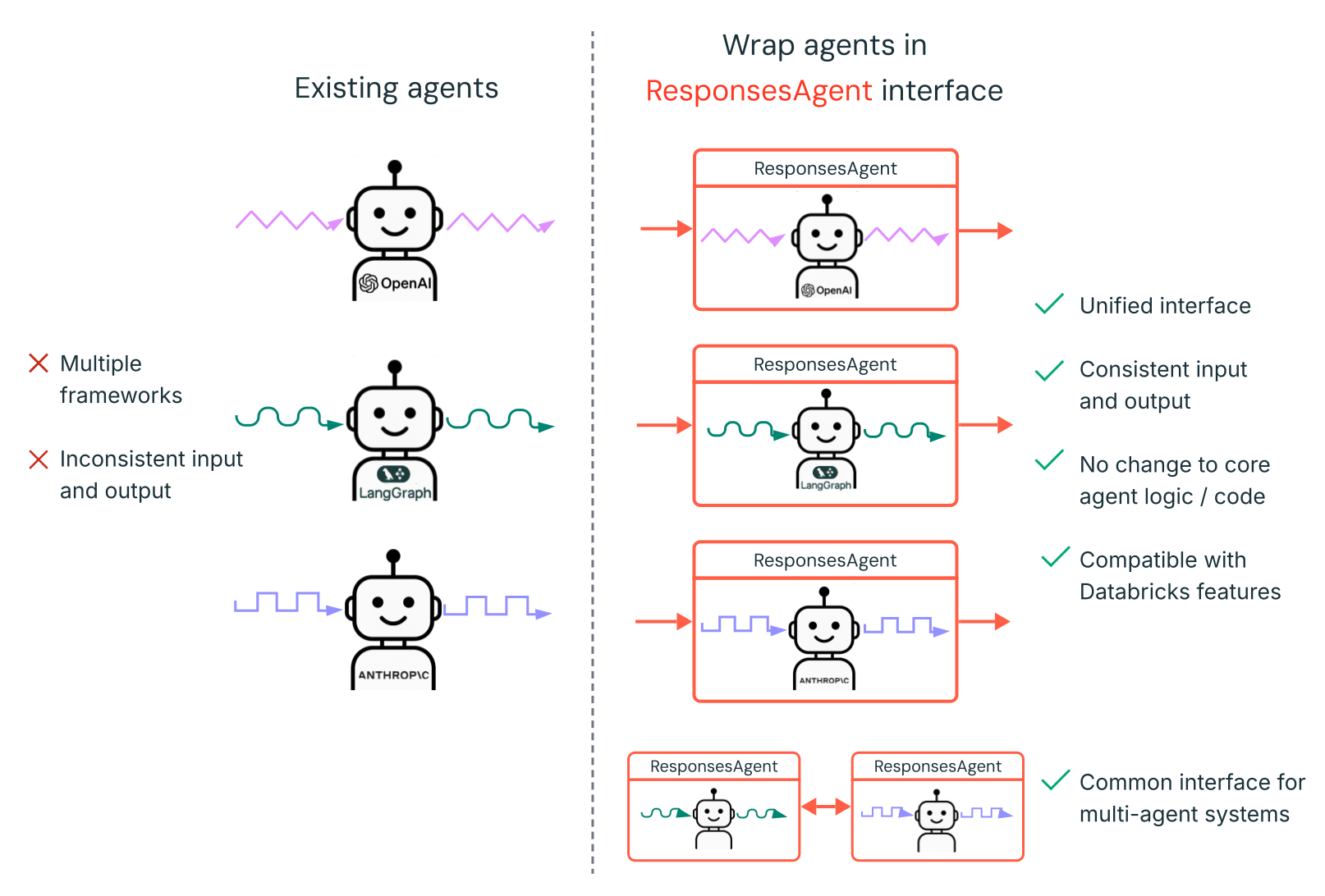
ResponsesAgent 次の利点があります:
-
高度なエージェント機能
- マルチエージェントのサポート
- **ストリーミング出力**:出力をより小さなチャンクでストリームします。
- 包括的なツール呼び出しメッセージ履歴 :中間的なツール呼び出しメッセージを含む複数のメッセージを返し、品質と会話管理を向上させます。
- ツール呼び出し確認のサポート
- 長時間実行ツールサポート
-
合理化された開発、デプロイ、およびモニタリング
- 任意のフレームワークを使用してエージェントを作成 : 既存のエージェントを
ResponsesAgentインターフェースでラップして、AI Playground、Agent Evaluation、および Agent モニタリング とのすぐに使える互換性を実現します。 - 型付きオーサリングインターフェース :型付きPythonクラスを使用してエージェントコードを記述し、IDEおよびノートブックのオートコンプリートのメリットを享受できます。
- **シグネチャの自動推論**: MLflowは、エージェントをログに記録する際に
ResponsesAgentシグネチャを自動的に推論し、登録とデプロイを簡素化します。ログ記録中のモデルシグネチャの推論を参照してください。 - 自動トレース : MLflow は、
predictおよびpredict_stream関数を自動的にトレースし、ストリームされた応答を集約して評価と表示を容易にします。 - AI Gateway-enhanced inference tables : AI Gateway 推論テーブルは、デプロイされたエージェントに対して自動的に有効になり、詳細なリクエストlogのメタデータへのアクセスを提供します。
- 任意のフレームワークを使用してエージェントを作成 : 既存のエージェントを
ResponsesAgentを作成する方法については、次のセクションの例とMLflow ドキュメント - Model Serving 用 ResponsesAgentを参照してください。
ResponsesAgent の例
次のノートブックでは、一般的なライブラリを使用してストリーミングおよび非ストリーミングの ResponsesAgent を作成する方法を示します。これらのエージェントの機能を拡張する方法については、 MCP を参照してください。
- OpenAI
- LangGraph
- DSPy
Databricks ホスト型モデルを使用した OpenAI シンプルチャットエージェント
OpenAI MCP ツール呼び出しエージェント
Databricksでホストされているモデルを使用するOpenAIツール呼び出しエージェント
OpenAI ホスト型モデルを使用した OpenAI ツール呼び出しエージェント
LangGraph MCPツール呼び出しエージェント
DSPyシングルターンのツール呼び出しエージェント
マルチエージェントの例
マルチエージェントシステムを作成する方法については、マルチエージェントシステムでGenieを使用する (Model Serving)を参照してください。
ステートフルエージェントの例
メモリストアとしてLakebaseを活用した、短期および長期メモリを持つステートフルエージェントの作成方法については、「エージェントメモリ (Model Serving)」を参照してください。
非会話型エージェントの例
複数ターンの対話を管理する対話型エージェントとは異なり、非対話型エージェントは明確に定義されたタスクを効率的に実行することに重点を置いています。この合理化されたアーキテクチャは、独立したリクエストに対してより高いthroughputを可能にします。
非会話型エージェントを作成する方法については、MLflowを使用した非会話型AIエージェントを参照してください。
すでにエージェントをお持ちの場合はどうすればよいですか?
すでにLangChain、LangGraph、または類似のフレームワークで構築されたエージェントをお持ちの場合、Databricksで利用するためにエージェントを書き換える必要はありません。代わりに、既存のエージェントを MLflow ResponsesAgent インターフェースでラップするだけです。
-
mlflow.pyfunc.ResponsesAgentを継承するPythonラッパークラスを記述します。ラッパークラス内では、既存のエージェントを属性
self.agent = your_existing_agentとして参照します。 -
The
ResponsesAgentclass requires implementing apredictmethod that returns aResponsesAgentResponseto handle non-ストリーミング requests.以下は、ResponsesAgentResponsesスキーマの例です。Pythonimport uuid# input as a dict{"input": [{"role": "user", "content": "What did the data scientist say when their Spark job finally completed?"}]}# output exampleResponsesAgentResponse(output=[{"type": "message","id": str(uuid.uuid4()),"content": [{"type": "output_text", "text": "Well, that really sparked joy!"}],"role": "assistant",},]) -
predict関数で、ResponsesAgentRequestからの受信メッセージを、エージェントが想定する形式に変換します。エージェントが応答を生成した後、その出力をResponsesAgentResponseオブジェクトに変換します。
既存のエージェントを ResponsesAgent に変換する方法については、次のコード例を参照してください:
- Basic conversion
- Streaming with code re-use
- Migrate from ChatCompletions
非ストリーミングエージェントの場合は、predict関数で入力と出力を変換します。
from uuid import uuid4

from mlflow.pyfunc import ResponsesAgent
from mlflow.types.responses import (
    ResponsesAgentRequest,
    ResponsesAgentResponse,
)


class MyWrappedAgent(ResponsesAgent):
    def __init__(self, agent):
        # Reference your existing agent
        self.agent = agent

    def predict(self, request: ResponsesAgentRequest) -> ResponsesAgentResponse:
        # Convert incoming messages to your agent's format
        # prep_msgs_for_llm is a function you write to convert the incoming messages
        messages = self.prep_msgs_for_llm([i.model_dump() for i in request.input])

        # Call your existing agent (non-streaming)
        agent_response = self.agent.invoke(messages)

        # Convert your agent's output to ResponsesAgent format, assuming agent_response is a str
        output_item = (self.create_text_output_item(text=agent_response, id=str(uuid4())),)

        # Return the response
        return ResponsesAgentResponse(output=[output_item])
ストリーミングエージェントの場合、ロジックを再利用してメッセージ変換コードの重複を避けることができます。
from typing import Generator
from uuid import uuid4

from mlflow.pyfunc import ResponsesAgent
from mlflow.types.responses import (
    ResponsesAgentRequest,
    ResponsesAgentResponse,
    ResponsesAgentStreamEvent,
)


class MyWrappedStreamingAgent(ResponsesAgent):
    def __init__(self, agent):
        # Reference your existing agent
        self.agent = agent

    def predict(self, request: ResponsesAgentRequest) -> ResponsesAgentResponse:
        """Non-streaming predict: collects all streaming chunks into a single response."""
        # Reuse the streaming logic and collect all output items
        output_items = []
        for stream_event in self.predict_stream(request):
            if stream_event.type == "response.output_item.done":
                output_items.append(stream_event.item)

        # Return all collected items as a single response
        return ResponsesAgentResponse(output=output_items)

    def predict_stream(
        self, request: ResponsesAgentRequest
    ) -> Generator[ResponsesAgentStreamEvent, None, None]:
        """Streaming predict: the core logic that both methods use."""
        # Convert incoming messages to your agent's format
        # prep_msgs_for_llm is a function you write to convert the incoming messages, included in full examples linked below
        messages = self.prep_msgs_for_llm([i.model_dump() for i in request.input])

        # Stream from your existing agent
        item_id = str(uuid4())
        aggregated_stream = ""
        for chunk in self.agent.stream(messages):
            # Convert each chunk to ResponsesAgent format
            yield self.create_text_delta(delta=chunk, item_id=item_id)
            aggregated_stream += chunk

        # Emit an aggregated output_item for all the text deltas with id=item_id
        yield ResponsesAgentStreamEvent(
            type="response.output_item.done",
            item=self.create_text_output_item(text=aggregated_stream, id=item_id),
        )
既存のエージェントがOpenAI ChatCompletions APIを使用している場合、コアロジックを書き直すことなくResponsesAgentに移行できます。次のラッパーを追加します:
- 受信した
ResponsesAgentRequestメッセージを、エージェントが期待するChatCompletions形式に変換します。 ChatCompletionsの出力をResponsesAgentResponseスキーマに変換します。- オプションで、
ChatCompletionsからの増分デルタをResponsesAgentStreamEventオブジェクトにマッピングすることで、ストリーミングをサポートします。
from typing import Generator
from uuid import uuid4

from databricks.sdk import WorkspaceClient
from mlflow.pyfunc import ResponsesAgent
from mlflow.types.responses import (
    ResponsesAgentRequest,
    ResponsesAgentResponse,
    ResponsesAgentStreamEvent,
)


# Legacy agent that outputs ChatCompletions objects
class LegacyAgent:
    def __init__(self):
        self.w = WorkspaceClient()
        self.OpenAI = self.w.serving_endpoints.get_open_ai_client()

    def stream(self, messages):
        for chunk in self.OpenAI.chat.completions.create(
            model="databricks-claude-sonnet-4-5",
            messages=messages,
            stream=True,
        ):
            yield chunk.to_dict()


# Wrapper that converts the legacy agent to a ResponsesAgent
class MyWrappedStreamingAgent(ResponsesAgent):
    def __init__(self, agent):
        # `agent` is your existing ChatCompletions agent
        self.agent = agent

    def prep_msgs_for_llm(self, messages):
        # dummy example of prep_msgs_for_llm
        # real example of prep_msgs_for_llm included in full examples linked below
        return [{"role": "user", "content": "Hello, how are you?"}]

    def predict(self, request: ResponsesAgentRequest) -> ResponsesAgentResponse:
        """Non-streaming predict: collects all streaming chunks into a single response."""
        # Reuse the streaming logic and collect all output items
        output_items = []
        for stream_event in self.predict_stream(request):
            if stream_event.type == "response.output_item.done":
                output_items.append(stream_event.item)

        # Return all collected items as a single response
        return ResponsesAgentResponse(output=output_items)

    def predict_stream(
        self, request: ResponsesAgentRequest
    ) -> Generator[ResponsesAgentStreamEvent, None, None]:
        """Streaming predict: the core logic that both methods use."""
        # Convert incoming messages to your agent's format
        messages = self.prep_msgs_for_llm([i.model_dump() for i in request.input])

        # process the ChatCompletion output stream
        agent_content = ""
        tool_calls = []
        msg_id = None
        for chunk in self.agent.stream(messages):  # call the underlying agent's stream method
            delta = chunk["choices"][0]["delta"]
            msg_id = chunk.get("id", None)
            content = delta.get("content", None)
            if tc := delta.get("tool_calls"):
                if not tool_calls:  # only accommodate for single tool call right now
                    tool_calls = tc
                else:
                    tool_calls[0]["function"]["arguments"] += tc[0]["function"]["arguments"]
            elif content is not None:
                agent_content += content
                yield ResponsesAgentStreamEvent(**self.create_text_delta(content, item_id=msg_id))

        # aggregate the streamed text content
        yield ResponsesAgentStreamEvent(
            type="response.output_item.done",
            item=self.create_text_output_item(agent_content, msg_id),
        )

        for tool_call in tool_calls:
            yield ResponsesAgentStreamEvent(
                type="response.output_item.done",
                item=self.create_function_call_item(
                    str(uuid4()),
                    tool_call["id"],
                    tool_call["function"]["name"],
                    tool_call["function"]["arguments"],
                ),
            )


agent = MyWrappedStreamingAgent(LegacyAgent())

for chunk in agent.predict_stream(
    ResponsesAgentRequest(input=[{"role": "user", "content": "Hello, how are you?"}])
):
    print(chunk)
完全な例については、ResponsesAgentの例を参照してください。
ストリーミング応答
ストリーミングにより、エージェントは完全な応答を待たずに、リアルタイムのチャンクで応答を送信できます。ストリーミングを ResponsesAgent で実装するには、一連の delta イベントの後に最終の完了イベントを出力します:
- デルタイベントを生成 : 同じ
item_idを持つ複数のoutput_text.deltaイベントを送信して、テキストチャンクをリアルタイムでストリームします。 - 完了イベントで終了 :完全な最終出力テキストを含むデルタイベントと同じ
item_idを持つ最終的なresponse.output_item.doneイベントを送信します。
各Deltaイベントは、テキストのチャンクをクライアントにストリームします。最後の完了イベントには完全な応答テキストが含まれており、Databricksに次を実行するように通知します:
- MLflowトレースでエージェントの出力をトレースします。
- AI Gateway推論テーブルでストリームされた応答を集計します
- AI Playground UIで完全な出力を表示します。
ストリーミングエラーの伝播
Databricksは、databricks_output.errorの下の最後のトークンとともにストリーミング中に発生したエラーを伝播します。このエラーを適切に処理し、表面化させるのは、呼び出し元のクライアントの責任です。
{
  "delta": …,
  "databricks_output": {
    "trace": {...},
    "error": {
      "error_code": BAD_REQUEST,
      "message": "TimeoutException: Tool XYZ failed to execute."
    }
  }
}
高度な機能
カスタム入力と出力
一部のシナリオでは、client_typeやsession_idなどの追加のエージェント入力、あるいは今後のやり取りのためにチャット履歴に含めるべきではない取得ソースLinkのような出力が必要になる場合があります。
これらのシナリオでは、MLflow ResponsesAgentはフィールド custom_inputs と custom_outputs をネイティブにサポートしています。ResponsesAgent Examples の上記リンクのすべての例で、request.custom_inputs を介してカスタム入力にアクセスできます。
Agent Evaluation レビュー アプリは、追加の入力フィールドを持つエージェントのトレースのレンダリングをサポートしていません。
カスタムの入力と出力の設定方法については、以下のノートブックをご覧ください。
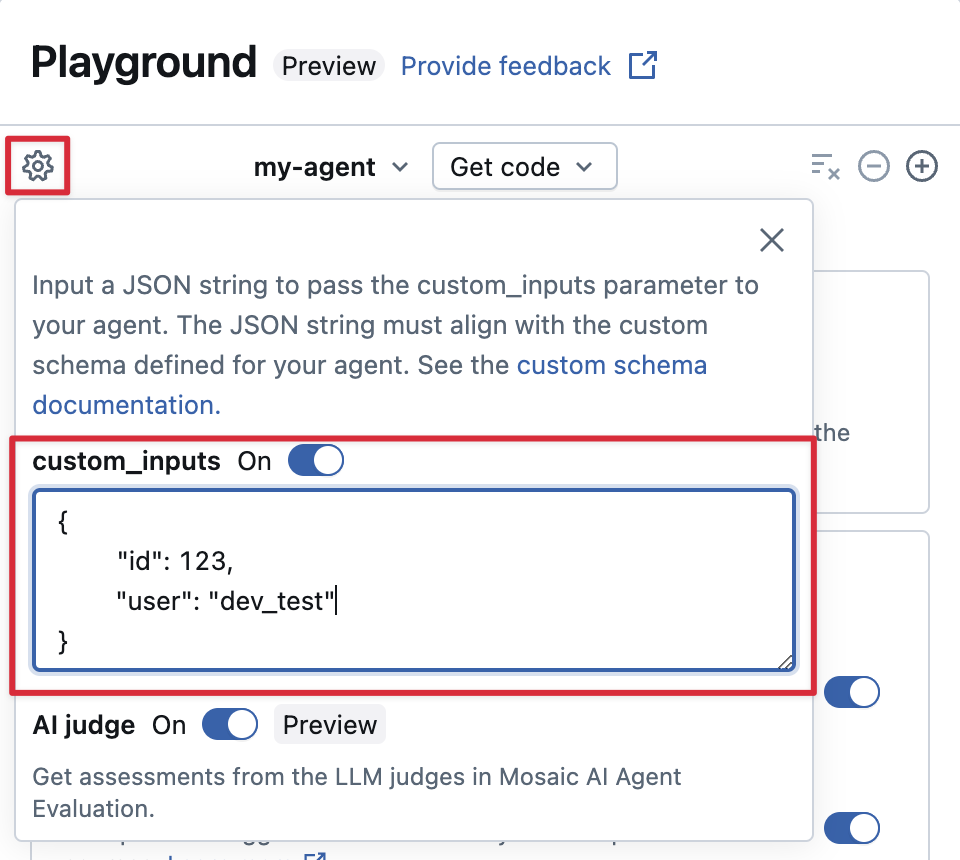
AI Playground とレビュー アプリで custom_inputs を提供します。
エージェントがcustom_inputsフィールドを使用して追加の入力を受け入れる場合、これらの入力をAI Playgroundとレビューアプリの両方で手動で提供できます。
-
AI Playground またはエージェント レビュー アプリで、歯車のアイコン
 を選択します。
 -
custom_inputs を有効にします。
-
エージェントで定義された入力スキーマに一致する JSON オブジェクトを指定してください。
カスタムレトリーバースキーマの指定
エージェントは一般的に、レトリーバーを使用して、AI Searchインデックスから非構造化データを検索し、クエリーします。たとえば、レトリーバーツールについては、「エージェントを非構造化データに接続する」を参照してください。
Databricksの製品機能を有効にするには、エージェント内でこれらのレトリーバーをMLflow RETRIEVERスパンでトレースします。これには以下が含まれます。
- AI Playground UI で取得したソースドキュメントへのLinkを自動的に表示する
- Agent Evaluationで取得根拠および関連性ジャッジを自動的に実行する。
Databricks では、MLflow レトリーバー スキーマにすでに準拠しているため、databricks_langchain.VectorSearchRetrieverTool や databricks_openai.VectorSearchRetrieverTool などの Databricks AI Bridge パッケージによって提供されるレトリーバー ツールを使用することをお勧めします。AI Bridge を使用したレトリーバーの開発 (推奨) を参照してください。
エージェントにカスタムスキーマを含むレトリーバー スパンがある場合は、コードでエージェントを定義するときに mlflow.models.set_retriever_schema を呼び出します。これは、レトリーバーの出力列を MLflow の想定フィールド(primary_key、text_column、doc_uri)にマップします。
import mlflow
# Define the retriever's schema by providing your column names
# For example, the following call specifies the schema of a retriever that returns a list of objects like
# [
#     {
#         'document_id': '9a8292da3a9d4005a988bf0bfdd0024c',
#         'chunk_text': 'MLflow is the largest open source AI engineering platform for agents, LLMs, and ML models...',
#         'doc_uri': 'https://mlflow.org/docs/latest/index.html',
#         'title': 'MLflow: The Largest Open Source AI Engineering Platform'
#     },
#     {
#         'document_id': '7537fe93c97f4fdb9867412e9c1f9e5b',
#         'chunk_text': 'A great way to get started with MLflow is to use the autologging feature. Autologging automatically logs your model...',
#         'doc_uri': 'https://mlflow.org/docs/latest/getting-started/',
#         'title': 'Getting Started with MLflow'
#     },
# ...
# ]
mlflow.models.set_retriever_schema(
    # Specify the name of your retriever span
    name="mlflow_docs_vector_search",
    # Specify the output column name to treat as the primary key (ID) of each retrieved document
    primary_key="document_id",
    # Specify the output column name to treat as the text content (page content) of each retrieved document
    text_column="chunk_text",
    # Specify the output column name to treat as the document URI of each retrieved document
    doc_uri="doc_uri",
    # Specify any other columns returned by the retriever
    other_columns=["title"],
)
doc_uri 列は、リトリーバーのパフォーマンスを評価する際に特に重要です。doc_uri は、リトリーバーによって返される文書のメイン識別子であり、グラウンドトゥルース評価セットと比較できるようにします。評価データセットのリファレンスを参照してください。
デプロイメントに関する考慮事項
Databricks Model Servingの準備
Databricks は Databricks Model Serving の分散環境に ResponsesAgent をデプロイします。これは、複数回のやり取りがある会話中に、同じサービングレプリカがすべてのリクエストを処理しない可能性があることを意味します。エージェントの状態を管理する際の次の影響に注意してください:
-
ローカルキャッシュの使用を避ける :
ResponsesAgentをデプロイする際、マルチターン会話のすべてのリクエストを同じレプリカが処理すると仮定しないでください。各ターンで、辞書ResponsesAgentRequestスキーマを使用して内部状態を再構築します。 -
スレッドセーフなステート : エージェントのステートをスレッドセーフに設計し、マルチスレッド環境での競合を防ぎます。
-
predict関数で状態を初期化する:predictの初期化時ではなく、ResponsesAgent関数が呼び出されるたびに状態を初期化します。ResponsesAgentレベルで状態を保存すると、会話間で情報が漏洩したり、単一のResponsesAgentレプリカが複数の会話からのリクエストを処理する可能性があるため、競合が発生する可能性があります。
複数の環境にデプロイするためのコードのパラメーター化
異なる環境で同じエージェントコードを再利用するために、エージェントコードをパラメーター化します。
パラメータは、Pythonディクショナリーまたは.yamlファイルで定義するキーと値のペアです。
コードを構成するには、Python辞書または.yamlファイルのいずれかを使用してModelConfigを作成します。ModelConfigは、柔軟な構成管理を可能にするキーと値のパラメーターのセットです。たとえば、開発中に辞書を使用し、それを.yamlファイルに変換して本番運用デプロイメントとCI/CDに使用できます。
ModelConfig の例を以下に示します:
llm_parameters:
  max_tokens: 500
  temperature: 0.01
model_serving_endpoint: databricks-meta-llama-3-3-70b-instruct
vector_search_index: ml.docs.databricks_docs_index
prompt_template: 'You are a hello world bot. Respond with a reply to the user''s
  question that indicates your prompt template came from a YAML file. Your response
  must use the word "YAML" somewhere. User''s question: {question}'
prompt_template_input_vars:
  - question
エージェントコードでは、.yamlファイルまたは辞書からdefault(開発用)構成を参照できます。
import mlflow
# Example for loading from a .yml file
config_file = "configs/hello_world_config.yml"
model_config = mlflow.models.ModelConfig(development_config=config_file)

# Example of using a dictionary
config_dict = {
    "prompt_template": "You are a hello world bot. Respond with a reply to the user's question that is fun and interesting to the user. User's question: {question}",
    "prompt_template_input_vars": ["question"],
    "model_serving_endpoint": "databricks-meta-llama-3-3-70b-instruct",
    "llm_parameters": {"temperature": 0.01, "max_tokens": 500},
}

model_config = mlflow.models.ModelConfig(development_config=config_dict)

# Use model_config.get() to retrieve a parameter value
# You can also use model_config.to_dict() to convert the loaded config object
# into a dictionary
value = model_config.get('sample_param')
次に、エージェントをログに記録するときに、model_config するパラメーターlog_model を指定します
ログに記録されたエージェントをロードするときに使用するパラメーターのカスタムセットを指定します。MLflow のドキュメント - ModelConfigをご覧ください。
同期コードまたはコールバックパターンを使用します
安定性と互換性を確保するために、エージェントの実装で同期コードまたはコールバックベースのパターンを使用してください。
Databricks は、エージェントをデプロイする際に、最適な並行処理とパフォーマンスを提供するために非同期通信を自動的に管理します。カスタムイベントループまたは非同期フレームワークを導入すると、RuntimeError: This event loop is already running and caused unpredictable behaviorのようなエラーが発生する可能性があります。
Databricks は、エージェントを開発する際、asyncio の使用やカスタムイベントループの作成などの非同期プログラミングを避けることをお勧めします。